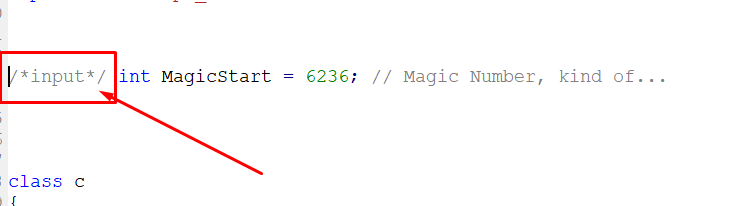
Locate the Magic Number in the code and do this
/input/ int MagicStart = 6666;
A
Best posts made by alok
-
RE: Hide Magic Numberposted in Questions & Answers
-
Input Variablesposted in Tutorials by Users
50 examples of different types of inputs in MQL4:
input int value1 = 10;
input double value2 = 2.5;
input string value3 = "Hello";
input bool value4 = true;
input color value5 = Blue;
input ENUM_TIMEFRAMES value6 = PERIOD_M5;
input ENUM_MA_METHOD value7 = MODE_SMA;
input ENUM_APPPLIED_PRICE value8 = PRICE_OPEN;
input ENUM_STYLES value9 = STYLE_SOLID;
input ENUM_LINE_STYLE value10 = STYLE_DOT;
input int value11[] = {1, 2, 3}; // Array of integers
input double value12[] = {1.5, 2.5, 3.5}; // Array of decimals
input string value13[] = {"Apple", "Banana", "Orange"}; // Array of strings
input bool value14[] = {true, false, true}; // Array of booleans
input color value15[] = {Red, Green, Yellow}; // Color array
input int value16 = 0; // Used as a counter
input double value17 = 0.0; // Used as accumulator
input string value18 = ""; // Used for text input
input bool value19 = false; // Used to activate/deactivate features
input color value20 = Black; // Used to define colors
input int value21 = Symbol(); // Returns the current symbol
input double value22 = Ask; // Returns the current selling price
input double value23 = Bid; // Returns the current purchase price
input int value24 = Digits; // Returns the number of decimal places in the symbol
input double value25 = Point; // Returns the pip size of the symbol
input ENUM_TIMEFRAMES value26 = Period(); // Returns the current chart period
input ENUM_MA_METHOD value27 = MODE_EMA; // Exponential moving average method
input ENUM_APPLIED_PRICE value28 = PRICE_CLOSE; // Closing price applied
input ENUM_STYLES value29 = STYLE_DASH; // Dashed line style
input ENUM_LINE_STYLE value30 = STYLE_SOLID; // Solid line style
input int value31 = Bars; // Returns the number of bars on the chart
input double value32 = iClose(Symbol(), Period(), 0); //Closing value of current bar
input string value33 = SymbolName(Symbol(), true); // Current symbol name
input bool value34 = iRSI(Symbol(), Period(), 14, 0) > 70; // Condition based on an indicator
input color value35 = Aqua; // Light blue color
input int value36 = TimeCurrent(); // Returns the current time
input double value37 = NormalizeDouble(1.23456, Digits); // Normalizes a value according to the decimal places of the symbol
input string value38 = DoubleToStr(123.45, 2); // Converts a double to a string with two decimal places
input bool value39 = StringLen("Hello") > 5; // Condition based on the length of a string
input color value40 = Crimson; // Dark red color
input int value41 = iHigh(Symbol(), Period(), 0); // Highest value of the current bar
input double value42 = iLow(Symbol(), Period(), 0); // Lowest value of the current bar
input string value43 = AccountName(); // Trading account name
input bool value44 = AccountFreeMarginCheck(Symbol(), OP_BUY, 0.1); // Check free margin before opening a position
input color value45 = DarkOrange; // Dark orange color
input int value46 = OrdersTotal(); // Returns the total number of orders
input double value47 = OrderOpenPrice(); // Current order opening price
input string value48 = OrderSymbol(); // Current order symbol
input bool value49 = OrderSelect(0, SELECT_BY_POS); // Select the first order
input color value50 = DodgerBlue; // Bright blue color