@princeomughele As i said above is almost impossible to get the round value.
This way the signal comes when rsi is very nearest to 50 value.
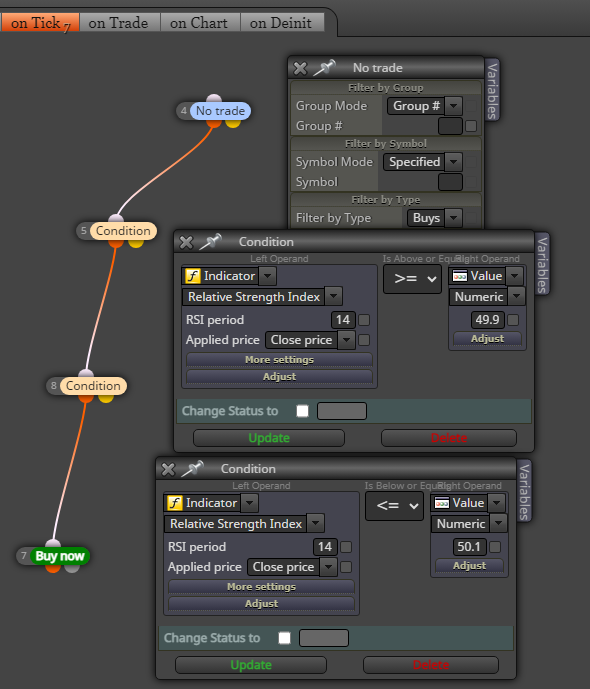
two RSI condition together
@princeomughele As i said above is almost impossible to get the round value.
This way the signal comes when rsi is very nearest to 50 value.
two RSI condition together
i don't think it's a bug. Can you share the link to your project?
If you look at the RSI value it has at least 4 decimal numbers, so it is very difficult to look for the value equal to eg.: 50. You can put two conditions in a row rsi >=49.9 and rsi <=50.1
@princeomughele said in No trade will be taken if the line in RSI 14 crosses below level 25 or above level 75:
Incorrect answer
in my opinion @l-andorrà gave the right answer regarding this topic
i don't think it's a bug. Can you share the link to your project?
Please, add a shared link to your project so we can look at
this is beyond my knowledge, I think jstap suggested something somewhere about global variables, I suggest you to do a search or tag him directly
@princeomughele said in Can I add custom indicators ?:
Can I add custom indicators like Double EMA & Super Trend that are in Trading Views to my EA. Cause can't find those indicators in FXDreema....
MT5 Double EMA is already inside fxdreema, regards Supertrend for MT5 you can find it on mql5 com site in codebase section
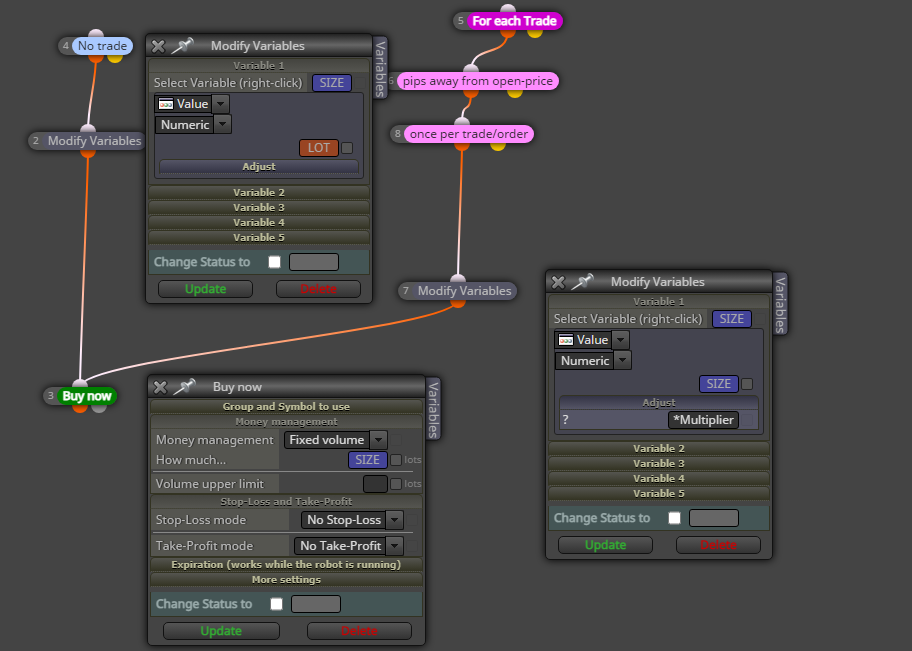
@Crisfx ah ok, now i understand. You have to create a variable and use it like this (the variable will be reset when there are no trades)
@Crisfx the market has minimum tradable lots, you can see it in your broker's specifications. Almost all brokers do not have sizes lower than 0.01

two blocks in a row: "no pending orders" then "buy pending orders"
not a constant, a variable. But only now i see you want like a loop. This way should work
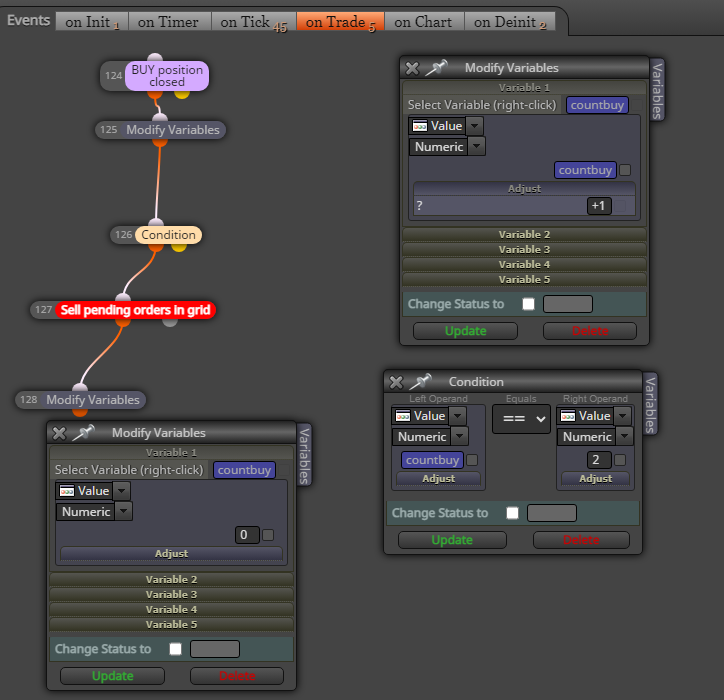
i think .... create a variable eg.: countbuy, then in "on trade" section > trade closed buy > modify variable countbuy +1
then in "on tick" put a condition countbuy==2 > no sell pending order > sell pending order
@jstap said in Urgent: ATR Stop Loss values wrong:
The 0 on the end is the candle ID (is called offset, a lot of code has it) set it to whatever candle you want the range to start from. The 0 at the start is the timeframe, 0=current, on MT4 you can use a int number, MT5 you need to use code like PERIOD_CURRENT
well! thank you for explanation
@jstap Yes me too. But i want ask to you, regard that adjust field, can we choose the candle ID? I mean inside this NULL,0,14,0
(my coding knowledge is less than zero)
This is my current settings
i think the difference is because the block calculate for stop loss the high (or low) value of candle ID 1 while the adjust field add (or subtract) the exact value of ATR in the same moment as the order is opened (so ATR value on candle ID0)

