@ziumo It works for me

@luis-d Are you backtesting with "every tick" model? And wich % of quality data?
@raja0033 Hi! Please look at my comment https://fxdreema.com/forum/topic/11551/block-trade-closed/11
Hi there! I suggest you opening a new project from scratch as the old bugs are present in the old environment, not in the blocks.

@cesardefez Hi! Maybe this topic can help you https://fxdreema.com/forum/topic/8188/how-can-i-round-a-number
@xyon126 Hi! I realized that you want to draw trendline as in the AutoCAD environment, but I can't figure out how to do it, I'm sorry.
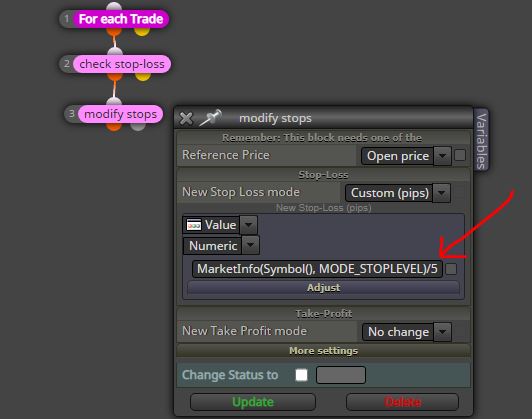
@roar oh yes! you have already simplified. (P.S. to get pips divide by ten, not multiplied  )
)
@roar hi! Please, why divide the stop level for 5 ?
@fxdreema thank you, please make as soon as you can. Please make a notification when the new code is ready.
@nillav said in Values in the buffers of the indicator 3_Level_ZZ_Semafor NRP:
@l-andorrà @ambrogio Muchas gracias a los dos, si no hubieseis respondido seguramente ahora estaría buscando otro indicador, por fin lo he conseguido, despues de volverme loco con el tema y viendo que a vosotros os funcionaba bien, no podía dejarlo asi, el error parece ser que el indicador que importo a FxDreema tiene que estar en la carpeta principal de indicadores dentro de la carpeta de datos de la Metatrader y yo lo tenía puesto en otra carpeta personalizada. Cuando lo copie a la principal, comenzo a funcionar, muchas gracias de nuevo, saludos.
In fact, that's the question I asked you above. Anyway good, problem solved. Of nothing, you're welcome.
@Nillav I am also noticing that you have shared a .mq4 indicator but you are working on MT5 charts..........?
@nillav said in Values in the buffers of the indicator 3_Level_ZZ_Semafor NRP:
@l-andorrà Hola, si te fijas, como te indico mas arriba, ese bloque ya lo he usado y no funciona, no me sale nada, si puedes hacer el favor de usarlo y comentarme si a ti te funciona y como te indico lo he usado en distintos ID de velas.
@Nillav as @l-andorrà suggested, the "indicator appears" block works great with all buffers, are you sure you have loaded the indicator correctly in fxdreema? And are you sure the indicator is in the right "indicators" folder of the MT4 platform?


@ghq In fact, this is the problem 
@ghq hello, are you backtesting your project with this model ?

@zedeai2 well, you're welcome.
@zedeai2 If you see the vertical lines it means that you have done the job correctly.
@sjthetechguy @l-andorrà I have already seen this section but I have completely forgotten where it is, can you tell me?
Thanks
@zedeai2 I don't remember at all if that link works, but in my projects I found this one that MUST BE TESTED
https://fxdreema.com/shared/twV9ZV9zb
This file should be your template to always use when you want to integrate the news filter.

I highlighted where to start with your expert, and also the block # 2020 that we will need after.
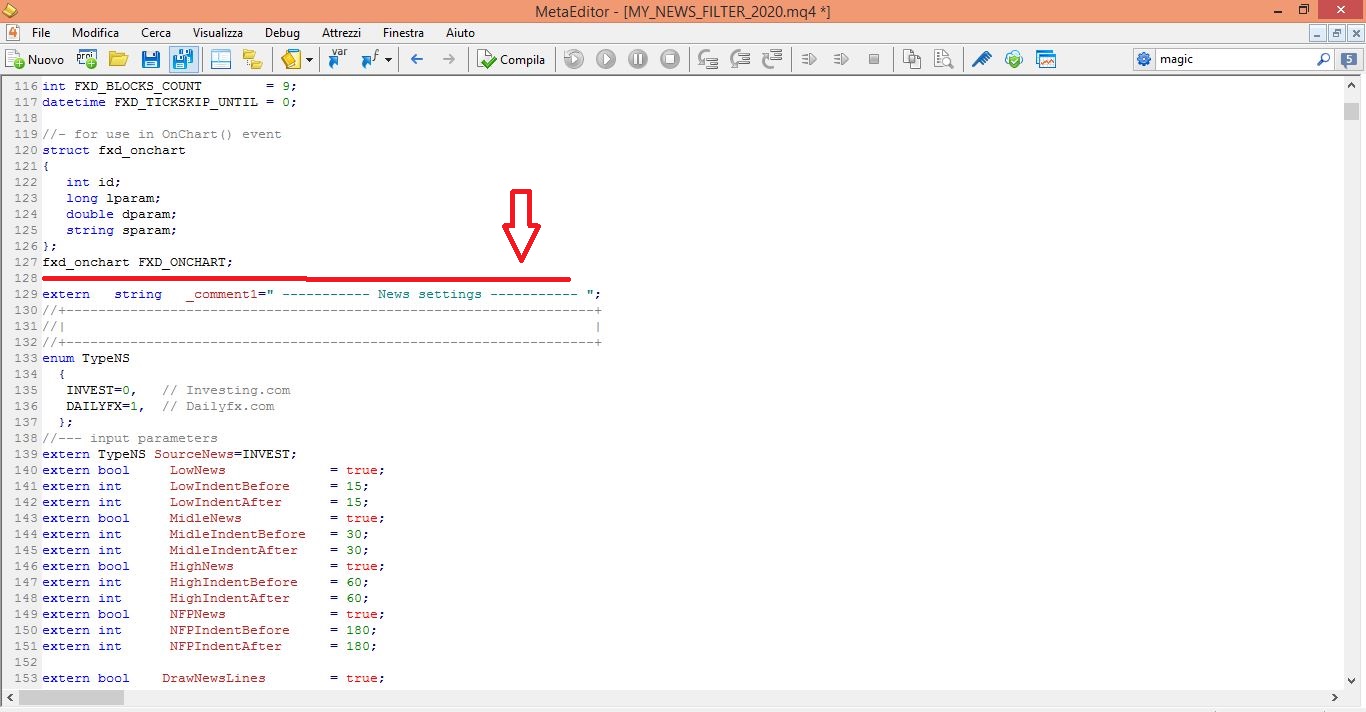
STEP 1) When you have finished your expert, save it through the .mq4 button
STEP 2) With the MetaEditor application, open the file you just saved
STEP 3) Copy and paste the content of block #2020 in the place i have indicate in this screenshot

Your project is ready to be tested.
BUT REMEMBER: if you reload the new modified .mq4 file in the fxdreema builder you will lose the content copied from the 2020 block, and you will have to redo the steps above.
