fxDreema

    • Register
    • Login
    • Search
    • Back to the main page
    • Categories
    • Recent
    • Tags
    • Popular
    • Search
    1. Home
    2. anse33
    A
    • Profile
    • Following 0
    • Followers 0
    • Topics 10
    • Posts 46
    • Best 0
    • Controversial 0
    • Groups 0

    anse33

    @anse33

    0
    Reputation
    1201
    Profile views
    46
    Posts
    0
    Followers
    0
    Following
    Joined Last Online

    anse33 Unfollow Follow

    Latest posts made by anse33

    • RE: Array out of range at OnTradeDetector()

      Same here. Error "array out of range" referring to the following lines:

      UpdateEventValues(EGV_OrderList[OrdersTotal()-1],"new","");
      or
      if (EGV_PositionsList0[i].type != EGV_PositionsList[i].type)
      or
      if ((EGV_OrderList0[i].sl != EGV_OrderList[i].sl) && (EGV_OrderList0[i].tp != EGV_OrderList[i].tp)) {

      Same EA, different times. Unfortunately, this error can not be reproduced in Strategy Tester. Occures only in realtime trading (demo & real). Happens faster if more EAs are running at the same time. Found no solution so far. This stopped me from using fxDreema & EAs a long time ago.
      posted in Bug Reports
      A
      anse33
    • RE: critical runtime error 503

      I received critical error 502 in OnTick function when I moved a block ("Position closed") from the OnTrade area to the OnTick area. Maybe it's something like that in your similar case too?

      posted in Bug Reports
      A
      anse33
    • RE: Self terminating EA - Error "array out of range"

      @fxDreema
      Now I come up with some new error messages: (was quite busy the last time)

      It is still a big problem, that my EAs keep terminating themselves without any visible reason! Tried different ways of building my EA. Tried different MetaTraders with three different Brokers. On some the EA runs longer, on some shorter. But 75% of them die!

      Do you see a solution?

      The EA terminates itself right in the second, it creates a position.

      Tab Journal says: "170914_OpenPosisGroupIDonlyForCheckOpen_v8 (EURUSD,M1) removed"

      Tab Experts says at the same second: "array out of range in '170914_OpenPosisGroupIDonlyForCheckOpen_v8.mq5' (3605,41)

      And Line 3605 is: UpdateEventValues(EGV_OrderList[OrdersTotal()-1],"new","");

      posted in Questions & Answers
      A
      anse33
    • Check Ping Time of Server

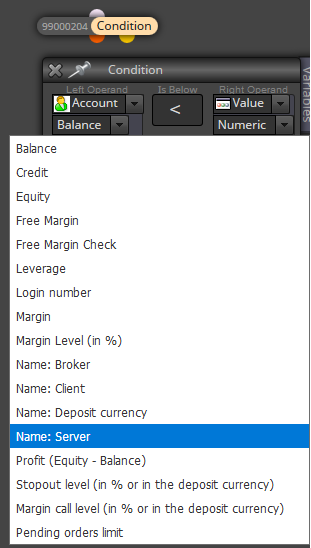
      It could be a good idea to prevent the EA from trading while the connection to the server is very slow, I think.
      Does anyone know a way to do this? I just could find a way to ask for the name of the server ...

      0_1505651362341_upload-76e57f8c-6dac-476d-bc21-09a0adf5c3b7

      posted in Questions & Answers
      A
      anse33
    • RE: Self terminating EA - Error "array out of range"

      @miro1360 This EA is for small & easy tests.
      https://fxdreema.com/shared/Hc1GUdqN
      I started 4 instances of this Test EA yesterday evening. Only 1 of them "survived" until this morning. Log just says:

      ...
      2017.09.15 01:54:00.404 Experts expert 170914_OpenPosisGroupIDonlyForCheckOpen_v8 (EURUSD,M1) removed
      ...
      2017.09.15 06:05:04.158 Experts expert 170914_OpenPosisGroupIDonlyForCheckOpen_v8 (EURUSD,M1) removed
      ...
      2017.09.15 08:52:02.566 Experts expert 170914_OpenPosisGroupIDonlyForCheckOpen_v8 (EURUSD,M1) removed
      ...

      posted in Questions & Answers
      A
      anse33
    • Self terminating EA - Error "array out of range"

      From time to time the EA decides by itself to quit. It just disappears from the chart. As far as I can see, this usually happens after opening a position.
      Does somebody else know this effect?

      posted in Questions & Answers
      A
      anse33
    • RE: Magic Numbers, Group Numbers and Multiple EA's Problems

      EDIT: I still didn't solve the problem! Thought so, but I have variables adding "1" every bar for each EA. So they are influencing and disturbing each other unintentionally! 😞

      I just don't get it! Why are different MagicNumbers not enough to keep all EA's actions only by themselves?!

      Now it works this way:
      Giving every trade from one EA the same group number (111) and every trade from another EA another group number (222) and so on. Actually, this should be the same like another MagicNumber for every EA.
      But anyway, if it works, it works. 😉

      posted in Questions & Answers
      A
      anse33
    • Magic Numbers, Group Numbers and Multiple EA's Problems

      What is "Check positions/pending orders count" checking in detail?
      Any position of an instrument using the same MagicNumber like the checking EA itself?
      Or any position of the instrument, looking at nothing else?

      I thougt, one EA would only recognize positions/orders of its own MagicNumber. So I tried to run more EA's on one instrument. But I'm not sure anymore. Somehow, the other EA's won't open any new position if another EA has opened one already. (Exception: More EA's open one position at the same time. In this case, there was "no trade" before.)

      Using groups also seems not to solve the problem, because "groups" only extend the existing MagicNumber for some digits.

      posted in Questions & Answers
      A
      anse33
    • RE: UPDATE time, write here if you have problems!

      @fxDreema I posted this link several times:
      https://fxdreema.com/shared/k7s6vOlzc
      Also, I described the problem several times in this thread.
      From my point of view, the problem is in the block "Indicator moves within limits". I tried to localize the source of the error as far as I could. But I can not compare the block compiled before and after the update. So you have to do it.

      The EA is not clearly broken now. The results differ. Maybe, it was "more wrong" before and is "more good" now. If this is the case: Please tell me what to do, to receive the results I've had before. (If is is possible in any way.) Because this always was better. In every backtest and also in demo trading.

      posted in Questions & Answers
      A
      anse33
    • RE: UPDATE time, write here if you have problems!

      @miro1360 Thanks for that good idea and the link, Miro.
      I really thought, I could localize the cause of the problem a little bit. But unfortunately, the desktop version doesn't work on my two computers.
      Tested on Windows 10 and Windows Server 2012 R2.

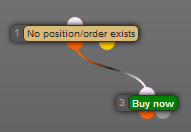
      Even the easiest EA containing "No Trade" and "Buy" (see picture, I didn't find "share copy" or anything like that) results in no trades at all. Same EA from online version trades.
      0_1505219430521_upload-6bb3ead1-c3ed-440e-bdb5-7232417f3317

      Also, I couldn't import (error pic 1) or copy&paste (error pic 2) any EA's:
      0_1505219539804_upload-b4cd0bc9-c0cf-4881-80f0-86a3f1e9b591

      0_1505219599219_upload-f1c63be2-b89d-4b08-a45b-2c9c4613b146

      @fxDreema So there still is an action urgently required from you!!!

      posted in Questions & Answers
      A
      anse33