Ah perfect, i was so close. Thanks so much
B
Posts made by bb 2
-
RE: Seeking to hire fxDreema user/devposted in General Discussions
What sort of issues are you having? what's the idea behind the EA?
You don't need to pay but i can help you as much as i can -
RE: Problem when upload EA to MQL5 Marketposted in Questions & Answers
Is your leverage different on MT5? try reducing your risk to the lowest amount and try again
-
RE: trailing stop and breakevenposted in Questions & Answers
You can achieve this with the "for each trade" bloc followed by "Trailing stop(each trade)" bloc. Just put your inputs under the trailing stop bloc
Trailing step is how often the stop loss updates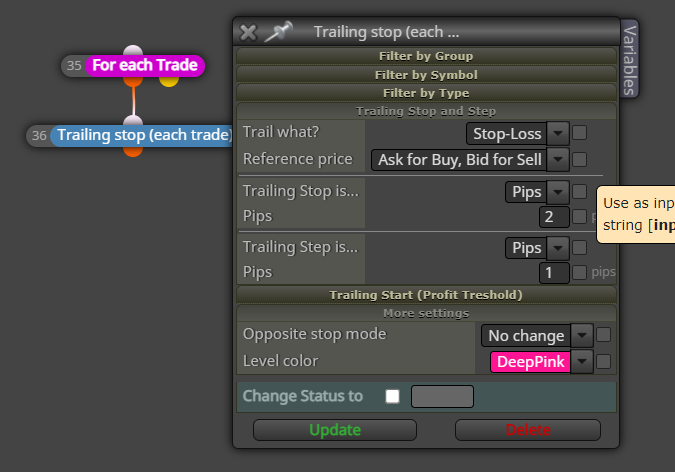
-
RE: TP random updateposted in Questions & Answers
I think i understand variables, i thought that's what i had done for this.
I think i found the issue but i cand resolve it. When i remove some of the entry conditions it seems to work ok. Any idea on where i should start?
-
RE: Show TPposted in Questions & Answers
I just tried it and its working for me.
So you changed your "Close_profit" constant from "TP mode" to "in pips" ? -
RE: Heiken ashi strategyposted in Questions & Answers
So are you only wanting to close a trade if the opposite signal true? so only close buy trades if a sell trade comes up and Vis versa for sell?
It would be like this
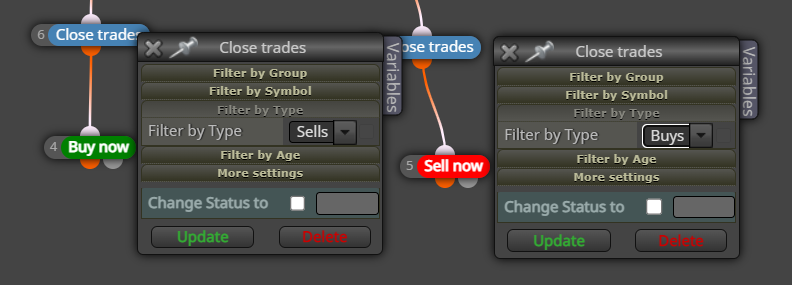
-
RE: Show TPposted in Questions & Answers
@sktsec is right your close profit constants should be on the "in pips" section
Is should be like this
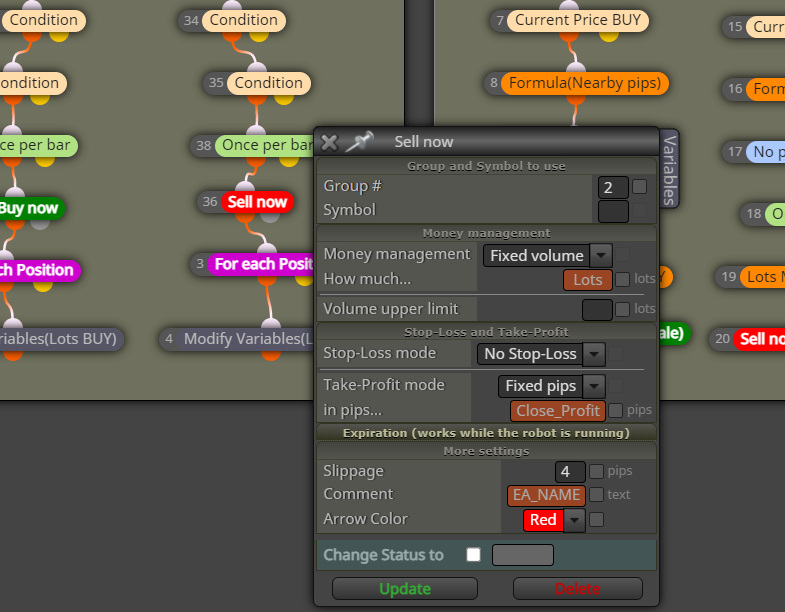
-
RE: Heiken ashi strategyposted in Questions & Answers
If you want to close every trade before a new one, you can add a “close trade” clock in between your condition and buy/sell block
-
RE: How can I create a proper capital management system?posted in Questions & Answers
is this what you are after? https://fxdreema.com/shared/XIHkwAWQ just add in all your conditions.
So it doubles its lot size after every win up to 8 consecutive wins, then resets back to the original lot size
If it makes a loss it also resets back to original lot size -
RE: Show TPposted in Questions & Answers
Can your share your project. And are your trades levels clicked under properties within metatrader?
-
RE: TP random updateposted in Questions & Answers
Yes that's correct, and then reset TP after a win
-
RE: Need your guide on thisposted in Questions & Answers
under your "check distance" change your upper level to candle low and your lower level to candle close.
this should measure the distance from candle 2 lower wick to candle 1 closeIs this what you are after?
-
RE: New to FxDreema - need some guidanceposted in Questions & Answers
I think i understand, try this https://fxdreema.com/shared/G0J2rEdKb
So it only allows max 4 open trades at a time and after 1hr 45mins all trades are closed.
You can play around with settings a bit to see what works for you.
I put in a couple constants so you can adjust your TP and Sl as well as risk within MT$
Hope this helps with the start of it -
RE: I'm building multiple trading systems. Can I set the closing conditions? Separation belongs to anyone of it or not?posted in Questions & Answers
the "Check Type" block will allow you to separate buys from sells
-
RE: condition with a conditionposted in Questions & Answers
if the "no trade" block is connected to the orange output and there is no current trades then both the "condition" blocks will trigger. if there is a trade active then the condition blocks wont be activated.
-
RE: New to FxDreema - need some guidanceposted in Questions & Answers
Hey Geoff,
You could start with something like this https://fxdreema.com/shared/SZNS5EyId
Just put in your conditions in the "condition" block. I've put in that price must close above/below EMA, this will give you the direction
You can change which timeframe you enter on the "once per bar" block
"Check trade count" this allows how many trades can be open at one time.With your closing trades can you be more specific? there are so many options under the condition block you can choose from. You can add multiple condition blocks
-
TP random updateposted in Questions & Answers
Hi All,
Can someone take a look at this project please
https://fxdreema.com/shared/Wjb8aUqCcSo the issue i need help with is the doubling TP after every loss. for some reason the EA decides to update and reset the TP when the rules are not met. sometimes it works, sometimes it doesn't.
Sometimes it doubles after 1 win and sometimes it takes 2 wins before it doubles. then randomly it will reset again after a loss, its only suppose to reset after a win.
I'm guessing it has something to do with the "On Chart" tab but i haven't been able to figure this out