Well this is embarrassing, I'm was sure they weren't there before (but they are now... of course).
Thanks for the info!
B
Best posts made by Breeeeen
-
RE: Enabling more system blocksposted in Questions & Answers
-
RE: Tutorial - Create Custom Blocks with "FXDreema Studio"posted in Tutorials by Users
You're a genius, it works like a charm! Thanks for your help.
For reference if it helps others, I did it like this in the on Init tab, I can now use the .ex5 button: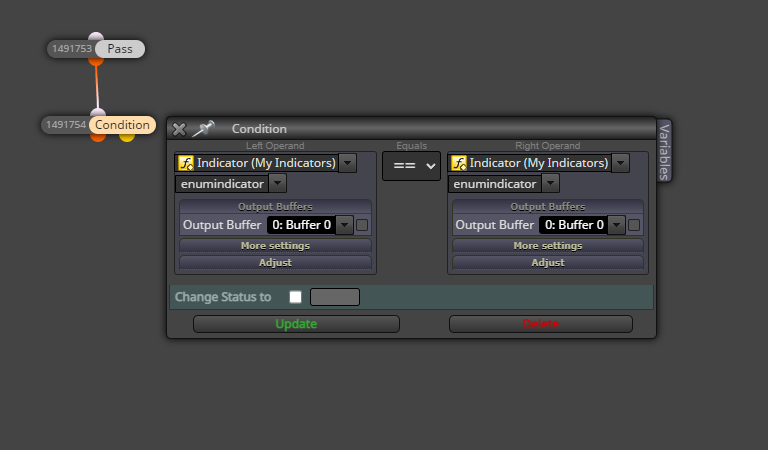
Latest posts made by Breeeeen
-
RE: No Position Nearby filterposted in Questions & Answers
Thanks for your reply, will give it a shot.
-
No Position Nearby filterposted in Questions & Answers
Hi everyone,
Is there a way to filter the "No Positions Nearby" block to only a certain number of positions?
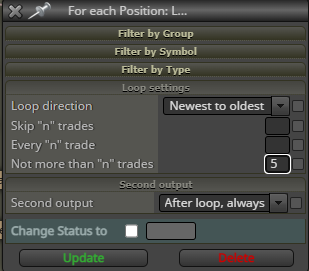
To paraphrase, the "For each Position" block allows you to specify either newest to oldest (vice versa) and not more than "n" trades, can this be done for the "No Positions Nearby" block?
I did a check on the forum before posting this, but if it's been asked before then apologies for missing it! Thanks for reading

-
RE: Some of my fxd EA's won't reinitiale after changing settings or timeframesposted in General Discussions
@fxDreema as what Mantadiver was asking, is there a way we can automatically exclude this code so we don't have to jump into meta editor each time? Essentially what we want is for the EA to reinitialise when changes to any settings have been made.
-
RE: Tutorial - Create Custom Blocks with "FXDreema Studio"posted in Tutorials by Users
You're a genius, it works like a charm! Thanks for your help.
For reference if it helps others, I did it like this in the on Init tab, I can now use the .ex5 button: -
RE: Tutorial - Create Custom Blocks with "FXDreema Studio"posted in Tutorials by Users
Hi @QuantEngineer , I'm wondering if this tutorial could help me with not having to write my enumerations each time I export a file.
Basically each time I want to export the file, I have to click the .mq5 button (not the .ex5) because of missing enumerations and then open the file in MetaEditor and add in the enumerations manually as per the picture below.

I tried adding a block using the tutorial above and adding it to the OnInit tab but every time I try clicking .ex5, I still get the same error that enumerations are missing.
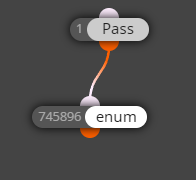
Any ideas how I might use a custom block to save me the hassle of having to manually add these enumerations each time I export?
-
RE: How to set conditions on closing tradesposted in Questions & Answers
@l-andorrà no that money doesn't need to be customizable, just as long as profits is greater or equal to losses, whatever their values.
I tried a loop condition, what changes would you make to this example? https://fxdreema.com/shared/XVQAQMwSb (this is in MT5) -
RE: How to set conditions on closing tradesposted in Questions & Answers
Hi @l-andorrà, sorry the +25 and -23 were just examples, it should be any number as long as profits are equal to or greater than the losses.
-
How to set conditions on closing tradesposted in Questions & Answers
Hi everyone,
How would someone set up a situation where the EA does the following?
- Count the total dollar value of all profitable trades
- Close all profitable trades
- Start closing losing trades (biggest loss first) until the amount closed in losses equals the profits
- Skip any trades where it would make the total losses closed to be greater than profit closed
To use an example, let's say I have 3 winning trades and 4 losing trades:
Winning trades
Trade 1 buy profit $5
Trade 2 sell profit $8
Trade 3 buy profit $12Losing trades
Trade 4 buy loss $6
Trade 5 sell loss $7
Trade 6 buy loss $8
Trade 7 buy loss $9Desired outcome: close trades 1-3 (total closed profit of $25) and then close trade 7, then trade 6, skipping trade 5 (since this would make the losses go over the profit) but closing trade 4 (total closed losses of $23)?
I tried a proof of concept but it failed to do what I wanted it to (it closed everything):
https://fxdreema.com/shared/XVQAQMwSb
(This is in MT5) -
RE: OrderCheck() failed: Unsupported filling mode (10030) [possibly solved?]posted in Bug Reports
I want to say yes to both, but it's "magically" come alright since posting this (was not working for two days prior). Thanks admins I guess!
-
OrderCheck() failed: Unsupported filling mode (10030) [possibly solved?]posted in Bug Reports
Hi everyone,
My MT5 EA works perfectly for seven different currencies that I'm testing it on, but on USDCAD it gives me this error.
Looking at old threads, the admins have fixed this in the past but it pops up again from time to time.
My broker is Blackbull Markets.
Thank you.