IGNORE THIS.
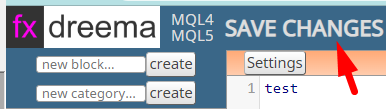
I found the Save Changes button, which doesn't look like a button:
IGNORE THIS.
I found the Save Changes button, which doesn't look like a button:
This was happening last time I tried to use this about a year ago and still seems to be a bug. I have validated this with another user and they get the same result.
In the MT5 studio (https://fxdreema.com/studio/MQL5) only (MQL4 one works fine) most thing work, apart from the code under the Settings button doesn't save, nor does the code in the Global variables.
Also, the block "Settings" don't save either.
Awesome, many thanks!
I cleared my cached and it worked fine 
I also thought I should go through the whole process to make sure it all works, which for me is importing the .mq5 to FxDreema and exporting it as a .ex5. The import worked fine but the export to .ex5 hung on "Processing..." with the red "Website too busy message". I tested it with a smaller project and it worked fine. So, I'm not sure it this is related to the fix, or if it's just a temporary thing?
I'll see if it's still doing this tomorrow and let you know if it is, as it may be related bug.
Probably best to keep this forum post on topic. Send me an email or DM and I'll let you know where I'll address this
He said I could advertise on the forum many years ago. It was the old forum before this one. I've only just now done something about it. Happy to remove it if he's changed his mind.
Hi @FXDREEMA-0
I'm trying to use the converter and my file has just gone over 2MB. Now it won't allow me to convert and shows an error message that the "website is busy right now".
When I reduce the file size to 1.99MB is works fine.
I've tried it several times and it consistently works with 1.99 and lower and not with 2MB and higher.
So, I'm guessing there is some kind of restriction in place.
Are you able to increase the converter's file size restriction, ideally to 5MB?
Are you also able to give an indication when you think this enhancement might be released?
Many thanks!
@l-andorrà Thanks. What's the best way to contact admin these days?
Same problem here. Also with pink "modify stops" block. It doesn't work in MT5 but works in MT4.
Hey, can I suggest you create a Telegram Channel (or similar) to update customers should something like this happen again? I remember it being down last year as well, so this would be an easy way for you to tell people you are onto it and keep them updated without much effort.
Are you also able to let us all know if you have a team of people supporting FxDreema, should something happen to you?
I even ended up messaging your web host to see if they could do anything. @fxDreema
Great news!
Hey, can I suggest you create a Telegram Channel (or similar) to update customers should something like this happen again? I remember it being down last year as well, so this would be an easy way for you to tell people you are onto it and keep them updated without much effort.
Are you also able to let us all know if you have a team of people supporting FxDreema, should something happen to you?
I even ended up messaging your web host to see if they could do anything.
Hey @trader-philipps thanks so much for this! It seems my MT4 was out of date. I updated the version somehow and now it works.
Much appreciated!
Yes, I tried them all... about 20 combinations lol!
Hi, I'm trying to save a chart screenshot and send it via "Send file to FTP" block.
The FTP block works fine when the file is under the Files folder, but the "Chart screenshot" block only allows me to save to a sub folder under "Files".
The FTP doesn't work for subfolders and I've tried virtually every combination of a relative path to the file, e.g. \subfolder\chart.gif, subfolder\chart.gif, ..\subfolder\chart.gif etc.
I'm guessing this is a bug versus something I'm doing wrong.
Can you please help?
Any update on this?
Thanks
My EA stopped working all of a sudden and I discovered that it was the "Trade closed" block.
To fix it I had to delete the SymbolMode and Symbol to get the EA working.
Can you please fix this bug?
Here's a screenshot:
Thanks
Thanks.
To replicate the problem, have two EA's running on the same time frame on demo, both using virtual stops that trail and have trades execute one after the other. At some point the trades should both be running with their independent virtual stops. You should notice that one of the stops disappears (I think after the first stop is hit on one of the trades)
I've attached 2 EA's you can use to test. One triggers a trade after 3 seconds the other after 30 seconds. Just run them on the same pair and timeframe. in demo. You'll see how the virtual stops disappear - especially when one trade closes on a stop.
1_1519164402790_Virtual Stops Disappear - B2.mq4 0_1519164402790_Virtual Stops Disappear - B1.mq4
Hi,
I'm running two different EA's on the same MT4 and they are both using Virtual Stops.
But when one EA is already in a trade and the other EA takes a trade and both Virtual Stops are running at the same time for both EA's, then one of the Virtual Stops (objects) gets deleted for one of the EA's and that EA no longer has a Virtual Stop.
Is this a bug and if so are you able to fix?
If not, do you know why this might be happening?
Thanks!
Ignore this. I solved it.
Hi,
I'm testing an EA and need to use virtual stops in order to get around the broker settings.
The EA has two levels of stops, those that are set below the entry and a Multiple Level Trailing Stop that it starts when the trade is in profit.
What I'm finding is that the virtual stops below the entry work fine but the trailing ones above it don't.
Should this work or is this a bug with Virtual Stops and the Multiple Level Trailing Stop?
If it's a bug, are you able to fix it?
Many Thanks!
Hi,
When I upload a custom indicator in .mq4 format it doesn't pull through the data Inputs or Buffers like it use to.
Also, when I insert Buffers they don't save. This is an issue with the .ex4 versions of custom indicators.
These bugs have both appeared after you moved servers.
Can you please fix.
Thanks
what's the best way to contact you instead