The first thing I notice is that in the condition block the left operand is the bid price, which seems ok, but the right operand is the name of the object. The bid value is always going to be a price and therefore will not cross a text attribute. I would start by changing the Attribute of the object to set 1 (numeric) and the Property to price level 1, which is the price at which the line is placed on the chart.
C
Best posts made by CPBonzo
-
RE: NO TRADEposted in Questions & Answers
-
RE: how to work with the buttonsposted in Questions & Answers
When you create the button ensure that under the "adjust" settings the it is set to not pressed. Then under "on tick" or "on chart" depending on the function you want to control, put the select button and check button state blocks. From the orange connector run whatever function you want to happen when the button is pushed. This will continue to run as the button remains pressed - unless - after the functions you add a "Custom MQL4 code" and insert the following:
ObjectSet(LoadedObjectName(),OBJPROP_STATE,0);
This will reset the button to off (i.e. 0, when on is 1). You could also use the block to change the button colour when pressed by changing the properties etc.
I hope that helps.
Regards
Colin
-
RE: How to Make EA trade Engulfing candleposted in Questions & Answers
@surachefx is correct, you need to specify more of the parameters of the engulfing pattern. In your post the conditions will pass if the body of candle 1 is greater in size than the body of candle 2, but this is only one of the characteristics of an engulfing pattern for Bearish Engulfing and there could be circumstances where these conditions are true but there is no engulfing pattern.
When creating an EA that trades candle patterns (or any EA for that matter) I find it useful to write down all of the characteristics of the pattern, in a similar way as @surachefx has done above and then identify how fxDreena logic can be used to describe these characteristics. This software is powerful and extensive so there will almost always be more than one way to write an EA to perform a particular task. Running the EA in strategy tester or a demo account and watching it will almost certainly reveal things missed e.g. it picks up too many signals because we haven't specified the minimum size of the candles for the engulfing pattern to be valid.
There is a lot of infomation on this Forum and a quick search on candle patterns will reveal a wealth of information others have already shared. -
RE: How to Make EA trade Engulfing candleposted in Questions & Answers
The Pass block does nothing except trigger the next block to execute and if you connected the chain of blocks to the No Trade block, for example, you would not need the Pass block at all.
To answer your question, you would need to place any additional condition block after the Pass block. As to where, it depends in what order you need things to happen and how often conditions should be checked or action taken. As I suggested, it is good idea to write on a piece of paper the logic of the EA you are designing so you can see the order and then structure the fxDreema blocks to do this. If, for example, you want the conditon in your block 2 to occur before an engulfing bar then place it before the other conditions. Where you place it in relation to the Once Per Bar block depends on how you want the EA to function. Without that block the condition will be checked every tick and passed once the conditions are met therefore activating the next block. The Once Per Bar block in this set up means that the following conditions will only be checked once per bar (as it says) and this is usually at the start of the bar regardless of how many ticks there are. If the conditions are met later in the bar the conditions will not pass until the next bar, assuming the conditions remain the same.
If you remove the once per bar block and, for example, connect your block 2 above the condition blocks 5 and 6 the EA will check for your condition every tick and once passed will check for an engulfing candle as long as your condition is met and every tick all the conditions ar emet it will send an alert and draw an arrow. If you place the Once per bar block betwen the last condition and the alert and arrow blocks these events will only occur once per bar however many times the conditions pass per bar. -
RE: NO TRADEposted in Questions & Answers
@josh01 You will have your reason for wanting to use the Bid value on the left, but I use Candle such that the condition passes when the candle crosses a line. This example from a current project:
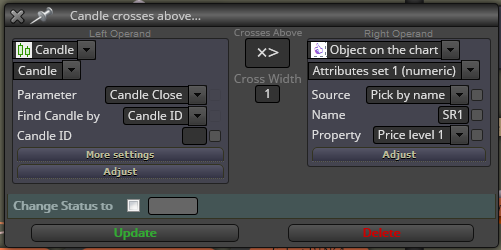
-
RE: NO TRADEposted in Questions & Answers
@josh01 There are a couple of things that occur to me. Firstly, in the example you shared the drawn lines have no name, so theconditions, which related to named lines don't relate to the lines drawn. Secondly, you have the condition placed after once per bar, which means the condition will only be checked at the beginning of the bar (usually) if the candle doesn't cross at that moment then the condition isn't met.
I would suggest trying with the conditions conected after a "No Trade" block, that time the conditions block is running all the time there is no trade, or use the "Pass" block if you want it to run even if there are live trades. Then place the "Once per Bar" block between the condition and the Buy and Sell blocks, this will ensure than when the condition is met a trade is only plced once in that bar even if the candle crosses the line more than once in this time. -
RE: Custom parameter to draw a lineposted in Questions & Answers
@trading-prana Why not create a variable with the value of (high+low)/3 and then use that variable as the value for the line?
-
RE: keeping indicators inside the EAposted in Questions & Answers
@josh01 No it isn't. Any indicators used by the EA need to be on theMT4 or MT5 platform.
-
RE: Custom parameter to draw a lineposted in Questions & Answers
@trading-prana Once you have the variable created, it needs to be placed as a value in the Draw Line block. In this instance, you will need to set the block to draw a horizontal line and then the value below that relates to the price i.e. the height on the chart at which you want the line to be drawn. Change the setting in the first of the pull-down menus to "Value", the second to "Numeric" (it should default to that) and then where you see a current value of "1" right-click that box and a list of your constants and variables will be displayed. Pick the variable created to give (high+low)/3 and the line will be drawn at that level on the chart.
Of course, the value (high+low)/3 is in most occasions going to be significantly below the current price so you may need to zoom way out on the chart to see it.
-
RE: close a certain trade when its Profit reaches same number of pips as its Stoploss?posted in Questions & Answers
I think you need to use the Close Trade block from the purple Loop for Trades and Orders menu and not the blue one from the Trading Actions. The purple Close Trade block closes only the trade in the current loop. I haven't checked this, but it is certainly worth a try.