@l-andorrà It may be a good solution, but it wouldn't make sense. What else are the "Check trades count" blocks for? To filter the open trades...so if I set Check trade count = 3 to a chain and check trade 4, check 5 etc to the subsequent chains, based on the number of trades opened on a specific chart only one chain MUST work, not the others...
C
Posts made by Crisfx
-
RE: For Each Trade / Check Trade Counts problemposted in Questions & Answers
-
RE: Multipairs EAposted in Questions & Answers
I managed to solve it, but now I have this Zero divide error (11730,31). Anyone know how to solve it?

-
RE: How to use constant/bool with chart valueposted in Questions & Answers
@jstap Thank you very much!
-
RE: How to use constant/bool with chart valueposted in Questions & Answers
@jstap Perfect, now it works, I imagine that instead of PERIOD_M15 I have to insert the reference timeframe on which my Expert works, right?
Would it be possible to combine the 2 constants (the bool and the string with the chart name) to create a single one? Use the constant string with the chart name and the true/false from the bool constant. So you only have 1 input line into the EA settings once it is attached to the chart, this would be perfect...
EA input example:
"Chart Name" | True/False
-
RE: How to use constant/bool with chart valueposted in Questions & Answers
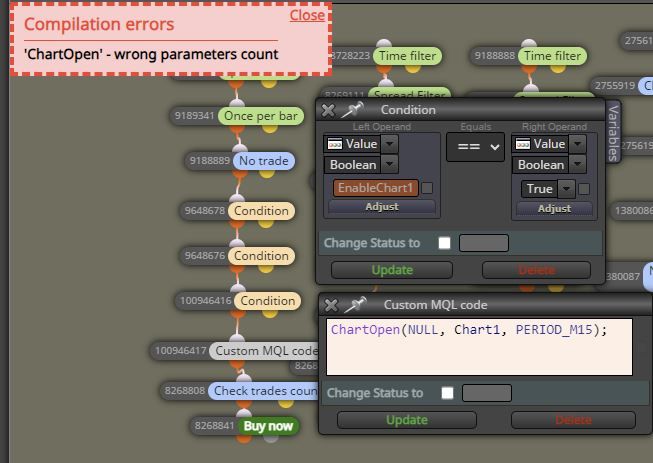
@jstap Yes, I have a bool constant called "EnableChart1", a string constant with the name of the chart called "Chart1" and below I inserted the custom code you sent me, unfortunately it returns the error: "ChartOpen - Wrong parameters count".
-
RE: How to use constant/bool with chart valueposted in Questions & Answers
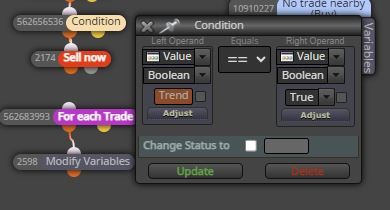
@jstap Thanks for your comment, unfortunately I don't intend to open a chart, but to have the possibility of using a bool with the name of a chart and near the true/false to enable or disable the opening of a buy or a sell for that chart .
Input EA example:
Variable: ----- Value
AUDCAD ------ True/False
EURGBP --------- True/falseThe idea is like the one I attach in the photo, that is, if true the chain works and opens buy/sell, if false it doesn't work. The problem is that I can't do it using the name of a currency pair since using a bool in "value" must necessarily put true or false.
-
RE: How to use constant/bool with chart valueposted in Questions & Answers
@l-andorrà Unfortunately I imagined it, I'll leave the topic open so if anyone knows how to proceed they can write it, it would be helpful..
-
RE: How to use constant/bool with chart valueposted in Questions & Answers
@Byens How should I do it?
-
How to use constant/bool with chart valueposted in Questions & Answers
Good morning everyone, let me start by saying that I am trying to create a multipair EA, writing the name of the chart to be used in each constant and then using the "set current market for the next block" block, everything works fine. Here on the forum I found a lot of information that explains the possibility of adding a bool constant with True/false value that can be used in a condition block to enable or disable the possibility of enabling or not a chain such as opening a trade, or using of an indicator..
My question is: what if instead in the EA constant I wanted to insert the name of the chart as a value and next to have the possibility of making True/False? That is, to open that graph or not?
Example of input into the EA: AUDCAD | True / False
I haven't found any way, because if you use the constant bool in "value" you can only enter true or false..
-
RE: For Each Trade / Check Trade Counts problemposted in Questions & Answers
If anyone has any suggestions please write them
-
RE: For Each Trade / Check Trade Counts problemposted in Questions & Answers
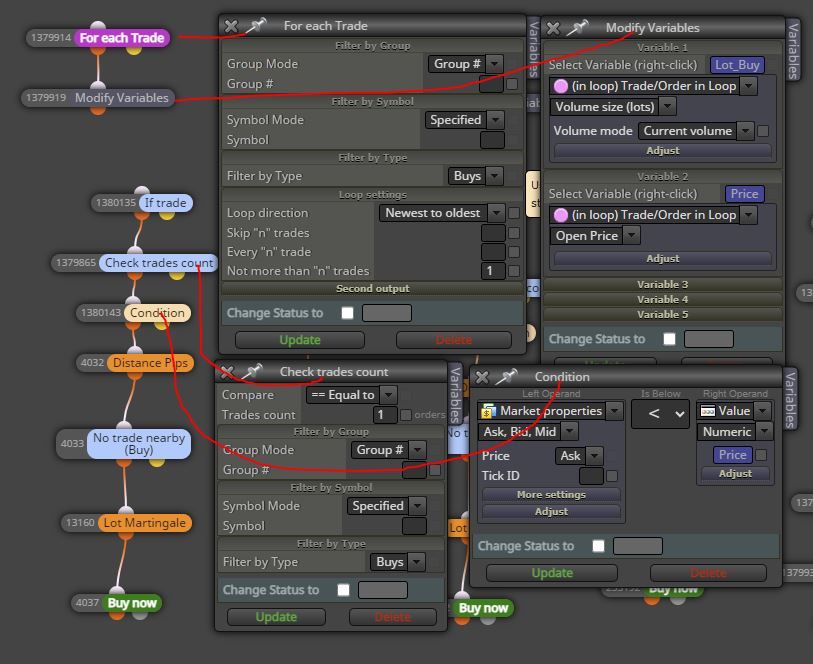
I'm trying this way, for each new trade (starting from the first) the variable for the size and entry price is assigned. At this point using "If trade" I check that there is an open buy trade (also valid for the sell), then I filter the number of trades using "check trade count" so as to use a specific chain (with a trade opening distance via formula) rather than another. The condition ensures that the current price is lower for the buy or higher for the sell than the price of the last open trade (variable). Since there are no pink blocks but only blue blocks they should work fine...
-
For Each Trade / Check Trade Counts problemposted in Questions & Answers
Good evening, I would like to solve the following problem. How can you "order" the execution of these blocks?
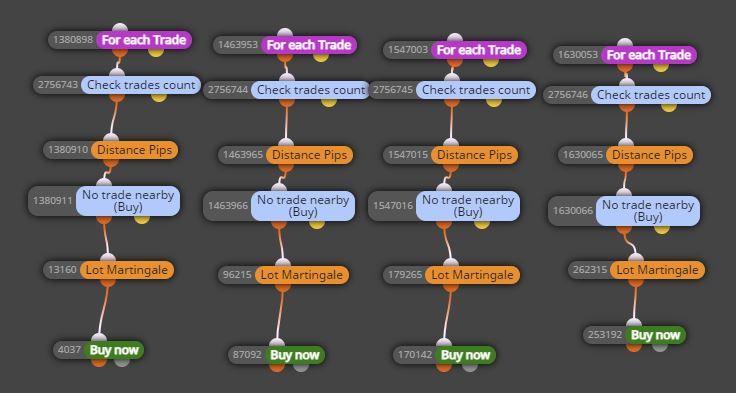
Let me explain better: After opening a trade (buy or sell), in the event of a loss I would like the bot to open other trades in the same direction with distances that can be configured via constant but which are calculated each time from the price of the last open trade. The problem is that I have noticed that these chains can "work" even several times if the price returns to the same distance as "no trade nearby", there is no real order. I tried to solve via the "check trades count" block but it doesn't work, it isn't respected.
The idea was to read the number of open trades to make ONLY that chain work, example check open trades = 2 -> ONLY the second chain is activated which opens a trade at a distance of X pips (written in the constant) FROM THE LAST open trade on the specific graph.
Or open check trades = 3 -> ONLY the third chain is activated which opens a trade at a distance of Y pips (always decided via constant) FROM THE LAST trade opened on the specific chart.
I would like it to work like this:
Conditions OK -> I open buy or sell
I have 3 or more constants (30/70/120 etc pips, it's just an example)
When the open trade reaches a negative 30 pips (first constant) another trade will open in the same direction. If this last trade goes negative by 70 pips (second constant) another trade will open in the same direction. And if this last trade also goes negative by 120 pips (always set in the constant) a further trade will open in the same direction...I hope you can help me, thanks
-
RE: Multipairs EAposted in Questions & Answers
I checked again and it was my mistake, in "No trade" before selecting any symbol I had tried with specified by inserting the constant with all the graphs to be used in the box. Then I left the constant inserted and clicked on any symbol, without removing it by right clicking "return to original value", now it no longer gives me any errors.
The problem now is: how do I open a trade at a distance of X pips for each open pair? Until now I have used the blocks that I attach in the photo, simple since the bot was connected on every chart, in this case of multipair I can't understand how to "filter" each open pair..

-
RE: Multipairs EAposted in Questions & Answers
Thanks for the reply, I tried, as in my case it opens the trades but in the experts tab it returns the "zero divide" error in line 11124...

-
RE: Multipairs EAposted in Questions & Answers
@willramsey Only backtesting is not possible on MT4, I assure you that I am already using several bots that work on many charts by connecting them to just one. I would just like to understand how to do it here on fxdreema, there are several topics but many no longer have the working link to be able to look at the examples.
-
Multipairs EAposted in Questions & Answers
Good evening everyone, I have already tried to do some research in the forum but I haven't found exactly what I'm looking for. I would like to connect my EA to a single (random) chart but also operate on other "X number" charts if the conditions are respected. In other topics I read about adding the "Set current market" block above the "no trade" block. Inside Set current market I would like to insert a string constant with all the names of the charts on which it is possible to check conditions and open trade, for example a string with: AUDCAD,EURUSD,GBPUSD,EURJPY ETC.. or with the extension that the broker assigns to it... (EURUSD., EURUSD+ etc..) to be able to add/remove pairs simply from the EA inputs.
I tried different combinations but every time, shortly after starting the bot, the "zero divide" error appears in the Experts tab. How should the blocks be set correctly?

-
RE: Modify TP including swap & Mt4 Crashposted in Questions & Answers
@jstap Ok, I'll try, but in case of accidental closure of the Metatrader, how will the EA know which "for each trade" to restart from?
-
RE: Modify TP including swap & Mt4 Crashposted in Questions & Answers
@jstap They have always worked very well for me. If I wanted to use for each trade as you suggest, how would I do the same thing? Now I use IF trade / pips away from price / once per trade / add to volume. Also, are you sure that in case of crash or closure of MT4 all trades are recognized without losing the count as it happens now?
-
RE: Modify TP including swap & Mt4 Crashposted in Questions & Answers
@jstap I'm not using for each trade. My setup is: IF trade / pips away from price / once per trade / add to volume.
The reason is that there are different pips away from open price with different distances. For example:
Original trade: open at price 11 (ticked id 1)
first pips away -30 pips, open at price 8 (p=1) with add to volume x1.2
second pips away -40 pips, open at price 4 (p=1) with add to volume x1.3If the metatrader is closed and reopened and there are already 3 open trades (original + 2 pips away) it happens that the EA will open a trade after -30 pips from the LAST trade he sees, i.e. the "second pips away -40 pips, opened at price 4", with add to volume x1.2 but with reference p=1. It is as if the "pips away" count started all over again starting from the last pips away opened, using the correct ticked id (p=1) but with the same add to volume as the FIRST first pips away (opened at price 8 with add to volume x1.2 ). This is very strange.
The result is this:
Original trade: opened at price 11 (ticked id 1) with add to volume x1.2
first pips away -30 pips, open at price 8 (p=1) with add to volume x1.2
second pips away -40 pips, open at price 4 (p=1) with add to volume x1.3
-> close and restart the metatrader and this happens:
At price 1 he will open a new trade with add to volume x1.2 and ticked p=1. -
Modify TP including swap & Mt4 Crashposted in Questions & Answers
Hi guys, I'm looking for a way to modify the take profit of one or more trades just after midnight (using the time filter command), increasing or decreasing it by X pips based on the swap (if positive or negative).
Another question: if the metatrader is closed by mistake, when it is reopened all the charts with the expert advisor inside are loaded, are the trades already opened by him recognized? Because it seems to me that using "pips away from open price" the ea only recognizes the last open trade, not the "original" one. Same thing using the check profit unrealized function, I think that if the metatrader is closed by mistake, the check profit no longer recognizes the "group" with the trades. Has this happened to anyone before?
I've read many topics but none of them exactly answer these questions.