How do i set a stop loss to be placed at the middle point of the last candle's total size? I dont think the "median price" is the right option in candle settings.
D
Posts made by davidmcc
-
🤔 Stop Loss - Middle of Last Candle?posted in Questions & Answers
-
RE: 🤔 EA is delayed because of manual tradesposted in Questions & Answers
I do have no trade blocks, but not sure if they reflect what you mentioned. Here they are:
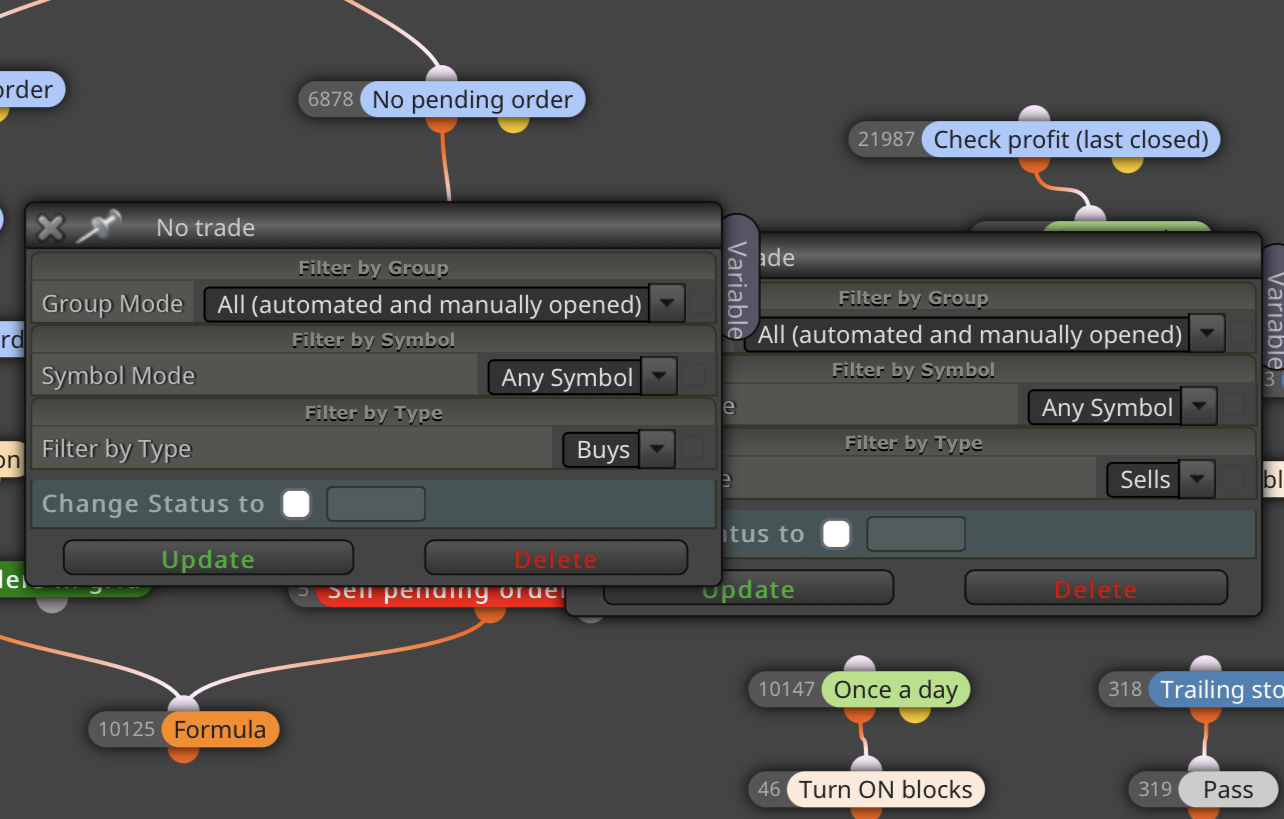
Edit: Should I change it to manually opened only?
-
🤔 EA is delayed because of manual tradesposted in Questions & Answers
Hey there, I have created my EA to trade automatically at the New York open on Dow Jones (US30). The EA works flawlessly, so no issues there.
The issue I do have though is, if a manually opened trade is running on another pair (let’s say Gold, for example) during the New York open, the EA will not trade the Dow Jones (US30) until the manual trade is closed on Gold.
This creates an issue because the EA is waiting for the manual trade to be closed before starting its operation. I need the EA to trade specifically at 9:30 am, regardless of any other trades that are currently open.
How can I go about fixing this?
Thanks.
-
Market GAPS Your Stop Loss ... NOW WHAT???posted in Questions & Answers
The EA I've created works flawlessly and is super profitable. Now I'm focused on fail-proofing it when rare occurrences like a price gap may occur that could jump my stop loss.
I was thinking of doing something like checking unrealized profit or loss once per minute and setting a solid monetary value to check for, but the problem with that is I am using the EA to trade and copy trades to multiple accounts with different balances. Therefore, I can not set a solid monetary value like, "check for $2,000 or great in loss, then close positions."
Does anyone know of a way I can check for losses by % of balance or equity? That would be ideal. Or has anyone created this type of fail-safe before?
Thanks
-
RE: How do you delete a pending orderposted in Questions & Answers
I would check the profit of the trade that was just closed (the buy trade in your example) and then do the following, which will turn off the EA and delete any outstanding pending orders.
-
RE: stop trading after 2 consecutive winns?posted in Questions & Answers
I don't see trade statistics in condition block. Help anyone?
-
RE: Is there a Limit on How many Blocks can be attached to another?posted in Questions & Answers
Yea I have the paid version. Okay that makes sense as far as the more blocks, the slower things become. That's gotta be the issue. Trying to think of a workaround now.
Thanks
-
Is there a Limit on How many Blocks can be attached to another?posted in Questions & Answers
Hey there! Is there a Limit on How many Blocks can be attached to another? For example: How many time filter blocks can be attached to a condition block?
I think my EA stops working correctly or doesn't work at all when there are too many time filter blocks attached to a condition block or to a check positions block
The reason i need so many time filter blocks is because I schedule my EA to run at specific times on specific days for each month of the year.
-
RE: Max number of trade per week/dayposted in Questions & Answers
@jstap I got it working! Thank you

-
RE: Max number of trade per week/dayposted in Questions & Answers
I have no idea what any of that means. Which is why i asked for a photo of what was put into the boxes next to the variables.
-
RE: Max number of trade per week/dayposted in Questions & Answers
@jstap can you show me what values you have entered in the list of variables? Please.
My goal is to have the EA take 2 trades max per day and then stop no matter if the trades are both buys, both sells or either one buy and one sell
-
RE: Max number of trade per week/dayposted in Questions & Answers
@l-andorrà said in Max number of trade per week/day:
@khacdiepvnc Then you need to count them with variables. One for open trades, another one for closed one and a third one for the overall result. Then on top of your launching structure you use a condition block requireing the overall variable to be less than or equal the maximum you want. Unless it is true, no more open trades will be executed. At the end of the day/ week all variables should be reinitialized to 0.
Would you be able to show an example of this? Many of us are not wizards when it comes to fxdreema and many learn visually. The explanation you gave confuses me lol
I'm looking for a way to open two trades max for the day and then pause the EA till the next day.
I'm sure it's simple to do, but I cant seem to get it right.
-
RE: Repeat Closed Trade Parameters? 🤔posted in Questions & Answers
Thank you. @l-andorrà
I am initially using the 'buy/sell pending orders in grid' blocks in the 'On Tick' which automatically places buy and sell stops based on my settings at a specific time (ex: market open)
Is there a way to set the grid to be in 25 pip increments with 25.00 price point endings?
For example:
30975.00
40000.00
40025.00
40050.00
40075.00
40100.00EDIT: NEVERMIND! Figured it out. Thanks for your help.
-
Repeat Closed Trade Parameters? 🤔posted in Questions & Answers
Hey ya'll! Quick question. Couldn't find the answer anywhere.
How can I repeat pending trades? For example:
EA places a pending buy stop at price 350.00 with take profit at 355.00 and Stop Loss at 345.00
Let's say this order is activated but the stop loss is hit. Now I am out of the trade.
I would like for my EA to IMMEDIATELY set another pending order at the EXACT same price as before as soon as the stop loss is hit from the first order (Pending buy stop placed at price 350.00 with take profit at 355.00 and Stop Loss at 345.00)
I feel like it is simple to do but I'm still new to using FXDreema.
Thanks!
-
Grid tradesposted in Questions & Answers
@fxdreema Hey! Did you ever get the chance to do this? I also need a grid setup at specific price points. (example: 35000.00 and then 35025.00 and then 35050.00 and so on, up and down)
Thanks!