That's interesting! Thanks
I'm wondering how this may work by having an indicator on the indicator.
I was playing with a custom code step, which finally brought some results. It's not sexy yet, but it works somehow.
That's interesting! Thanks
I'm wondering how this may work by having an indicator on the indicator.
I was playing with a custom code step, which finally brought some results. It's not sexy yet, but it works somehow.
Hi,
in the condition block there is a drop down option missing.
The right hand parameters can only apply to price and not to indicators like in MT4/MT5.
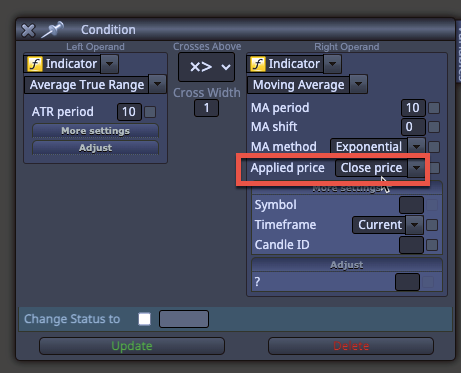
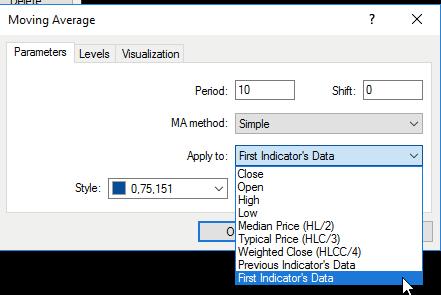
I want to use a moving average on an ATR indicator. That's not possible.
Is there a workaround?
hmm, yes seems to be an issue with the custom indicator. If i run it on the 1min it's half way exactable. For bigger back tests i need to let it run over night then.
Thanks!
Thanks Morpheus, i tried this also. I'm just wondering if it's a general issue on MT4 or if it's linked to my server or strange settings somewhere?
Maybe i just need to log out and in from time to time or do the old Microsoft hack and restart it 
There is no memory, CPUor network shortage so my infrastructure is stable and fast. I used it for NT8 before...
Hi All,
my strategy tester on MT4 gets slower and slower with every run.
I'm wondering if someone faced this issue as well and how to solve it?
I'm using a VPS server. I installed a completely new MT4 with nothing in it.
Cleared out the tester catches and log directories, restarted the server ...
It always gets slower and slower with every change i do in the EA.
I leave the Expert, time frame and symbol on and just refresh the navigator.
I don't have this issue on MT5 but unfortunately the custom indicator is currently only on MT4 available..
Thanks!
tried this as well. It's probably an issue on my MT4, now it loads a very old template which i don't use anymore.
So it's probably somehow still cached. Deleted everything in the tester directory and other log files and caches... A bit strange
Hi Experts,
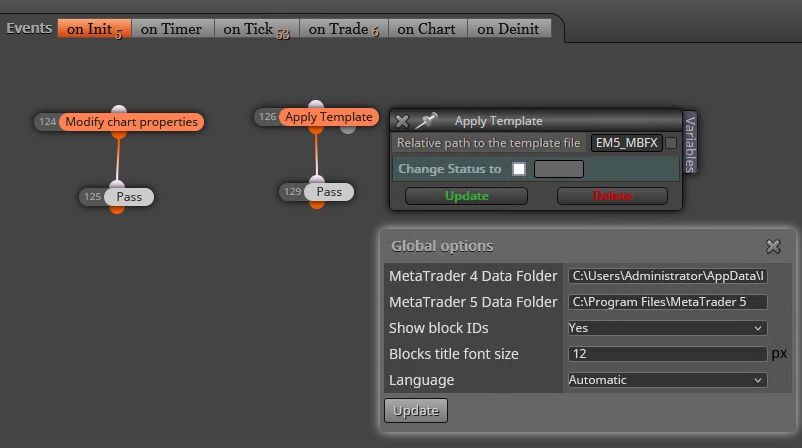
i know this question was raised multiple times. I want to apply a template at startup.
Is this a confirmed bug that it's not working or did i miss something.
The event is straight forward by just typing in the name...
I tried to change the global option to the MT4 datafolder since i have multiple plattforms installed - is this an issue?
Thanks
You would laugh. But chatGPT did the work perfectly 
Thanks to all of you. This was very helpful and I learned a lot. I had issues with the way the buffer worked and was able to change the source code to use chart objects instead.
I will probably post a follow-up soon
the same values as in my second post.
The lowprice x candles away...
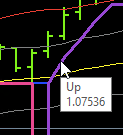
Seems that it always has a 0 the first time the trend changes
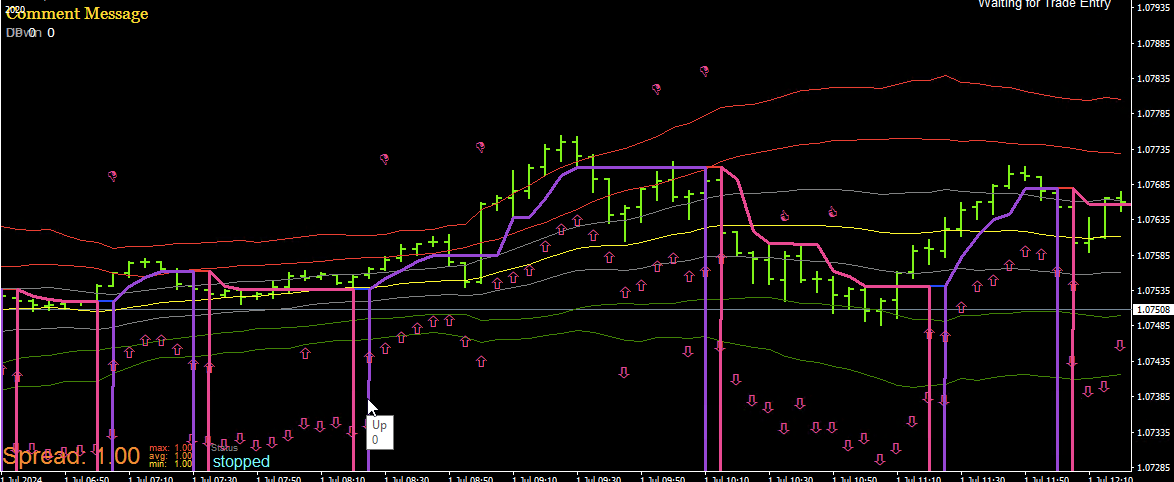
// Indicator settings
#property indicator_chart_window
#property indicator_buffers 1
#property indicator_color1 Blue // up[]
#property indicator_width1 2
// External parameters
extern int Amplitude = 2;
// Indicator buffers
double up[];
//+------------------------------------------------------------------+
//| Custom indicator initialization function |
//+------------------------------------------------------------------+
int init()
{
IndicatorBuffers(1); // We are only using one buffer for the blue line
SetIndexBuffer(0, up); // Assign the buffer for the blue line
SetIndexStyle(0, DRAW_LINE); // Draw it as a line
SetIndexEmptyValue(0, 0.0); // Set empty value for the buffer
return(0);
}
//+------------------------------------------------------------------+
//| Custom indicator iteration function |
//+------------------------------------------------------------------+
int start()
{
double atr;
double lowprice_i, highprice_i;
double lowma, highma;
double maxlowprice;
bool nexttrend = 0;
int counted_bars = IndicatorCounted();
if(counted_bars < 0) return(-1);
if(counted_bars > 0) counted_bars--;
int limit = MathMin(Bars - counted_bars, Bars - 1);
// Loop through each bar
for(int i = Bars - 1; i >= 0; i--)
{
// Get the lowest price and highest price over the amplitude range
lowprice_i = iLow(Symbol(), Period(), iLowest(Symbol(), Period(), MODE_LOW, Amplitude, i));
highprice_i = iHigh(Symbol(), Period(), iHighest(Symbol(), Period(), MODE_HIGH, Amplitude, i));
  // Calculate moving averages for low and high prices
  lowma = NormalizeDouble(iMA(NULL, 0, Amplitude, 0, MODE_SMA, PRICE_LOW, i), Digits());
  highma = NormalizeDouble(iMA(NULL, 0, Amplitude, 0, MODE_SMA, PRICE_HIGH, i), Digits());

  // Calculate ATR
  atr = iATR(Symbol(), 0, 100, i) / 2;

  // Initialize maxlowprice
  if(i == Bars - 1)
     maxlowprice = lowprice_i;

  // Check if the trend is up
  if(nexttrend == 1)
    {
     maxlowprice = MathMax(lowprice_i, maxlowprice);

     if(highma < maxlowprice && Close[i] < Low[i + 1])
       {
        nexttrend = 0;
       }
    }
  else
    {
     maxlowprice = MathMax(lowprice_i, maxlowprice);

     if(lowma > highprice_i && Close[i] > High[i + 1])
       {
        nexttrend = 1;
       }
    }

  // Set the blue line values if in an uptrend
  if(nexttrend == 0)
    {
     if(i < Bars - 1 && up[i + 1] != 0.0)
       {
        up[i] = MathMax(maxlowprice, up[i + 1]);
       }
     else
       {
        up[i] = maxlowprice;
       }
    }
  else
    {
     up[i] = 0.0;
    }
 }
return(0);
}
Blue Line (up[]):
Purpose: Represents an uptrend. When the market is in an uptrend, the blue line is displayed.
Calculation:
The up[] value is set when the market switches from a downtrend to an uptrend.
It uses the maxlowprice, which is the maximum low price of the last few bars.
If the market was in a downtrend and switches to an uptrend, the blue line is adjusted to reflect the maximum low price from previous bars.
The blue line value is further adjusted with ATR to calculate atrlo[] and atrhi[].
Thanks for your reply.
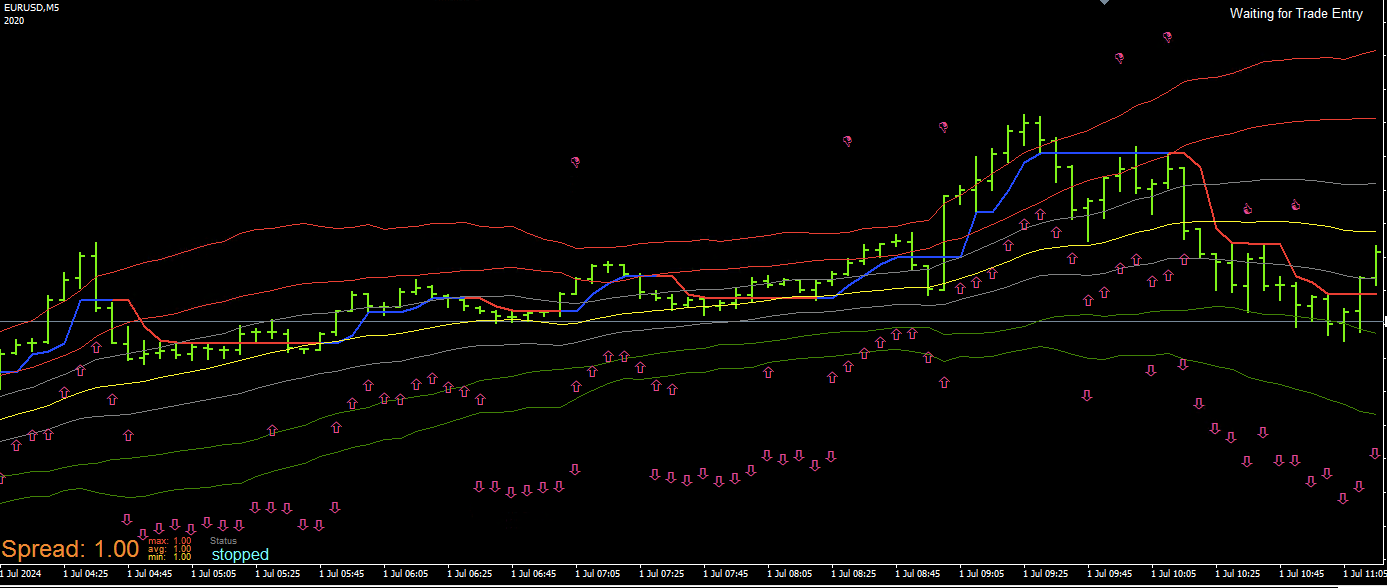
the system is pretty easy. I have a band and a trend indicator. The trend indicator just changes the color red (buffer 1) to blue (buffer 2).
I made both now > value 0.1 since it uses price +- a few pips I think.
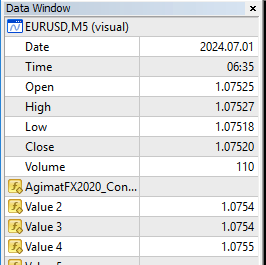
It's not perfect that I have the double but it should work nevertheless since the idea is it needs to be overbought/oversold first.
As soon as the price hits the red or green band. Indicated with the thumb up and thumb down
So far I'm using this blocks:
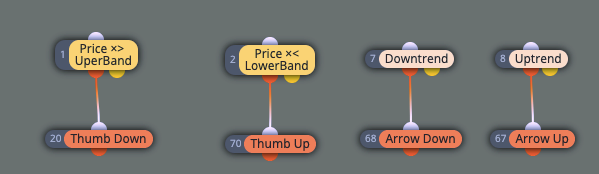
So my next "challenge" will be when I have a thumb down wait for the arrow down
Hi,
I started to play with fxDreema and want to test a simple strategy. It uses a kind of super trend as a custom indicator. The colour changes with buffer 0 and buffer 1.
If I display the values both values get fired at the first time the trend changes.

I tested 2 ways both give the same results:
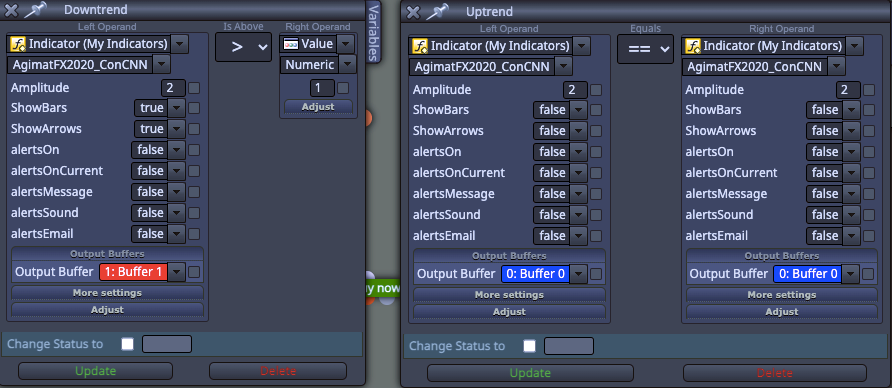
Any idea?
Thanks