This is when the button worked as a switch, which I need right now (he always pressed at the first command). Currently the function of the button already makes it return to the starting position, I think so much to ask, the fxdreema updated.
E
Posts made by eks
-
RE: How to keep a variable at 1 from a graph click (button, shape, etc ...)posted in Questions & Answers
-
How to keep a variable at 1 from a graph click (button, shape, etc ...)posted in Questions & Answers
How do you keep a button pressed? Long ago it was already pressed to the mouse click, now it returns after being pressed.
-
RE: Delete Object MT5posted in Questions & Answers
@ambrogio Thanks, I had already read your topic, but now I tested it with the correct colors.
Sorted out. -
RE: Video Tutorial - Signals Dashboard EA [advanced] - looping Objects, arraysposted in Tutorials by Users
@miro1360 I made a matrix according to your example to see the spread in 3 pairs, but each currency has its decimal point rating, how to solve it being that the matrix is unique?
-
Delete Object MT5posted in Questions & Answers
@FxDreema @miro1360 Is the Delete Object function working on MT5 ??
Has anyone used it recently?Thanks
-
RE: How to minimize CPU consumption in Fxdreemaposted in Questions & Answers
Just several robots together in one EA.
-
RE: How to minimize CPU consumption in Fxdreemaposted in Questions & Answers
In the OnChart area it would be perfect to allocate all blocks, but scam is only done when we click on the screen and not automatically.
-
How to minimize CPU consumption in Fxdreemaposted in Questions & Answers
How to minimize CPU consumption (Metatrader 5 above 40%) when using many visual blocks in Fxdreema ?
Has anyone ever experienced this ?
I tried to split a little for OnTimer, increasing the scan time and a little for OnTick, but I didn't get success.
EA seems to slow down over time.
I really need help, because if I reached the limit of block capacity this would make my projects unfeasible. -
Draw Shape on conditionposted in Questions & Answers
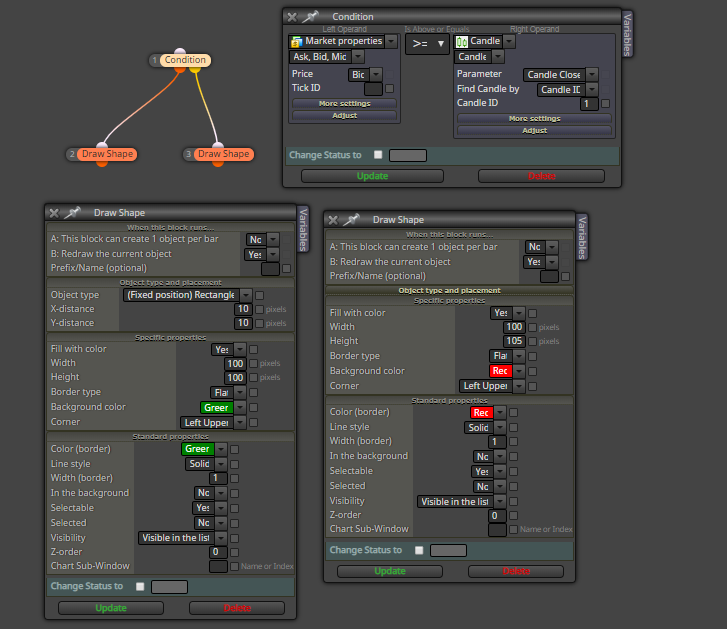
If the condition is true draw a Green rectangle, if it is not true, draw a red rectangle on the graph. This condition can vary several times during the same bar, but this does not happen in the graph (only repainted once), even changing the Repaint parameters in the draw shape block.
It seemed simple, I tried several possibilities but none repainted several times in the same bar.
Could you please help me?
-
RE: Scale conversion.posted in Questions & Answers
Thank you for your attention my friend, I will test here.
-
RE: Scale conversion.posted in Questions & Answers
@josecortesllobat This function only removes the decimal places, I need to convert a scale result from 0 to 100.
-
Scale conversion.posted in Questions & Answers
I want to normalize the result that is in the price in the scale of 0 to 100, how to proceed ???
<FOREX.EUR> = (EURUSD + EURGBP + EURCHF + EURJPY) / 4
-
Average Daily Rangeposted in Questions & Answers
I would like to calculate the ADR (Average Daily Range). Which block can I extract the maximum and minimum of the day or a certain number of candles?
-
Daily, weekly and monthly balance !posted in Questions & Answers
Which block to use to display the daily, weekly and monthly balance in the chart?
-
RE: Pending Order Priceposted in Questions & Answers
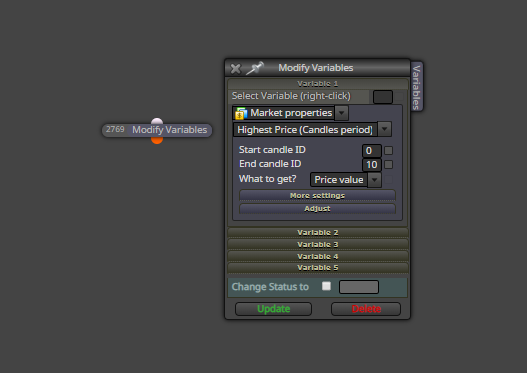
I was able to do it using the block "Modify variables".Thanks
-
RE: Pending Order Priceposted in Questions & Answers
I want to record the price of each order pending or open, and then place new orders at the same prices recorded.