Thanks for your answer.
I did try using loop thru open position but it seems unreliable for me. I'd like the idea of comparing open position before and after trade, however i'm bit confuse on what block to use. I tried to check the "Check Trade Count" block, but i don't know how to store the value of the trade count after using that block
E
Posts made by everjn17
-
RE: Help with Failed Executed Orderposted in Questions & Answers
-
Help with Failed Executed Orderposted in Questions & Answers
Hi Guys,
I am running an EA right now with some scale up money management system on it. Basically what it does, after x criteria is met, it open first trade that i call Base trade.
Then on each x amount of price movement that against me i add more to the position with 1.2x the lot of previous trade.However, sometimes my broker or my MT4 or my VPS failed to execute for any reason. Sometimes a network error or sometimes the log just throw "common failure". The point is this thing happens once in a while which really screw my position sizing.
When the order failed to execute, somehow my EA just keep trying to execute the order but with higher lot position each time it tries to execute it.
Is there any block that i can use after "Buy Now" or "Sell Now" block to confirm if the order is succeed? I want to catch the result and compare it, if the order succeed than it goes to next step but if not, keep try to execute the order but without increasing the position size.
-
RE: Error in Comparison That Should Never Happenposted in Questions & Answers
Still doesn't have any clear solution for this Bug.
-
RE: Error in Comparison That Should Never Happenposted in Questions & Answers
Yes since you'll need a custom indicator for it to run. However i can't share the custom indies as i have a copyright with the programmer of that indicator. You can replace the custom indicator with simple moving average crossover condition to test the EA.
-
RE: Error in Comparison That Should Never Happenposted in Questions & Answers
Hi' Guys,
Here i share the EA project links which hopefully will get you better sense of what i am doing
https://fxdreema.com/shared/N4acCy3bdAlso, here's a youtube video i made explaining what i am aiming for and the issue i had
https://youtu.be/2YwjV1d9d70Thanks in advance
-
Error in Comparison That Should Never Happenposted in Questions & Answers
Hi' Guys,
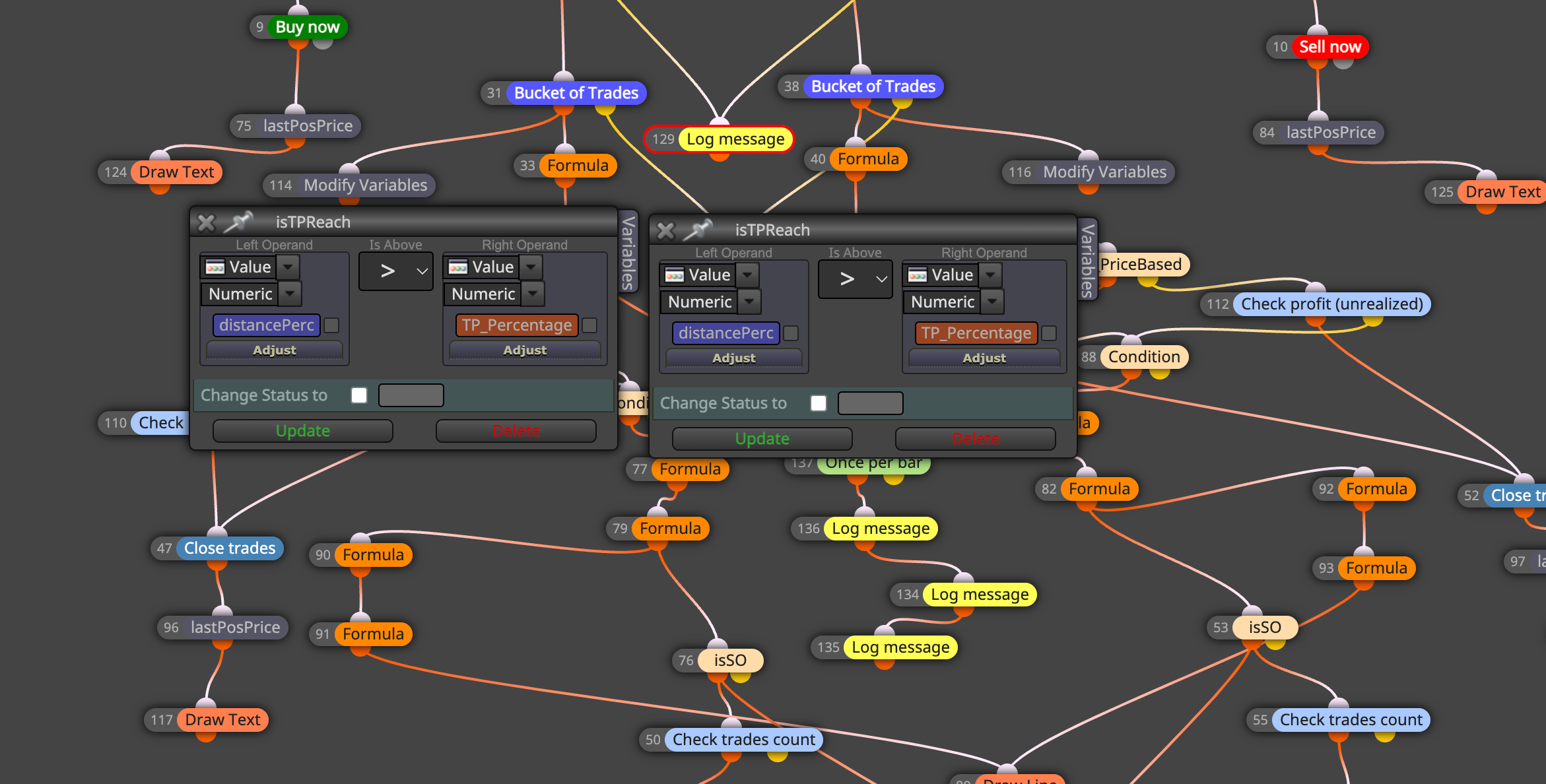
I am trying to edit some of my EA here but got stuck for almost a day with some stupid misscalculation.So, as you can see on the screenshot(SS1) i have a block that compare if distancePerc > TP_Percentage. This block never get executed as TRUE. It always falls into FALSE result.
I am surely have some moment that it should turn into TRUE. I do the LogMessage to check and make sure that some times the distancePerc > TP_Percentage is TRUE.
However, if i reverse the logic to distancePerc<TP_Percentage, sometimes it executed as TRUE and sometimes as FALSE. Like what it should be. It's also match with the LogMessage from those 2 value.
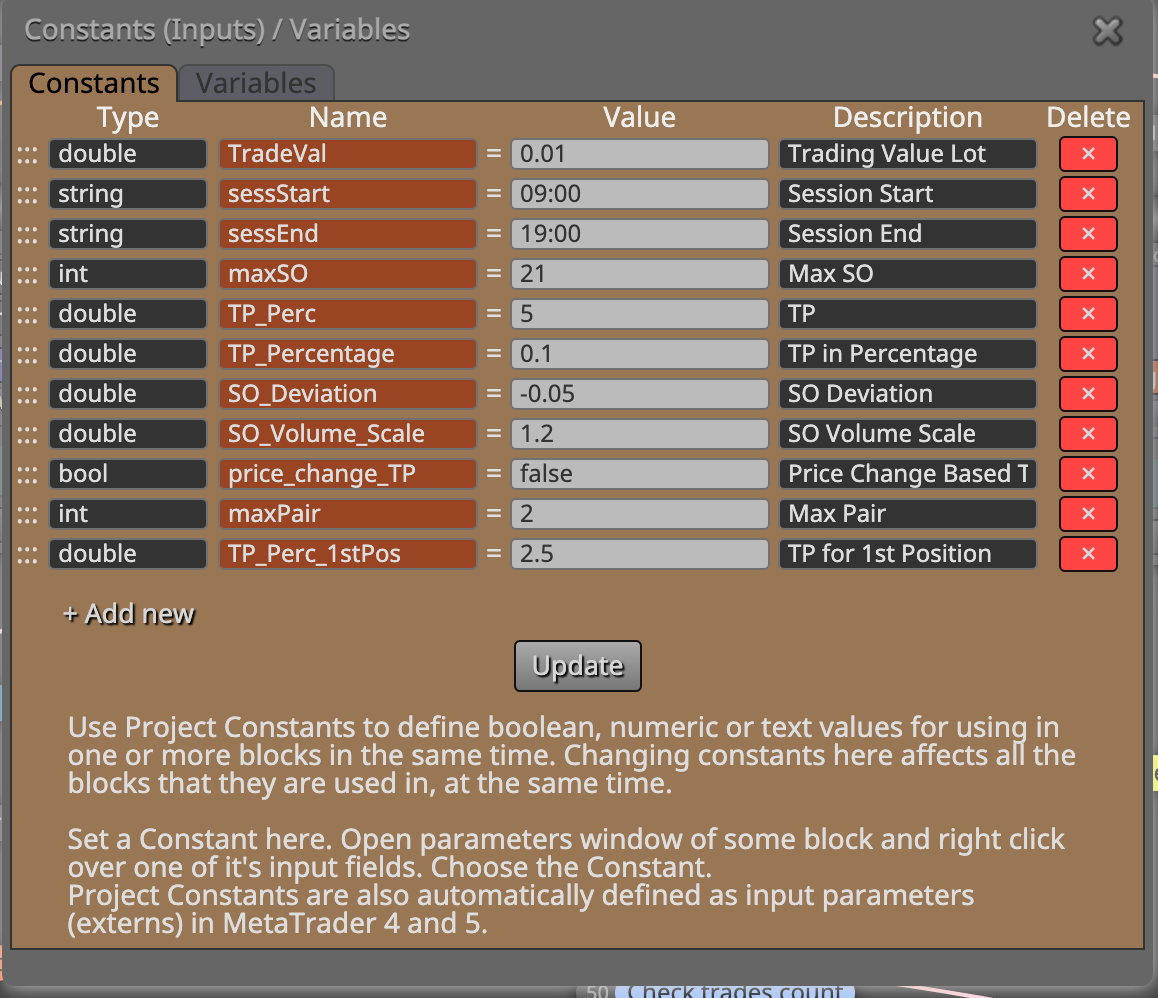
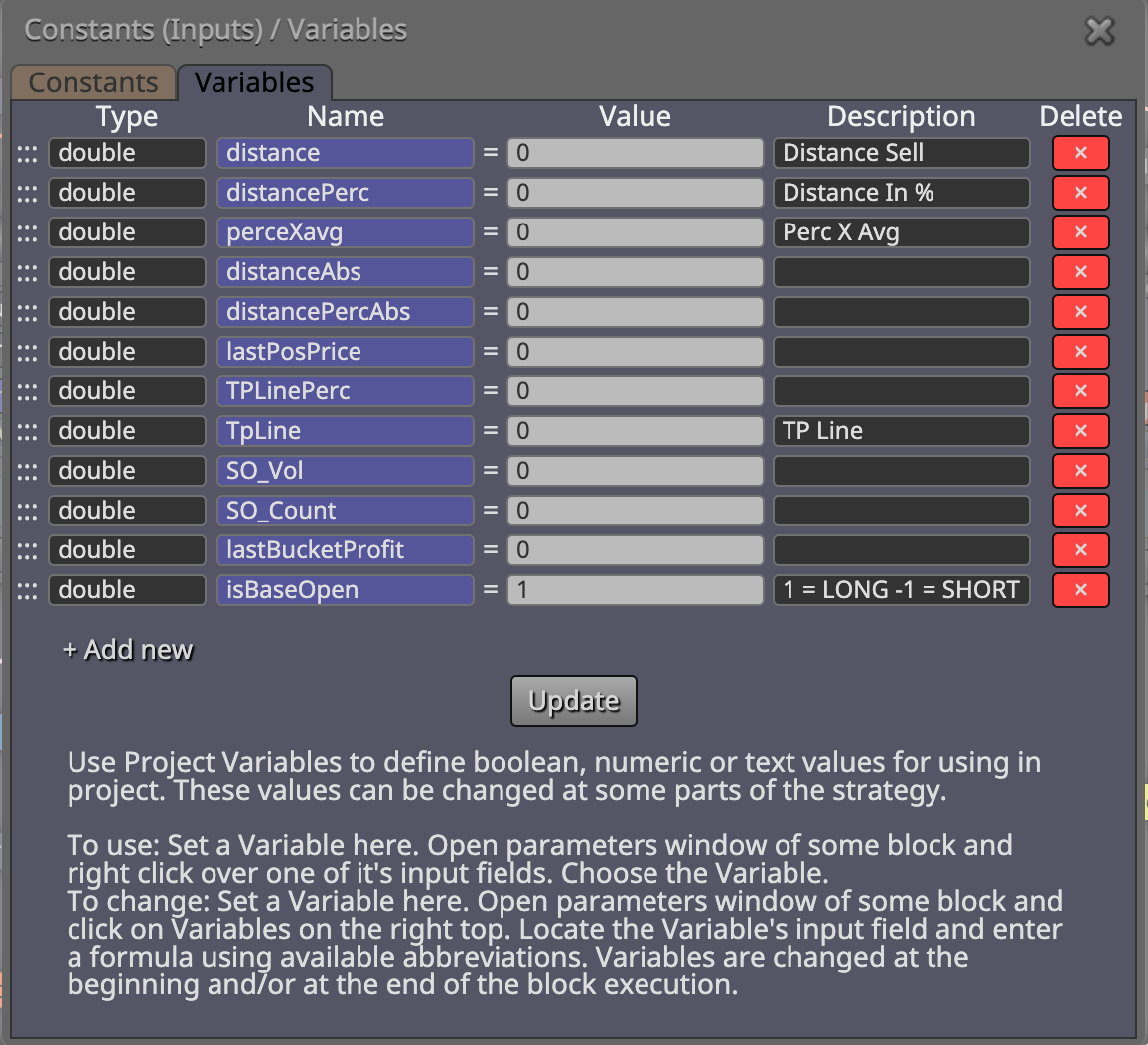
The data type of both value is the same (double). Also i attach Screenshot (SS2 and SS3) so you can see my variable and constant list.
Really hope someone can point me out to some stupidity i made. Or perhaps this is a bug?
SS1
SS2
SS3
-
RE: HELP with Error "Cannot Load Custom Indicator" on Strategy Tester MT5posted in Questions & Answers
@miki
Wow, it works.
Sorry i misunderstood what you mean previously,Thanks Miki, you save me a lot of time
-
RE: HELP with Error "Cannot Load Custom Indicator" on Strategy Tester MT5posted in Questions & Answers
@miki
Thanks for your answer,
I did delete the PRICE_TYPE enum and try to run it again on strategy tester, but the same error still come up. -
HELP with Error "Cannot Load Custom Indicator" on Strategy Tester MT5posted in Questions & Answers
Hi' guys,
I just stuck in this error with no clear clue at all for a day.
So, i create a custom indicator which just an RSI but taking it's value using VWAP instead of "Close". I successfully build the indicator and load it to the chart with no problem.
Then i upload it to my EA on Fxdreema as Custom Indicator then use it for the calculation. Basically when the RSI corss the BuyLine Value, it'll open a BUY trade. Simple.
I download the Ex5 from Fxdreema and try to test it using Strategy Tester. Then here's the big error i don't have any clear clue.
The strategy tester just threw this error:
I did check the Indicator and load it manually, it successfully loaded without any issue. I also try to load the EA right away into the chart, it loaded successfully. So the error only appears on Strategy Tester. I try using Every Tick and 1 minute OHLC test and results are the same.
Here's my indicator if you want to check the code inside,
0_1607419142201_vwap.mq5Here's my FxDreema Project :
https://fxdreema.com/shared/HYCH1kx2ePlease help me if you find some clue,
Thanks
-
Help Clarify "For Each Position/Trade" Blockposted in Questions & Answers
Hi'
I was creating two EA to help me trade cfd stocks on MT5. One EA to help me opening trade on a certain price and the other one for a rush buy meaning using market order.
For sake of simplicity let's call the first one "EA Pending" and the second one "EA Rush".
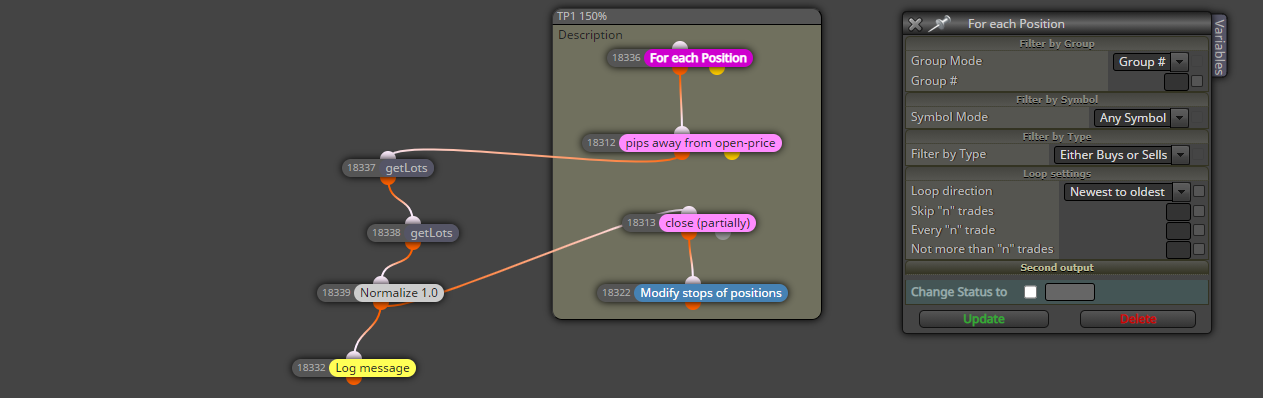
So, the EA Pending have a block called "For Each Position" which gonna trigger the next block where it will move the stop loss to breakeven when the price hit 25% of TP. And the "EA Rush" doesn't have any of that block.
.
So, from what i read on the forum and some documentation, the "For Each Position" are gonna scan thru all of the available trades that are still open. All trade included wheter it's openend by the EA Pending or openend by EA Rush will be scanned.
.
Problem is, when i open trade using EA Rush, when it reach 25% of the TP, the stop loss didn't move and nothing happen. Even when it reach 50% TP, the stop still not move. Meanwhile, when i open a trade using EA Pending, even i change the symbol opened on the chart, when it reaches 25% of TP, the stop will be moved.
.
Here's my settings on "For Each Position" block, is there anything wrong i am doing here?
Regards,
-
RE: Help Me Open Chart from CSVposted in Questions & Answers
@hadees
Thanks for your answer, will take a look on it now -
Help Me Open Chart from CSVposted in Questions & Answers
Hi'
I was finalizing my EA for Stock CFD trading, but i just stuck on this one function that i want to build into the EA.
So, each premarket time (for US stock market) i will do the scanning for certain stock specifications using tradingview and download that scanning result as csv. In this CSV the first column is the stock symbol.
Now, i want to load that CSV to my EA and let it open all the symbols inside the csv on a separate chart. Let's say there's 5 stock symbol in the CSV, then when i load the csv to the EA, it'll open 5 charts with each symbol loaded there.
Is it possible on MT5? and is anyone knows where i should start?
I was jiggling around the use of arrays but i can't got it work tho.Thanks
-
RE: Help with make a Scrollable Dashboardposted in Questions & Answers
Yea sir,
Maybe Mr. @miro1360 can help me
-
Help with make a Scrollable Dashboardposted in Questions & Answers
Hi' I was doing very well following @miro1360 thread about making a dashboard in here http://fxdreema.com/forum/topic/4501/video-tutorial-signals-dashboard-ea-advanced-looping-objects-arrays
But, since i trade on US stocks and there's around 200ish symbol that i trade, i can't fit all the 200 symbols in one chart. The dashboard can only show 43 symbols and the rest are buried below the chart (look at the screenshot).

I have an idea to make it go horizontal and wrap the text but it seems i need more variables on each section. So i try to avoid that. Then i just think is it possible to make the dashboard scrollable? I mean i can scroll on the symbol and show everything that are burried under the chart.
Is that possible ? Maybe someone can give a suggestion.
Thanks
-
RE: Help with set "Current Market"posted in Questions & Answers
Okay @Zackry, i did try to just print a Log Message that contains the market symbol under once per bar block and i can confirm the block is working. It prints each symbol that i listed on the marketlist input.
So, the problem right now is maybe something on my project not on the block or how i use the block -
RE: Help with set "Current Market"posted in Questions & Answers
@zackry Sadly, there's no clue same as Journal tab. On my Expert tabs it only prints when the EA initialized and EA settings.
Okay i did simplify the project before and try just to print some log message, it did print that tho, but only on the current chart symbol.
I'll re-run the EA with only Log Message output but i need live data from US market first. So maybe gonna give some update on monday. -
RE: Help with set "Current Market"posted in Questions & Answers
@zackry That's the problem, there are nothing related to the EA shown in the Journal tab except a notification when it's successfully loaded to the chart.
-
RE: Help with set "Current Market"posted in Questions & Answers
@l-andorrà said in Help with set "Current Market":
@everjn17 Can you please confir all those 'MarketlistX' constants are of a string type? Otherwise, they will not work.
Hi' Yes, it's string type and if i tried to put a symbol that not on the marketwatch it will give a feedback saying "This symbol XXX aren't in the marketwatch so it'll be removed from process"
-
Help with set "Current Market"posted in Questions & Answers
Okay, after digging here and there on many threads before about this block i started to understand how to use it. I did build my EA and completely backtest it on single pair and it runs.
But, this EA is intended to run on many pairs even only attached to one chart. I have written on the input menu all the symbols that i want this EA to run. But, after a week of testing, no trade are taken at all.
The condition for my strategy based on Gap and Go, which only trade if a symbol is gapping up or down more than 4%. Even last week is a hot week on stock market, but this EA didn't open any trade (Ps. I only use this EA to trade on stock market).Could someone please correct me if i was using the block in the wrong position or something that made the EA didn't work as i expect.
Here's the project https://fxdreema.com/shared/k61SHjmteRegards,
-
Help to reset variable once a dayposted in Questions & Answers
I was working on my EA for Indices, i have everything run smoothly and had great results in the backtest.
I run the EA on both DEMO and REAL account at a time. I notice the two of them aren't opening trade exactly at the same time.
.
.
Sometimes the DEMO open trade but not on REAl and vice versa,
.
I notice that i use Once Per Day block to toggle a variable that controls the EA to only take one trade per day. So i think this was the culprit for the problem.
.
What i want to do since the Indices are open in a different time (example HangSengIndex open at 02 AM GMT and US30 open at 11 PM GMT), i want the Once Per Day block pass at the first candle of the day, so i was ready to execute signal from the indicator later on the day.
.
I tried to track this first candle of the day but don't get any result, is there any simpler solution for this? Thanks