I think it depends on what kind of restart he needs. Because the EA restarts also when you modify its properties, but this restart is not full restart and some global variables still keep their values.

I think it depends on what kind of restart he needs. Because the EA restarts also when you modify its properties, but this restart is not full restart and some global variables still keep their values.
MQL5 is weirdly asynchronous and I often have unexpected problems with it. But if the error shows only once and then everything works, it's not a big problem
Cross width is number of candles between both crossover points. To mention again, the candles in between are not used in this type of crossover, but maybe I will do it that way in future. Now it is simple as that:
Only 1 value can be used for Candle ID, and I don't think I will do something about it, at least not in Condition 
Maybe "Indicator moves within limits" can be used for this, because it checks each candle. Normally it checks some indicator for each candle, but candle parameters can be considered as indicators, so... not impossible.
If you try to put an order at the same price where it's currently placed, then nothing should happen anyway, so you don't have to ask.
I think that your EA is overcomplicated, because it has many similar groups of blocks. Anyway, now the problem is that the real names of the objects are not exactly what you want, so try with these settings: http://prntscr.com/btfe8w
https://fxdreema.com/shared/DXBa7Rlrb
Partial close of 1 lot in steps:
The result is this: http://prntscr.com/3gdvve
@CPxiom said in Forum update:
@fxDreema Hello, it seems favicon is missing, or it looks changed. Using Safari.
Favicon is that small icon that now looks like mirrored blue letter B. This is just the default NodeBB icon. I'm not sure whether I want to change it, because my icon is very stupid
The logo thing appears from time to time, and this is how it happened even before. I think it's because of two broken <meta> tags in the <head>, which seems to prefer to stay broken.
Here are the user settings:
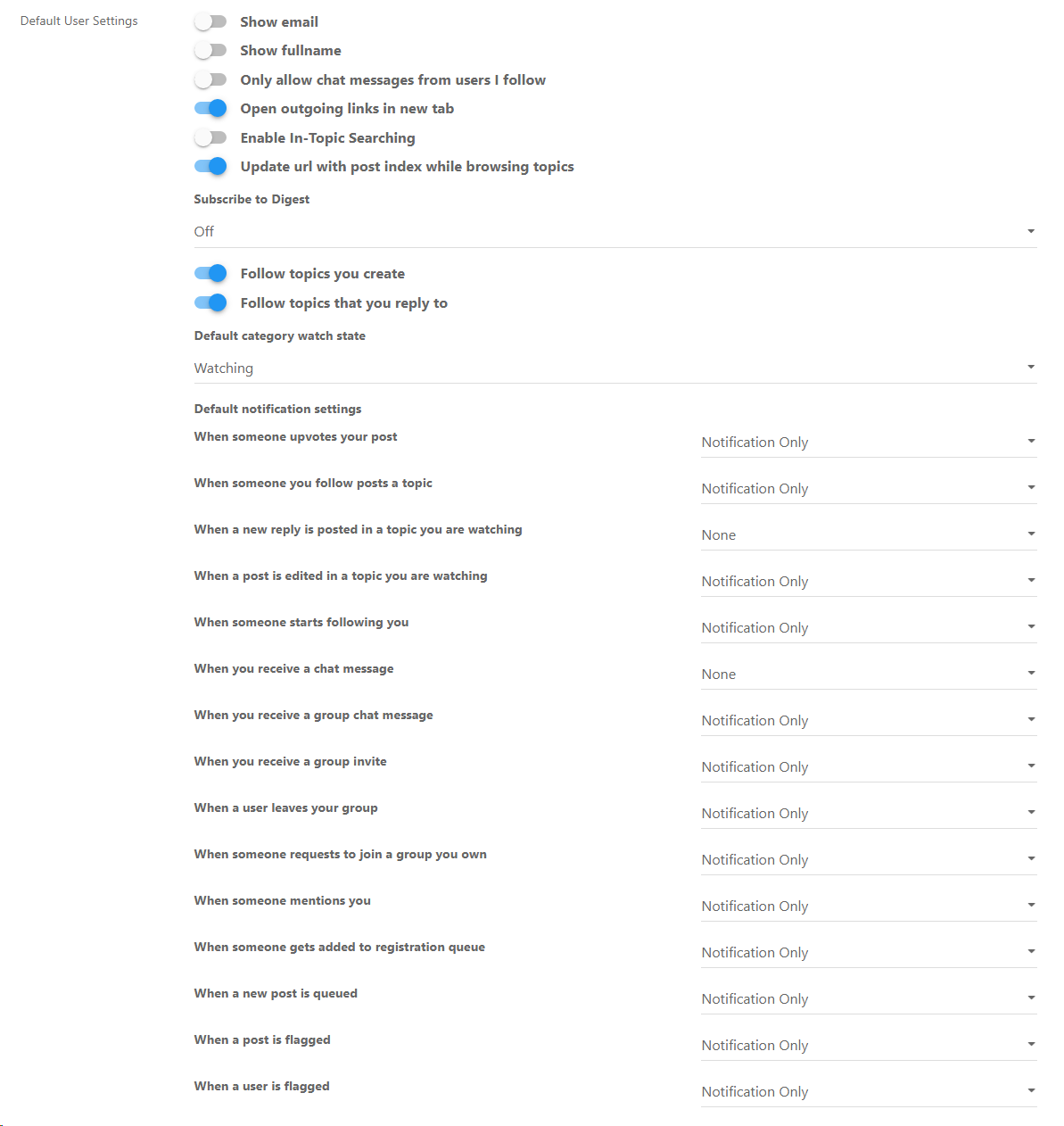
I remember changing only that "Follow topics you reply to". I see there are two "None" settings, I will set them to "Notification Only".
About the image upload, I knew why it broke and I fixed it.
Reading "It doesn't...." I understand that this is the way it is right now and it needs to be other way. I also assume that the screenshot shows the problem.
Ok, this is what I have -
https://fxdreema.com/shared/iJnetfkZb
http://prntscr.com/avhp7w
http://i.imgur.com/a0g0VaZ.png
You can see the price labels. They represent the signals that the block produce. Tell me which label you don't want to appear? Or which arrow you expect to appear, but it doesn't?
(it's funny how the golden labels ends with 001, this is probably some bug and I will fix it later)
I guess that I need to update some pictures Search for "Terminal variables"
Well, as you probably know, lines are normally drawn by indicators. And their lines are actually a little bit different kind of lines. If you try the "Trace" block, it draws a line, but that line is made out of multiple trend-lines, multiple objects. Compared to that, Moving Average draws a line that does not appear on the list of objects. So the best is to make a custom indicator. EAs are primarily designed to read indicators data and put trades and orders here and there.
Here is how the code of the "Delay" block works in the studio - http://prntscr.com/ig6otk This is the only block where I use .dll and the #import code can be seen at the bottom. Normally I don't want to write code that uses .dll file
I don't know why that happens with Trendline by Angle. It looks that it works with correctly with angles different than 0. And with angle 0 it works fine initially, but then the line becomes vertical.
I placed this block in "on Init", so it creates only 1 line at the beginning. At first tick the line looks horizontal, only to become vertical (or sometimes disappear) on the next tick.
Actually, the line becomes vertical even if I only click on the chart with the mouse. I put the Tester on pause, so everything that the EA does is to run the block in "on Init" to create a trend line, which appears horizontal at first... until I click somewhere.
What is notice is that in the properties of the object we can see slightly different values in both Value inputs. In the MQL4 code we provide only one value (for Price 1), while the other value (Price 2) is set to 0. MetaTrader is supposed to automatically calculate it, and I guess that it should set it to be exactly the same as the first value... but for some reason it decides to change it a little bit, I don't know for what reason.
By the way I see that in your project you have "hedge" in the title. My opinion about this is that it is a scam. I think that "hedging" in the same symbol is useless, too complicated, hard to do and the result is surely not that magical.
Different volume and TP... this almost sounds like a different "Buy now" block. You can reuse one block with different input values, if you are using some Variables, but how do you really want to do it - with 1 block or with multiple?
And what means "Different". Because I can say that I want such volumes - 0.1, then 0.3, then 0.2, then 0.1... - those are like random numbers, there is no system in them. Or I can say I want to double the lot size, which is a system and is called Martingale, as everybody knows. And in "Buy now" you have this Martingale option.
Not only Martingale, but you have this "Betting: Custom sequence" option, which is probably the one you want to use. Try it.
Well, there are MQL4 functions for that, but not in MQL5, and because of that I didn't added them in fxDreema. I think in the past we wrote with someone about this problem. I don't exactly remember how it was done, but I know it's possible... you only need to write some MQL4 functions in some "Custom MQL4 code" blocks.
Once per bar -> Close trades?
Mmmmm yes. Somewhere in Condition, where Object attributes are, search for Fibonacci attributes (somewhere at the bottom of the list of attributes) But it can be tricky, especially if you use some of these fancy looking fibonacci