@miro1360 .... very interesting option!!!! What windows option (2012R2 or 2016) is better?
Thanks!

@miro1360 .... very interesting option!!!! What windows option (2012R2 or 2016) is better?
Thanks!
@fxDreema is it safe working with builder today? I've lost a project I made yesterday and wonder if that can happen again.
Yesterday it was very slow and don't know if that's already fixed.
Thanks.
@fxDreema , unfortunatelly it doesn't work.
Once renamed and imported it still appears as a MT4 project. Please think about it for the future because when you make all blocks equal in MT4 and MT5, we're going to miss an easy way to convert one into the other.
Thank you!
@fxdreema Hello again.... just one question and a suggestion....
The question ... is there any east way to copy all constants and variables from one projet to another? I can't find any other than copying and pasting one by one...
If there's not, the suggestion.... It would be great to have that option especially going forward in order to convert MT4 projects to MT5, once all the blocks will be compatible.
Thank you for all your work!
@fxdreema OK. Thanks for the clarification.
I will keep on testing the options and will wait for further developments.
Take care!
Hi,
Is it right to think that the current converter from MT4 to MT5 is in "beta" phase?
I'm not able to convert any of my fxDfreema EAs with the converter as I get tons of errors and it doesn't even compile in MT5.
While this issue is solved I have thought of a work-around and would like to know if it's right or wrong. The process would be:
1.- Copy all blocks in MT4 project and paste them in a new MT5 project.
2.- Change all blocks related to "trades" and use the MT5 corresponding blocks related to "positions"
3.- Manually update all constants and variables.
Would this process be correct? Would it work?
Please give some light on these matters because as time passes, MT4 to MT5 conversion becomes more and more relevant.
Thank you in advance.
Hi,
I'm trying to set up a block that doesn't allow to trade in December from a specific day (external parameter) till the month end.
It seems like there's no way to do this other than with code.
Can anybody help my with the code needed in a block "Custom MQL4 code" to make this filter.
Thanks in advance!
@ambrogio I'm afraid is not fixed at all.... please see "Builder not working for about 13 hours so far."
Same all issues here.... additionally when copy&paste some connectors dissapear!
@mpantogi Thanks but what does (UNIX) mean? Does MT4 have to run in a UNIX system?
Thank you!
Hi,
Is it possible to get the time when a pending order is created?
Same for the time when an order is created.
Thanks,
@miro1360 That's great! Thank you so much!
Hi,
I would appreciate if anyone can help me.
I'm trying to get the number of pips lost in my last closed trade. Is there any easy way to get this?
Thanks in advance.
How can I set a time filter for a pending order?
The problem is that when a pending order is generated is not possible to know when it's going to be executed. So I want to avoid the order to be executed at certain times with a time filter.
Thanks in advance.
Yes... and aditionally today I found out that from time to time the right click to open block properties stop working and I have to refresh the window to continue using it...
See error below...
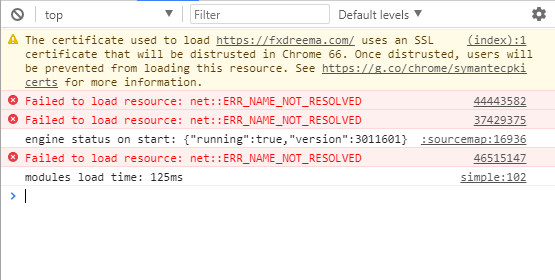
@fxDreema Dear fxDreema. I have tried in Edge and Firefox and with those browsers I can rearange the constants holding them and moving to the desired position. However I still can't do it with Chrome.
A week ago I was able to doing it in Chrome so I'm assuming that any change is preventing me from doing it in Chrome. Any idea to fix it? My Chrome version is Versión 62.0.3202.94 (Build oficial) (64 bits).
Thanks in advance.
Thank you so much! Definitely it was my Chrome versión. I tried out with Edge and it works.
I'll try to update my Chrome.