fxDreema

    • Register
    • Login
    • Search
    • Back to the main page
    • Categories
    • Recent
    • Tags
    • Popular
    • Search
    1. Home
    2. isp00rt
    3. Posts
    • Profile
    • Following 0
    • Followers 5
    • Topics 68
    • Posts 460
    • Best 9
    • Controversial 2
    • Groups 0

    Posts made by isp00rt

    • RE: What am I missing?

      I forgot to say that Variable A is reset at a different place in my EA, not shown at my example. That point is already fixed.

      On the other hand, trading model is exactly what I need according to its definition. I want the SL to move only when the price is ABOVE open price in a buy and BELOW open price in a sell. Additionally, I don't understand why a button is required for it to work. Your additional blocks are really necessary? Why should I add a button?

      posted in Questions & Answers
      isp00rt
      isp00rt
    • What am I missing?

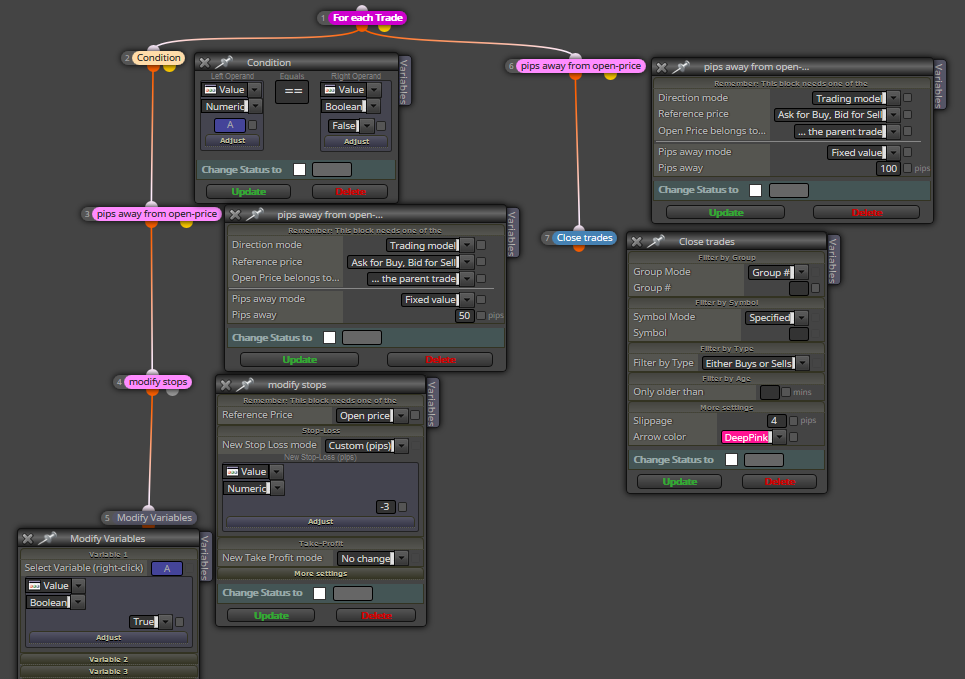
      This is a part of my latest EA and it doesn't work:
      https://fxdreema.com/shared/SBX9d9xib

      What is intended to do is easy. Once price reaches 50 pip move SL to 3 pips beyond breakeven. Once it reaches 100 pips close the order. Well, I don't know why but it doesn't do any of them.

      0_1545405128263_00.png

      Could someone please tell me what am I missing?

      posted in Questions & Answers
      isp00rt
      isp00rt
    • RE: Change Variable in Modification box

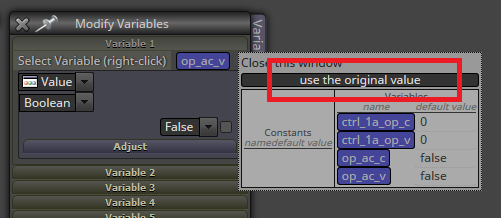
      When you try to change that variable select this option:

      0_1545214635341_00.png

      That will erase the selected variable.

      posted in Questions & Answers
      isp00rt
      isp00rt
    • RE: Compile error with MT4 1160

      Same to me.

      posted in Bug Reports
      isp00rt
      isp00rt
    • RE: Help please

      We can't see the image. Can you please reupload it?

      posted in Questions & Answers
      isp00rt
      isp00rt
    • RE: I need a simple ea that buys after a bullish candle

      You cannou use candle ID 0. That is the current forming bar. Until it's not completed, you will not know how big is (size). You should compare bars 1 and 2, never 0 and 1. On the other hand you can use 'Bull/Bear candle' blocks.

      posted in Questions & Answers
      isp00rt
      isp00rt
    • RE: How to use Weekday and Hour filter for EA?

      I use that same structure of blocks at the on tick tab and it works smoothly for several EAs ;).

      posted in Questions & Answers
      isp00rt
      isp00rt
    • RE: How can I stop placing Buy Limit/Sell Limit pending orders?

      Are you useing the correct 'Buy/Sell now' blocks?

      posted in Questions & Answers
      isp00rt
      isp00rt
    • RE: Save the value in pip of an operation when it is created.

      You ned to create a variable to save it there. Then insert the variable into a 'Modify Variable' block. Then you have to select 'Value' at the first display and 'Pips' in the second. Finally at the 'I mean...' display you need to select 'this value, as is' option.

      posted in Questions & Answers
      isp00rt
      isp00rt
    • RE: How do I use all the tabs to make my EA work correctly to my conditions?

      Did you read the help section of this site? I strongly recommend it you to do it.

      posted in Questions & Answers
      isp00rt
      isp00rt
    • RE: EA trading not using conditions

      All condition block must be ABOVE both Buy/Sell blocks. It is always recommended to check all conditions first and then send the buy/sell order.

      posted in General Discussions
      isp00rt
      isp00rt
    • RE: Fractal S/L T/P help

      You specified that the fractal is exactly four bars before the current one. That means that the EA will look exactly at that position. If there is no fractal there, the condition is not met. I guess this is why no trades are open.

      posted in Questions & Answers
      isp00rt
      isp00rt
    • RE: hello how can i create indicators here not EA can i ? or just EA ? any help ?

      No. This site if for EAs only, sorry.

      posted in Questions & Answers
      isp00rt
      isp00rt
    • RE: Reset trader counter

      You can use a condition block in which your variable equals zero.

      posted in Questions & Answers
      isp00rt
      isp00rt
    • RE: Help with MA crossover EA - new User

      Blocks 2 and 4 have different timeframes selected. On block 2 'monthly' is selected whereas on block 4 you specified 'current'. Additionally, blocks designed to close trades are 'Off', ie, not active (red highlight).

      posted in Questions & Answers
      isp00rt
      isp00rt
    • RE: how to buy sell in a specific time zone ?

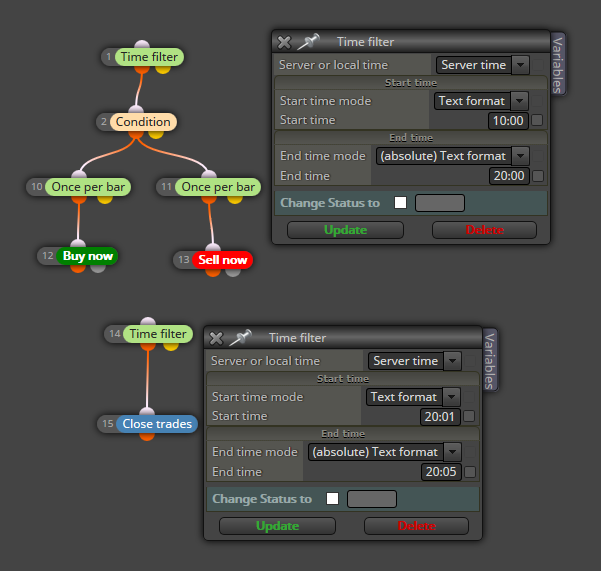
      Sorry, I didn't explain myself. What I mean is that you must separate both time filters so that each actos on different time periods: one for opening trades and the other one for closing them in an independent way. Just like this:

      0_1541938544023_00.png

      By the way, I recommend to use server time and not local time. Using the broker's server is always better.

      posted in Questions & Answers
      isp00rt
      isp00rt
    • RE: Establecer un porcentaje de ganancias y cierre todo

      This EA is designed to get a fixed amount of pips, not money. You can add it to any existing EA, but you'll have to adapt it, of course. I have no problem dowloading it.

      posted in Questions & Answers
      isp00rt
      isp00rt
    • RE: how to buy sell in a specific time zone ?

      Your time filter block is correct for launching orders. The problem here is that you need to specify a new (different) time filter block aboce the 'close order' block. What I mean is that you have to separate the launch time filter and the closing order one.

      posted in Questions & Answers
      isp00rt
      isp00rt
    • 1
    • 2
    • 3
    • 4
    • 5
    • 6
    • 7
    • 8
    • 22
    • 23
    • 6 / 23