@trader-philipps ATR? not necessarily. It's rather the average daily range ADR. But I want to customize it so I could use any timeframe and any number of previous candles. Hence my question. Many thanks for your reply.
J
Posts made by Jaychyke
-
RE: Add more than two variablesposted in Questions & Answers
-
Add more than two variablesposted in Questions & Answers
I have created 15 variables which are the ranges (High minus low) of each of the last 15 candles. Now i want to get the average of the 15 ranges, that is, to add all 15 variables and divide by 15. This average value should be added to the lowest low of the last 15 candles, or minused from the highest high of the last 15 candles. And I need to draw a line for each of the average range lines (two lines, one up and one down), and use them as a support or resistance.
I only created the variables, I don't know how to preceed from there again. Someone please help!! -
RE: The "Adjust" button inputposted in Questions & Answers
I have not been able to find solutions to this problem! ALL I NEED is what to do to make the EA MEMORIZE a particular candle pivot parameters of R4 to S4, and use these pivot numbers for trades.
-
RE: The "Adjust" button inputposted in Questions & Answers
I use "candlescount" as a variable; for the current Day the value of the variable is 0, and (value) increases by one every new day. Now I know I can specify Group # (variable "candlescount") as the group number for trades and orders. Is it possible that, instead of just using "candlescount" as an input variable to identify trades and orders, I can use the perceived numerical value of the "candlescount" variable?
In other words, can I use the numerical value of a variable as input parameter to identify trades, instead of using the name ("candlescount") of the variable?
-
RE: The "Adjust" button inputposted in Questions & Answers
@miro1360 said in The "Adjust" button input:
and my blocks 206,207,208 are working together with blocks 204,205 ... see, that blocks 204+205 are counter, once per bar (once per day in this situation) is variable candleCount increased with +1 ... next goes to comparison with block 206 .. when comparison is true (when candleCount>resetPendingsDays) pending orders are deleted and candleCount is reseted to 0 (and waiting for next loop) ... result is, that pending orders are deleted in some "day" interval which is given by number in resetPendingDays (input parameter) ... you can enrich this counter with next check conditions (like only when pending 4 exist, or no Trade exist, etc) ... you can reset candlesCount to null also in other situations (e.g. in on Trade when trade is opened) ...
I actually do not want the previous Day H4 trades and/or pending orders to be deleted on the change of bar. The trades and pending orders of the previous bar should run independently of the new bar's trades and/or pending orders. Will your current guide do this? I have learnt a few things from your guide (and thanks a million for reminding me of the "On Trade" stuff, I didn't even look at that initially!), but my latest post is what I want to really achieve; where the previous Day's pivot levels are used for orders up till S4 or R4, irrespective of new Day/Bar's reset pivots.
-
RE: The "Adjust" button inputposted in Questions & Answers
Thank you so much! I guess I need to make some important adjustments. If you check out https://fxdreema.com/shared/8KgVRugCc, then I should change the parameters of the Block (Modify variables High, low, open, close) to reflect your Modify variables blocks of 106 and 107. I should also include the variables varR1 to varS4 in the blocks 106 and 107, and candlescount as variables.
Please refer to your final three blocks of 206, 207, and 208. Does that mean that for every new change in Day, older pending orders (of the previous Day) should be deleted?
Now where exactly should I "insert" your blocks in my project?
-
RE: The "Adjust" button inputposted in Questions & Answers
@miro1360 said in The "Adjust" button input:
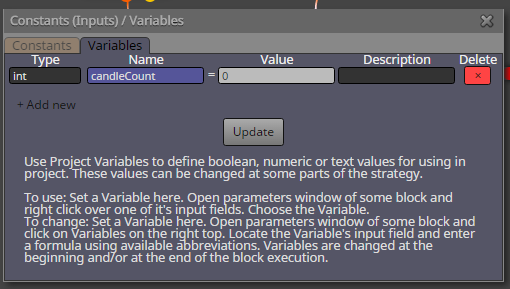
flag is for memorize state
 ... for memorize candles counting you can use variables ...
... I dont know how to explain to you this problem because for it you need know more stuffs ... for completing your project 100% take hours ... but here is simple example how to count candles:
this opens buy trade every 5 hours (every 5 hour candles):https://fxdreema.com/shared/pYx0Q2TOd
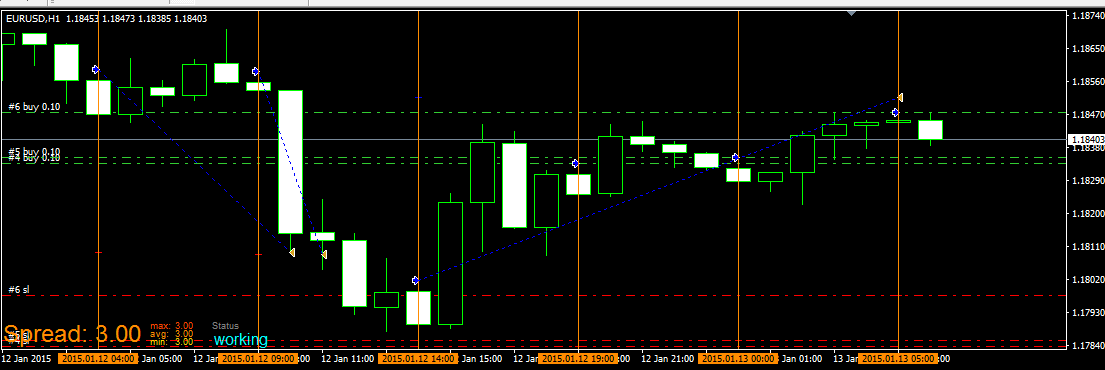
this is variable:
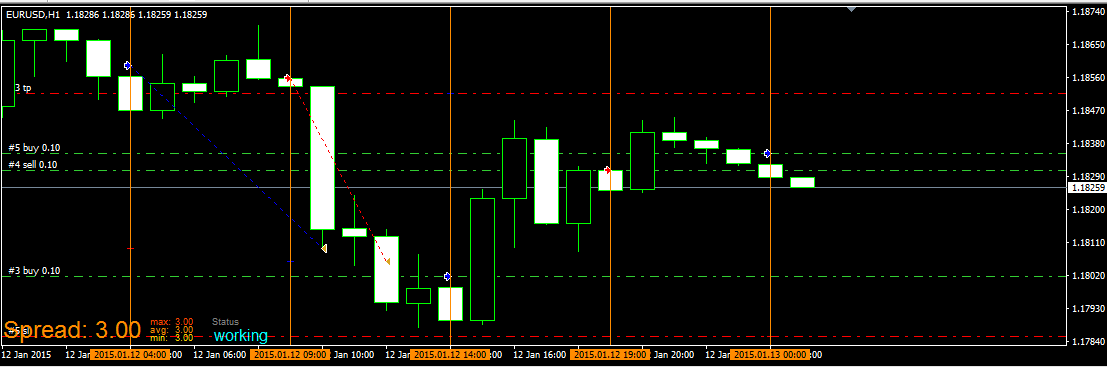
and this one is the same, but alternate between buy and sell using flags:
https://fxdreema.com/shared/32oc3KFab
Honestly, I've tried my best, but I can't get it. Kindly help me out with my project, openable in the Fxdreema builder. Chat me privately for your reward please.
-
RE: The "Adjust" button inputposted in Questions & Answers
Thank you, it's a good way to start. Let me try.
-
RE: The "Adjust" button inputposted in Questions & Answers
Thanks for understanding my question! But "Flags"?, I've never used them. So, when setting pending orders, the flags can be used to memorise candles? That's exactly what I'm talking about! But does that mean every single candle will have a flag set for it for all trades/pending orders about the said candle? I'm sure you could help with a simple example, even with my project? Sorry to bother you, but I got no choice.
-
RE: The "Adjust" button inputposted in Questions & Answers
Hello Miro1360,
Thanks for your assistance so far. This project has helped me a lot. But there is a little problem. Please refer to the previous link on this page. How do I specify (lock) a particular H4 (or D1) candle for all (R4 through S4) pivot trading trades/pending orders? Timestamp or Candle ID is used to specify candles, but what if trades get prolonged and a few new candles have formed (by which time the EA setting of candle ID 1 now refers to a new candle), how do I set new trades/pending orders based on the initial candle ID?
As a concrete example, I place a pending order at R1 for a daily candle; when R1 trade triggers, the EA sets pending order at R2 (based on the same prevous candle); when R2 triggers, another pending order is set at R3 (based on the same daily (ID 1) candle, and so on up to R4 (final trade). If, for example, by the time trade R2 triggers we are in the 3rd day (candle ID 1 now becomes candle ID 3 by EA), how do I make the EA set R3 (and even R4) pending order since the R1 to R4 trades were initially set to be based on the previous day (Id 1) candle? Is there a way to specify a particular candle (regardless of if new candles have formed)? -
The "Adjust" button inputposted in Questions & Answers
Hello,
What is the better way of adjusting forex quotes with "pip" value in the "Adjust" button? I tried to adjust the open (and other) prices using +1pip, but the EA could not run, MT4 said it does not recognise the word "pip" as used. Pls check the "adjust" buttons of block 17, 18, 21, 30...and tell me the word to use instead. https://fxdreema.com/shared/YLbfvjV2b .Previous versions of the builder recognised "pip". -
RE: EA based on custom indicator not runningposted in Questions & Answers
Does the Block 14 (Pass3 visual test) refer to Block 3 in the example, because I have renumbered the blocks? Or does Block 14 refer to the 3 blocks of 1, 3, and 4?
-
RE: EA based on custom indicator not runningposted in Questions & Answers
You're simply amazing! Thanks very much for your help. First, I hope I could renumber these example blocks, because block 2 is missing? But then, on a lighter mood, I wonder where you got all these seemingly hidden blocks in the builder, I have never seen them nor used them! Under what "Category were they hidden?" They seem to be "custom Blocks". Your help so far is appreciated!
-
RE: EA based on custom indicator not runningposted in Questions & Answers
Thank you so much. I've effected the corrections, the EA is now active; but, just like you said, no pending orders are opening yet because of buffer. I will await your response when you come online. I really appreciate!
-
RE: EA based on custom indicator not runningposted in Questions & Answers
Here is a copy of the Custom Indicator
https://www.mql5.com/en/code/download/15777/all_pivot_points.mq4The formula used in the calculation of Classic Pivot Points are:
R4 = R3 + RANGE (same as: PP + RANGE * 3)
R3 = R2 + RANGE (same as: PP + RANGE * 2)
R2 = PP + RANGE
R1 = (2 * PP) - LOW
PP = (HIGH + LOW + CLOSE) / 3
S1 = (2 * PP) - HIGH
S2 = PP - RANGE
S3 = S2 - RANGE (same as: PP - RANGE * 2)
S4 = S3 - RANGE (same as: PP - RANGE * 3)Where R1 through R4 are Resistance levels 1 to 4, PP is the Pivot Point, S1 through S4 are support levels 1 to 4, RANGE is the High minus the Low for the given time frame (usually daily).
-
RE: EA based on custom indicator not runningposted in Questions & Answers
Thank you so much, at least for the prompt response and willingness to guide. The problem is actually not with the names, because I have added the names to those lines, still the EA cannot open on chart; its just there, not active.
And in truth, I am NOT WORKING on, nor my strategy based on ADX crosses. My strategy is based on Pivot points/lines, S4 to R4. Fxdreema has really tried so hard to update the builder with various kinds of Pivot point calculations; this should have been easier for me, but for some reason I cannot explain why the builder's calculations for Classic pivots do not tally with my manual calculations when applied on chart. I have tried to call his attention to this. I guess he's rechecking his latest pivot inputs, otherwise I cannot explain why he is yet to respond to my latest post on Pivot calculations (after 5days). I'm still patiently waiting for the response while my one month subscription runs out!
The EA cannot run because, I guess, some parameters needed to have been first "defined". I don't know how to do that, I suppose the EA should have done that itself.
This is the grand project I'm working on https://fxdreema.com/shared/pjmwl7PK
Some parameters like TF (timeframe) and others in the pending order blocks 2, 3, 7, 14, etc, needed to have been predefined. How do I do that so this EA can run? -
RE: EA based on custom indicator not runningposted in Questions & Answers
@miro1360 I saw the Trace block, used it, still nothing happened! The EA was still not opening! https://fxdreema.com/shared/zED4QSW3
However the following are the errors that MQL editor compiled about the project:
'TF' - undeclared identifier NewEJmod (4).mq4 2432 61
'240' - some operator expected NewEJmod (4).mq4 2432 64
'CalMode' - undeclared identifier NewEJmod (4).mq4 2432 70
'1' - some operator expected NewEJmod (4).mq4 2432 78
'ShMode' - undeclared identifier NewEJmod (4).mq4 2432 82
'0' - some operator expected NewEJmod (4).mq4 2432 89
'TF' - undeclared identifier NewEJmod (4).mq4 2450 61
'240' - some operator expected NewEJmod (4).mq4 2450 64
'CalMode' - undeclared identifier NewEJmod (4).mq4 2450 70
'1' - some operator expected NewEJmod (4).mq4 2450 78
'ShMode' - undeclared identifier NewEJmod (4).mq4 2450 82
'0' - some operator expected NewEJmod (4).mq4 2450 89
'TF' - undeclared identifier NewEJmod (4).mq4 2464 60
'240' - some operator expected NewEJmod (4).mq4 2464 63
'CalMode' - undeclared identifier NewEJmod (4).mq4 2464 69
'1' - some operator expected NewEJmod (4).mq4 2464 77
'ShMode' - undeclared identifier NewEJmod (4).mq4 2464 81
'0' - some operator expected NewEJmod (4).mq4 2464 88
'TF' - undeclared identifier NewEJmod (4).mq4 2494 61
'240' - some operator expected NewEJmod (4).mq4 2494 64
'CalMode' - undeclared identifier NewEJmod (4).mq4 2494 70
'1' - some operator expected NewEJmod (4).mq4 2494 78
'ShMode' - undeclared identifier NewEJmod (4).mq4 2494 82
'0' - some operator expected NewEJmod (4).mq4 2494 89
'TF' - undeclared identifier NewEJmod (4).mq4 2507 61
'240' - some operator expected NewEJmod (4).mq4 2507 64
'CalMode' - undeclared identifier NewEJmod (4).mq4 2507 70
'1' - some operator expected NewEJmod (4).mq4 2507 78
'ShMode' - undeclared identifier NewEJmod (4).mq4 2507 82
'0' - some operator expected NewEJmod (4).mq4 2507 89
'TF' - undeclared identifier NewEJmod (4).mq4 2538 61
'240' - some operator expected NewEJmod (4).mq4 2538 64
'CalMode' - undeclared identifier NewEJmod (4).mq4 2538 70
'1' - some operator expected NewEJmod (4).mq4 2538 78
'ShMode' - undeclared identifier NewEJmod (4).mq4 2538 82
'0' - some operator expected NewEJmod (4).mq4 2538 89
'TF' - undeclared identifier NewEJmod (4).mq4 2551 61
'240' - some operator expected NewEJmod (4).mq4 2551 64
'CalMode' - undeclared identifier NewEJmod (4).mq4 2551 70
'1' - some operator expected NewEJmod (4).mq4 2551 78
'ShMode' - undeclared identifier NewEJmod (4).mq4 2551 82
'0' - some operator expected NewEJmod (4).mq4 2551 89
'TF' - undeclared identifier NewEJmod (4).mq4 2584 61
'240' - some operator expected NewEJmod (4).mq4 2584 64
'CalMode' - undeclared identifier NewEJmod (4).mq4 2584 70
'1' - some operator expected NewEJmod (4).mq4 2584 78
'ShMode' - undeclared identifier NewEJmod (4).mq4 2584 82
'0' - some operator expected NewEJmod (4).mq4 2584 89
'TF' - undeclared identifier NewEJmod (4).mq4 2602 61
'240' - some operator expected NewEJmod (4).mq4 2602 64
'CalMode' - undeclared identifier NewEJmod (4).mq4 2602 70
'1' - some operator expected NewEJmod (4).mq4 2602 78
'ShMode' - undeclared identifier NewEJmod (4).mq4 2602 82
'0' - some operator expected NewEJmod (4).mq4 2602 89
'TF' - undeclared identifier NewEJmod (4).mq4 2616 60
'240' - some operator expected NewEJmod (4).mq4 2616 63
'CalMode' - undeclared identifier NewEJmod (4).mq4 2616 69
'1' - some operator expected NewEJmod (4).mq4 2616 77
'ShMode' - undeclared identifier NewEJmod (4).mq4 2616 81
'0' - some operator expected NewEJmod (4).mq4 2616 88
'TF' - undeclared identifier NewEJmod (4).mq4 2646 61
'240' - some operator expected NewEJmod (4).mq4 2646 64
'CalMode' - undeclared identifier NewEJmod (4).mq4 2646 70
'1' - some operator expected NewEJmod (4).mq4 2646 78
'ShMode' - undeclared identifier NewEJmod (4).mq4 2646 82
'0' - some operator expected NewEJmod (4).mq4 2646 89
'TF' - undeclared identifier NewEJmod (4).mq4 2659 61
'240' - some operator expected NewEJmod (4).mq4 2659 64
'CalMode' - undeclared identifier NewEJmod (4).mq4 2659 70
'1' - some operator expected NewEJmod (4).mq4 2659 78
'ShMode' - undeclared identifier NewEJmod (4).mq4 2659 82
'0' - some operator expected NewEJmod (4).mq4 2659 89
'TF' - undeclared identifier NewEJmod (4).mq4 2690 61
'240' - some operator expected NewEJmod (4).mq4 2690 64
'CalMode' - undeclared identifier NewEJmod (4).mq4 2690 70
'1' - some operator expected NewEJmod (4).mq4 2690 78
'ShMode' - undeclared identifier NewEJmod (4).mq4 2690 82
'0' - some operator expected NewEJmod (4).mq4 2690 89
'TF' - undeclared identifier NewEJmod (4).mq4 2703 61
'240' - some operator expected NewEJmod (4).mq4 2703 64
'CalMode' - undeclared identifier NewEJmod (4).mq4 2703 70
'1' - some operator expected NewEJmod (4).mq4 2703 78
'ShMode' - undeclared identifier NewEJmod (4).mq4 2703 82
'0' - some operator expected NewEJmod (4).mq4 2703 89
'TF' - undeclared identifier NewEJmod (4).mq4 2736 61
'240' - some operator expected NewEJmod (4).mq4 2736 64
'CalMode' - undeclared identifier NewEJmod (4).mq4 2736 70
'1' - some operator expected NewEJmod (4).mq4 2736 78
'ShMode' - undeclared identifier NewEJmod (4).mq4 2736 82
'0' - some operator expected NewEJmod (4).mq4 2736 89
'TF' - undeclared identifier NewEJmod (4).mq4 2754 61
'240' - some operator expected NewEJmod (4).mq4 2754 64
'CalMode' - undeclared identifier NewEJmod (4).mq4 2754 70
'1' - some operator expected NewEJmod (4).mq4 2754 78
'ShMode' - undeclared identifier NewEJmod (4).mq4 2754 82
'0' - some operator expected NewEJmod (4).mq4 2754 89
'TF' - undeclared identifier NewEJmod (4).mq4 2768 60
'240' - some operator expected NewEJmod (4).mq4 2768 63
'CalMode' - undeclared identifier NewEJmod (4).mq4 2768 69
Now I have no idea what these mean, and how to correct the errors. Please offer some assistance. Thank you! -
RE: EA based on custom indicator not runningposted in Questions & Answers
Trace block? Pardon my ignorance. Kindly let me know what it is and how to use it to achieve my aim. Thank you for your prompt reply!
-
EA based on custom indicator not runningposted in Questions & Answers
Hello Fxdreema,
I have read instructions on previous posts about inputs and buffers of custom indicators and how to use them. I've downloaded this custom indicator and done all that I think is needed. The input and output parameters are all captured by the EA, and the indicator is in the "/indicators" folder. however, the EA could not be executed. What is wrong? Please take a look https://fxdreema.com/shared/kI3W49q5b and tell me what I can correct to enable the EA run. Thank you!