You can use global variables to temporarily store data between MetaTrader terminals. However, these variables can be deleted when the program is restarted or the terminal is closed.
J
Latest posts made by Jeson C.
-
RE: Candle crosses EMA to closedposted in Questions & Answers
-
RE: custom functionposted in Questions & Answers
Dont work function This code you wrote does not work like this. Because tick init ... etc. This card is already a function and functions do not work inside functions, my friend.
-
RE: Stop Loss and close all orderposted in Questions & Answers
********** I am replying to keep it in the archive.
and this code closes the processes that are open at the same time **********//+------------------------------------------------------------------+
//| CloseAll.mq5 |
//| Copyright 2021, Omega Joctan |
//| https://www.mql5.com/en/users/omegajoctan |
//+------------------------------------------------------------------+
#property copyright "Copyright 2021, Omega Joctan"
#property link "https://www.mql5.com/en/users/omegajoctan"
#property version "1.00"
//---
#include <Trade\Trade.mqh> //Instatiate Trades Execution Library
#include <Trade\OrderInfo.mqh> //Instatiate Library for Orders Information
#include <Trade\PositionInfo.mqh> //Instatiate Library for Positions Information
//---
CTrade m_trade; // Trades Info and Executions library
COrderInfo m_order; //Library for Orders information
CPositionInfo m_position; // Library for all position features and information
//---
input color OrdersColor = clrDodgerBlue; // Orders counter color on the chart
input color PositionsColor = clrGreenYellow; //Positions counter color on the chart
//+------------------------------------------------------------------+
//| Script program start function |
//+------------------------------------------------------------------+
void OnStart()
{
//---ChartWrite("Positions", "Positions " + (string)PositionsTotal(), 100, 80, 20, clrGreen); // write number of positions on the chart
ChartWrite("Orders", "Orders " + (string)OrdersTotal(), 100, 50, 20, clrDodgerBlue); //Write Number of Orders on the Chart{ for(int i = PositionsTotal() - 1; i >= 0; i--) // loop all Open Positions if(m_position.SelectByIndex(i)) // select a position { m_trade.PositionClose(m_position.Ticket()); // then close it --period Sleep(100); // Relax for 100 ms ChartWrite("Positions", "Positions " + (string)PositionsTotal(), 100, 80, 20, PositionsColor); //Re write number of positions on the chart } ObjectDelete(0, "Positions"); //delete a Position Object }//---
{
for(int i = OrdersTotal() - 1; i >= 0; i--) // loop all Orders
if(m_order.SelectByIndex(i)) // select an order
{
m_trade.OrderDelete(m_order.Ticket()); // then delete it --period
Sleep(100); // Relax for 100 ms
ChartWrite("Orders", "Orders " + (string)OrdersTotal(), 100, 80, 20, OrdersColor); //Re write number of positions on the chart
}
ObjectDelete(0, "Orders");
}
}
//+------------------------------------------------------------------+
//| |
//+------------------------------------------------------------------+
void ChartWrite(string name,
string comment,
int x_distance,
int y_distance,
int FontSize,
color clr)
{
ObjectCreate(0, name, OBJ_LABEL, 0, 0, 0);
ObjectSetInteger(0, name, OBJPROP_CORNER, CORNER_LEFT_UPPER);
ObjectSetInteger(0, name, OBJPROP_COLOR, clr);
ObjectSetString(0, name, OBJPROP_TEXT, comment);
ObjectSetInteger(0, name, OBJPROP_FONTSIZE, FontSize);
ObjectSetString(0, name, OBJPROP_FONT, "Lucida Console");
ObjectSetInteger(0, name, OBJPROP_SELECTABLE, false);
ObjectSetInteger(0, name, OBJPROP_XDISTANCE, x_distance);
ObjectSetInteger(0, name, OBJPROP_YDISTANCE, y_distance);
}
//+------------------------------------------------------------------+
//| |
//+------------------------------------------------------------------+ -
RE: [TUTORIAL] How to Enable/Disable virtual stop loss on EA Inputposted in Tutorials by Users
@jstap
ok ok
sorry
i was biased .
talked about a different topic... -
RE: [TUTORIAL] How to Enable/Disable virtual stop loss on EA Inputposted in Tutorials by Users
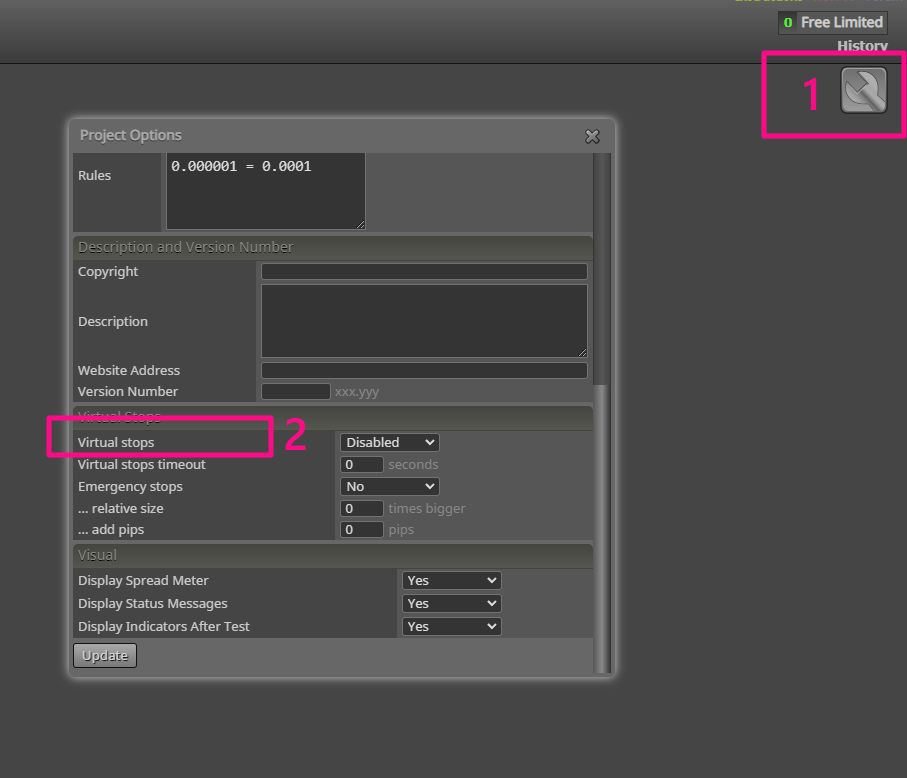
Already have in fxdreema . What do you talk about ...
-
RE: How to close 75% in profits of total trades runningposted in Questions & Answers
I get really annoyed by people who comment just to reply.
-
RE: How to close 75% in profits of total trades runningposted in Questions & Answers
Are you asking if all open trades should have a total of 75% profit? If so, here's a possible translation:
If this is the case, then the following variables apply:
balance * 0.75 = target_profit
target_profit + balance = target_balance
Then, you can use the following code to close all open orders when the equity is greater than or equal to the target balance:
if (equity >= target_balance) {
close all open orders;
} -
RE: how i remove magic number from expert setting page ?posted in Questions & Answers
@jstap I know this already, but I have to delete it completely. anyway thanks for the reply...
-
how i remove magic number from expert setting page ?posted in Questions & Answers
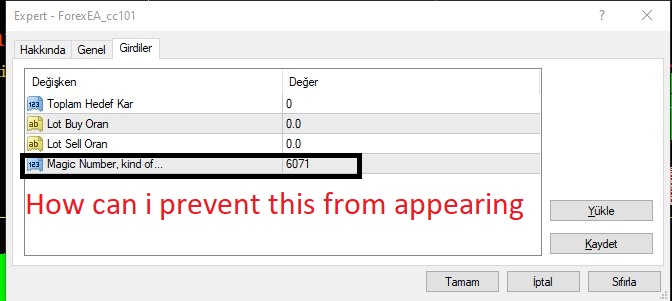
hello , how i remove magic number from expert setting page ?
for help thanks very much