Perhaps try the adjust field
https://fxdreema.com/forum/topic/7730/digit-adjustment-of-variable-solved/7
= NormalizeDouble($, 5)

Perhaps try the adjust field
https://fxdreema.com/forum/topic/7730/digit-adjustment-of-variable-solved/7
= NormalizeDouble($, 5)
Hi @l'andorrà.
I've been using fxDreema for quite a while now and am busy slowly making Youtube tutorials on it.
I've come accross many strange problems using fxdreema and this one seems like a coding issue with this indicator.
It has so many settings it seems to have hit some sort of parameter limit which generates the error.
The one way I found to work around this is using on chart signals which means using the discriptions, colors and values that's on chart.
So far it's not doing too bad.
Tricky but it works.
https://fxdreema.com/shared/dg4hqZtkc
Still working on it but this should give an idea of how to use on chart signals.
@fxDreema I tried loading a custom indicator and it gave this error. iCustom' Wrong Parameters Count. I take it's because it has too many settings? I've tried everything I could think of including importing it without adding Input Parameters and just the buffers.
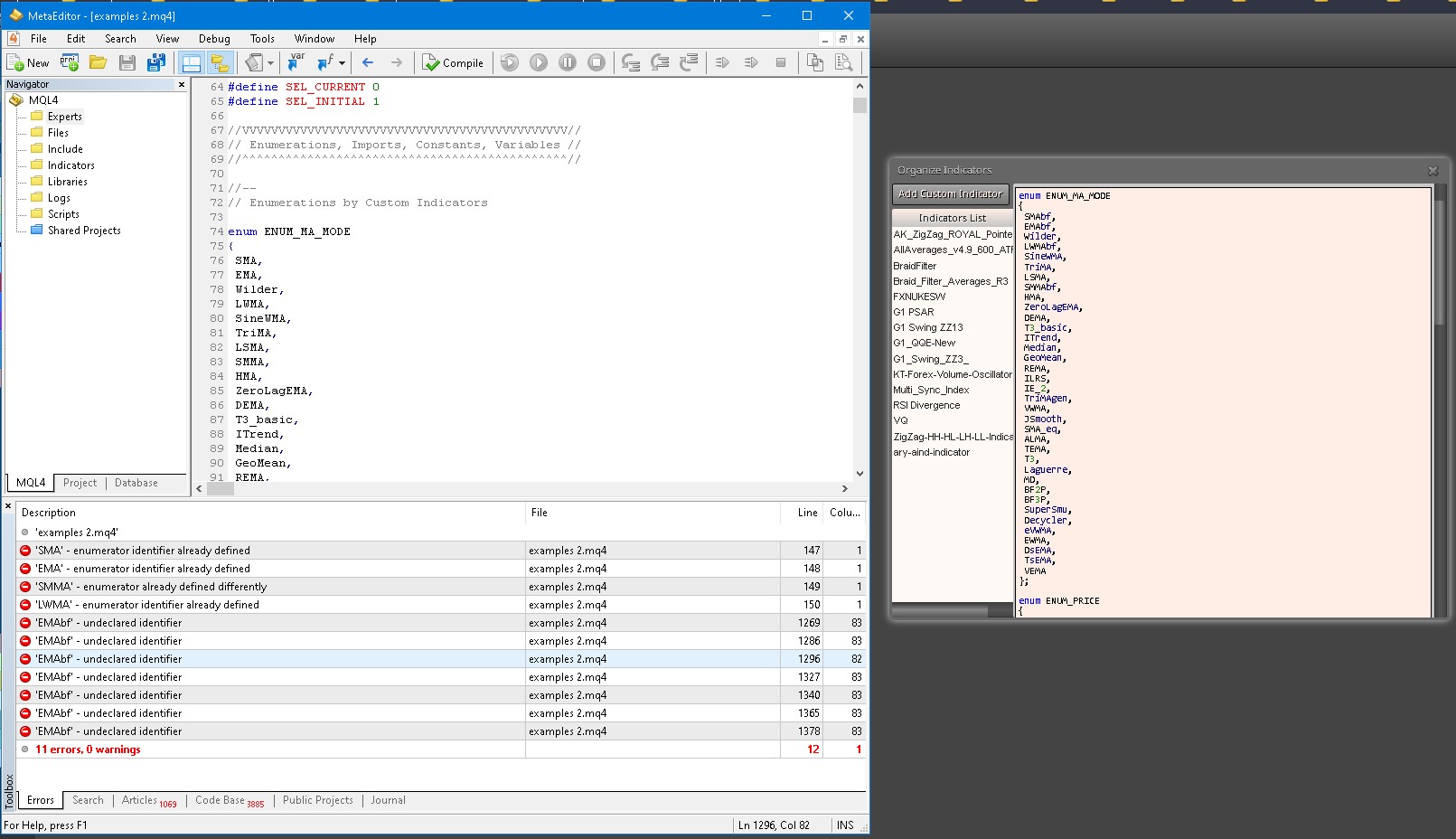
I have modified an indicator to be compatible with another, but because the indicator was previously loaded it doesn't make the changes
eg. SMA for enum ENUM_MA_MODE I changed to SMAbf so that another indicator could enum sma, otherwise there would be errors.
I do not know where fxDreema stores this information, but my guess is maybe on the user's profile of the server... ? It would make sense this way because regardless of what computer I use my indicators are still available.
@Airdreema The way around this is to do a time filter for trading days and trading hours. On the ICMarkets website they have the trading times for the different markets. You might have the trade times right or within the right times but you still have to add the days filter as well.
There is this bug where if you misspell the data type of a custom indicator, it cant be changed again. eg. init instead of int
For some reason it remembers the indicator name and the misspelling even after deleting the indicator.
Projects will give compile errors pointing to the the misspelling.
The only way around this if the indicator allows for it ,is to change its name and correctly importing it after.
Much appreciated.
Johann.
@l-andorrà Thanx man. Hope you're doing well. I will send him a message. I have also been learning a bit of MQL5 to broaden my understanding. Much Appreciated.
Does anyone here have experience with creating custom enumerations ?
I understand there is a way to do it via a custom block. (Not Custom MQL block)
I'm trying to get as much info as I can. Any info would be appreciated.
@jstap that has no effect on anything. it's not a calculation but merely a naming mechanism. the string is sperate from the integer but joined to create the name.
There is two separate jobs being done
The text is given a name and number automatically by Mt5
The name is specified and number increases on it's own every time text is drawn.
The name and numbering is cloned on a sperate system in a loop.
The name is specified (string) - typecasting
The number is increased every time text is drawn (int) +1
This is to specify which object to delete that goes by that name.
This one I have difficulties with.
https://fxdreema.com/shared/9Yl9MvDkd
It looks the way it does atm because I've been trying all sorts to try get it working.
Anyone with experience with something like this ?
0_1628445813890_1.mq5
0_1628445954914_Twiggs_Money_Flow.mq5
0_1628449391735_1.mq5 Updated
Thanx @Johntyr will give it a try. If Iset profit to anything above 0 it should work right?
Hi guys. Another simple one.
It's a basic action.
Play sound on profit. How to do?
Much Appreciated.
@l-andorrà No, not deleting code. Basicly i have lines that get drawn at certain points, but after a while the screen is filled with too many. So I want to delete lines one after the other after 7 is on the screen, keeping 7 on the chart at all times after.
I'm struggling to delete 1 line after about 7 is created and then continues to do so keeping 7 lines on screen.
Update: I got it to kind of work but it stops deleting lines after about 12 or so for some strange reason.
@jsauter86 Thanks for your reply. I have also found to have to reload the EA after editing. Rather than closing and opening MT4 I change the EA in the tester to a different one and switch back. I also do a reset of the Expert properties values if variables/constants has been modified. I've tested this by adding a [Draw text] block and changing the text to version numbers so I can see if the newer version has been loaded.
Cheers.
I've discovered that after doing a lot of chopping and changing to an EA that sometimes remnants remain of variables that has been removed.
I have discovered this after trying to delete a variable which pointed out that is being used in a block.
I went to the block and reset the values by clicking on use the original value.
Even after doing so it still pointed out that the variable is being used on that block.
The only way to delete the variable was to delete the block.
This is concerning because there might be more remnants remaining of previous values/blocks.
Much appreciated.
@q8carpenter Thanks. I am using every n bars atm. Does the job. Cheers.
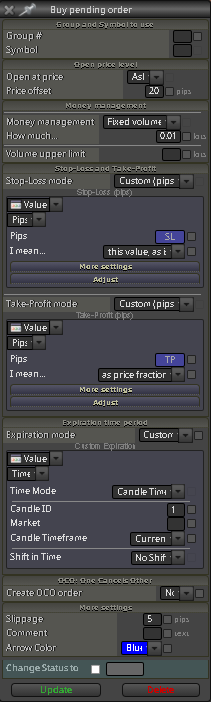
I would like pending orders to close on candle 1. I'm not sure what i'm doing wrong. This is the settings I have.
Much Appreciated.