Okay thanks, that's a more understandable answer.
But you write that I have to change my setup, and I don't know what you think I can try to do.
The only thing I can do is create new blocks. It has helped me in the past, where I know which block has a problem.
Now it's just ALL TOGETHER, and I have 1000 blocks on "on Tick"
It works on "on Chart"
I hope you try to get a software technician to find out what the problem might be.
K
Posts made by kiwi789
-
RE: No block connectionsposted in Questions & Answers
-
RE: No block connectionsposted in Questions & Answers
Corrected.
I really DO NOT understand what you mean.
You have written that you use Edge, and have no problem.
But what are your suggestions for a solution to the recurring problem for several users.
Maybe you can consult with "fxDreema" or "l'andorrà" who also provide answers here on the pages. -
RE: No block connectionsposted in Questions & Answers
I really understand what you mean.
You have written that you use Edge, and have no problem.
But what are your suggestions for a solution to the recurring problem for several users.
Maybe you can consult with "fxDreema" or "l'andorrà" who also provide answers here on the pages. -
RE: No block connectionsposted in Questions & Answers
Good luck, with what?
Because you haven't had the problem, there are more people who have. Maybe you will too one day.
It's obviously a program problem.
That's a really bad answer to give!! -
RE: No block connectionsposted in Questions & Answers
I usually use Google Chrome.
I have also tried Firefox and Microsoft Edge, It gives the same problem.
If I insert new blocks on the page, it works. This indicates that something has happened to ALL the existing blocks.
I can see that there are others who have written about the same problem.
Is there work being done to find out the cause? -
No block connectionsposted in Questions & Answers

Hi friends.
I have previously encountered that block connections cannot be made. (See picture)
It has been a bad block, where I could make a new one with the same properties, and then it worked again.
Now, however, it is ALL the blocks on "on Tick" where the connection lines cannot be made.
Does anyone know what the problem is, and know a method where the blocks can be UPDATED to "good" blocks.
Maybe how to investigate where the problem lies.
I have tried "Normalize IDs", it does not help.
Kind regards
Kim Wiboe. -
RE: Stop Loss blockingposted in Questions & Answers
I would think that the "check stop-loss" block should count how many trades meet the requirements (S.L. > 400) It doesn't seem to work.
Would you like to explain in a little more detail what you think I should do.
Maybe with a block example. -
RE: Stop Loss blockingposted in Questions & Answers
Hi I'andorra.
Sorry for not replying sooner, but I've been away from it for a bit.
I think it is correctly understood, but I have added some changes (YOU CANNOT WRITE IN COLOR, SO MY CHANGES ARE WRITTEN IN CAPITAL LETTERS) that I think make it more accurate.
(My main language is Danish, not English, so perhaps these are redundant corrections)- If there is one only trade no matter where the SL is, there will be more trades.
- If there are 2 OR MORE open trades and 2 SL distances are beyond 400 pips, MUST IT NOT OPEN MORE TRADES. However, if ONLY one of them has a SL shorter that 400 pips, MUST more trades open.
Still I don't understand why it doesn't block further trades. Maybe you can see what's wrong with the setup.
-
RE: Stop Loss blockingposted in Questions & Answers
I try to explain it simply.
Everything takes place in the same EA.
If all the ongoing trades have Stop Loss < 400 pips, then it must make more trades.
If there are 2 (or more) traders who have S.L. > 400 pips, then it must NOT make any more trades. -
RE: Stop Loss blockingposted in Questions & Answers
@kiwi789 said in Stop Loss blocking:
I have also tried with: "check stop-loss / Function value".
It does not work.
Can anyone see what is wrong and how to fix the problem.
Kim Wiboe.
shared/Ao3ikdfEc -
RE: Stop Loss blockingposted in Questions & Answers
How can I share my EA. It doesn't seem to work with the link that was created.
-
Stop Loss blockingposted in Questions & Answers
Hello friends.
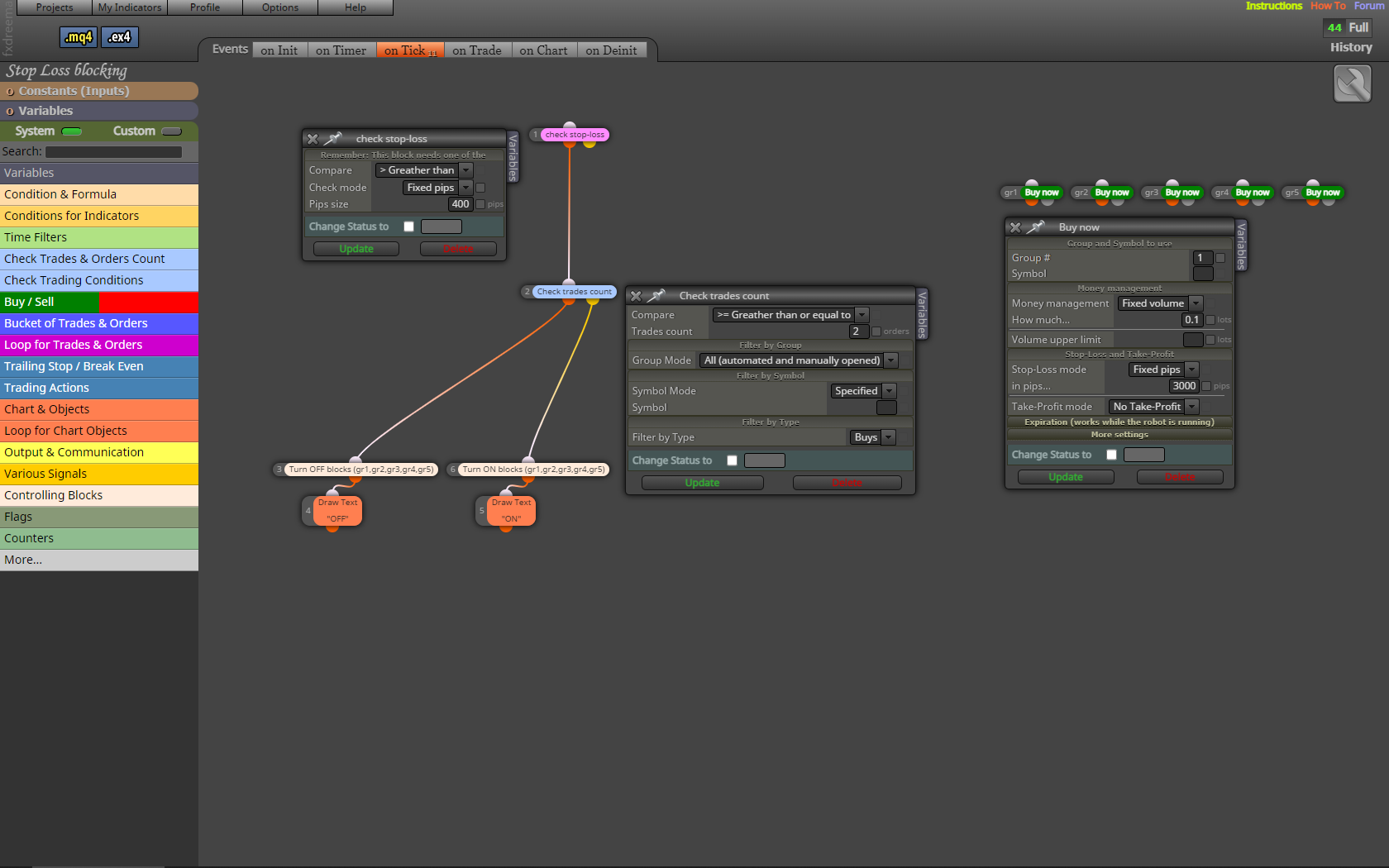
My setup is to be able to stop several trades if there are a number of trades (2 pieces) that have a Stop Loss that is greater than a specified value (400 pips).
I have an EA which changes S.L. according to a system when several trades are made.
In this setup, the "Buy now" blocks have ID: gr1, gr2, gr3, gr4 and gr5. (so they don't get a new number when you run "Normalize IDs")
The block "Check trades count" writes: "This block calculates the number of trades matching the filter settings"
As a filter I use the block: "check stop-loss" (> 400 pips)"Check trades count" reacts to number of trades (>= 2), whether "check stop-loss" is connected or not, and it works.
I have also tried with: "check stop-loss / Function value".
It does not work.Can anyone see what is wrong and how to fix the problem.
Kim Wiboe.
shared/Ao3ikdfEc
-
BLOCKS, CONSTANTS and VARIABLES.posted in Questions & Answers
Hello.
Does anyone know if there is a limit to the number of
BLOCK
CONSTANTS and
VARIABLES. -
Tester run step by step.posted in Questions & Answers
An example:
At a signal, EA trades with S.L. and T.P.
Along the way (by live trading) you can change S.L. and T.P. if you think there is a need for it. (Just move them on the screen).During the test process, you can not do that.
Does anyone know a method (In MT4 or another test program) where the test moves step by step. (Eg new candle every time you press Enter or F12) and you can change settings along the way.
Same as running EA on a demo account for a week, just with "old" data, and faster.
Yours sincerely
Kim Wiboe. -
Find the problem.posted in Questions & Answers
Hello friends.
If you make a mistake. Example:Makes a comma (1,5) instead of a period (1.5) in a Constant value.
or
uses a letter in the "Pass once" block.
and so on.EA will not work. A small black square appears on it, instead of a yellow one.
Does anyone know a method to test and find the problem. It can take a war to find it in the system.
Yours sincerely
Kim Wiboe. -
To use Events tabs.posted in Questions & Answers
Hello friends.
Does anyone know of a guide that describes the use of the 6 Events tabs. Init, Timer, Tick, Trade, Chart & Deinit.
When and for what to use them.Kim Wiboe.
-
RE: Do not change filename.posted in Questions & Answers
Thanks, but where can I change it ?
I can't find it despite much searching. -
RE: Do not change filename.posted in Questions & Answers
Thanks.
Is there anyone else who knows anything about it.