Hey @jstap, I looked into the logic of it and found the issue. Thanks for the response!!!!

Hey @jstap, I looked into the logic of it and found the issue. Thanks for the response!!!!
Hope you all are well,
I've been using the Buy/Sell Pending orders block and have ran into a slight issue; I'd like to specify to ONLY use limit orders and not create stops.
I know this can be avoided by using For Each Pending order > Delete Pending Order (Stops) but this is extremely taxing on the backtester and making an incredible amount of unnecessary deals.
If anyone would have a solution to this, It would be greatly appreciated!
Thanks
Butters
@jstap @sktsec Got it to work by using a counter reset block boys. Thank you so much for helping me solve this! Good luck!
@sktsec @jstap Boys! It's deleting the lines now which is awesome! Problem is, it's deleting the first High and Low then not re-creating them for the next day or the rest of the backtest.
I tried adding adding a time filter but that isn't doing the trick either
@sktsec I think this could be a very valid reason. I'm sorry, I'm somewhat new to fxdreema; would you be able to provide an example of what you mean by lowering the block numbers?
@jstap hmm, that doesn't seem to be the case 
would you be okay if I dm'd about this issue?
@jstap Ah interesting. It is successfully drawing lines of the Asia Session Highs and Lows yes. It's just after the those lines are broken, they are not deleting.
Mind you, they DO reset after the specified trading day resets.
@jstap forgive the double response here I also forgot to add, did you manage to get the EA to work on your end?
@jstap Hey thanks again J, I'm not fully sure If I understand what you're expressing here though.
I tried filling in both "Name Starts With" and "Name Contains" and it still doesn't seem to work.
Maybe it has to do with the modify variables blocks using helping create the lines?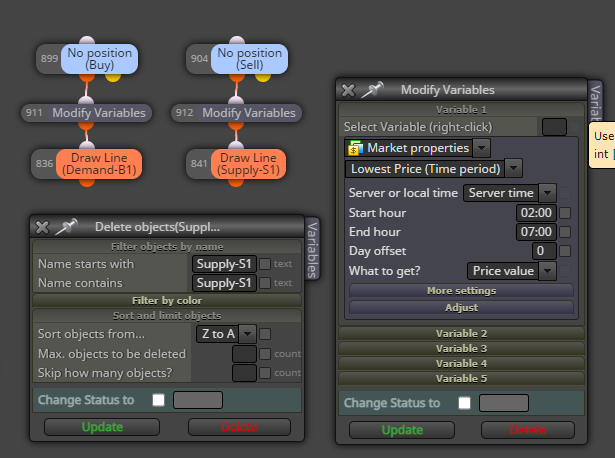
@jstap Thanks for taking the time to look at the project! No luck with what you suggested though.
Hope all are well and making lots of money!
I can't seem to figure out why my horizontal lines won't delete once passed through. It should be fairly simple but they stay after the conditions are met.
Any help would be much appreciated !
Project below,
Thanks