@cpbonzo What is the function of the Trailing Take-Profit block ? In my understanding, if it is trailing above during a buy, it will run away from the price and not get triggered... which would defeat the point of having it... so the only thing left to sense would be that it would work like a limit order. Could you shed some light as to the function of a Trailing TP ?
N
Posts made by Nande Designs
-
RE: How to use Trailing TP as Trailing SL (Link provided) ?posted in Questions & Answers
-
How to use Trailing TP as Trailing SL (Link provided) ?posted in Questions & Answers
I am trying to figure out how to use Trailing TP.
If for example, I need to buy and use Trailing TP... My thinking or logic in the robot is that I should write a negative sign before the TP so that it is behind the Current Price and not in front of it... (E.g. TP -15)... That way, my order does not get triggered at 15 pips away above current price as per normal TP, but instead TP follows the price from behind. When price retraces, it locks profit as a Stop-Loss would, except its a TP.
Please check link below and advise if this is the correct way (Use of negative signs).
-
BROKERS DONT RESPECT STOP LOSS (HOW TO USE TP AS SL INSTEAD) ?posted in Questions & Answers
Hi all I realise that brokers have no respect for stop-loss during News break-outs. They will literally ignore them and take back your equity. The excuse they use for this is "the market is too fast" even when you use a VPS... yet the market is never too fast to trigger and activate a trade, its just too fast to stop your loss. Which is hilarious but great. So all trades/orders always get triggered but not all stop-losses do (unless there is a Gap, which is a different condition altogether).
So as a solution... I have never seen anyone complain about a Take-Profit that was not respected. EVER. So I want to use Take Profit as a Stop Loss and Trail it. So for example... Say I want to buy GBPUSD and trail my stop-loss at 15 pips... So I buy it but instead of using trailing "Stop-Loss" for it, I use trailing "Take-Profit"... How do I make this work ? I see there is a provision for it here at Fxdreema... My thinking or logic is that I should write a negative sign before the TP so that it is behind the Current Price and not in front of it... (E.g. TP -15)... That way, my order does not get triggered at 15 pips away infront of current price as per normal TP, but instead TP follows the price from behind. When price retraces, it locks profit as a Stop-Loss would, except its a TP "so it gets respected".
My only technical worry now is using the negative sign on TP (to put it behind price instead of front of it) in the BuyNow block and using negative sign again for the second time on the Trailing TP block. Is it necessary to use negative sign twice (both on the BuyNow and Trailing TP blocks)
? Am I doing it right according to link below ?PLEASE REVIEW MY BLOCKS HERE e(https://fxdreema.com/shared/TeYbtGJ9d)
I have looked at almost similar questions asked before but the answers are not straightfoward but evasive besides not being exactly like my particular questin... Can someone out there help ?
-
RE: HOW TO MAKE A TIME-INTERVAL FILTER IN "HH:MM:SS" ?? (Link provided below)posted in Questions & Answers
@l-andorrà Yes, because I will be scalping with it particularly...
-
RE: HOW TO MAKE A TIME-INTERVAL FILTER IN "HH:MM:SS" ?? (Link provided below)posted in Questions & Answers
@l-andorrà Yes, because I will be scalping with it particularly...
-
RE: HOW TO MAKE A TIME-INTERVAL FILTER IN "HH:MM:SS" ?? (Link provided below)posted in Questions & Answers
Hi, the sequence is as follows :
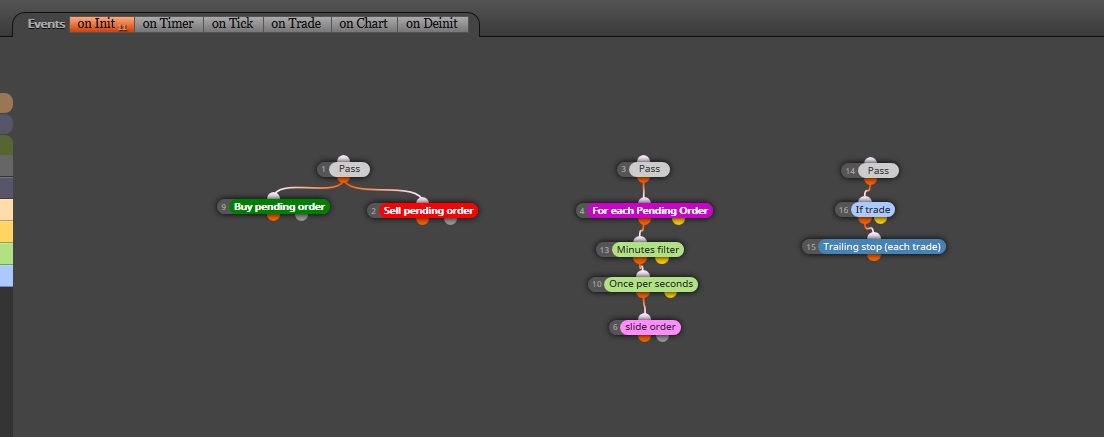
- I program a pending order.
- The pending order keeps slidding with current price to avoid being triggered before the breakout.
- Once the period is over, the slidding stops but the order is not removed. it is now ready to be triggered by breakout...
-
HOW TO MAKE A TIME-INTERVAL FILTER IN "HH:MM:SS" ?? (Link provided below)posted in Questions & Answers
Hi,
INTENTION :
I would like to slide my pending orders for a limited timeframe. This "sliding" timeframe will be a few seconds only (e.g. say in the last 15 seconds before a news breakout at 11am).
PROBLEM :
My challenge is that the blocks do not have all the time parameters i.e. Hours, minutes and seconds (HH:MM:SS) for me to narrowly filter my timeframe from the hour all the way to the second (e.g. like 10:59:45). Its either we have only one of the three time-parameters (e.g. Minutes only) or we have a maximum of only two time-parameters (E.g. Hours and Minutes only). What i did to try to solve it myself was to take the existing "Time Filter" block which has Hours and Minutes, and I added Seconds too, but your algorithms may not understand as they were not made for that.
Is there a way to legitimately make a timeframe filter-block that can filter with all 3 time parameters like HH:MM:SS ?
HERE IS THE LINK :
https://fxdreema.com/shared/kFrI7bJQc -
RE: TRAILING STOP - NOT TRAILING (link attached)posted in Questions & Answers
The splitting actually works ! Thanks (Excited for days) !
-
RE: TRAILING STOP - NOT TRAILING (link attached)posted in Questions & Answers
@l-andorrà I manually open the robot once. Then all the orders open sequentially. The first order is a sell, the second is a pending sell order, they open one after the other. All I do is execute once, then they launch sequentially.
My issue with the "On TIcK" tab is that, I do not have control of execution, it just goes into a trade automatically before I manually tell it myself. But alternatively, on the "inIt" tab, It wont launch unless I manually launch it, which is what I want.
The important part that does not work is the "trailing" part though...
-
RE: TRAILING STOP - NOT TRAILING (link attached)posted in Questions & Answers
On the 'On Tick' tab, the robot does not allow me to execute it "manually" only when I want to execute it. Instead, it just goes off and executes itself automatically right away... Can I stop that in the 'On Tick' tab ?
-
TRAILING STOP - NOT TRAILING (link attached)posted in Questions & Answers
I saw a Tutorial video for setting a trailing stop. But upon applying it in my custom situation, it does not trail. What am I missing here ? (link below)
INTENTION -
My intention is to :
- have a sell now trade
- with a pending sell order 100 pips later
- I want both orders to have trailing stops of 100 points.
- I want to "Manually" execute the robot (hence it is in the "Init tab" not in the "on Tick" tab)
- I would like to use the simplest possible logic.
THE PROBLEM -
Upon executing the robot, the stop-loss orders do not trail. They just remain in one position and do not follow current price. I noticed that in the tutorial I saw, there was an "if no trade block first", I do not have it here but a "Pass" block since mine is in the "Init" tab. I do not know what I am missing, please assist. Remember, I am trying to do this with the simplest possible logic. Link below, thanks !!!
LINK -
-
RE: "TIME FILTER" Block edittingposted in Questions & Answers
The "time filter" block has start time and end time. Where is the end time for the "modify variables" block ? There seems to be only one time, infact I am not sure whether it is end or start time....
-
"TIME FILTER" Block edittingposted in Questions & Answers
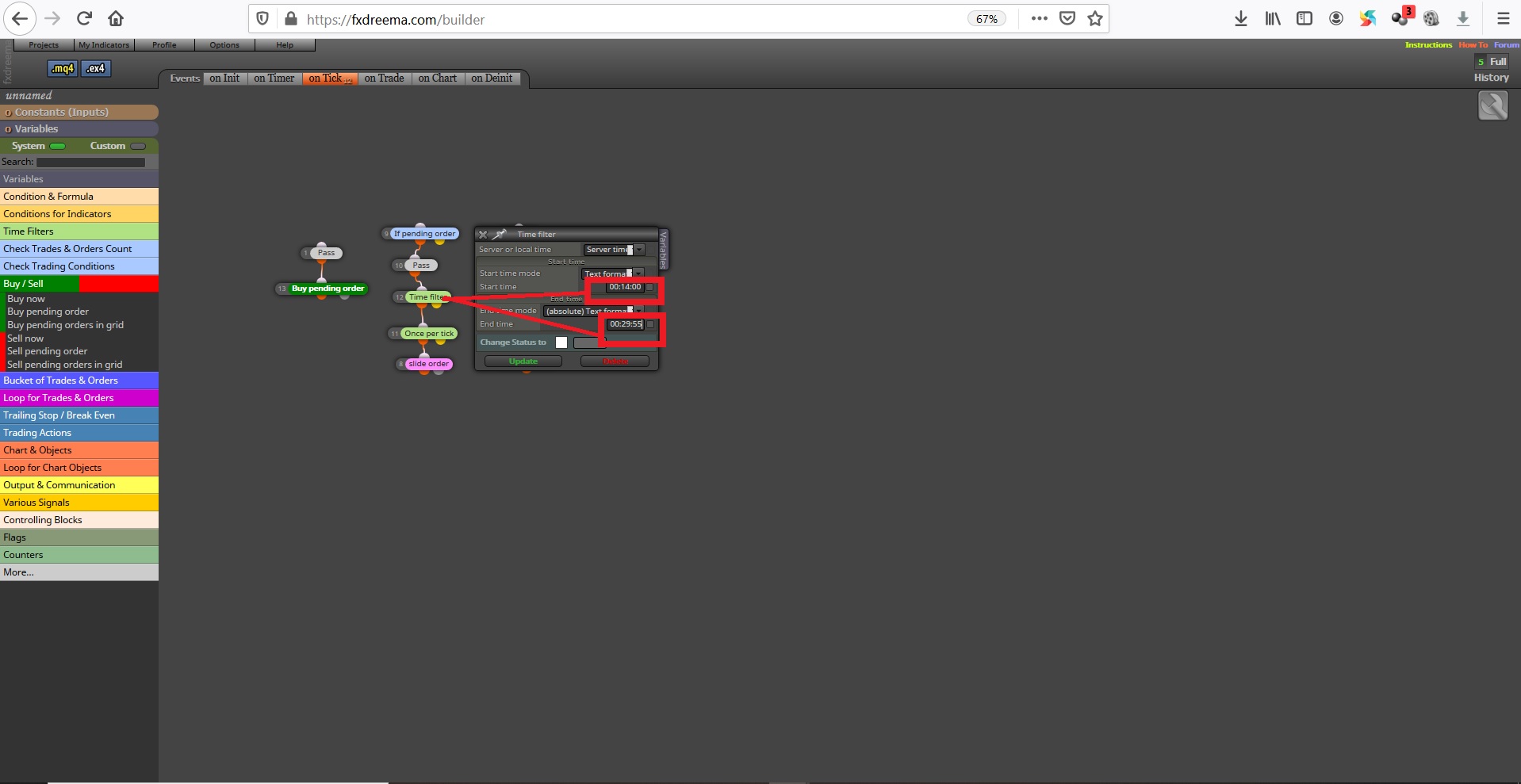
The time filter has hours and minutes and no seconds... I want to boil the accuracy of that time from hour, minute, right up to "the second" But the Time Filter only has 2 parameters, the hour and minute, not second.
I have put in the seconds manually as seen in image below but I am wondering if the FxDreema code recognises my manual input of seconds or it is a must that I add a separate seconds filter below ?
-
RE: SLIDE ORDER functionposted in Questions & Answers
@l-andorrà
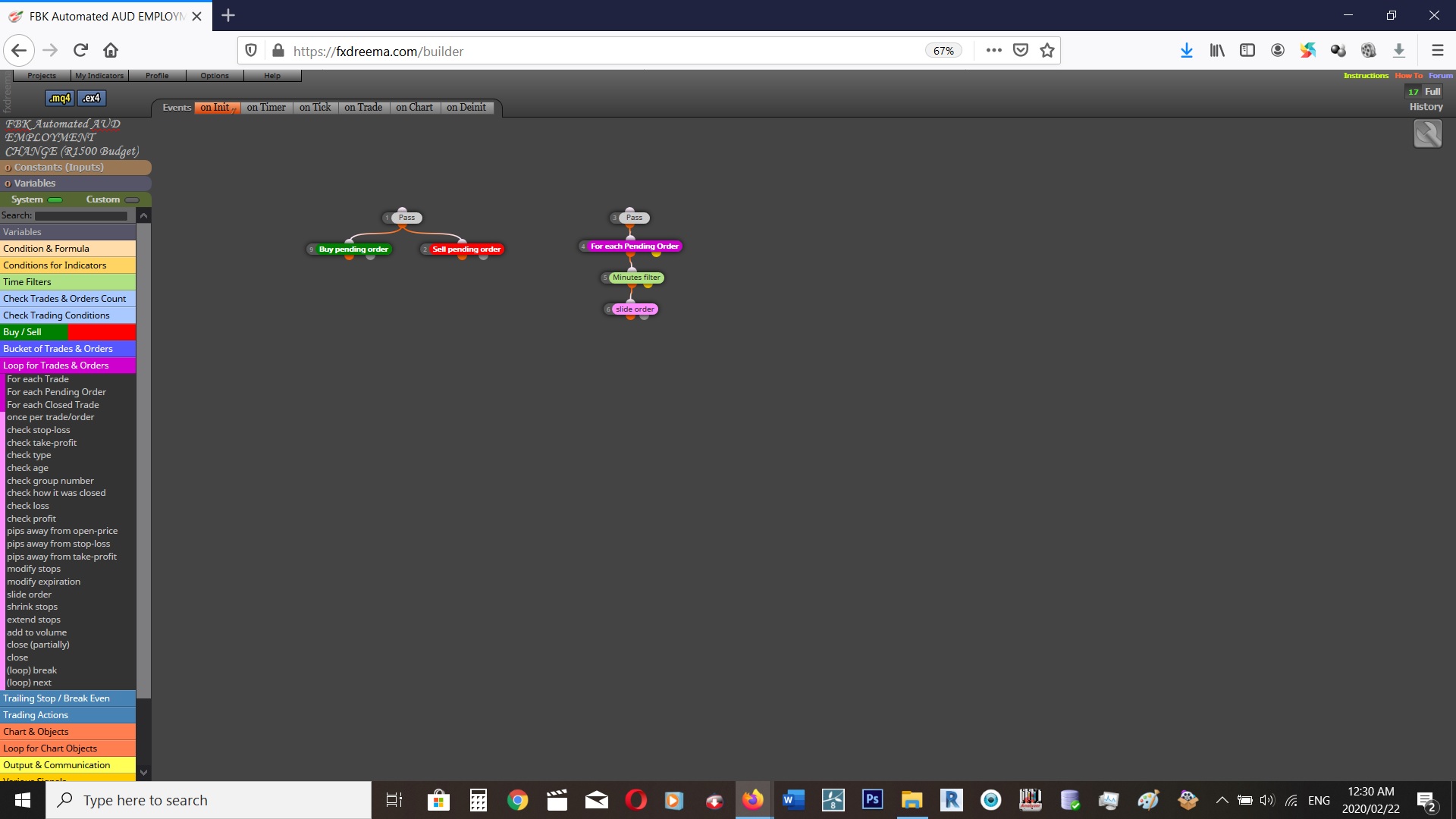 Perhaps this as a screenshot helps ?
 -
RE: SLIDE ORDER functionposted in Questions & Answers
@l-andorrà What I am trying to do does not exist. I do not have a screenshot of it. I am trying to make it exist. In my best description, I want to make a pending order that will trail current price over a certain length of time and then stop trailing wherever it is after that timeframe (Note : Order not to execute the trailling 'after a certain period' of time, but instead to execute the trailing 'over a certain period' of time).
This is extremely simple since both the trailing order block and time block are there, but what makes it difficult is the fact that the time blocks seems to be designed for executing something 'after a certain length' of time.