@jstap Thank you for this! Appreciated. I'll try this approach and see.
N
Posts made by nbathan
-
RE: Bucket of Positions Not Giving Open Lots - MT5posted in Questions & Answers
-
RE: Bucket of Positions Not Giving Open Lots - MT5posted in Questions & Answers
@l-andorrà Thanks for the reply. That might be my last option as I prefer the ease of testing in MT5.
-
Bucket of Positions Not Giving Open Lots - MT5posted in Questions & Answers
Hello, I need help please. I am building an MT5 EA where I have to keep track of 6 individual trades and use their lot sizes when opening other trades. I used Bucket of Positions to achieve this. The problem is the buckets doesn't give any value for the lot size although there is open trade on that bucket. When I open a trade using a bucket lot size, the opened trade is always 0.01 lot as the bucket lot size is null. I confirmed it by commenting the total lots of grey bucket which has an open trade, and no value was shown on the comment during testing. Am I doing something wrong?
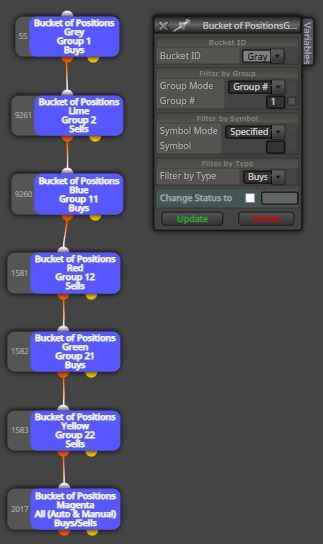
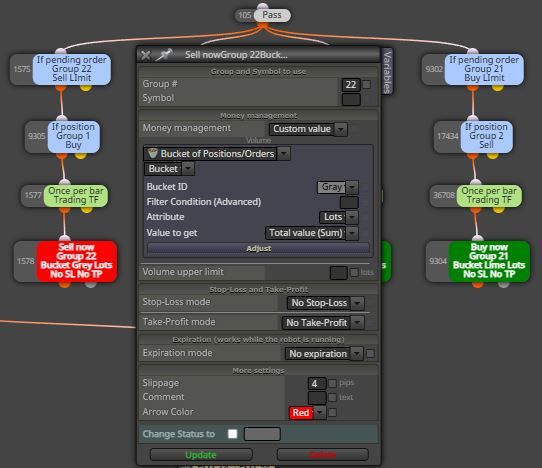
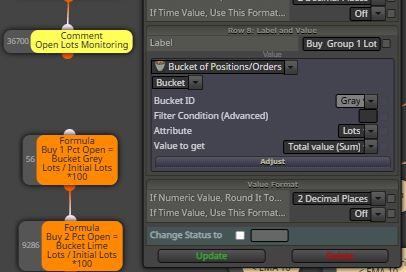
I have read on some posts here on the forum that Bucket of Positions can be buggy on MT5. In that case, how will I achieve the same using a different approach? For example, is there a way of using Magic Numbers instead? Can I assign specific magic numbers to each trade so I can track when those trades are opened or closed, and also check the open lots for specific magic numbers? I will also need partial closing of positions, so will a position retain its magic number after partial close?
Sorry for the lengthy question. Thanks in advance!
-
RE: MT5 Very simple news filterposted in Tutorials by Users
@VHV-Profit-Masters I have confirmed that the version from @Ipod works. However, once in a while, the FXSSI indicator would have news loading error on log (MT5) and will not show the news line on chart. In this case news won't be captured but it is indicator issue and not @Ipod's news filter issue.
-
RE: MT5 Very simple news filterposted in Tutorials by Users
@VHV-Profit-Masters Are you using @Ipod's or @chrisbe's version?
-
RE: MT5 Very simple news filterposted in Tutorials by Users
@Ipod Sorry for the disconnect. I was actually trying the other version by @chrisbe as the option to enter before and after news extra time is handy as I integrated it into my EA. Thanks @Ipod I'll see how your version works on my EA.
-
RE: MT5 Very simple news filterposted in Tutorials by Users
@Ipod Another possibility I can think of is that new versions of FXSSI calendar are not compatible. If you have an older version that works, kindly share it. Thanks.
-
RE: MT5 Very simple news filterposted in Tutorials by Users
@Ipod Please do so. Thanks in advance. I actually installed the indicator and attached it to the chart, but it can't detect high/medium impact news.
-
RE: MT5 Very simple news filterposted in Tutorials by Users
@hansol1411 I see. Thanks for the reply.
-
RE: MT5 Very simple news filterposted in Tutorials by Users
Hello! Can anybody please confirm if this news filter is working? It doesn't detect any medium or high impact news during my live testing. Thanks
-
RE: Manipulating Pips, Price Fractions and Price Levelsposted in Questions & Answers
@jstap Thanks! Great advice. I can always output calculation results as comment and back test to see if I'm getting the values I need.
-
Manipulating Pips, Price Fractions and Price Levelsposted in Questions & Answers
Hi guys, kindly educate me on this please. I have always been struggling on the correct usage of Pips as "value as is" and " as price fraction." Please enlighten me if my understanding is correct. Here are my questions:
- If I have a constant "SL_Gap" with a value of 20 points and I want to get the price level of candle 1 low minus SL_Gap, then store to variable SL_Level_Calc, is this how I do it?
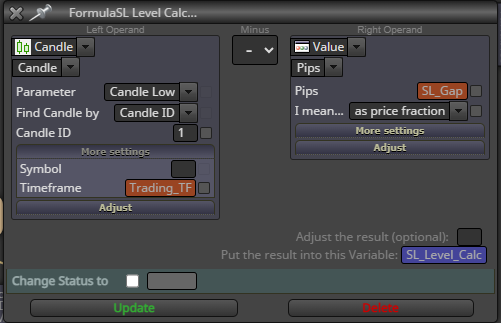
- Then if I want to get SL_Distance_Calc as Ask price minus SL_Level_Calc, is this the way to do it or the the right operand needs to be Value -> Numeric?
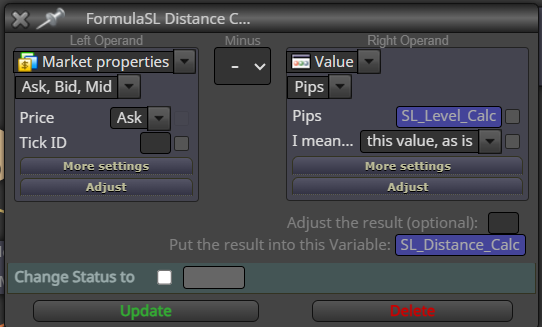
- The way I understand it, Value -> Pips -> As price fraction would convert Points Value to Price Fraction. So what is the use of Value -> Pips -> This value As Is? Wouldn't that be just the same as Value -> Numeric?
Thanks in advance!
-
RE: Finally succeeded!!!posted in General Discussions
@sami92 Hi, it's been 4 years, how's your EA doing? Regards.
-
RE: Finally , Integration of News Filter :) [ MT4 Only ]posted in Tutorials by Users
@ambrogio Thanks a lot for the prompt reply!
-
RE: Finally , Integration of News Filter :) [ MT4 Only ]posted in Tutorials by Users
@ambrogio said in Finally , Integration of News Filter
 [ MT4 Only ]:
@zedeai2 I don't remember at all if that link works, but in my projects I found this one that MUST BE TESTED
https://fxdreema.com/shared/twV9ZV9zb
This file should be your template to always use when you want to integrate the news filter.

I highlighted where to start with your expert, and also the block # 2020 that we will need after.
STEP 1) When you have finished your expert, save it through the .mq4 button
STEP 2) With the MetaEditor application, open the file you just saved
STEP 3) Copy and paste the content of block #2020 in the place i have indicate in this screenshot
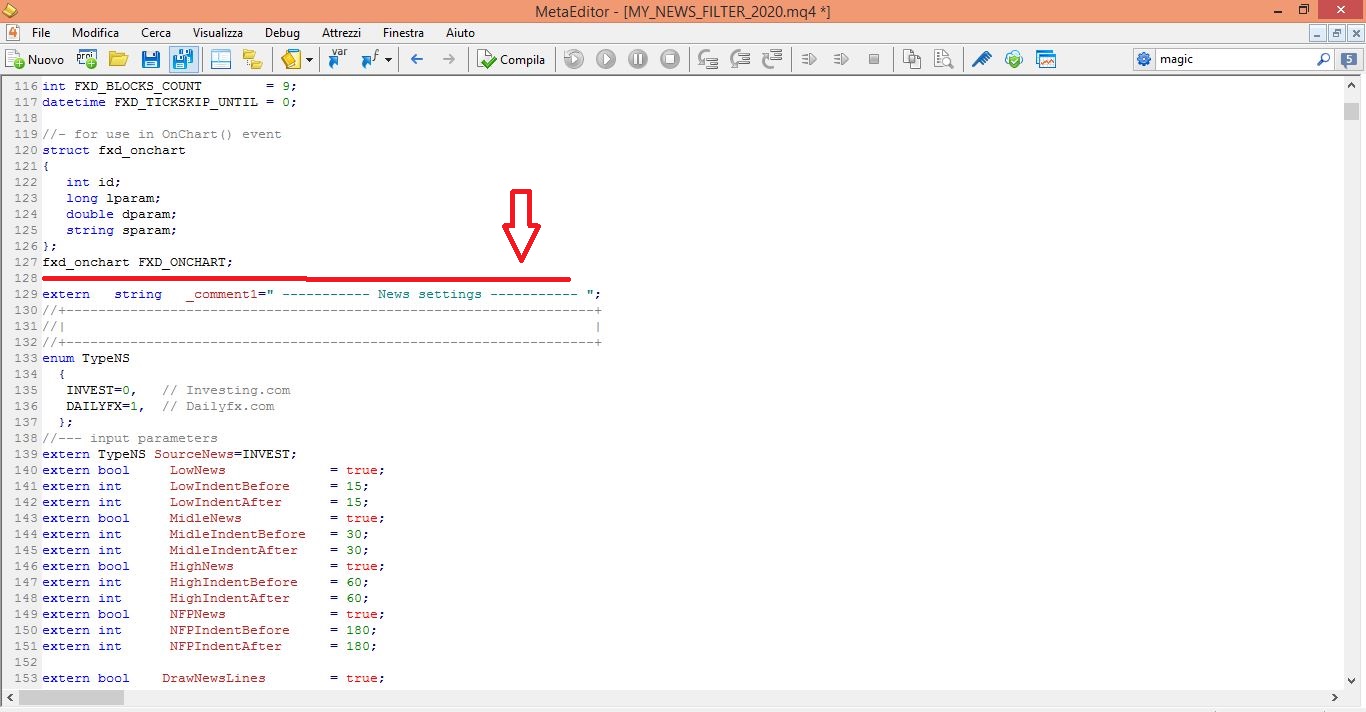
Your project is ready to be tested.
BUT REMEMBER: if you reload the new modified .mq4 file in the fxdreema builder you will lose the content copied from the 2020 block, and you will have to redo the steps above.@ambrogio Hi, I'm currently making a project that will include this news filter. My question is aside from being pasted in the MQL code, does block # 2020 need to be present as well as shown in the screenshot when the MQ4 file is generated, or it won't matter as the block is not connected anyway? Thanks.
-
RE: Exiting MT4 Terminal with Open Tradesposted in Questions & Answers
@l-andorrà Thanks a lot for the prompt reply! Much appreciated.
-
RE: Advice on how to shorten fxdreema learning curveposted in Questions & Answers
Practice is the key. I had the same feeling when I was doing my first EAs, it was really very hard to accomplish the logic I want. But I just kept on working on different strategies that came to my mind until one day I just noticed I already a have better understanding of FXDreema. I wouldn't say I'm already an expert but I feel I'm already comfortable with the program. Cheers!
-
Exiting MT4 Terminal with Open Tradesposted in Questions & Answers
Hello everyone. Hopefully someone can answer my question. Let's say my EA created with FXDreema has open trades and then I accidentally closed my terminal or there is a power outage, assuming I'm not using VPS. When I restart my terminal, will my EA register back those running trades as if nothing happened? I'm hoping there's a built-in code that FXDreema adds to each project that does this, or is this something that needs to be added to the program/logic? Thanks.