It is indeed. To speed things up I hired a developer to add extra buffers that are plotted on each high and low. That should solve it 
N
Posts made by nk0815
-
RE: Get value from data window to see if indicator is visibleposted in Questions & Answers
-
Get value from data window to see if indicator is visibleposted in Questions & Answers
Hello,
as the default Zigzag indicator doesn't recognize all highs and lows correctly, I want to use a different Zigzag indicator.
This one: alexstal_zigzagprof.mq5
In order to use it in an Fxdreema EA, I have to identify the candles where it is visible (in other words, where it has a value in the data window). For now, I want to draw a vertical line on each candle that has a zigzag value (high or low).
I created this: https://fxdreema.com/shared/Ubxkf64fc
The indicator mentioned above creates 2 rows in the data window; one for the identified highs, and one for the identified lows.
When I use the "Indicator is visible" block, it only recognizes the highs (first data window row), but not the lows (second data window row).
Here you can see how it recognizes the highs from the data window, but not the lows:
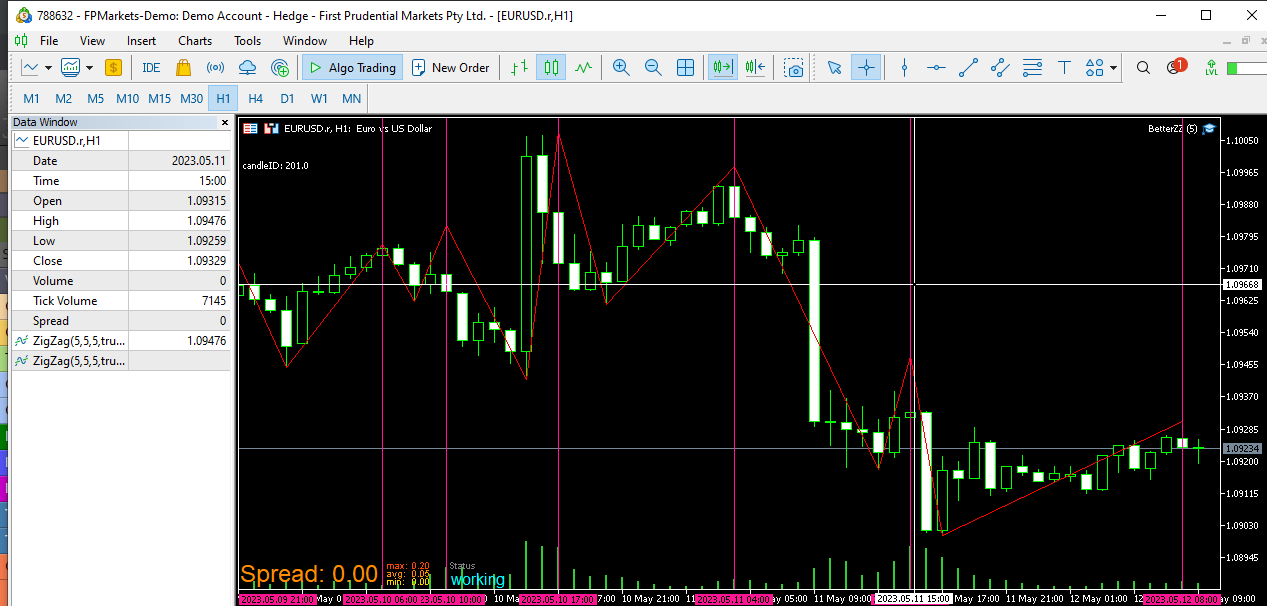
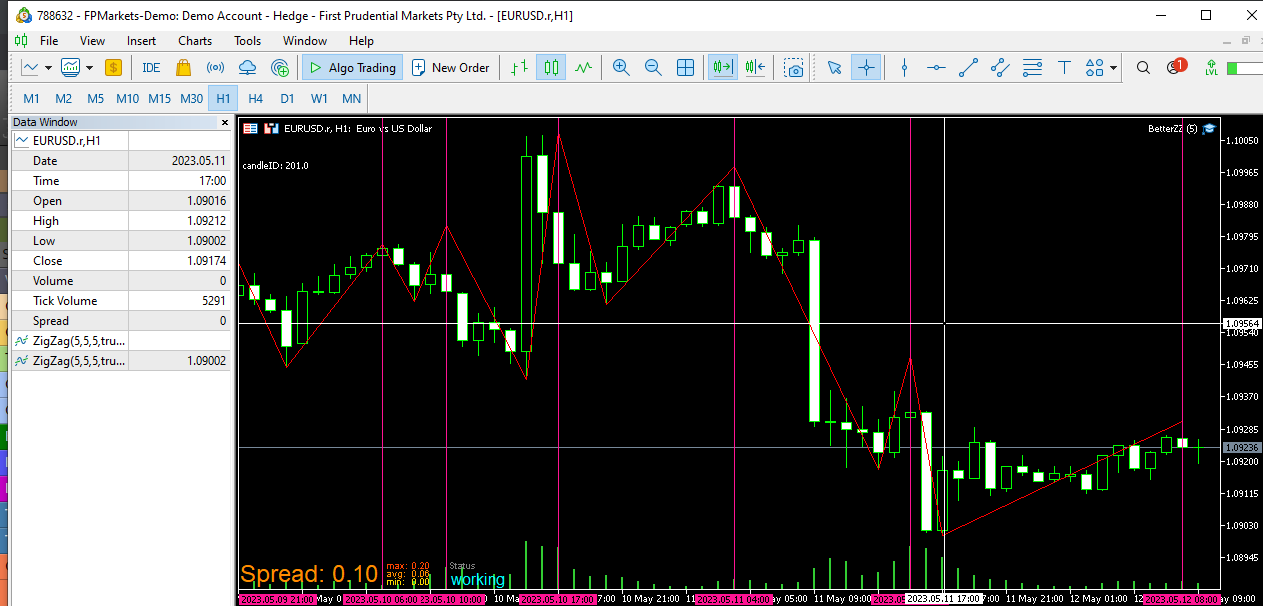
How can I recognize the lows as well?
As far as I know, I can work with iCustom, but I unfortunately have no idea how to approach this.
Any help is much appreciated.
-
RE: Previous project lost when starting new projectposted in Bug Reports
Yes, 100% sure. It also has the file name of the project. I also noticed that some older projects are not in my project list anymore. It seems like my database table on fxdreema has some errors.
-
RE: Finally, News Filter for MT5 in 1 easy to use Block !!posted in Tutorials by Users
Thank you for providing this, @QuantEngineer
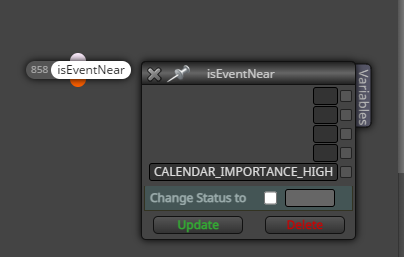
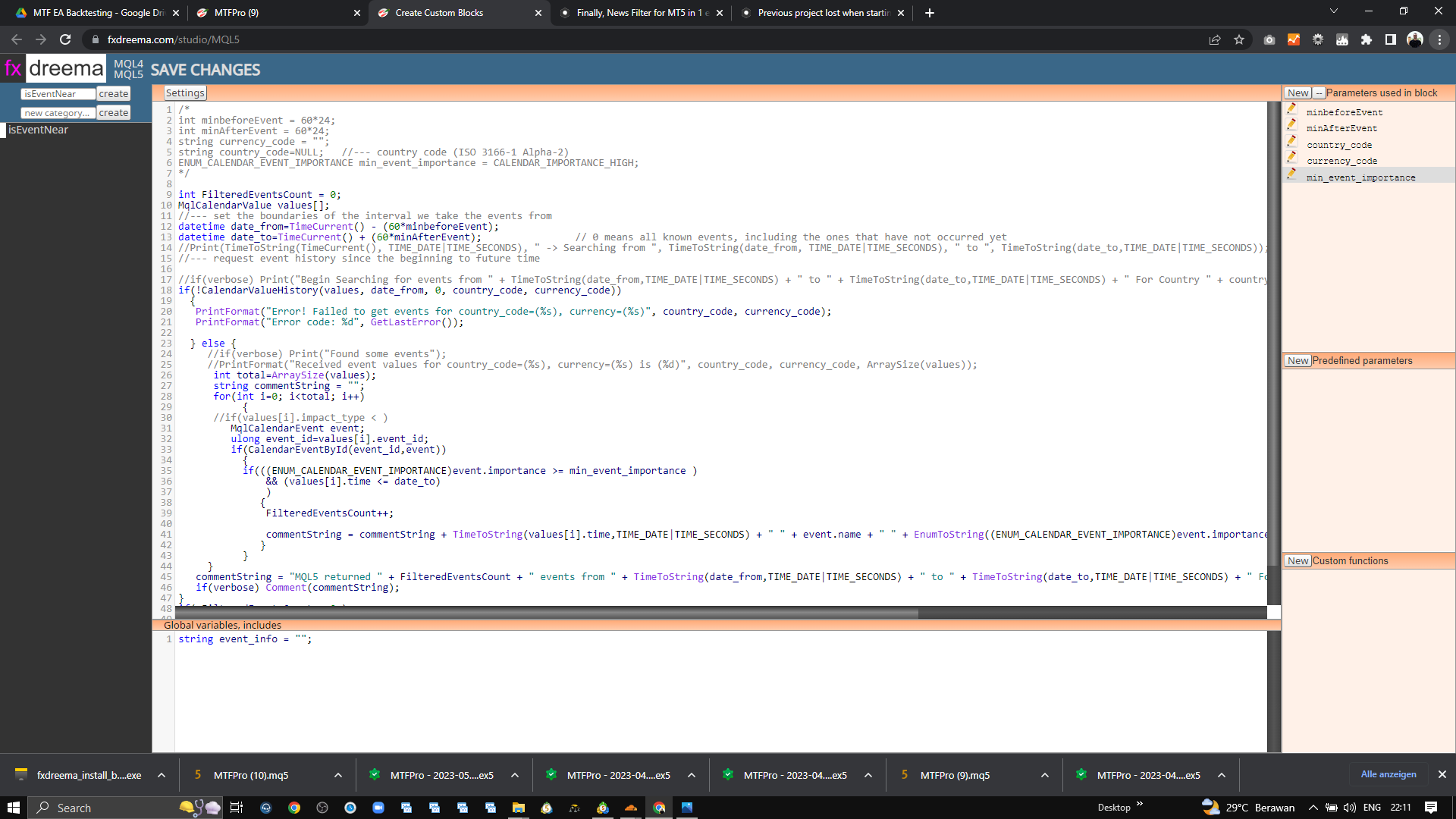
I pasted your latest code into the Studio, and created the parameters from the "out-commented" beginning of your code.
When I add the block to my project, however, it is empty. Am I missing something?
-
Previous project lost when starting new projectposted in Bug Reports
Hi,
I just finished working on a project which took around 200 hours. I downloaded the .mq5 file just in case.When I started a new project, the 200 hour project wasnt appearing in the projects list anymore, and when I import the .mq5 (which has the correct project name), it imports some old project.
How can I get my project back?
-
Simulate trades to permanently optimize indicator settingsposted in Questions & Answers
Hi all,
this is quite a long shot, but I just had the idea to let my EA simulate trades on different indicator settings, to always know the best settings for i.e. the last 3 or 6 months. I would then automatically update the real entry settings with the best performing ones.
While I am aware that I could do this by using demo accounts, and update the settings manually, this would not be suitable for backtesting.
Is there any way to simulate trades without actually taking them?
-
RE: Get ID for oldest candle on chartposted in Questions & Answers
Thanks a lot, didn't know that one. This would't give me enough candles though. However, I added a condition to only loop back 2000 candles and it works now
-
RE: Get ID for oldest candle on chartposted in Questions & Answers
Hey, thanks for the reply
This is the part that checks the candles:
https://fxdreema.com/shared/6VSzHpSBd
I think I need to find a way to stop the loop once it hits the oldest candle on the chart.
-
Get ID for oldest candle on chartposted in Questions & Answers
Hello,
I have an EA that loops back through many candles on the chart. It works so far when putting it on a live chart, but when I run it in the tester, there are only around 100 candles in the past. and it causes a critical error.
Is there a way to identify the oldest candle on the chart, so that I could stop the loop at that candle? Or add something like "if candle exists" to the loop.
I am aware that I can add a delay to the EA, but that does not solve the problem if it ever occurs on a live chart, so the oldest candle ID would be good to know.
-
RE: lastmanstanding swing point indicator (how to get candle IDs of swing dots?)posted in Questions & Answers
Found a way, it works via Indicator is visible
-
lastmanstanding swing point indicator (how to get candle IDs of swing dots?)posted in Questions & Answers
I want to use the following indicator to draw lines at swing highs and lows.
I tried to get the candle IDs of the dots painted by the indicator via "find object by color" (it doesn't put them into buffers), but it still does not find them. Does anybody know how I can get the values?
0_1653372733524_lastmanstandingindicatorv11.mq4
From the indicator code, the drawing seems to be configured here. But I still don't know how to find it in a loop:
//+------------------------------------------------------------------+
//| Custom indicator initialization function |
//+------------------------------------------------------------------+
int OnInit()
{
//--- indicator buffers mapping
SetIndexBuffer(0,majorSwingHigh); //associates array with buffer
SetIndexStyle(0,DRAW_ARROW,EMPTY,MajorSwingSize,MajorSwingColor);
SetIndexArrow(0,108); // drawing wingding 108
SetIndexLabel(0,"Major Swing High"); -
RE: Custom MQL code to start a loopposted in Questions & Answers
Update: https://fxdreema.com/shared/Hjrqm45Dc
The loop counter allows 1 pass per bar in this case?
-
RE: Custom MQL code to start a loopposted in Questions & Answers
I still wouldn't know how to solve the issue in that case. Maybe it is clearer with the project link

https://fxdreema.com/shared/DiYH5WiW
My guess is that it will either always pick the same object and fail with the conditions , or it would run through way too many as it doesn't stop once it drew the lines at the end. Or is there some block to stop a loop that I can add at the end?
-
RE: Custom MQL code to start a loopposted in Questions & Answers
I tried to achieve it that way, however, I have a problem with "Not more than 1 object" if it has to check multiple times to find one that matches the conditions. It would still pick the same first one in Maroon color over and over again I assume? Or do I understand this wrong?
-
Custom MQL code to start a loopposted in Questions & Answers
Hello, for my current EA project I need to start a loop with multiple conditions. As the "For each object" block doesn't support additional conditions, I would be forever thankful if somebody could tell me how to write the following statements into a custom MQL code block to start a loop:
For each object
Filter by color: Maroon
Additional filters (not available in "for each object" block):
Object price level is above last M15 candle close (candle ID 1)
Every candle after object (or: where age is younger than the object) closed below object price level
Loop settings: Z to A
Not more than 1 objectThanks a lot in advance if somebody can point me in the right direction
-
RE: End loop once condition is metposted in Questions & Answers
Thank you for your reply, that brought me thinking quite a bit further.
I think I will need a custom MQL code block to start the loop. I will open a separate post for this as it is not really related to what I have written here first.
Have a good day
-
End loop once condition is metposted in Questions & Answers
Hello, I use an indicator that draws an object (not available via buffer, but I can get it via colour) on swing highs and lows.
I want to get the candle ID of the most recent object, but ONLY if it is higher (for swing high object) or lower (for swing low object) than the current candle close. The loop should run until the price-is-higher and price-is-lower conditions are met, and then write the 2 candle IDs into variables. How do I add this condition into the loop, and stop it once the first object that meets the condition is met?
Here is what I have so far; any help is highly appreciated.
-
RE: pips away from stop-loss as % doesnt workposted in Questions & Answers
@l-andorrà tried that too, didn't fix it
