just verified, it does work on projects with less than 10 blocks. Normally i get a message "not available in free edition etc", to then pay fxdreema for a plan. The fact it showed a message regarding connection problems made me reluctant to activate a payment plan, but i guess it does work with the export then.
R
Posts made by robertk
-
RE: Can't export/save mq5posted in Bug Reports
-
RE: Can't export/save mq5posted in Bug Reports
same here, tried multiple browsers, phone, notebook.. cant export any mq4 or mq5 files. pls fix!
-
RE: Multiple symbol filter not working properly?posted in Questions & Answers
@Byens Thanks for your suggestion but the "set market to.." block works in a way where every block below is ran first before moving on to the next pair. I want multiple pairs to be checked in the first block that follows below.
On non crypto pairs its working fine for me. I dont trade crypto anyway so its all good for now!
Thanks for all the suggestions, also the pip value @l-andorrà
Marking as solved
-
RE: Multiple symbol filter not working properly?posted in Questions & Answers
Thanks for the replies. I experimented with the above on bitcoin currency pairs during weekend. For some reason it didnt work back then.
While using non btc currency pairs on monday it did work correctly. Not sure what caused the problem in btc pairs because the symbol name was identical.
-
Multiple symbol filter not working properly?posted in Questions & Answers
I am trying to check whether i have a running loss within a specified group of currency pairs.
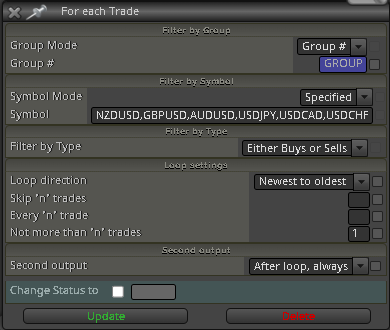
It unfortunately does not seem to work / not spotting the loss on any of the specified pairs. It does work when i change the symbol mode from "specified" to "any market", but this is not what i want to work with. What am i doing wrong here?
-
RE: Modify pip variable not working for meposted in Questions & Answers
Yes, all seems fine now
 thanks, problem solved
 -
RE: Modify pip variable not working for meposted in Questions & Answers
@jstap Thanks for your suggestion. It doesnt seem to work yet though. When you say to change the value from 0, what value are you referring to? And to what should i change it?
-
Modify pip variable not working for meposted in Questions & Answers
Example project:
https://fxdreema.com/shared/UMsqBU4RcOn every pair i need to add certain pip distance above/below a previous top/bottom of last "x" candles. I created a pip variable and used this variable within the horizontal line that will be placed at tops/bottoms + the value put in modpips.
I used "+v::modpips" in the adjustment box from the horizontal line.
This element doesnt seem to work in my main project? Can anyone tell me what im doing wrong here.
-
(Partial) Take profit trailingposted in Questions & Answers
FXdreema has a block in place for stop-loss and take profit trailing. This block will move the hard stop-loss and take-profit, to then fully close the trade when hit.
I am trying to make an adjusted version of this within my strategy. Below number 1 and 2 is already implemented in FXdreema. Number 3 is not.
1 -> start the trailing of a take profit once the trade is 50% in loss of current stop-loss
2 -> define steps and stops, similar to the options within the trailing stop block already in place3 -> define what volume needs to be closed once the trailing take profit has been hit. I dont want the trade to be fully closed.
I am trying to tackle above with this project: https://fxdreema.com/shared/ctSDXrned
Within the project horizontal line "LIM" will be moving with a fixed distance from moving average 1 (current price). LIM should however work as a virtual trailing take profit and therefore only move in one direction; north in case of a sell and south in case of a buy.
The next step would be a condition whenever price crosses below or above LIM the partial take profit closing will take place. This is no big deal and i can handle this myself.
My question is if anyone has ideas how i can produce a horizontal line that is only trailing upwards or downwards, and not both directions as seen in the project example i've given. In other words, a trailing line that would only move north once the price goes north and ignore movements to the south.
Hope someone can help me on this, thanks.
-
RE: Custom MQL code for saving a templateposted in Questions & Answers
Ok, apparently it had to do with me using using the code in the wrong way. Apparently its used this way:
//--- Save the result in a template
ChartSaveTemplate(0,"EURUSDTEST");Not able to remove this topic due to permissions, but perhaps anyone else finds this helpfull..
-
Custom MQL code for saving a templateposted in Questions & Answers
At the moment i am creating a robot to automate a bunch of pre-work (setting up charts for me to analyze). Part of this includes the automated saving of the current chart template when a button is pressed.
I found the following code:
bool ChartSaveTemplate(
long chart_id, // Chart ID
const string filename // Filename to save the template
);When putting the above within a custom MQL block and defining ID and name i get the following errors:
'ChartSaveTemplate' - function declarations are allowed on global, namespace or class scope only
Can anyone tell me the correct way of doing this? Thanks
-
RE: Copy object valuesposted in Questions & Answers
If its still unclear i will make a small sample project on the builder tomorrow, or record it. Its quite important to me
