@Ho3ein-sh
این روش اشتباهه و بیشتر برای مبتدی ها خوبه دلیلش اینه که اگه اینترنت شما قطع بشه یا متاتریدرتون کرش کنه و این وسط چندتا کندل بگذره اون وقت ربات نمیتونه اون تعداد رو بشماره چون ربات فعال نبوده. از طرفی اگر ربات شما سهوا از روی چارت حذف بشه و دوباره لودش کنید روی همون چارت, شمارنده ریست میشه و صفر میشه
بهترین راه حل اینه که زمان رسم خط رو توی دیسکریپشن یا تولتیپ ذخیره کنیم و ربات همیشه اون رو بخونه و هر موقع بیشتر از ده کندل ازون زمان گذشته باشه بیاد خط رو حذف کنه. ایننجوری حتی اگه شما این وسط به اندازه 5 کندل هم رباتتون غیرفعال باشه باز درست میتونه سر 10 کندل خط رو پاک کنه
R
Posts made by rouzbehali
-
RE: گروه روبومستر سلیمانی خواهposted in Questions & Answers
-
Output Feature for Custom Blocksposted in Questions & Answers
I'm building a custom block in Fxdreema and want to replicate the variable selection feature of the native "Modify Variable" block. Specifically, I want a field in my block where users can right-click to choose a target variable from a list, and my block will then store its output (e.g., an extracted string) into that variable.
How can I implement this right-click variable picker in a custom block? I've attached images for reference.
Currently The right-click menu on any custom block's input currently works in "read" mode (blockinput = v::output_save). I need to change this to "write" mode (v::output_save= blockinput).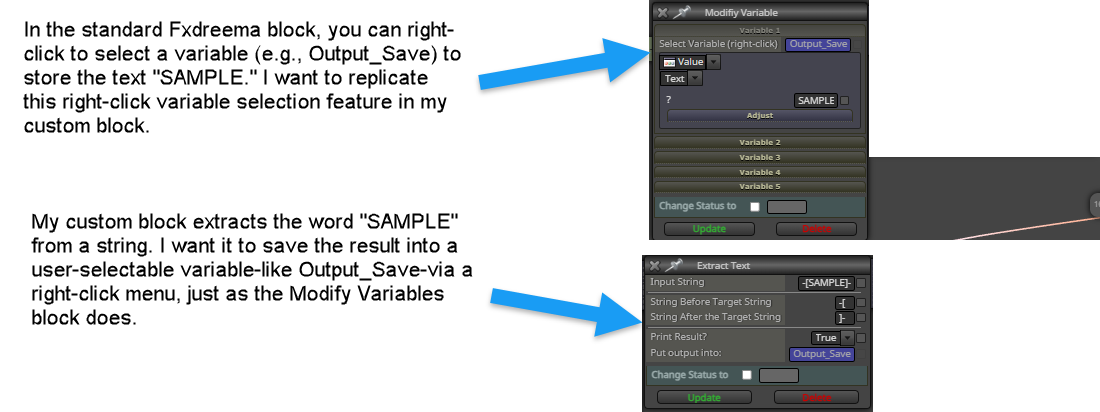
-
RE: what is the problem with this errorthis array out of rangeposted in Questions & Answers
This can happen when you work with custom-created arrays. Do you have a custom MQL block that is filled with array codes? If the answer is no, do you have Market Properties Bid/Ask somewhere in the blocks?
-
RE: How to Add Output Variable in Custom Blocks?posted in Questions & Answers
@jstap Thank you for your response. My query is about "Custom Block," which is developed in Custom Block Studio. What I am asking for is a way to include output variables in "Custom Blocks." In other words, how do I create a custom block in custom block studio and then set a variable as output, similar to the field I previously shown for the "Modify Variable" block? I hope everything is clear now.
-
How to Add Output Variable in Custom Blocks?posted in Questions & Answers
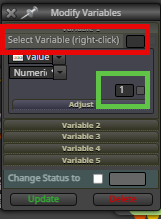
Is it possible to define an output field that stores a value in a variable in Custom blocks? Currently, we can only specify input variables while creating a custom block. But I am looking for what we have in the "Modify Variable" block. I am seeking for the red box, as I already know how to add the green box. Any help would be appreciated.
-
RE: Save variables/constants if terminal closes/crashesposted in Tutorials by Users
@tswaldi https://fxdreema.com/shared/srfHv6Ksc
Here's a link to an example project. When EMAs cross up, this EA buys, and when they cross down, it sells. After the buy trade, it assigns the variable "Buy". After selling, it assigns the variable "Sell" and creates a text far away from the corner (1000000 pixels). This text stores the variable value. If your metatrader crashes or you accidentally remove the ea from the chart, simply reload the ea. On init, ea looks for the text. If the text is discovered, ea fills retrieves the variable by checking into the text description. -
RE: "Once per Week" Block is removed from fxdreema?posted in Questions & Answers
@jstap I actually got the same result with a "once per bar" candle and set the timeframe to weekly. I was wondering why the block was removed from the block library.
-
"Once per Week" Block is removed from fxdreema?posted in Questions & Answers
I updated my client's EA and he noticed that the "Once per Week" feature is not working as it did before. I checked the blocks and everything seemed fine until I realized that I couldn't recreate the "once per week" block because it had already been removed. Any thoughts on this?
-
RE: Save variables/constants if terminal closes/crashesposted in Tutorials by Users
I use a different approach by creating text label objects on the chart in a location that is not visible. These text labels will hold the variables, flags, etc. If my MT4/MT5 crashes and I reload the EAs to the same chart, it will look for those text labels to retrieve the data and continue working.
-
RE: PERIOD CURRENT compiling errorposted in Bug Reports
I’m running into the same problem with exporting my projects. I used to be able to export the ex4 files, but now I’m getting an error about ‘PERIOD_CURRENT’ being undefined with some of my previous projects. I even tried exporting around 10 older versions of an EA from a year to a few weeks ago, which worked before, and I’m having the same issue with those too having the exact same error. It’s like something changed recently. I can’t even export the EA that I successfully exported last night. I also tried checking the history, but no luck there either. I attempted to export the mql4 and re-export it, but that didn’t work either. By the way, I attempted to remove 10 blocks at each time to locate the problematic block. After narrowing it down and finding the problematic block, I deleted it, but when I undelete the other blocks to export again, I encountered the same error. It’s strange because no matter which block I delete, the issue seems to move to another block. Weird,
-
RE: Missing block on next dayposted in Bug Reports
I’m running into the same problem with exporting my projects. I used to be able to export the ex4 files, but now I’m getting an error about ‘PERIOD_CURRENT’ being undefined with some of my previous projects. I even tried exporting around 10 older versions of an EA from a year to a few weeks ago, which worked before, and I’m having the same issue with those too having the exact same error. It’s like something changed recently. I can’t even export the EA that I successfully exported last night. I also tried checking the history, but no luck there either. I attempted to export the mql4 and re-export it, but that didn’t work either. By the way, I attempted to remove 10 blocks at each time to locate the problematic block. After narrowing it down and finding the problematic block, I deleted it, but when I undelete the other blocks to export again, I encountered the same error. It’s strange because no matter which block I delete, the issue seems to move to another block. Weird, right? I’ve been using fxdreema for about 5 years, almost every day for around 12 hours, so I’m pretty familiar with it. Any ideas on what could be causing this?
-
RE: گروه روبومستر سلیمانی خواهposted in Questions & Answers
دلیلش اینه که شما روی دیتای دقیق رباتتون رو تست نکردید. شما باید دیتای دقیق رو دانلود کنید و وارد متاتریدر کنید
-
RE: Updating the constants results in deleting some of the wordsposted in Bug Reports
@jstap the share link does not have the constant/variable form. the issue is exactly about the constant/variable form. so sharing the link does not help. the project is just one single Pass block.
-
RE: Updating the constants results in deleting some of the wordsposted in Bug Reports
the share link does not have the constant/variable form
-
RE: Updating the constants results in deleting some of the wordsposted in Bug Reports
this is the text in a proper form. the text above was corrected by the website algoritm

-
Updating the constants results in deleting some of the wordsposted in Bug Reports
I try to have this input value below for the input option but fxdreema skips the few last words
{ A2 = 2, /* Pips*/ A1 = 1, /* Price*/ A3 = 3, /* Entry Level*/ A7 = 7, /* Fixed TP Pips*/ A5 = 5, /* PB*/ A6 = 6, /* Dynamic Level*/ A10=10, /Dynamic +/ A11=11, /Dynamic Extra/ A8 = 8,/* Automatic*/ A9=9, /None/ }
No matter how many times you try, once you paste the text and click on update, fxdreema deletes some of the words from the end
This issue has not happened before. I currently have a bunch of projects with this input option and I can compile easily. but for the next projects, I cannot use it anymore as once I update the constants, the compiler deletes some of the words and letters from the end. I'm facing this issue since the few days EA with BUG.mq4