fxDreema

    • Register
    • Login
    • Search
    • Back to the main page
    • Categories
    • Recent
    • Tags
    • Popular
    • Search
    1. Home
    2. s00071609
    3. Posts
    S
    • Profile
    • Following 0
    • Followers 1
    • Topics 8
    • Posts 69
    • Best 0
    • Controversial 0
    • Groups 0

    Posts made by s00071609

    • RE: Value Using Buffer (No Source Code)

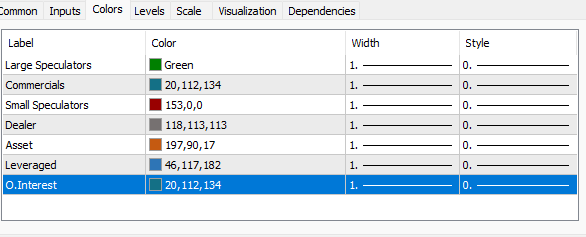
      @jstap Do you mean input window:
      c12770c3-7db7-4fc0-a8ab-4302a809ebba-image.png .

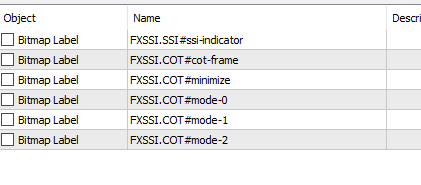
      The bitmaps are objects, but I cannot find object related to the lines. The objects on the list are the buttons and frame. I dont think they contain any value. If it was possible to get the data somehow it would be wonderful.

      posted in Questions & Answers
      S
      s00071609
    • RE: Value Using Buffer (No Source Code)

      @jstap This is the buffer - it does have buffer. But these buffer return error. Object on chart does not show these lines, not sure why - it should show on object lis right? See below
      58797b3c-6267-4773-bcf6-7cc56bca8b92-image.png

      15cca460-b7c6-4120-a131-771f1eb3598b-image.png

      posted in Questions & Answers
      S
      s00071609
    • Value Using Buffer (No Source Code)

      I wanted to check if anyone can provide a suggestion as to how I can get the indicator values with buffer. Don't have source code. Its a Cot data indicator.

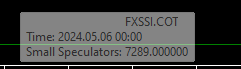
      If mouse is hovered over the green or red line, it gives the value of Cot data. But when I use the buffer value it gives error. Any suggestion

      This is what it shows when hovering mouse over red line:
      91cc4caf-a326-46c7-9654-cb622d528f04-image.png

      This is the project and indicator link
      https://fxdreema.com/shared/wqeynVpSb
      https://fxssi.com/cot-indicator

      posted in Questions & Answers
      S
      s00071609
    • RE: News EA

      @Ipod If the EA works as intended, it can be useful. Lets say you are trading a prop challenge and have traders running on profit. You have a news you wish to hold through.

      If you have EA running and you are not in from of computer. If EA needs to close the position as your exit conditions are met during the news, you could use the filter to avoid that. These days prop firms wont pay your profit if its executted during news

      posted in Questions & Answers
      S
      s00071609
    • RE: News EA

      @l-andorrà
      The purpose of this EA is simply to prevent opening and closing the postion during news. The FSSI calander indicator draws the line named: FXSSI.CALENDAR#news-line - EA identifies the next available coloured (active line) and gets the time. Then you know the rest. Iposted the FSSI link in previous posts.

      posted in Questions & Answers
      S
      s00071609
    • RE: News EA

      @l-andorrà said in News EA:

      Select object by name block

      I am not too sure what you mean. Its been a while since I posted this. Since then, I have changed a few things. Here is the new link

      https://fxdreema.com/shared/6MGerqbgd

      This EA does work, as far as I can see. If you see any issue do post back. thanks

      posted in Questions & Answers
      S
      s00071609
    • RE: Screenshot when Button Pressed

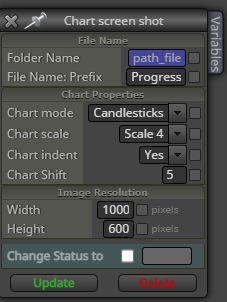
      @s00071609 e5ab9f1b-9d96-41bb-82c4-7ed82470f299-image.png

      I have resolution set to 1K x 600. It works at times but most of the time it gives bad shot

      posted in Questions & Answers
      S
      s00071609
    • RE: Screenshot when Button Pressed

      @s00071609 I don't trade on a chart that look like above. Its obviously a bug. My chart is pretty big and not so squeezed up.

      Any idea why this may be occurring. If i reload the EA, the screenshot works fine and takes correct size. But when condition is triggers then the shot become like above.

      posted in Questions & Answers
      S
      s00071609
    • RE: Screenshot when Button Pressed

      @jstap Another question I had was - when the screen shot gets taken, it ignores the pixel set, not sure why this is happening, I have set it to 800x500 and I get this

      8ca9ca55-8ce1-40c3-b5e3-ae4781febb2f-image.png

      posted in Questions & Answers
      S
      s00071609
    • RE: Screenshot when Button Pressed

      @jstap That just checks the condition. If i load Screenshot EA to 15m chart and want muliple timeframe screenshot, will the change timeframe block work with it?

      I tried to use that block, but only current timeframe screenshot worked. What do you think?

      posted in Questions & Answers
      S
      s00071609
    • RE: Screenshot when Button Pressed

      @jstap said in Screenshot when Button Pressed:

      something like condition block (chart TF != variable TF)-print screen

      The conditions you have described can be made but are we taking about the change timeframe block?

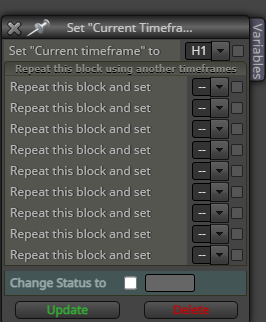
      This block"Set "Current Timeframe" for next blocks" description says it loops if multiple timeframes are set. But i tried it and does nto seem to work. This block does not physically change the TF, do you think it can take screenshot of another timeframe?
      Or is there a way to physically change the timeframe.

      16b84060-5835-4c1e-8b3a-45d38a2fbe81-image.png

      posted in Questions & Answers
      S
      s00071609
    • RE: Screenshot when Button Pressed

      @jstap Yep it did work. I think subwindow was the issue. Would screenshot work with change timeframe block or the change market block? Suppose i would like it to take screenshots for 15m, 1hr, 4hr etc. Would this be possible without loading it into multiple timeframes?

      posted in Questions & Answers
      S
      s00071609
    • Screenshot when Button Pressed

      I am trying to have a button when pressed on chart, a screenshot is taken and saved. I also have screenshot for buy and sell actions, which are working correctly.

      Screenshot when button pressed is not working. Any one got idea why this would not work. Here is the link - https://fxdreema.com/shared/K1MofRMec

      posted in Questions & Answers
      S
      s00071609
    • RE: Account Starting Balance (lifetime)

      @jstap Ok thanks for this. So, it is supposed to save the current balance at start then keep it that way - which means that it needs to be loaded to an account that hasn't been traded. Am I right about it?

      posted in Questions & Answers
      S
      s00071609
    • RE: Account Starting Balance (lifetime)

      @jstap said in Account Starting Balance (lifetime):

      MagicStart

      I never heard of MagicStart, could you please clarify what it means?

      posted in Questions & Answers
      S
      s00071609
    • RE: Account Starting Balance (lifetime)

      I have already got global var balance. It works very well. I wanted to see if initial balance can be derived from block. If i forget to change the BL in global var, its a problem - and i have done this. But such a simple thing missing from fxdreema is unbelievabl Would there be any custom block that we can create to get that value?? anything should be possible with custom blocks dont you think, just that I dont know how

      posted in Questions & Answers
      S
      s00071609
    • Account Starting Balance (lifetime)

      How is it possible to get the lifetime starting balance for an account, if anyone can help would be great. I need to create a block that can pull the initial balance for an account - its because i use prop accounts so initial balances will change often.

      If starting balance cannot be created via exisiting block or custom functions. Then is it possible to get PL so far from which starting BL can be calculated?

      I understand that balance can be saved as variable but I am looking to create a custom block or any other idea that can automatically do this.

      posted in Questions & Answers
      S
      s00071609
    • RE: News Filter Block

      @l-andorrà I think most of the threads regarding news was related to automatic and identifying news timing. Offcourse you could add dates and stop trades or even remove the algo during that time.

      I was trying to use the FSSI calander that draws the lines automatically, so it seems to be correctly give the news time.

      I use VPS which is not accessible to me all the time so automatic process is helpful and if trading several pairs, it can help.

      The vertical line i mentioned above was to replicate FSSI calendar indicator in case you dont have it installed. FXSSI.CALENDAR#news-line is the object name FSSI creates. So to test you could draw vertical line and rename it; to see if news filter can be automated. May be I wasnt clear above.

      posted in General Discussions
      S
      s00071609
    • RE: set current timeframe block

      @jstap does the change timeframe block work for screenshot? I am trying to achieve it, but it takes shots of only the current timeframe. Any idea?

      posted in Questions & Answers
      S
      s00071609
    • RE: News EA

      I was testing some ideas using a news indicator. FSSI calander MT4 and MT5 link here - https://fxssi.com/forex-news-indicator-mt4. FSSI simply draws the line on the chart and the fxdreema blocks can identify the lines and get the time value which can be used to prevent news trading or to trade news. This is my work-in-progress project which seems to be working fine.

      It gives the time value for the next news based on Fssi setting, type of news by identifying the object name for the vertical line that fssi creates "FXSSI.CALENDAR#news-line". So it gives the exact new time (next news), then you can use time filter to do whatever is needed.
      https://fxdreema.com/shared/ICKXO6y4

      The shared link will give the news time, and times to avoid before and after. If you dont have a FSSi indicator, you can simply create a vertical Line and name it - FXSSI.CALENDAR#news-line . Works exact same (For testing out).

      It has to be tested properly, but looks to me like it can work
      posted in Questions & Answers
      S
      s00071609
    • 1
    • 2
    • 3
    • 4
    • 3 / 4