@fxDreema Thanks for clarifying 

I am using 5 digit broker, I want to keep 5 points SL. I finally able to do it once I set 0.2 as Spread in the strategy tester. But now the problem is spread it is showing as 2.50 due to which I am not able to test the same in MT4 terminal.
Currency Pair: EURUSD [Actual Spread is 2 points]
Below are the point settings.
0.001 = 0.01
0.00001 = 0.0001
0.000001 = 0.0001
Below are the MT4 strategy tester settings:
In strategy tester, if I set the spread as 0.2, showing 2.50 in Spread Meter. Able to see SL as 2 points.
If I set the spread as 2, showing 0.2 in Spread meter. But SL is showing as 8 points.
@vish Thanks for your response. But my question is how will the EA recognize which timeframe I placed the trade from mobile. Lets say if I place a trade in EURUSD in 15 mins timeframe. As my EA is used in all the timeframes of EURUSD, it will close the trades whichever first matches.
The condition you mentioned works only on MT4 terminal window. I want the same to happen when I trade in any particular timeframe from mobile.
I want it to recognize the timeframe as well as symbol.
Hello,
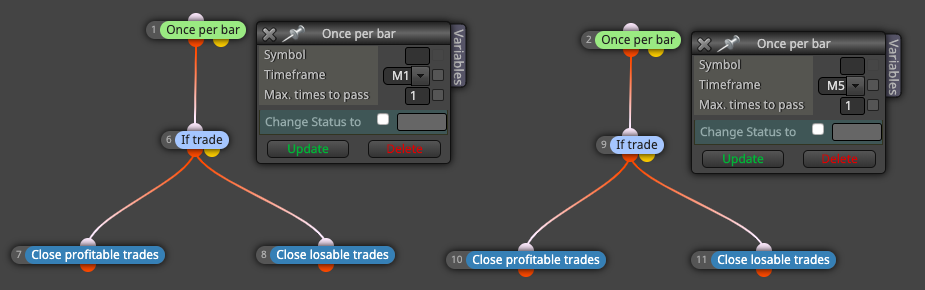
I want to place the trade manually by looking into some facts on any of the symbol. I want to close the trades from the EA on particular timeframes like below. I would like to use it in any symbol and in any timeframes. Is this possible without dragging the EA into the chart? or is it possible to place the EA in a single symbol and use it on multi-timeframes in MT4 or for that particular Symbol?
This scenario arises while I am away from system. But I place the trade through mobile in a particular timeframe.
Eg: EURUSD, from mobile I placed a buy in 15 min timeframe. As soon as that happens only 15 min chart of EURUSD should use the EA. How to achieve this scenario?
@casper Thanks for sharing @miro1360 Could you please help me to understand this?
@martin-1 Nope
I have put this simple flow.
for each close trade newest to oldest and all options are empty and connected to the modify variable which does +1 and added an Alert to this variable.
I have many closed trades. But it always shows 2 alerts with value 2. I am expecting it to hit the alert with values incrementing each time for each closed trade.
Eg: My expectation is If 10 closed trades - then 10 hits with value 1,2...10 for each alert.
Not able to understand why these pink blocks are so difficult to understand or use.
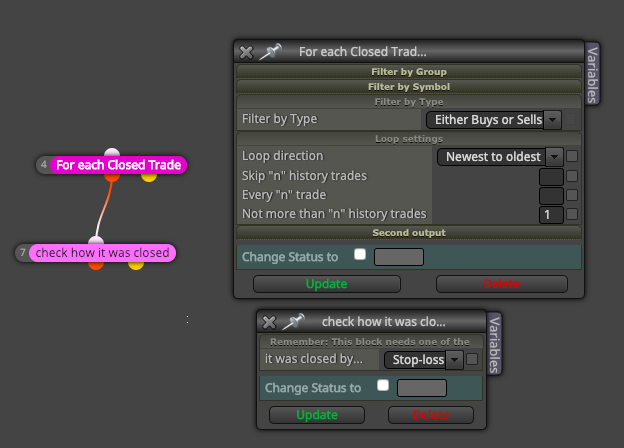
@casper Thanx. But that is not what I want. I want to check the last closed trade was it closed by Stop loss... Also I don't think these pink blocks are working and I am trying to use things like For each pending order, normal for each and other things nothing seems to be working. This is the first time I am using these blocks. Am I missing something here?
I want to check the last closed trade is closed by stoploss or not. But even though there is a trade closed by Stop loss, its not getting triggered. What I am doing wrong here?
Note: Please help me, I am not able to use any of the pink looping section. It doesn't do what it intended to do. Is there something am I missing while using or is it a bug?
@fxDreema Thanks for your response.
I will try to explain my scenario. As per your example, Let's say I want to trade b/w 11:00 to 12:00, if I see two consecutive losses (newest to oldest) I will stop trading that time. I will start to trade again at 12:25 to 13:00 freshly. My condition for stop trading would be 2 consecutive losses. Next time when I try to trade, trading will not happen since it encounters previous 2 consecutive losses. This is the why I want to put some time filter on it so that my next trading set will still continue.