fxDreema

    • Register
    • Login
    • Search
    • Back to the main page
    • Categories
    • Recent
    • Tags
    • Popular
    • Search
    1. Home
    2. Shaktale
    S
    • Profile
    • Following 1
    • Followers 0
    • Topics 2
    • Posts 7
    • Best 0
    • Controversial 1
    • Groups 0

    Shaktale

    @Shaktale

    -1
    Reputation
    227
    Profile views
    7
    Posts
    0
    Followers
    1
    Following
    Joined Last Online

    Shaktale Unfollow Follow

    Best posts made by Shaktale

    • Condition & Formula, Yellow connection has stopped working

      Hi all,

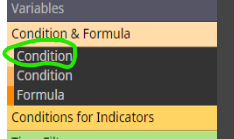
      I have an issue with the yellow connection in the condition box
      0_1593266477832_Annotation 2020-06-27 145700.png

      0_1593266900118_Annotation 2020-06-27 145790.png

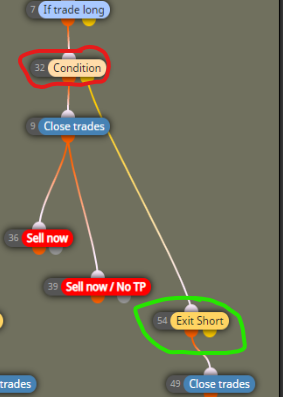
      I am using one indicator in block 32 and one in block 54.
      EA will first check condition in block 32 and if not met it will have to check condition in block 54.
      Indicator in block 54 is not doing anything and is not even showing up in MT4 when connected through the yellow dot.
      If I connect block 54 to the orange dot in block 32, indicator will show in MT4 and work, but obviously I only want this indicator to work then the first condition in block 54 is not met.

      Just to clarify, this was working before, and I have been using this EA for months, I have just noticed this behaviour this week.
      I have even previous versions of this EA downloaded and working as intended, but If I import them to fxdreema and download them again (without making any changes) they will break and ignore that box.
      The indicators I am using are custom indicators that I have been using in fxdreema for months without issues, so not an issue with the indicator itself.
      Even when connecting one of the default indicators in the yellow connection it will be ignored in MT4.
      I am a paying user so nothing to do with connection limits.

      Please Help

      posted in Bug Reports
      S
      Shaktale

    Latest posts made by Shaktale

    • RE: Compilation errors - '::' - syntax error

      Thanks a lot for the help.
      I tried that but didn't work. Same error.
      I will have to keep trying other indicators, this one doesn't seem worth the hassle.

      Thanks again

      posted in Questions & Answers
      S
      Shaktale
    • RE: Compilation errors - '::' - syntax error

      Thanks for having a look.
      I did use a variable as input (which was working before), but even after removing it, I keep getting the same error

      posted in Questions & Answers
      S
      Shaktale
    • Compilation errors - '::' - syntax error

      Hi all,

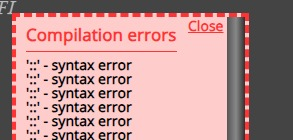
      I am getting this error.

      d6f7b4fa-8805-4f4c-87a1-54d447684c56-image.png

      https://fxdreema.com/shared/x97hgQsCc

      The strange thing is even if I try to compile older EAs that were working before just fine, I'm getting this same error.
      This only happens on EAs that run this particular custom indicator.
      Neither the EAs or indicator have been modified, and were working fine before.
      If I take the .mq4 of the indicator and compile it, it does not give any errors.

      Not sure how to trace back this syntax error, as it does not mention any details.

      Any help or ideas are more than welcome đŸ™‚

      Thank you.

      Kind regards

      posted in Questions & Answers
      S
      Shaktale
    • RE: Condition & Formula, Yellow connection has stopped working

      Hi there,

      So the issues I was having with the yellow output were because it does not work as a "false" output or "otherwise".
      Let me explain, if you create a box with some indicator conditions, when these conditions are met it will use the orange output. The yellow output is used when the opposite conditions are met, not when the orange output conditions are false or not happening.

      Hope that makes sense.

      Kind regards

      posted in Bug Reports
      S
      Shaktale
    • RE: Condition & Formula, Yellow connection has stopped working

      Confirmed, this is happening in all my projects.

      No matter what I do I cannot use that yellow connection anymore.
      I have tried creating new blocks but the issue is the same.
      I have managed to create a work around using the orange connections and different conditions, but this is something that has to be looked into.
      I have sent an email to support.

      Thanks

      posted in Bug Reports
      S
      Shaktale
    • RE: Condition & Formula, Yellow connection has stopped working

      @l-andorrĂ  Thanks for your reply.
      It seems some of my projects are not loading indicators properly, as if the code of the EA is bugged, but some are still working fine.
      This is really strange indeed, I will try to contact the admin.

      posted in Bug Reports
      S
      Shaktale
    • Condition & Formula, Yellow connection has stopped working

      Hi all,

      I have an issue with the yellow connection in the condition box
      0_1593266477832_Annotation 2020-06-27 145700.png

      0_1593266900118_Annotation 2020-06-27 145790.png

      I am using one indicator in block 32 and one in block 54.
      EA will first check condition in block 32 and if not met it will have to check condition in block 54.
      Indicator in block 54 is not doing anything and is not even showing up in MT4 when connected through the yellow dot.
      If I connect block 54 to the orange dot in block 32, indicator will show in MT4 and work, but obviously I only want this indicator to work then the first condition in block 54 is not met.

      Just to clarify, this was working before, and I have been using this EA for months, I have just noticed this behaviour this week.
      I have even previous versions of this EA downloaded and working as intended, but If I import them to fxdreema and download them again (without making any changes) they will break and ignore that box.
      The indicators I am using are custom indicators that I have been using in fxdreema for months without issues, so not an issue with the indicator itself.
      Even when connecting one of the default indicators in the yellow connection it will be ignored in MT4.
      I am a paying user so nothing to do with connection limits.

      Please Help
      posted in Bug Reports
      S
      Shaktale