
S
Posts made by SimonFX
-
RE: Put the indicator code directly into the EA.posted in Questions & Answers
Not easily: There is a binary type for variables and you can then writefile.. then icustom/load the file written as appropriate. Could all be done in custom code but not easy stuff really..
You can also export as MQL5 from fxdreema then use an include to include the whole indicator.. compile in your local mt5 editor, this is likely easier path..
-
RE: How to change minimum lot size from 0.01 to 0.001?posted in Questions & Answers
@mr-lenny I think we'll all encounter same problem wherever those lot sizes are available.. a very rare scenario indeed it seems as it stands, but would be good to have solved..I've lots of mt5 accounts across lots of brokers and never seen that before! rare!
-
RE: Suppress EA Init Warnings..posted in Questions & Answers
Thanks, I'll try get his attention.. I'd sure like to make this work ready for commercial prime time.
-
RE: Entering a number to a variable during active tradingposted in Questions & Answers
@simonfx and by now ten or so real accounts 245, too... so am sure happy with outcome of testing thus far. I apply ITIL/Agile methodologies to my approach but yes more testing regime is very welcome!! I'll look into that Visual Backtest and again, thank you. I did find backtesting useful for bots that are fully automated back when I was blowing myself up alot lol
-
RE: Entering a number to a variable during active tradingposted in Questions & Answers
@jstap I use demo accounts and call ontick with ontimer on weekends
 I'm not sure that will work for me.. but I'd love to get it going if I can pretend to real time trade with what you call .. Visual backtest? If on chart doesn't work.. not much good to me.
I'm not automating much, just making metatrader actually user friendly is my aim here. not a full automated solution, semi.
-
RE: Suppress EA Init Warnings..posted in Questions & Answers
2022.04.24 23:27:07.327 AutoTrade (MATICUSD,D1) 1 object of type Block529 left
2022.04.24 23:27:07.327 AutoTrade (MATICUSD,D1) 1 object of type Block530 left
2022.04.24 23:27:07.327 AutoTrade (MATICUSD,D1) 260768 bytes of leaked memoryThat reference to memory leak log entry above, no need to know that here.. can we turn it off? fingers crossed someone might know how we could suppress (custom code is fine) if its not an easy option in the interface somewhere..
-
RE: Entering a number to a variable during active tradingposted in Questions & Answers
@jstap um right, yeah, my view not include back testing..
indeed ontick could be used, too. I like on chart cause it's cheaper performance wise and only doing what it has to on event.. but yes, ontick is fine too. I think we sure covered, the answer is yes!
So that leads to.. couldn't imagine needing to change the variable contents on fly from a human interface input during back testing.
Probably I'm not understanding how it could be used in back test, everytime I try it processes ten years in minutes.. no chance to work with input fields there.
Gosh, If I wanted my bot to work in backtesting I'd have so much to re-write come to think of it now that you point that out.. oh well, I'm happy to tell punters it don't work in back testing lol thanks for that clarification.
-
RE: Entering a number to a variable during active tradingposted in Questions & Answers
I can confirm that variable/input data can be overwritten using modify variables and an edit field on the chart.
I capture the input into the edit field in onchart, with 'edit field modified' event > modify variables ( based on object on the chart..)
-
RE: Suppress EA Init Warnings..posted in Questions & Answers
@l-andorrà All things are worth to be traded, just depends when
The glory of MT5, imho, is one can open ten accounts, spreading risk across brokers (in case of a black swan) .. and comparing them real time.
I wouldn't trade coins with anyone but Eightcap that said.. please tell them Simon sent you. They genuinely have spreads that have made the coins actually worth while.. and leverage is good. It's likely they won't serve US customers however..
Some other brokers are taking the opportunity (advent of coins) to produce instruments with such wide spread, trucks could drive through them haha..
I just love Admirals Reversed Quotes and I wish all MT5 brokers would do that!! but oh well, we can program same logic into FXDreema. Getting rid of these messages on startup is one of the last parts of polish to a completed robot here.. I hope someone can help. same robot works across all the brokers and all the instruments, means I'm not looking for the one "great broker" ... seems to me they're all great at something.. generally. This will be because the LPs behind them spread their best deals across their retail customers (the brokers)... again, generally speaking.
Indeed, this log thing I'm wrestling with is something deep within (fxdreema) so I fear only admin might be able to help..
PS I find the coins stressful, commodities is easiest.. imho. money to be made if you can let go and let robot.. that said.
-
Suppress EA Init Warnings..posted in Questions & Answers
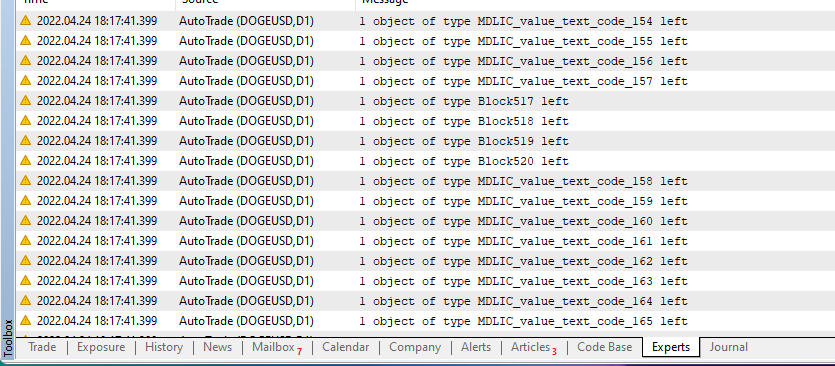
Sorry if it's been asked before, and sorry if its just in interface somewhere.. but does anyone know the trick to turning off/suppressing these verbose experts log entries?
All of my fxdreema EAs do something similar to oninit it seems.
granted, it doesn't have much noticable if any effect, just, before offering this bot for sale it would be much more professional to suppress what appears to me to be debug output.
ALSO when loading twenty charts you can imagine the log if very busy on init.. would like to avoid and just see the relevant status/debug messages I'm printing via Comment/Print method.. they are output log enough for me.
Thank you
Simon
PS these messages often talk of memory leak too, but all works really well, for days, so, not sure what it means.. any input welcome.
-
RE: all my stops set to 48.01posted in Bug Reports
I spoke to early when I said it was solved.. I think perhaps I need to setup Group # but not set a number.. otherwise my other option is All Trades (Manual and Auto) is my other option.. but I think that might be faulty somehow. That said I do have the symbol specified and the type specified, so thought that would filter enough. I'll try with Group # and no number set. seems to be the default for one of the blocks so I'm hopeful.
I had my oil trade set to a stop of 3380.46, clearly the correct stop for one of the index trades.
-
RE: all my stops set to 48.01posted in Bug Reports
have further solved this by actually bothering to grab the Symbol (oninit) and drop it in Specified for the Symbol filter (ontrade/ontick) in the foreach type blocks. this as made my ea's really solid in terms of sticking to their own trades.
a explanation of the Group # as a trade filter would be welcome. will continue to search for that.. all suits me for now, but would like to understand that option.. thx. Simon
-
RE: all my stops set to 48.01posted in Bug Reports
Hi Team, this is awesome to know no updates.. so it's all my side by the sounds.
Since then I've found a rogue ontrade filter set on sells instead of buys.. so there's the bleed.
THEN I think maybe this is correct, https://fxdreema.com/forum/topic/8561/unreliable-ontrade-filter-events-on-mt5/4
-
RE: all my stops set to 48.01posted in Bug Reports
I found out of six trades.. that one had correctly set 48.01 as its stop... it seems to me that three of the others all have their stop set to the same as this one trade.. any thoughts on how that could even happen? it seems like stop bleed between the trades or something, seems impossible.. but..
-
all my stops set to 48.01posted in Bug Reports
Is it possible that there is some hard coding introduced recently?
I see my usual SL change, then straight away it changes back to 48.01
I think it's within the block itself at this stage of my troubleshooting.. please check
my bots were all fine for some weeks but now all are broken..
thanks,
Simon