fxDreema

    • Register
    • Login
    • Search
    • Back to the main page
    • Categories
    • Recent
    • Tags
    • Popular
    • Search
    1. Home
    2. steveukrm
    3. Posts
    S
    • Profile
    • Following 0
    • Followers 0
    • Topics 4
    • Posts 11
    • Best 0
    • Controversial 0
    • Groups 0

    Posts made by steveukrm

    • RE: MT4 Testing Gives Wrong S/L £Amount

      Hi FxDreema,

      Thanks, but the lot size, entry price and S/L price are all correct (as shown on the screenshot) so the EA is calculating it correctly. It just looks like MT4 is calculating the loss amount incorrectly.

      If you look on the screenshot you will see that the levels are all correct but the loss amount shouldn't be the figure that it is.

      Do you have any idea what would cause that?

      Kind regards,
      Steve.

      posted in Questions & Answers
      S
      steveukrm
    • RE: MT4 Testing Gives Wrong S/L £Amount

      Hi FxDreema,

      I forgot to mention that the test was to trade short on GBPAUD 5min chart starting on 16 September 2016. All the other parameters are set in the constants in the EA I attached to my previous post.

      Kind regards,
      Steve.

      posted in Questions & Answers
      S
      steveukrm
    • MT4 Testing Gives Wrong S/L £Amount

      Hi FxDreema,

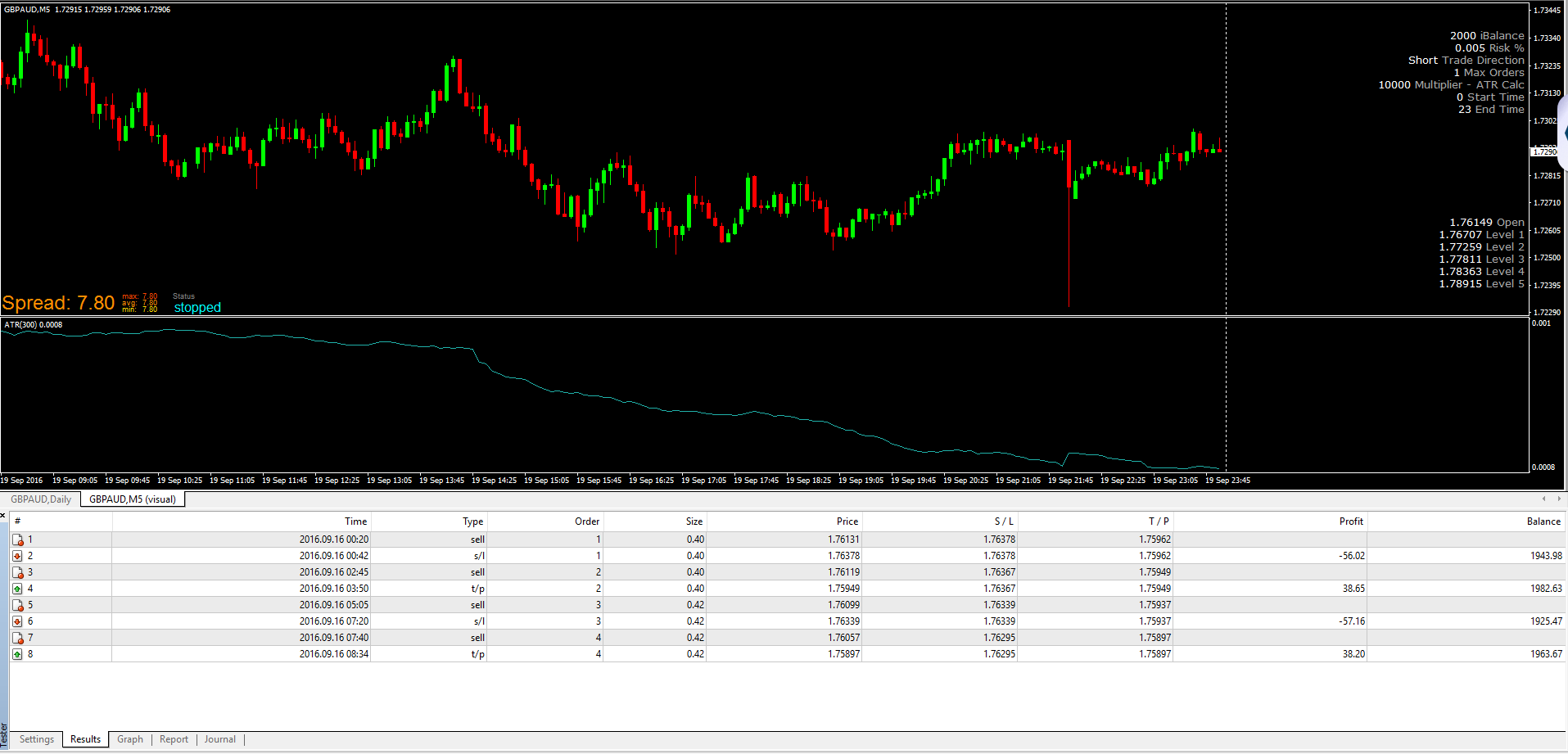
      If you could cast your eye over my EA & screenshot I would appreciate it. Basically the attached EA is set to to risk 0.5% on the £2,000 balance which should show a loss of £10 when the S/L is triggered.

      When run through MT4 Strategy Tester the trades Entry Price (1.76131), S/L Price (1.76378) and Amount/Point (£0.40) is correct. This should equal my risk amount of £10 ((1.76378 - 1.76131) * £0.40 = £9.88. This is close to my intended risk amount which is fine.

      What actually happens is that MT4 Strategy Tester shows a loss of £56.02 which is 5x larger than it should be.

      If you could let me know what the problem is and how to solve it I would greatly appreciate it.

      Kind regards,
      Steve.

      0_1481140200605_Screenshot.PNG 0_1481140211863_Steve_v4.mq4

      posted in Questions & Answers
      S
      steveukrm
    • RE: EA Inputs No Longer Visible in MT4 Strategy Tester

      Thanks, I'll make the changes from variables to constants and see how it goes.

      Kind regards,
      Steve.

      posted in Questions & Answers
      S
      steveukrm
    • RE: EA Inputs No Longer Visible in MT4 Strategy Tester

      Hi there,

      I've been a subscriber on and off for a couple years now. I had an EA that I was testing in MT4 early last year. Work got really busy and I'm only now able to work again on my EA.

      The problem..
      Now when I download the MQL file none of the inputs are visible when I click on 'Expert Properties' in Strategy Tester. The old EA is still in MT and opens up fine but the exact same one now downloaded from FXDreema doesn't show the inputs..?!

      Has the code changed?
      Is the code within the blocks from my EA (Steve_v4) outdated or something?

      If you could let me know how to resolve this soonest I would appreciate it.

      Kind Regards,
      Steve.

      posted in Questions & Answers
      S
      steveukrm
    • RE: Trend Lines

      Cool thanks.

      Any idea when a trend line block would be ready?

      posted in Questions & Answers
      S
      steveukrm
    • RE: Trend Lines

      Hi FxDreema,

      Instead of drawing horizontal lines, is it possible for an EA to draw trend lines instead?

      The reason I ask is that I use a kind of breakout system and I use lines to show where the levels are visually. Once a line is broken I then get the EA to delete the lines. I'd like to be able to look at the chart of the old breakout lines though and a horizontal trend line would allow me to do that (without the ray property used anyway), providing I didn't delete them once the line was broken of course.

      I look forward to your response.

      Kind regards,
      Steve.

      posted in Questions & Answers
      S
      steveukrm
    • RE: Work Around Error 130 with MarketInfo

      I'm using Windows 8. I discovered what the problem was with the 130 error. I was testing data from 2010 and when I opened the chart and attached the ATR indy to check manually I could see that the indy didn't show that far back - that's why the EA was falling over.

      Thanks for your help though - much appreciated.

      posted in Questions & Answers
      S
      steveukrm
    • RE: Work Around Error 130 with MarketInfo

      Hi,

      I'm trying to use the library to create my custom block for the MarketInfo data but when I open the library I get the following displayed.

      Warning: include_once(C:\Program Files\fxDreema\Data\globals\functions\filesystem.php): failed to open stream: Permission denied in C:\Program Files\fxDreema\Data\configuration.php on line 14

      Warning: include_once(): Failed opening 'C:\Program Files\fxDreema\Data/globals/functions//FileSystem.php' for inclusion (include_path='.;C:\Users\Steve\AppData\Local\FxDreema{18D1BCB9-84FB-4AA4-9FDE-B7796D37D947};C:\Program Files\fxDreema\Data') in C:\Program Files\fxDreema\Data\configuration.php on line 14

      Any idea how I can fix this?

      Kind regards,
      Steve

      posted in Questions & Answers
      S
      steveukrm
    • RE: Work Around Error 130 with MarketInfo

      My EA is a volatility EA which uses ATR in several ways. I enter on a 5min chart based on a custom indicator I had coded. I use a fraction of the ATR value of the daily chart to place stops. I've been testing different methods (tight stops with higher lot sizes vs larger stops with smaller lot sizes) to look at a strategy that gets both gains from smaller moves and also stays with a longer trend.

      Anyway, what I would like to do is the following:

      1. When indicator gives signal, have the EA compare MarketInfo minimum stop with the stop proposed by the EA.
      2. If EA stop is less than minimum allowed by broker then either change stop (and recalculate lot size to keep risk the same) and then place order at min stop level, OR if I get the Error 130 then close trade immediately.

      At the moment a trade is placed every now and then where a stop can't be placed (Error 130) and my trailing stop function then sees no SL and places one but the trailing SL is larger than the initial SL and I end up with the occasional large loss. After seeing this error crop up every now and again there's no way I can let an EA go live without being able to handle errors as I would like.

      The other thing that comes to mind is "How are errors handled?" I'd like to have routines in place to work around errors like 130 but perhaps if other error types come up then the trade would be closed immediately.

      I'm happy with the logic of my blocks but I just need the MarketInfo data. If you don't provide access to this can I create a custom block myself using MQL code?

      Thank you for your prompt response by the way.

      Kind regards,
      Steve.
      posted in Questions & Answers
      S
      steveukrm
    • RE: Work Around Error 130 with MarketInfo

      Hi there,

      Firstly, thank you so much for this software! I've nearly copied a custom EA I paid £600 for as a test of your software and I'm really happy with what I can do with fxdreema.

      I'm trying to find a way to deal with the 'Error 130'. I found a workaround online (http://www.earnforex.com/blog/ordersend ... hat-to-do/) and it looks like it's worth a try. How would I find the MarketInfo data? I've looked at all the drop down menus available but can't see where this information is.

      I look forward to your reply.

      Thank you,
      Steve.

      posted in Questions & Answers
      S
      steveukrm
    • 1 / 1