fxDreema

    • Register
    • Login
    • Search
    • Back to the main page
    • Categories
    • Recent
    • Tags
    • Popular
    • Search
    1. Home
    2. tharindu999
    3. Posts
    T
    • Profile
    • Following 0
    • Followers 0
    • Topics 21
    • Posts 72
    • Best 1
    • Controversial 0
    • Groups 0

    Posts made by tharindu999

    • RE: How to get the account name in Meta Trader

      "put the name into a comment to see what is returned"

      I didn't got it bro.... can you simplify it..

      posted in Questions & Answers
      T
      tharindu999
    • RE: How use counters to stop this EA ?.

      @jstap thanks brother

      posted in Questions & Answers
      T
      tharindu999
    • is this variable method is correct ?.

      Case - :

      The EA should count every modification / creation / close of a trade. once these activity limit reached to 2000m then the EA should stop working until the next day.
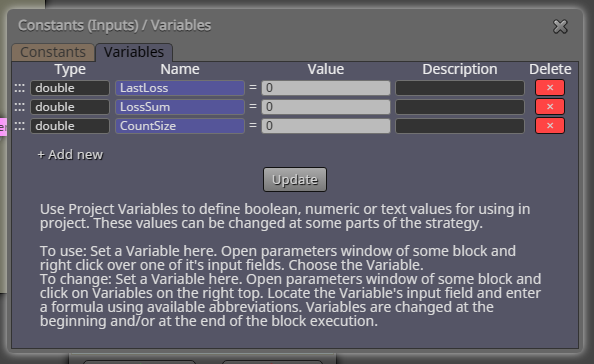
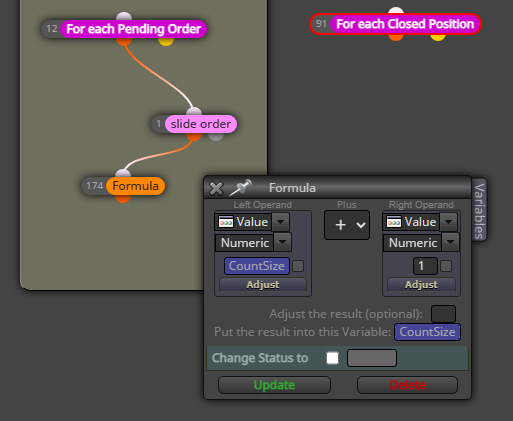
      1. Can I pick a previously defined variable like this way and add some math to it and store the value in the same variable?.

      a1c2cc36-5be3-4d0a-a469-a60ee04b75af-image.png
      bea04aba-7975-465d-8a15-efd345dbfdab-image.png

      posted in Questions & Answers
      T
      tharindu999
    • How use counters to stop this EA ?.

      Case - :

      The EA is creating orders / Modify orders / Close orders (including trailing) using OnTimer / OnTick / OnTrade Events.

      1. I need to count each time the EA is create a order / modify / close.
      2. Once all of counters (total) reach amount 2000, the EA should stop working until the next day.

      ex -

      counter 01 - 100
      counter 02 - 1300
      counter 03 - 600

      total counts = 2000

      like that.

      How should I use blocks to do this..?

      posted in Questions & Answers
      T
      tharindu999
    • How to get the account name in Meta Trader

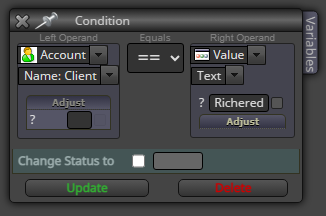
      I want to know my client name (my name for broker) to set it for this block. Where do I can find my name ?.
      271c457d-4c36-499c-af3e-57762b9eab16-image.png

      posted in Questions & Answers
      T
      tharindu999
    • RE: How to use variables

      image.png you mean this one ?.

      posted in Questions & Answers
      T
      tharindu999
    • How to use variables

      Case - :

      The EA should identify the last closed trade is either the profit or loss. If it was a loss,

      1. The EA should store the value of the loss (in money) somewhere. and trade using doubled lot size than user entered in the inputs of EA.

      2. Then EA should check the sum of the previous closed profit trades from the last lost trade. (the trade we stored at beginning to compare the recovery process).

      3. If the SUM of profits trades (from the last loss) is greater than the last lost trade, (which means the lost $$ has been recovered) then turn back to normal lot sizes.

      actually I don't know how to use variables for this. If you guys can help me with this, I can fast learn it.

      posted in Questions & Answers
      T
      tharindu999
    • RE: How to set dropdowns for inputs

      Thanks a lot brother... now I know how to create and use enumeration because of you... thanks a lot...

      posted in Questions & Answers
      T
      tharindu999
    • RE: Which code block will execute first ?.

      @jstap true...

      posted in Questions & Answers
      T
      tharindu999
    • RE: How to set dropdowns for inputs

      No, I mentioned that the value we assign to the "TM" (or any name) always should be a value of the enumeration we created. is it?.
      I also curious to know the name (data type) of the "Trading_Model" (in this case) we assigned in the data type field.

      posted in Questions & Answers
      T
      tharindu999
    • RE: How to set dropdowns for inputs

      @jstap Bro... thank you... Finally, I got it... I got one last question.

      Should we assign value for "TM" here? is there any effect "TM" value being different from the "enum" values...?

      posted in Questions & Answers
      T
      tharindu999
    • RE: How to set dropdowns for inputs

      A recap - :

      1. I created an enumeration with "enum" keyword in "constant" window / menu.
      2. then I entered values as {Model01,Model02}

      tests :

      I tested it, there is no dropdown in inputs of EA.

      I have no idea what's wrong here.

      posted in Questions & Answers
      T
      tharindu999
    • RE: Which code block will execute first ?.

      So, the winner is OnTick....

      posted in Questions & Answers
      T
      tharindu999
    • RE: How to set dropdowns for inputs

      I want to create like this type of dropdown for my inputs brother.
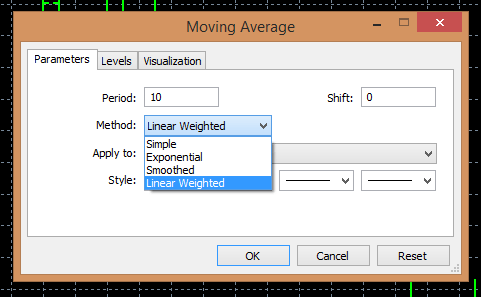
      image.png

      posted in Questions & Answers
      T
      tharindu999
    • RE: Does anybody recognize this ea strategy?

      Remove "once per bar". I'll solve the issue

      posted in Questions & Answers
      T
      tharindu999
    • RE: How to set dropdowns for inputs

      https://fxdreema.com/shared/3bLzDAAie

      Compilation error occurs.

      posted in Questions & Answers
      T
      tharindu999
    • RE: Does anybody recognize this ea strategy?

      @wegbereider that's it. there should be some other criteria's as well. since I'm always makes EA's out of candlesticks patterns, I understood that candlesticks alone won't make a profitable strategy. there should be some additional confirmations as well.

      posted in Questions & Answers
      T
      tharindu999
    • RE: How to set dropdowns for inputs

      https://fxdreema.com/shared/s8CFUMgLc

      posted in Questions & Answers
      T
      tharindu999
    • RE: Positions Count

      there should be a logical method bro, but right now my knowledge is not enough to answer this question. it would be better to repost this question.

      posted in Questions & Answers
      T
      tharindu999
    • RE: Which code block will execute first ?.

      yup brother.

      posted in Questions & Answers
      T
      tharindu999
    • 1
    • 2
    • 3
    • 4
    • 3 / 4