fxDreema

    • Register
    • Login
    • Search
    • Back to the main page
    • Categories
    • Recent
    • Tags
    • Popular
    • Search
    1. Home
    2. tmk1000
    T
    • Profile
    • Following 0
    • Followers 0
    • Topics 5
    • Posts 16
    • Best 3
    • Controversial 0
    • Groups 0

    tmk1000

    @tmk1000

    5
    Reputation
    61
    Profile views
    16
    Posts
    0
    Followers
    0
    Following
    Joined Last Online

    tmk1000 Unfollow Follow

    Best posts made by tmk1000

    • Please add menu for Project "Save as"

      I looked up the forum and I saw someone asked a similar question before but I think they were misunderstood.

      Currently, I have completed a project (P1) but I want to updated it without loosing my previous work. if there was a "Save as" option I could save it in a different name (P2) and I will get to keep the old project (P1) meanwhile I can work and edit new project (P2).

      Currently if I edit the project (P1), it will rewrite it. The best option is to create a new project and copy everything I did from he old project to the new project. That includes manually entering each variable I used in the previous project.

      if there's a better solution please advise. But adding the Save as button will be great.

      Thanks in advance

      posted in Questions & Answers
      T
      tmk1000
    • RE: Please add menu for Project "Save as"

      I will encourage us to have more vote on this post. I think if we get more vote on the post, it will get their attention.

      posted in Questions & Answers
      T
      tmk1000
    • RE: Please add menu for Project "Save as"

      @Vahab-K That's good I didn't think of that

      posted in Questions & Answers
      T
      tmk1000

    Latest posts made by tmk1000

    • RE: Please add menu for Project "Save as"

      I will encourage us to have more vote on this post. I think if we get more vote on the post, it will get their attention.

      posted in Questions & Answers
      T
      tmk1000
    • RE: Please add menu for Project "Save as"

      @Vahab-K That's good I didn't think of that

      posted in Questions & Answers
      T
      tmk1000
    • Please add menu for Project "Save as"

      I looked up the forum and I saw someone asked a similar question before but I think they were misunderstood.

      Currently, I have completed a project (P1) but I want to updated it without loosing my previous work. if there was a "Save as" option I could save it in a different name (P2) and I will get to keep the old project (P1) meanwhile I can work and edit new project (P2).

      Currently if I edit the project (P1), it will rewrite it. The best option is to create a new project and copy everything I did from he old project to the new project. That includes manually entering each variable I used in the previous project.

      if there's a better solution please advise. But adding the Save as button will be great.

      Thanks in advance

      posted in Questions & Answers
      T
      tmk1000
    • RE: Compilation errors: enumerator identifier already defined

      True, thank you for your assistance. It is much appreciated. I will keep trying different solutions. Hopefully, the bug will be fixed soon, or maybe someone will come up with a workaround or something.

      posted in Bug Reports
      T
      tmk1000
    • RE: Compilation errors: enumerator identifier already defined

      Thank you for your prompt reply. Yes, I have done that before. it works on some indicators but not all of them. Some indicators won't work at all and it will give you this error: " You are trying to use renamed indicator"

      posted in Bug Reports
      T
      tmk1000
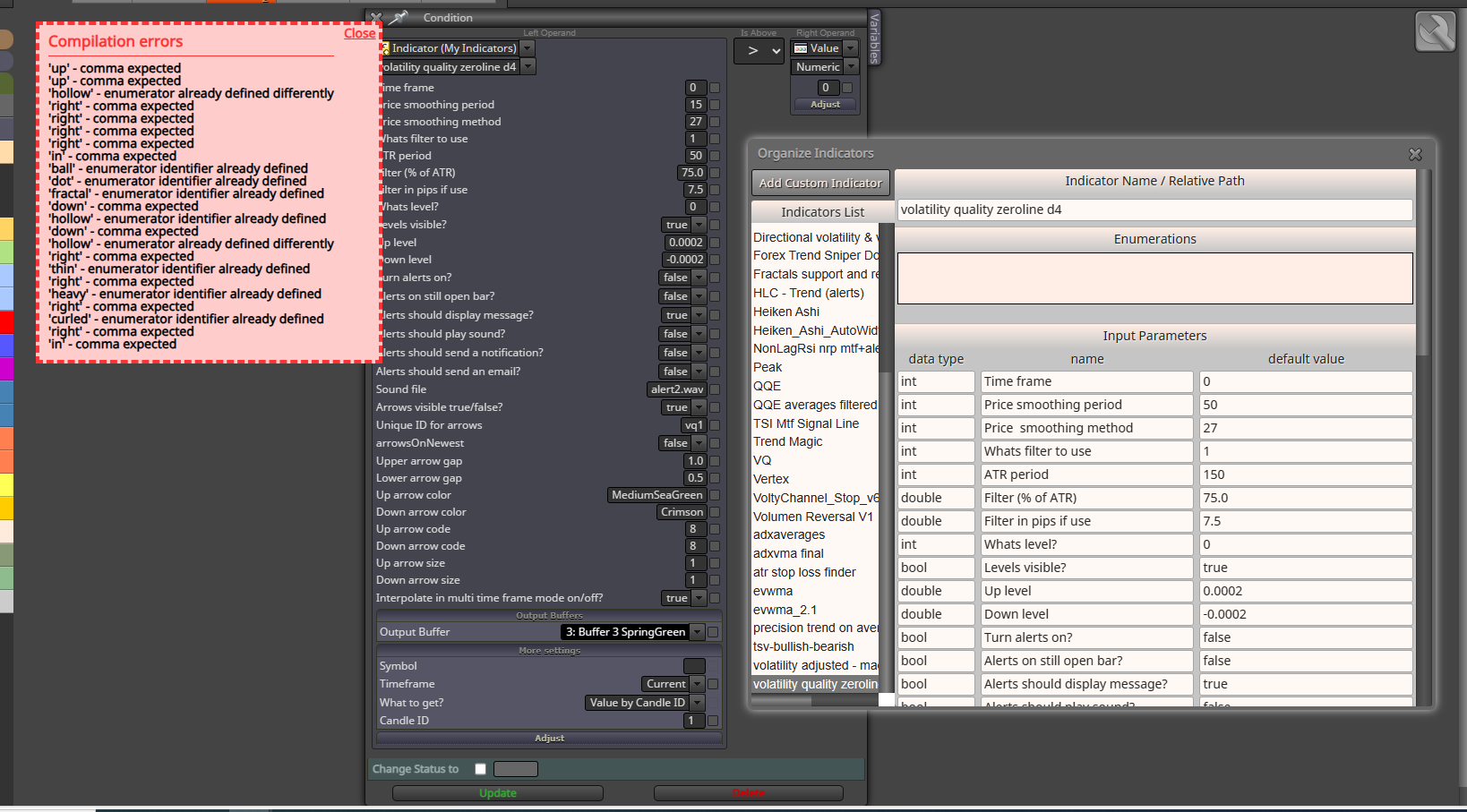
    • Compilation errors: enumerator identifier already defined

      Hi everyone,

      I'm experiencing a persistent issue with compilation errors in fxdreema, specifically related to enumeration identifiers. I've encountered this problem before and usually managed it by switching to a different indicator, ensuring only one with enumerations is used in the entire project. However, now I need to use multiple indicators with enumerations and can't find a workaround.

      I simplified the logic to isolate the problem and experimented with various solutions, but nothing has worked so far: https://fxdreema.com/shared/45lPJsgWb
      I searched the forum and found only one relevant topic: https://fxdreema.com/forum/topic/8484/compilation-errors-enumerator-identifier-already-defined?_=1721670606308

      I followed the instructions provided by @trader-philipps, but the error persists.

      Here’s what I’ve done:

      Deleted the indicator from fxdreema's custom indicators list.
      Re-added the indicator.
      Cleared all enumerations as instructed.
      Clicked "update"
      Then I go back to the project and re-selected the indicator before downloading the .ex4 file.

      Despite these steps, the same compilation error appears. It seems as if the system retains the data of the deleted indicator. sometimes I don't remember how but when playing around with it, I get the "undeclare identify error"

      Is there a known fix for this situation? From what I understand, the issue arises because enumerations can't be defined twice, yet these enumerations should be isolated to each specific indicator, not the entire project.

      Is there a way to force the system to recognize that these enumerations are unique to each indicator? Alternatively, is there a method to link all indicators requiring enumerations to a particular database to avoid this conflict?

      I appreciate any help or insights. Thanks in advance!

      84c80cb1-f965-47ce-b755-e6a817936df7-image.png

      posted in Bug Reports
      T
      tmk1000
    • RE: Creating EA using .ex4 indicator

      Hi @roar , I was meant to do another topic for this but because it happened again. I decided to ask here. But please advise if I need a new topic for this.

      Basically whenever, I edit an .ex4 indicator under "My indicator tab: Indicator Name / Relative Path". it seems like the change does not take effect immediately. Somehow the program still store the previous entered data. I can fresh the page, close the page, to even switch the laptop. it won't change until some times pass and randomly when you try it work again. or If I re-upload the indicator or rename it. it may work.

      Example: with this current indicator as I have shown above I was getting errors with the enumerations. I decided to follow your second advise by removing it and just use integers. But whenever I click on download the ex4, I still get errors of enumerations that were previously used. Although I have deleted it as shown in the picture below. I have also attached the link.
      I have been struggling with it for hours now. the errors still not going away. This happens so often with other indicators too. Thank you in advance.

      https://fxdreema.com/shared/PNADRdNje

      fxDreema8.PNG

      posted in Bug Reports
      T
      tmk1000
    • RE: Creating EA using .ex4 indicator

      @roar Thank you for your time and assistance.
      I tried both suggestion

      1. Enumeration:
        I'm still getting errors depending on what I select on the indicator condition.
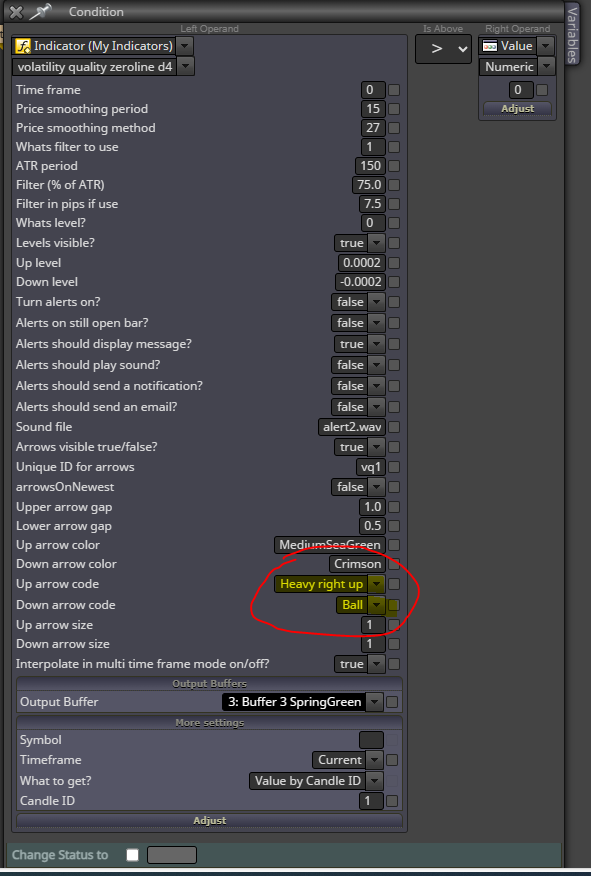
        fxDreema7.PNG
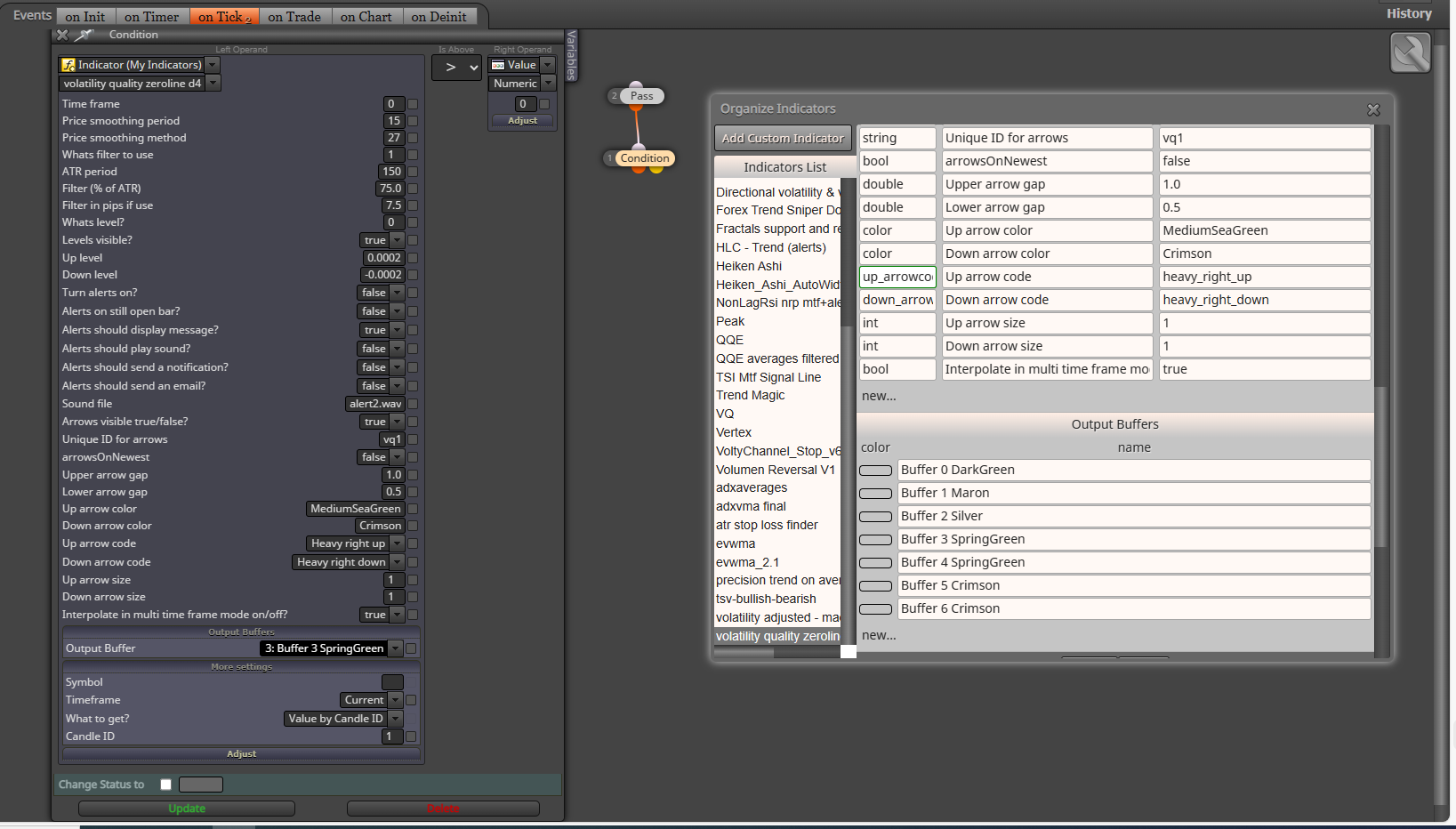
        for example: if I choose "Heavy right up" from the dropdown, I will get a compilation error on "Heavy right up". If I choose "Ball" I will get compilation error on Ball. if I choose both I will compilation errors on both respectively.
        Below I listed data I entered.
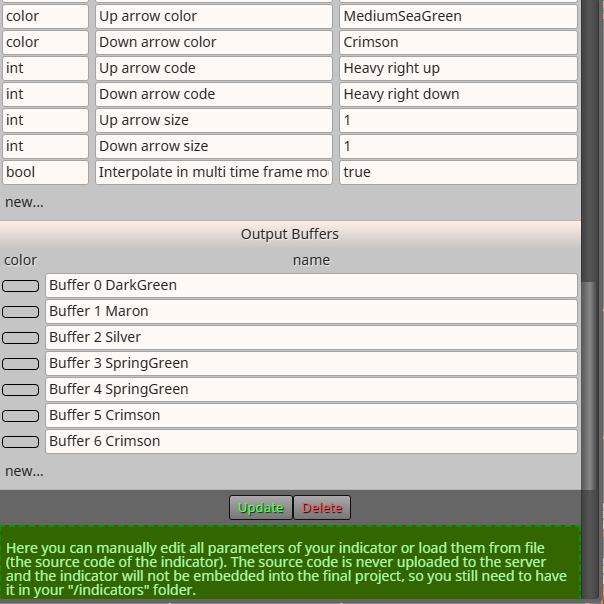
        fxDreema5.PNG

      fxDreema6.PNG

      1. Using integers

      Using integers, the indicator worked. it wasn't multiplying itself as it was doing before. I almost got emotional when I saw it because it took me days. So thank you.

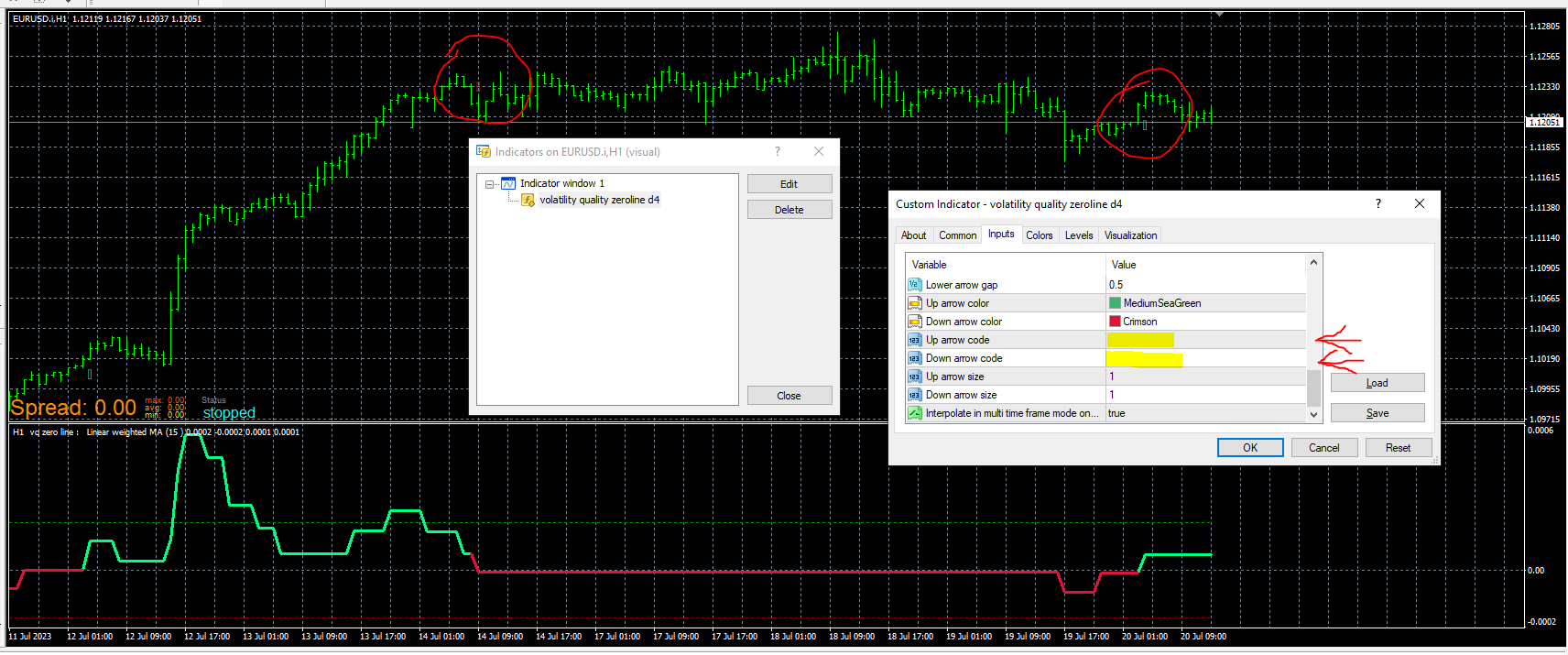
      however, on the indicator window on MT4, if doesn't seem to recognise the number. next to "Up arrow code" and "Down arrow code" it's empty. Initially in fxDreema, I entered 8, then I replaced it with 7. But I still got the same thing. I also attached a picture below.

      fxDreema4.PNG

      posted in Bug Reports
      T
      tmk1000
    • RE: Creating EA using .ex4 indicator

      @roar Hi roar first of all I would like say thank you for your assistance. I see how you assist many of us in this forum. so thank you. you're a legend,
      hahah trust me that was produced less than 5 seconds.

      I decided to try how you done it. it's giving compilation errors.

      I have attached a picture and a link to it.
      https://fxdreema.com/shared/3oFMcTSQb

      fxDreema2.PNG

      posted in Bug Reports
      T
      tmk1000
    • Creating EA using .ex4 indicator

      Hi !

      I am trying to create a EA using this indicator.
      volatility quality zeroline d4.ex4

      I manually entered Variables and buffers. After some days of trial and errors I managed to get it to work/appear on the tester.

      However, when running the strategy tester, the indicator sub-window keeps multiplying itself. it's like adding the indicator on chart every millisecond.

      I have attached examples.

      chart 1.PNG

      chart 2.PNG

      chart3.PNG

      chart4.PNG

      As you can see in the above image the longer the strategy tester runs the worst it gets.

      Bellow is how I added the indicator on fxDreema.

      Capture1.PNG

      Capture2.PNG

      Capture3.PNG

      Please can you can assist me please maybe I added wrong "data types".

      Please help.

      There's also another bug that I realised when editing ".ex4" but I will explain it in another topic.

      Please your assistance will be much appreciated.

      posted in Bug Reports
      T
      tmk1000