ok i just found it, thanks again!
T
Posts made by TNS
-
RE: How to open multiple "buy now" tradesposted in Questions & Answers
-
RE: How to open multiple "buy now" tradesposted in Questions & Answers
@ambrogio thank you! Which loop block are you using in the screenshot?
-
How to open multiple "buy now" tradesposted in Questions & Answers
Hello,
if instead of opening 1 "buy now" trade of 1 lot, i want to open 10 "buy now" trades of 0,1 lots each, is there a way to do it without adding 10 separate "buy now" blocks? I see that there is the block "buy pending orders in grid" but i am not looking for pending orders, i want direct market execution so similar to the "buy now" block.
Thank you in advance!
-
RE: Condition NOT BETWEENposted in Questions & Answers
@ambrogio Indeed you are right, I was confused trying to find how to include everything in one block but I did not think I could use two separate blocks. Thank you!
-
RE: Condition NOT BETWEENposted in Questions & Answers
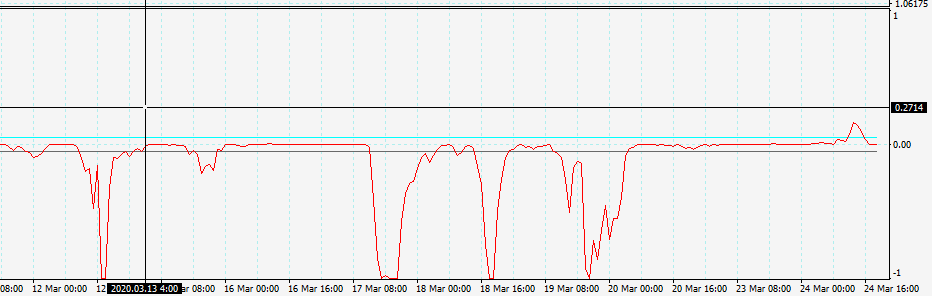
Or alternatively it could be if Buffer#red is below buffer#black OR above buffer#blue.
I have not seen any condition that includes 'OR' or 'BETWEEN'...
-
Condition NOT BETWEENposted in Questions & Answers
Hello,
for the screenshot below, how could I enter the following condition in fxdreema:
If Buffer#red is not BETWEEN Buffer#Black and Buffer#Blue, then take a trade.
Thanks!
-
RE: Cannot read color bars histogram in custom indicatorsposted in Questions & Answers
@fabien-s Thank you, that works!
-
RE: Cannot read color bars histogram in custom indicatorsposted in Questions & Answers
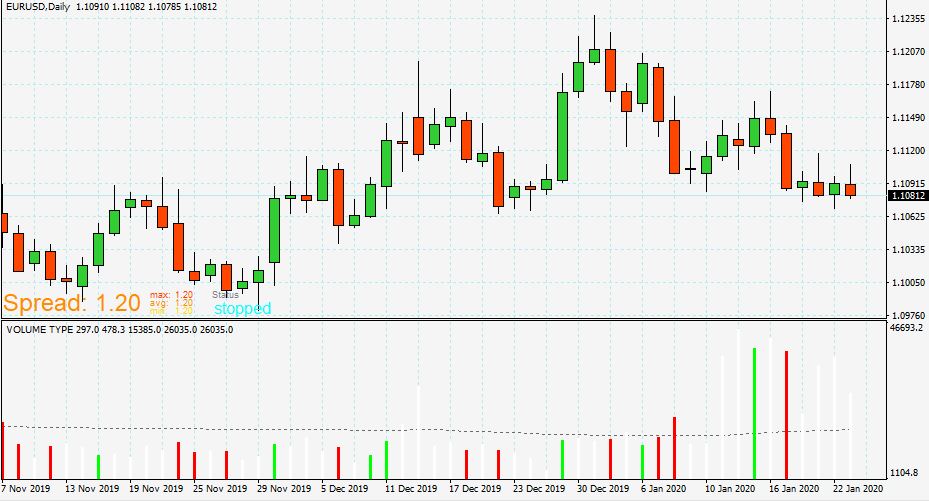
@tns This is how the indicator looks on the chart:
-
Cannot read color bars histogram in custom indicatorsposted in Questions & Answers
Hello, I am trying to read the color bars of the histogram in some custom indicators I have. For example, for the following custom indicator:
0_1579787260376_HAWKEYE_VOLUME_modif2.mq4
I want the EA to place a buy order when the bar in the histogram is green. This is what i have done:
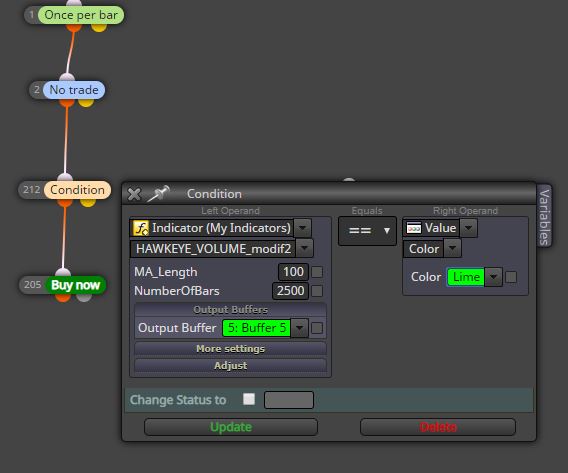
For some reason, nothing happens. I also tried to do the following:
Effort 1:
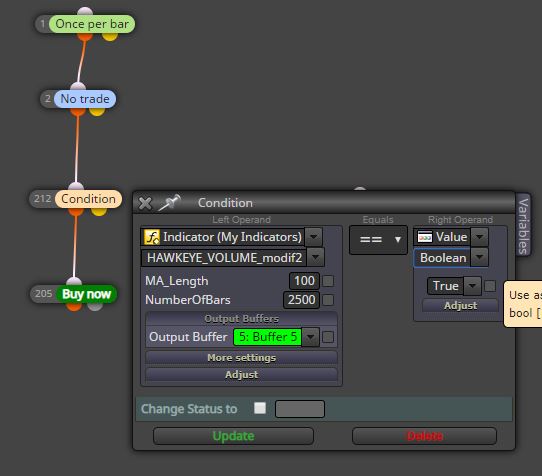
Effort 2:
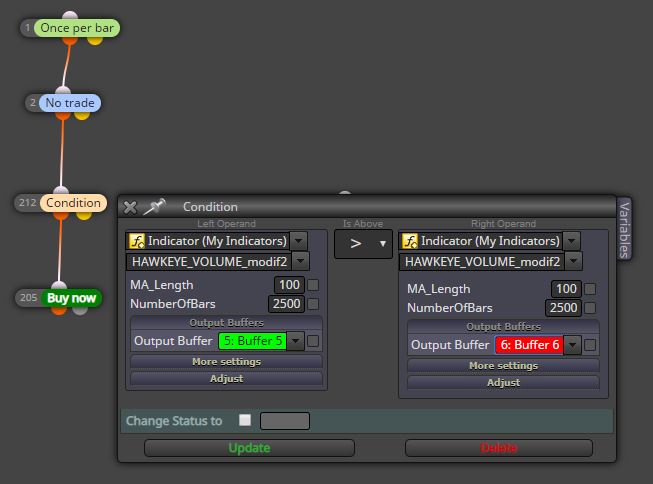
Effort 3:
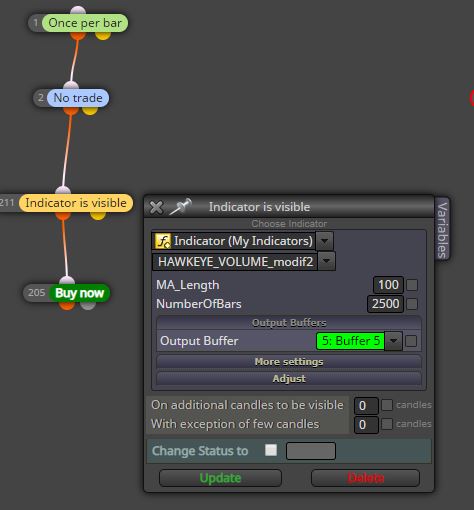
Effort 4:
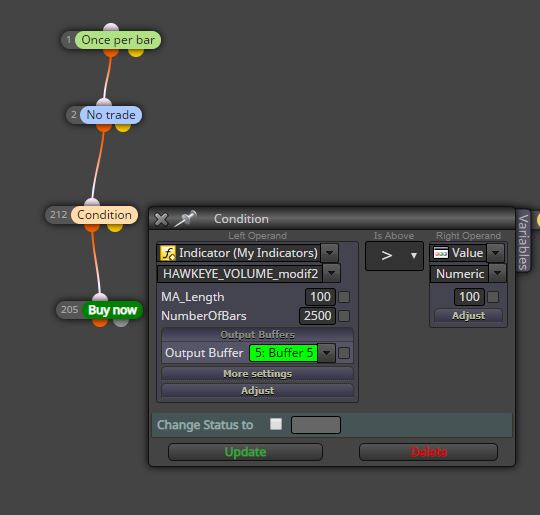
Again no trade takes place.
I tried the same things with another indicator and still the same problem.
Why the EA cannot read the green bar? Any ideas?
Thank you
-
RE: SL and trailing SL in the middle of the candlestickposted in Questions & Answers
@trader-philipps Thank you, this is a good workaround but I do not think it provides a solution to what i want to do.
The problem I see with NOT using the block 'Trailing SL' and instead using the blocks: 'Pips away from SL' --> 'Modify Stops' is that it will modify the SL not only as a trailing SL that follows the price upwards, but it will also follow the price downwards...Also it does not have the 'trailing start' option that the 'Trailing SL' has.
This is why i would like to stick to the initial EA that I shared but I do not understand why the SL does not activate at the right timing. Maybe @fxDreema can explain?
-
RE: SL and trailing SL in the middle of the candlestickposted in Questions & Answers
@l-andorrà Thank you for the reply.
I have created a new tree of conditions following the example you sent to me but I do not think I can use this as a trailing SL because when I backtest it I see that the trailing SL is never activated. It actually trails the SL both upwards and downwards. Here is what i did: https://fxdreema.com/shared/VgSIeDYrdAlso, I do not understand why you say that I should not use a SL price in the 'buy now' block, what is the problem with doing that? And why is the 'trailing stop' block not appropriate for my strategy?
To clarify, the first EA that I had shared was doing what I wanted, the only problem was that it was not activating the SL at the correct timing...
@trader-philipps Thanks for the suggestion. I am indeed using current spread in the tester but all these examples are not on weekend and it is in the EURUSD so i doubt the spread was that huge that many times...
-
SL and trailing SL in the middle of the candlestickposted in Questions & Answers
Hello,
I am building and EA that opens a trade with a SL and adds a trailing SL to this trade. Here is the simple version of the EA: https://fxdreema.com/shared/2GfqteQ1e
I want both the SL and the trailing SL to only activate at the closing of the last candlestick or the opening of the new candlestick, this is why I am using the 'once per bar' block. However, in the strategy tester I see that they activate when the SL price is reached, even if it is in the middle of the candlestick. Here is a screenshot:
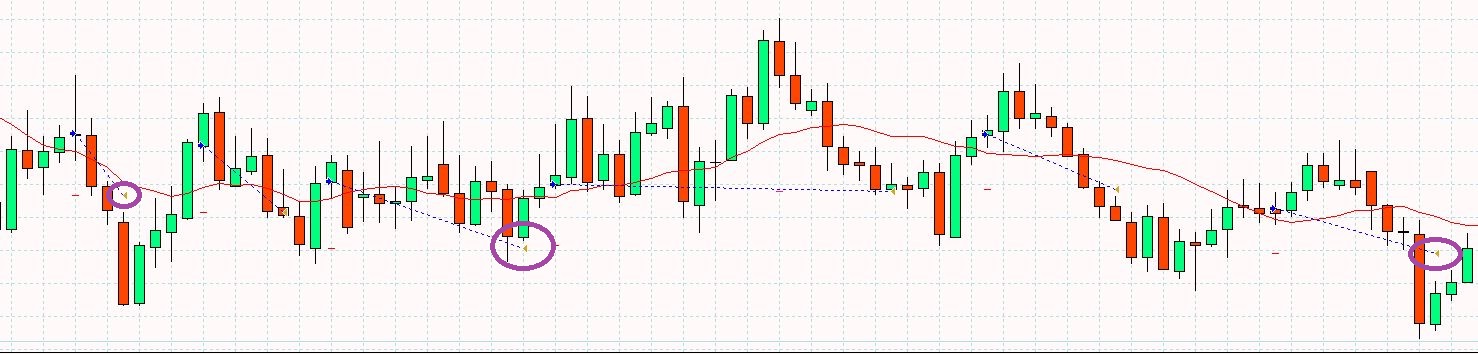
Why is this happening and what is the solution?
Thank you.
-
RE: FX dreema not reading custom indicatorposted in Questions & Answers
@cpxiom Thank you, indeed that works!
-
RE: FX dreema not reading custom indicatorposted in Questions & Answers
@ambrogio You are right, that solves the problem, thank you!
What I am seeing is that the indicator has to be saved in the main folder 'indicators' of mt4. If it is saved in a subfolder within the 'indicators' folder, it is not read by the EA...is there any workaround for that?
Also, since i am using mt4 from two different laptops, will the custom indicator work for both laptops or i need to be creating two different EAs, one for each laptop?
-
FX dreema not reading custom indicatorposted in Questions & Answers
Hello,
I want to incorporate the following condition: when the candlestick close value is above the line (value) of my custom indicator, make a buy trade.
Here is what i have done: https://fxdreema.com/shared/sKDOdrMHb
Apparently, fxdreema is not reading the value of my custom indicator because no trade takes place. Also my custom indicator does not appear in the chart once the strategy tester is completed.
I also tried with other custom indicators (most of them are moving average types) but still no trade takes place...
I read in the forum about adding the 'indicator appear' block or 'indicator is visible' block but even this does not make my custom indicator show up in the strategy tester.
Could you please help?