@l-andorrà Let's see who wins 
T
Posts made by trader.philipps
-
RE: How can I collect the latest open positions in the event of a trend change?posted in Questions & Answers
@khalids222 So after having a deep thought about it, the algorythm seems to be MathAbs(buylots-selllots)+lots. MathAbs calculates the absolute number, which means 1 and -1 have the absolute number value of 1.
Right? -
RE: SL and trailing SL in the middle of the candlestickposted in Questions & Answers
@tns In that case you might calculate the SL value by yourself and compare if it's above (buy trade) your current SL and only modify the order if that is the case.
-
RE: AND command blockposted in Questions & Answers
@geofx Remember to set the flag back to false after eg. trade is opened!
-
RE: Moving Average EA not working properlyposted in Questions & Answers
@luisd72 Connect the blocs correctly first. All condition blocks are not connected at all. Make a separate path for entry and for exit! They can exist next to each other. Create a shared link to your project and post it here.
-
RE: How can I collect the latest open positions in the event of a trend change?posted in Questions & Answers
@khalids222 Okay, if I have more time I'll think of the algorythm behond it. I'm traveling right now and will not be able to take a deeper look.
-
RE: Store how many orders open at the same timeposted in Questions & Answers
@seb-0 Where did you see that? I usually use first character of variable name in order to datatype of it.
-
RE: How can I collect the latest open positions in the event of a trend change?posted in Questions & Answers
@khalids222 I think that doesn't make sense.
If I have 0.01 buy, 0.02 sell and 0.03 sell, next buy is 0.01 -0.05 +0.01 = -0.05
PLEASE TAKE MY EXAMPLE FROM ABOVE AND WRITE THE EXPECTED LOT SIZE PER TRADE!!
1st Signal/Trade: Sell
2nd Signal/Trade: Buy
3rd Signal/Trade: Buy
4th Signal/Trade: Sell
5th Signal/Trade: Sell
6th Signal/Trade: Buy
7th Signal/Trade: SellMy guess:
- Sell 0.01 -> (initial/new 0.01)
- Buy 0.02 -> (0.01 Sells + new Buy 0.01)
- Buy 0.04 -> (0.02 old Buys + 0.01 Sells + new Buys 0.01)
- Sell 0.08 -> (0.06 old Buys + 0.01 old Sells + new Sell 0.01)
... and so on right? If not please tell me the exact vakues per signal trade in the list:
1. Trade: Sell 2. Trade: Buy 3. Trade: Buy 4. Trade: Sell 5. Trade: Sell 6. Trade: Buy 7. Trade: Sell -
RE: Store how many orders open at the same timeposted in Questions & Answers
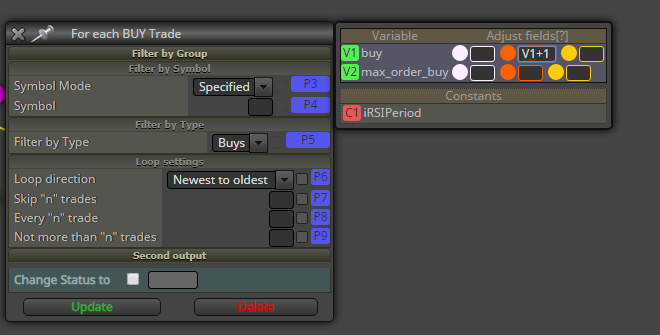
@ambrogio I reset the counter to 0. Block 201 picks up all buy trades (in a loop) and each time it executes Block 29. When all trades were past, the yello dot of Block 201 is executed.
Btw. if you only want to increse the counter per loop, you may do that in the variables section of Block 201 as well.
Would look like this
-
RE: Not working - SSA of price - advanced_histoposted in Questions & Answers
@sebaseba54 I tested in my terminal and it doesn't show nothing at all. Taking a look in the journal it states
2020.01.05 14:22:05.405 Cannot call 'libSSA.dll::fastSingular', 'libSSA.dll' is not loaded
2020.01.05 14:22:05.405 Cannot load 'libSSA.dll' [126]So I nedd the libSSA.dll in order to make it work at all. If you have it in your terminal, maybe you also neet to allow importing of external dlls maybe.
-
RE: Store how many orders open at the same timeposted in Questions & Answers
@ambrogio Ok. Keep in mind that if you closed the terminal while trades were open, you may want to run the check as well. Alternatively you may store the value of max_orders_buy to a terminal variable (mus be unique per EA instance!) as well and read that variable if existing on the onInit tab.
-
RE: Store how many orders open at the same timeposted in Questions & Answers
@ambrogio Well, it's not exactly as I would do it. With your approach you wouldn't check for update if a trade gets closed for any other reason by the broker (eg. TP or SL is hit or margin call, etc.). Hence I'd do on both events on the onTrade tab (order opened and order closed) a calculation loop over all currently open trades. Hence your counter would always be up to date.
Check this out!

-
RE: Mobile ?posted in Questions & Answers
@dhuntleyinc Unfortunately no. Fxdreema is not touch aware. It would be sufficient maybe if in the dropdown menü there would be an additional menu entry for opening the details of a block. Maybe you can request that new feature.
-
RE: How can I collect the latest open positions in the event of a trend change?posted in Questions & Answers
@khalids222 You still didn't answer my question. In the screenshot above the EA gave the following signals:
This sequence is- Trade: Sell
- Trade: Buy
- Trade: Buy
- Trade: Sell
- Trade: Sell
- Trade: Buy
- Trade: Sell
What lot size should each trade have? Did it take too many trades? If so, where would the EA start over again and reset all counters?
This is important as if there are buy trades opened and followed by sell trade(s), do we need to care about the open buy lots or not? -
RE: how to make bot to stop taking trades after a certain condition has occuredposted in Questions & Answers
@tradingjunkie Usualy you would create a path of blood is for your entry conditions and the order open. You can then switch the first block on or off depending on the conditions to allow taking new trades again.
There is no need to terminate the EA as if you do so, you have to enable it manually again.Typical usage would be a condition block where you allow trading days and trading hours. At the end you'd have a block disabling and one for enabling the trade entry path.
-
RE: Binary options backtestposted in Questions & Answers
@inquiry I think your specs are not accurate enough.
Are you sure about rsi crossing 10 as that rarely happening with default period of 14? And in which direction should it cross?
From below 10 x> 10?
From above 10 x< 10?However, your code works quiet well, if you reduce the RSI indicator's period.

Or do you expect something else?
-
RE: How can I collect the latest open positions in the event of a trend change?posted in Questions & Answers
@khalids222 Could you please answer my question with concrete values? Otherwise I'm out of this thread!
-
RE: TSV- Time Segmented Volume Indicator Not workingposted in Questions & Answers
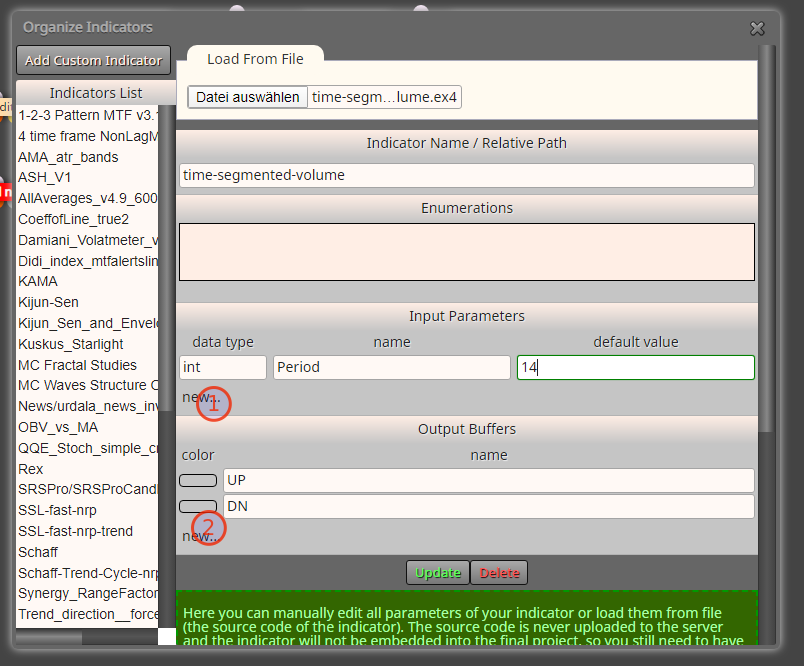
@errinjm If you import the ex4 file, you need to create the input parameter(s) and the 2 buffers manually like that
-
RE: Store how many orders open at the same timeposted in Questions & Answers
@ambrogio Okay, so you need something like a high watermark? Will that ever be re-set?
By logic you'd do the same as metioned above, but would create another counter variable. This you would only update, if the condition is true that the current counter for open orders is bigger than the high watermark variable. Do you need an example?
-
RE: Store how many orders open at the same timeposted in Questions & Answers
@ambrogio What exactly you want to count (and what not)?
In your example you increase the variable each time a trade is closed by 1

But you want to know how many orders are currently open, right?
The idea is that the number of open orders only change if a new trade is opened or an existing trade is closed.
That's why I use the 2 blocks Trade created and Trade closed on the onTrade tab.

In the screenshot case I have 1 For Each trade for Buys and one for sells. If you just need the total number of both, you just need 1 For each trade block.
Important: Re-set the counter variable on white dot to 0. So it will start the calculation each time by 0.
Than you just add 1 to the counter variable each time the modify Cariabkes block is called (for each trade).