@kmfoster79 Well, I thought that it wouldn't be that easy somehow. Can't help you at the moment as I'm on mobile and have no idea how to open a block with touch screen.
T
Posts made by trader.philipps
-
RE: EA Works in Test but not Liveposted in Questions & Answers
-
RE: EA Works in Test but not Liveposted in Questions & Answers
@kmfoster79 Because of block 19?!?! It only opens trades if EA is running in Strategy Tester.
-
RE: EA ON MT5 NOT WORKING PERFECTLY......I NEED HELPposted in General Discussions
@fxadels Never mind. I will try to guide you. However, let's first check conditions.

So you expect all 3 crossing conditions to happen at the same time? That ios very unlikely unless all involved indicators do the same calculations. You should first define what is the major condition to trigger the trade and than think about the other 2 ones if they can be re-defined a bit.
Example: Main condition is cross of Tema with Dema. It is sufficient if price is > psar and stochastic between 20 and 30 .. or something like that.
-
RE: can you make this for me because i don't know how can make i am tiedposted in Questions & Answers
@l-andorrà I guess that candles touching the MA do not count. So you look for first bullish candle (x>) or first bearish candle (x<) that does noz touch the MA again. I further guess that the trade will be opened on the open of the candle thereafter.
Sometimes it's really like a puzzle to understand the strategies that are posted here :)) -
RE: Another simple request guysposted in Questions & Answers
@ssekajoe In that case change candle ID 1 to candle ID 0 on all relevant blocks, but keep in mind that on candle ID 0 as long as candle is not closed values may change again (called repaint). Thus it's better to use candle ID1!
-
RE: how to limit trades number of tradesposted in Questions & Answers
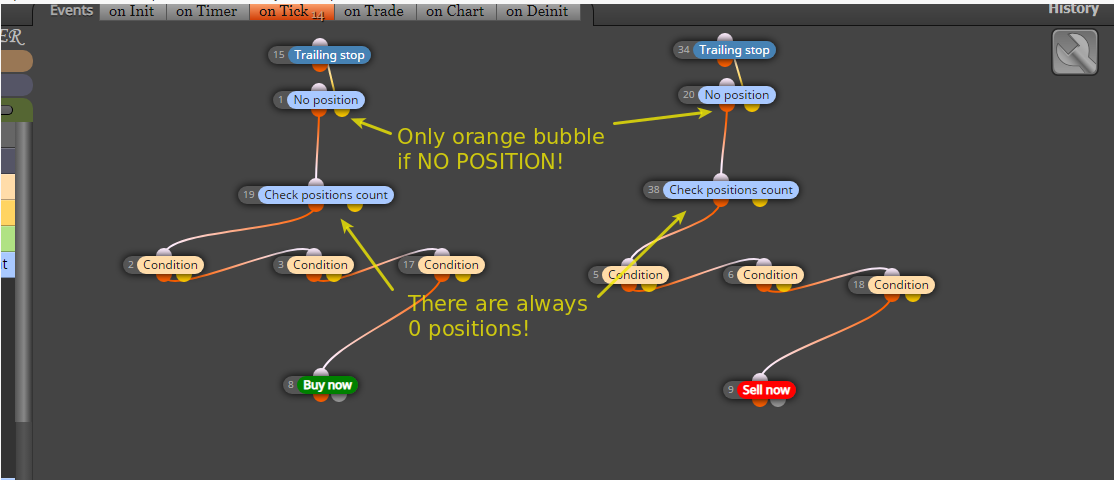
@fxadels Keep Buy and Sell path seperated! The trade count block only makes sense if the EA can open more than one trade, which doesn't seem to be possible due to block 1 (No position).
-
RE: EA ON MT5 NOT WORKING PERFECTLY......I NEED HELPposted in General Discussions
Do you understand what I mean?
-
RE: Hedge, Simultaneously Open BUY/SELL STOP (Pending ORDER) with Executed orderposted in Questions & Answers
@princebobby That strategy may not work as you expect it on live account due to spread and slippage of pending orders. However, you could use the "on trade" tab to manage the counter order on the "Trade created" block to catch whenever a trade was opened.
-
RE: Finding buffer in source code of indicatorposted in Questions & Answers
@simharr Can you share the indicator? An what exactly is the problem? There can be empty buffers as their values may not be required for painting anything, but for further calculations. Do you need values other than the painted ones?
-
RE: Can anyone help me with this error. "Compilation errors 'BuyOrSell' - constant expected 'BuyOrSell' - constant expected.posted in Questions & Answers
@glen-mckinnie Okay, I did export only. Checked the source code again.
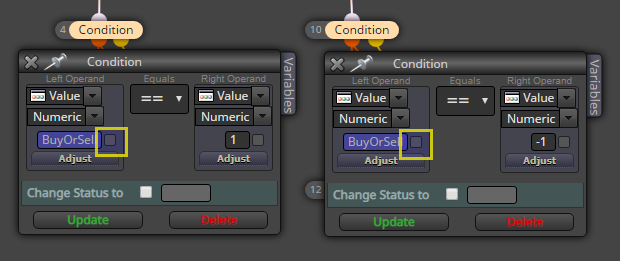
Unckeck the 2 backtesting if you use a variable as input. You may use a constant instead in order to have variable values with MT4 optimization.
-
RE: How to set up EA business days and hours?posted in Questions & Answers
@fabiobioware I did so by using flags in one of my projects. That looks like that.
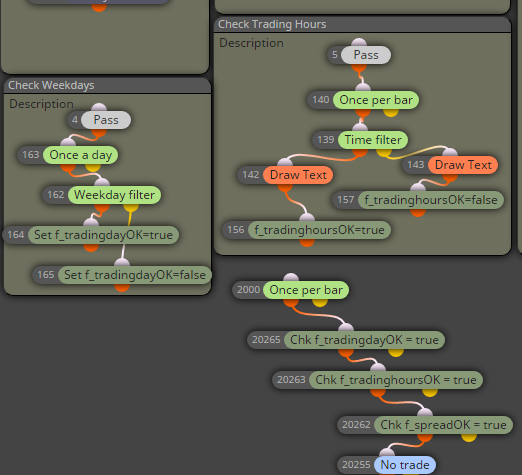
So with set Flag you set it for instance to true or false and with check flag you check if it is true.
Alternatively you may turn on / off some of your blocks.
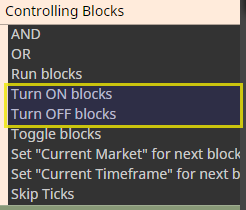
Usually you'd want the EA to not open trades outside your trading hours rather than completely stop working (for instance close open trades or adjust stopps and so on).
-
RE: Variable values from CSV fileposted in Questions & Answers
@gunterd Check this thread: read-file-data
-
RE: Can anyone help me with this error. "Compilation errors 'BuyOrSell' - constant expected 'BuyOrSell' - constant expected.posted in Questions & Answers
@glen-mckinnie ^Well, I can import your mq4 file in my project and compile without errors. Maybe try to do the same?!
-
RE: EA ON MT5 NOT WORKING PERFECTLY......I NEED HELPposted in General Discussions
@fxadels .. I was too quick with my update. Check positions count after a no trade block should always be 0 unless you opened a trade somewhere in your path. In that case the count is not necessary!
-
RE: EA ON MT5 NOT WORKING PERFECTLY......I NEED HELPposted in General Discussions
@fxadels Okay, look at the Check positions count block. You specify Pos count == 2 ! Thus you only open a new position if 2 trades are open.
Split the Buy and sell block and check positions count twice (one for buy on the buy path and 1 for sell on the sell path). If you don't want more than 2 trades open, specify "Lower than or equals ro" criteria.
Hope that helps. -
RE: EA ON MT5 NOT WORKING PERFECTLY......I NEED HELPposted in General Discussions
@fxadels From the order of blocks it looks okay. Maybe you can share a link to the project that we can look inside the blocks. Especially the No position block I'd guess may not work correctly.
-
RE: Another simple request guysposted in Questions & Answers
@ssekajoe Haven't tested, but that should give you an idea: RSI Demo Project