@marianomartinez Did you casely specify the symbol explicitly? Otherwise you may share your project in order to check where the issue might be.
T
Posts made by trader.philipps
-
RE: Problem with Magic Numberposted in Questions & Answers
-
RE: pending order opening way higher than candle set in EAposted in Questions & Answers
@sli1-0 check the adjust values.
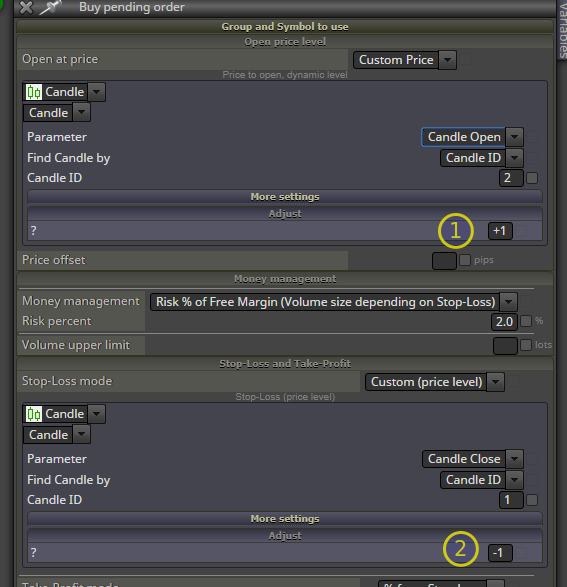
Assuming your chart symbol is something luke EURUSD, you would add 1.00000 to the price, which would be 1.09522 and you make it 2.09522!
Same with SL.
-
RE: block ID orderposted in Questions & Answers
@ambrogio That's right, but I don't care so much for the block IDs inside a line - unless if I need something to run prior to another thing. I also start every block with a pass block so I can identify my starting blocks better.
-
RE: ATR strategy, I'm confused. Help me please.posted in Questions & Answers
@mieyhr I like to use pips rather than price fragments. So how I do it in my projects is:
- on Init tab: create a custom MQL code block. Create an double variable (here: dPipsMultiplicator)
enter the foloowing code:
//
dPipsMultiplicator = MathPow(10,_Digits-1);
//

- Create 2 double constants (here: cdSLAtrMult and cdTPAtrMult), so you can change the multiplicator from the EA settings.

- on Tick: Create the following sequence

I created a comment block that shows me the values of the variables and it looks like that on the chart:

Finally you can use the SL and TP eg in a modify Stops block like that

As I took the parts from my actual project, the last part isn't tested, yet. But I think it will work like that.
- on Init tab: create a custom MQL code block. Create an double variable (here: dPipsMultiplicator)
-
RE: How to make EA to look back past x number of candles?posted in Questions & Answers
@polishinglife I think you have to loop. However, have those condition be met after another or could there be some other RSI cycles that don't hit above 75 or below 40?
I'd start a loop from candle ID1 to candle ID100. The last condition is the trigger for the loop.
Order:
- ID1 RSI x< 60 (don't know if x< works here otherwise <)
- loop from ID2 to IDx where >75 [exit condition RSI < 40 or loop counter 100]
- check if IDx+1 and x+2 were also >75
- create another loop for candle IDx+4 until <60 say it's candle IDy with [exit condition RSI < 40 or loop counter 100]
- create another loop starting from candle ID y+1 and check if RSI >75. If true asuming candle IDz [exit condition RSI < 40 or loop counter 100]
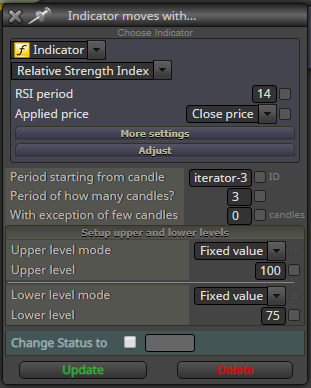
For the 75 condition may work this block, but if going backward in the loop you need to care that "iterator+3" is less than 100, where the integer variable iterator is the loop index.
-
RE: block ID orderposted in Questions & Answers
@kiwi789 Yepp. I use first blocks such as 100 200 300 and so on for logical purpose and in order to have some space if I need something inbetween.
-
RE: Close trade when take profit is higher then sell priceposted in Questions & Answers
@trader-philipps I forgot to mention that it's on the on trade tab!
-
RE: Close trade when take profit is higher then sell priceposted in Questions & Answers
@wakalz99 Just a rough try how I would start. This one is for buy orders on the symbol the EA is attached to. You maybe need to set same magic number as you boss EA has.

-
RE: Close trade when take profit is higher then sell priceposted in Questions & Answers
@wakalz99 Okay, I understood that you have some marti-grid EA - some call it averaging EA and it keeps openeing positions against the market. It has a steaddy profit it needs to reach - some kind of a "virtual take profit" when the complete basket of trades will be in profit.
What you want to do now is to close positions, whose open price is lower than this "virtual take profit" as they will be in loss anyway, right? -
RE: Close trade when take profit is higher then sell priceposted in Questions & Answers
@wakalz99 If you are using an existing EA and try to modify the TPs / SLs of the trades it created, you should first check if when you manually change a SL or TP, the EA re-sets it again. In that case it wouldn't be possible by adjusting the SL/TP.
The only way would be to close when a certain point in time or loss or profit is reached. -
RE: Close trade when take profit is higher then sell priceposted in Questions & Answers
@wakalz99 Don't understand what you try to do. Do you have a project started that you may share?
-
RE: Arrows showing wrong entry/exit pointsposted in Bug Reports
@markc1974 So you mean that the transactions should be closer to the price line? Do you mean that with arrows - can't see any others.
Check the spread you are backtesting with. Or share the complete projectthat we might have a look. -
RE: help me, how to make ea fiboposted in Questions & Answers
@trader-philipps 0_1570326050901_1-2-3 Pattern MTF v3.1.mq4 That indicator draws fibo levels by itself. Hi Lo level defines the last high / low to take as a start for fibo drawing. It will give a signal on 100 level. So if you want to open a trade on 0 level, you need to take the SL price it generates.
-
RE: Expert Adviser is not loading into MT5posted in Questions & Answers
@gearforlife Maybe there is a compile error in your EA? But it should show up there. Check the journal maybe. Right click on Experts and than refresh.
If that doesn't work, you may share your project. or better mq5 file -
RE: help me, how to make ea fiboposted in Questions & Answers
@winner888 Maybe you start here .
Will you draw the fibo levels by yourself or does the ea has to do it?
-
RE: help me, how to make ea fiboposted in Questions & Answers
@winner888 Okay, so tell us the strategy and if available the custom indicators to use. Fxdreema is able to draw for instance fibo tetracement levels on the chart, but maybe that's a bit too advanced for a beginner.
-
RE: Compilation Error Messageposted in Questions & Answers
@alphaandy Need more details. May you share your project?
-
RE: Bug with variables and formulaposted in Bug Reports
@casebefx Can't reproduce. Maybe a browser specific or caching issue. Have you tried with browser in private mode? Are you connected through a proxy server?
-
RE: Only fist candleposted in Questions & Answers
@eli Aditionally you might switch off you trade open blocks. However, you have to care also to enable those blocks again deoending on the conditions you specify to be a "new" market situation and want to enter again.