@gunji80 There is an upload button above the editor. Just hover over the icons. You will find it.
T
Posts made by trader.philipps
-
RE: fxdreema glitchyposted in Questions & Answers
-
RE: Four Conditions Met Before Trigger Orderposted in Questions & Answers
@edward-brazil Well in that case you should for the longer term MAs use just < or > and on the short term MA just the x> / x< from my perspective.
-
RE: Four Conditions Met Before Trigger Orderposted in Questions & Answers
@edward-brazil The issue is the crossing event. The 300 and 500 MA cross not very often. And you'd expect that this happens at the same time as 100 crosses 300 and 25 crosses 100 or soemthing like that.
Usually I'd expect a certain condition to confirm the reason for opening a trade. Let's say you want to ensure that 100, 300 and 500 are aligned in the right order 100 > 300 > 500. So you confirmed you trading condition or reason for opening the trade. Now you'd have a trigger such as 25 x> 100 and open the trade.
Is that what you try to achieve? Or does the crossing of any of your cross condition has a special meaning when considering to open the trade? -
RE: Buy and sell buttons won't work on live account?posted in Questions & Answers
@clauscbh :)) I meant the topic
-
RE: Four Conditions Met Before Trigger Orderposted in Questions & Answers
@vnpython-0 Sure you can have multiple x< / x> conditions in your chain. However, it reduce the number of occurrences if conditions have to take place at the same time.
What you may do is to allow the cross not strictly on a certain candle, but on a pre-defined range. That means you would set the "cross width" parameter to a different value than 1 on each of the x< / x> blocks - or just some depending on the required strictness. -
RE: Buy and sell buttons won't work on live account?posted in Questions & Answers
@clauscbh Good to hear! You may mark this thread as ** solved **
-
RE: fxdreema glitchyposted in Questions & Answers
@gunji80 May I ask you to provide the custom indicator as well, please?
-
RE: fxdreema glitchyposted in Questions & Answers
Just post your project and maybe necessary indicators and we can help you.
-
RE: Buy and sell buttons won't work on live account?posted in Questions & Answers
@clauscbh That may have several reasons. Check stop level of the symbol you're trading. If it's an ecn account there may be a limitation that you have to first place your order and than modify stops. Haven't seen this for a while, but there are probably brokers that still do so.
-
RE: Protecting our EAposted in Questions & Answers
@haliloo There are several ways to limit the EA for particular reason (offline).
Use some of those blocks in fxdreema for instance
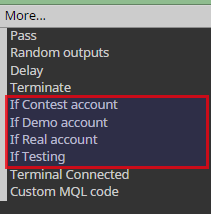
In addition you may set an expiry date see here.
You may also lock your EA to a certain account number, but than need to compile a version per account number(s). See here!.
If you really want to protect your code even for decompiling, I think you may need a commercial service such as Mqllock .. I picked just one well known for demonstration and don't want to advertise a comercial product here. Use your preferred serach engine to get a market overview.
-
RE: COSTUME INDICATORposted in Questions & Answers
@ariefwindhiarto Okay, I had a look in that issue. The error you see in the journal of tester is produced by the indicator. If you have the mq4 version of it, I might have a look at what level the issue occurs.
Unfortunately, if the included custom indicator is producing an error condition, fxdreema EA stops working. Well, actually it's "fortunatly". Imagine what may happen to your account if it wouldn't.So send me the mq4 file of the indicator. If it's a commercial indicator, you should contact the vendor to fix that issue.
Additionally I tested on one pair where it openend a few trades. I think that indicator is repainting some of the arrows as fxdreema misses some of the signals.
-
RE: Two conditions are met.posted in Questions & Answers
@edward-brazil

Number (1) is okay. That is the first occurance that your indicator value crossed up (or a bit later) below your clipping level. But what abot the case I marked with (2)?If that is also a valid entry, than your first condition is that price closes below the Moving Average or whatever indicator is on the chart and you take all occurances that your oscilator brakes some clipping level.
If you only wnat to take the first occurance, than it's a bit more tricky. -
RE: modify a variable while earnigposted in Questions & Answers
@clacky And how do you deal with deposits and withdrawals and other transactions that may occur on your account?
I still don't understand what you try to achieve. Don't try to explain again with your 50 and 550 and so on. We all understand how profit is calculated.The thing is that there may be transactions on your account that will change your balance. Even if you go to trade history tab and choose something different than all history, there is a high chance that your logic fails. For instance if you switch the date to today, the EA only sees the transactions from today. Maybe there is a way to get around this with fxdreema, but I'm not aware of.
What about the idea to specify a constant in EA settings where you put your EA's start balance. If no other EAs are working on your acccount, you can easily calculate the profit or loss you have made by substracting the actual balance from the EA start balance.
If you have clipping levels for lot size, you may specify an algorithm such as 0.1 lot per 10.000 profit or something else.So what is your real intention?!?
-
RE: COSTUME INDICATORposted in Questions & Answers
@ariefwindhiarto I will have a look later today 8n detail.
In the meantime it appears that there is some issue with permission on filesystem on your pc.
Could you fix that first? It seems there is no history data when tester starts. -
RE: Donchian channel breakout strategy does not run.posted in Questions & Answers
@blindfoldedmonkey Don't use the Price x> x< blocks with your indicator! This condition will never happen.

You can compare a price level with a previous candle, but the x> x< means that there is a cross of price and indicator value in the specified candle.
-
RE: Stops/adding variables?posted in Questions & Answers
@chemdog Here you go.
0_1569124420946_1569114719916-v.18.mq4I updated the structure a bit.
In addition I made a little mistake when posting the loop stuff. Right would be this
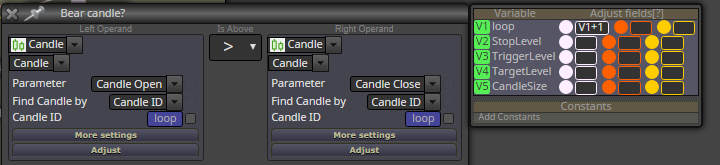
For the adjustment you have to put the variable ID and add +1 .. here as loop is ID V1 you put V1+1
I run in tester. It does basically what you want. You may want to use stop orders instead of market orders. However, it was not very profitable. I think you need to add some minimal candle size of bear candle maybe. But check by yourself.
-
RE: Stops/adding variables?posted in Questions & Answers
@chemdog Ok, I give it a try. From first look ..
a) Block 8. What for you need that? It checks if last candle was a bear candle. If that's not the case it will exit the routine.
b) After block 14 (orange) you should get the candle's high and low and maybe size and store it into a variable. After that you check if current price is bigger than the candle's highHowever, I feel there is still a flaw in the logic as you want to trigger that trade just once .. just assume that there are 3 bullish candle in a row that all pass the high of the last bear candle. In that case you don't want to open a trade each time, right?
But we will take a look for that later on.A bit off-topic: 9 and 20 are EMAs, 50 and 200 are SMAs .. is that your intention?
-
RE: COSTUME INDICATORposted in Questions & Answers
@ariefwindhiarto Are you sure it's th same version as in tester? In line 421 there is no column 24 in the version you sent.
If you send me the "panah" indicator I can use it in tester by myself.
-
RE: COSTUME INDICATORposted in Questions & Answers
@ariefwindhiarto If you may share your mq4 file, I may have a look in MetaEditor at line 410 what is processed there.
-
RE: Stops/adding variables?posted in Questions & Answers
@chemdog You may want to exit the loop in case that no bear candle is found within a pre-defined maximum number of bars. In that case make a condition block connected to the yellow dot of (Bear candle ?" block instead of the the yellow - white connection.
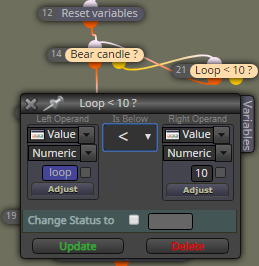
I took 10 as an example. Hence if loop didn't find a bear candle until candle ID 10, it would exit.