fxDreema

    • Register
    • Login
    • Search
    • Back to the main page
    • Categories
    • Recent
    • Tags
    • Popular
    • Search
    1. Home
    2. Trader3487
    3. Posts
    T
    • Profile
    • Following 0
    • Followers 0
    • Topics 81
    • Posts 298
    • Best 0
    • Controversial 1
    • Groups 0

    Posts made by Trader3487

    • RE: Trader3487

      @Andermaiden2nd I want to test with spread 0 to see with my own eyes that the back tester results are, in fact, accurate and that the EA is trading exactly as it is written. An EA that buys and sells each bar with 10pips sl/tp should produce an even balance - neither profit nor loss, correct?

      Question is why doesn't setting spread to 0 in MT4 strategy tester give a 0 spread? What broker are you using?

      Thank you 🙂

      posted in Questions & Answers
      T
      Trader3487
    • RE: Trader3487

      for me, setting changing MT4 spread to a lower number like from 10 to 1 decreases the distance between bid and ask lines but setting it to 0 does not make it 0. Any suggestions?

      posted in Questions & Answers
      T
      Trader3487
    • RE: Trader3487

      @fxDreema I understand but even with spread set to 0 in MT4, there is still a spread of 1. Using the ea below, are you able to produce a 0 spread and have a horizontal blue balance line?

      https://fxdreema.com/shared/Xu9P4ULge

      posted in Questions & Answers
      T
      Trader3487
    • RE: Trader3487

      2nd screenshot:

      posted in Questions & Answers
      T
      Trader3487
    • Trader3487

      Hi, I'm still stumped on how to run a backtest with 0 spread. Even when I remove these lines from the void DrawSpreadInfo() function in source code, it still shows a distance of 1pip between bid line and ask line on graph:

      if (custom_point > 0) {
      current_spread = (SymbolInfoDouble(Symbol(),SYMBOL_ASK)-SymbolInfoDouble(Symbol(),SYMBOL_BID))/custom_point;
      }
      if (current_spread > max_spread) {max_spread = current_spread;}
      if (current_spread < min_spread) {min_spread = current_spread;}

      I want to run a test where it buys and sells once per bar with 10pips sl/tp so that the trades cancel each other out and the blue line on the graph is perfectly horizontal (currently it goes only downhill to 0 balance).

      Thanks!

      Screenshot of unchangeable 1pips spread:
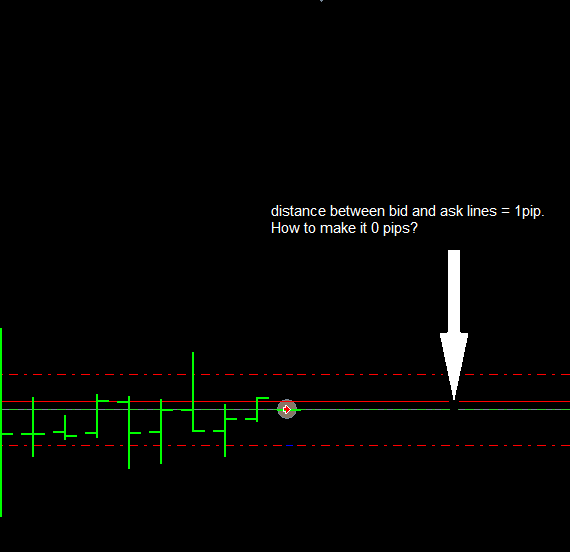
      0_1479889011135_distance 1 pip.png

      Screenshot of downhill slope graph:
      https://www.dropbox.com/s/mqk6hvmh3lwzicq/Screenshot 2016-11-23 10.24.30.png?dl=0

      posted in Questions & Answers
      T
      Trader3487
    • RE: Trader3487

      Hi, I tried changing that to "0" but it doesn't seem to affect the results. Spread always remains 1.

      posted in Questions & Answers
      T
      Trader3487
    • RE: Trader3487

      Is there a way to create a simple EA with spread = 0 that buys when no trade is open, sl/tp = 10pips. I want to see results where the blue balance line stays in the same place after a large # of trades.

      I tried editing the function void DrawSpreadInfo() in EA source code and setting current_spread = 0; but it didn't work. Metatrader results still say spread = 1 and blue/green curves are still going downhill.

      posted in Questions & Answers
      T
      Trader3487
    • RE: Historical data

      What's the best historical data to use for backtesting EAs?

      posted in General Discussions
      T
      Trader3487
    • RE: Writing EA Name In "Comment" Field Of Trade

      yes, the comment field of buy now/sell now block is what I was looking for. Thank you very much 🙂

      posted in Questions & Answers
      T
      Trader3487
    • RE: Writing EA Name In "Comment" Field Of Trade

      it's a project I'm working on in local version of fxdreema. Which block would I use for that?

      posted in Questions & Answers
      T
      Trader3487
    • RE: Writing EA Name In "Comment" Field Of Trade

      Hi,

      How can I write the name of the EA or custom text in the "Comment" field of the trade. Right now it just says "Long trade[s]" or "Short trade[s]".

      Thanks 🙂

      posted in Questions & Answers
      T
      Trader3487
    • RE: Fibonnacci

      ok, so I would need to use a condition block to set the tp/sl according to fibonacci? How would this be done?

      Is there an explanation somewhere about what the different price attributes mean? i.e. what is "Price level 1, 2, 3"?

      posted in Questions & Answers
      T
      Trader3487
    • RE: Fibonnacci

      Hi,

      Is there a way use fibonnacci lines for tp/sl?

      Thanks 🙂

      posted in Questions & Answers
      T
      Trader3487
    • RE: Close Trade At Start Of Next Bar

      wow, that was easy! Thanks 🙂

      posted in Questions & Answers
      T
      Trader3487
    • RE: Close Trade At Start Of Next Bar

      Hi,

      What block(s) would I use to close a trade at the start of the next bar (candle open[-1])?
      How about to open trade at start of next bar (candle open[-1]) and close trade at start of bar after that (candle open[-2])?

      Thanks!

      posted in Questions & Answers
      T
      Trader3487
    • RE: ex4 Export Error

      seems like it has to do something with my mt4 installation. For some reason mt4 stopped using the data folder in C:\ProgramData\MetaQuotes\Terminal and started using the data folder in the mt4 installation instead. I reinstalled mt4 and it's working now.

      posted in Bug Reports
      T
      Trader3487
    • RE: ex4 Export Error

      I tried reinstalling but that didn't work. How can I completely remove fxdreema from windows registry so that I can do a clean reinstall?

      posted in Bug Reports
      T
      Trader3487
    • RE: ex4 Export Error

      Hi,

      In local version of fxdreema, I updated mt4 terminal and data folder paths in Options > Global Options. Then when I went to export my ea in ex4 format, it gave me a compilation error (I tried attaching screenshot but forum says "Sorry, the board attachment quota has been reached." so please see dropbox link below for screenshot). I changed the paths back to what they were originally and restarted fxdreema, but the error perists. I tried created a new simple project but I still get the error. Maybe I need to reinstall fxdreema?

      https://www.dropbox.com/s/z1z0147llv459 ... 9.png?dl=0

      Thanks 🙂

      posted in Bug Reports
      T
      Trader3487
    • RE: Alert/Comment Message Text Labels

      beautiful, thanks!

      posted in Bug Reports
      T
      Trader3487
    • RE: Alert/Comment Message Text Labels

      I'm trying to add the following text exactly as it appears below to the text value field in send email block but when I click update and then reopen the block, the text disappears:
      "symbol()"

      Also, when I open previous projects in fxdreema local version that have "symbol()" stored in text field, the field is blank now.

      posted in Bug Reports
      T
      Trader3487
    • 1
    • 2
    • 3
    • 4
    • 5
    • 14
    • 15
    • 1 / 15