I have box that I need, when box respawns it adds additional number like first box was box1 then second one is box2.
I need to find and rename box2 back to box1.
I only found a way to change description but I need name.
I have box that I need, when box respawns it adds additional number like first box was box1 then second one is box2.
I need to find and rename box2 back to box1.
I only found a way to change description but I need name.
@jstap could be, never used that block but did some testing while back
@Morpheus_0 Here's the thing with testing using custom indicators. The parameters of testing will be default indicator parameters. So your thing might only can be tested in real time.
Forget it man, even if you catch them with their pants down simple retailers can't do shit. You best next thing to do is don't waist your time and just change brokers.
You're not the only one who tried and as you can see we are powerless. Bastards have too much money and power.
Have you tried making input variable then attach it to the Length window?
I don't have mt5 but you can check if the closing is caused by the EA by simply drawing some text on the chart when conditions are met.
Alternatively there is an easy fix. All you need to do is add filter "check age" block. Just like.
Obviously adjust waiting time to your timeframe.
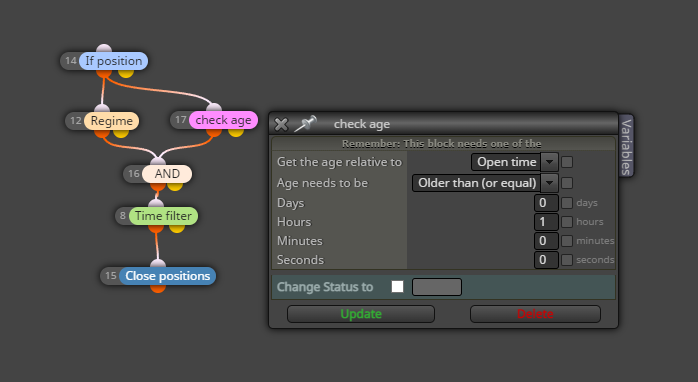
@William29 I mean you can drag EMA onto RSI window and make it to work off of RSI values and not the candles. Shame though, This would of been a lot easier if it was possible.
I couldn't find o way to do this unless you'd use some kind of custom indicator and then pull buffers.
But how do you do that without custom indicators?
hmm maybe, I dont really know how the flags work though but I'll give it a go.
So I made this system in which a condition block checks for a trendline by its number and takes price level as value.
when I make a condition block to compare that value to the price that is true BY THE LOGIC the block should say no. Because if the first value is empty and it's set to check if its == to the true value of where it should be it should say no.
But, the block does not give you either yes or no. It simply does not do anything. I check it with activity tracking. Tried spamming numbers if one or the other would be true but nothing.
So what I simply want to do is to draw a trendline at the specific price if there is none. If there is already a trendline do not draw another. But I cant find a way to check if there is or there is no trendline on the chart.
anyone knows how?
Thanks in advance!

So this solves the pip value per lot.
But now there's another problem, the problem is with base and quote.
If your trading account is the same as your base this is not an issue. But if it's not then it's complex.
Let's say your account is in USD
and you trade AUD/CAD how the hell do you work this shit out?
For all it's worth, the complexity is not worth the effort and I'm better off using external indicators for this.
I could not find a way to pull such variables from.
Is there any way to make it automatic instead of putting input for it?
What I want to do is simply have an Info panel where I put in SL distance and it takes balance and SL distance and calculated how many lots that should be for x amount of risk of the balance. Pretty simple, but I can't get the pip value in money per one lot, or per pipet.
I know when you choose money management there is a way to do it based on balance, equity, and so on so there is a way on the back end.
Any help?
The title says it all.
I copied this button example to my ea and it works as expected until the chart does not move. When it does button stays off permanently.
https://fxdreema.com/shared/4LWM6r3Ac the sample button.
I would think that there would be a block on the tick tab that would overwrite the button variable for every tick. (That would be a logical conclusion) But it's not the case. The variable is not used only for the button itself and does not exist inside of on Tick tab so why it stops working is beyond me.
However, if I try the button EA by itself it works fine.
I cannot share the project but maybe anyone has had this issue?
Modify Variables one. You'd sellect object in the chart and the property tab does not have a horizontal line 
There is no horizontal line option for variable output using Object on the chart.
trendline check
vertical line check
horizontal?
Discrimination of some sorts? 
I've made a way to take profit whenever candle 0 crosses below a trendline on the chart that is found by the name. So everything works until here. However, the trigger happens when the price crosses the lowest point of the trendline instead of the price level at by time and line location of the trendline.
I'm really not keen on even making code to make this actually work I just wonder why when getting value from trendline it uses the lowest point of it instead of its location at the given time. Too much work?
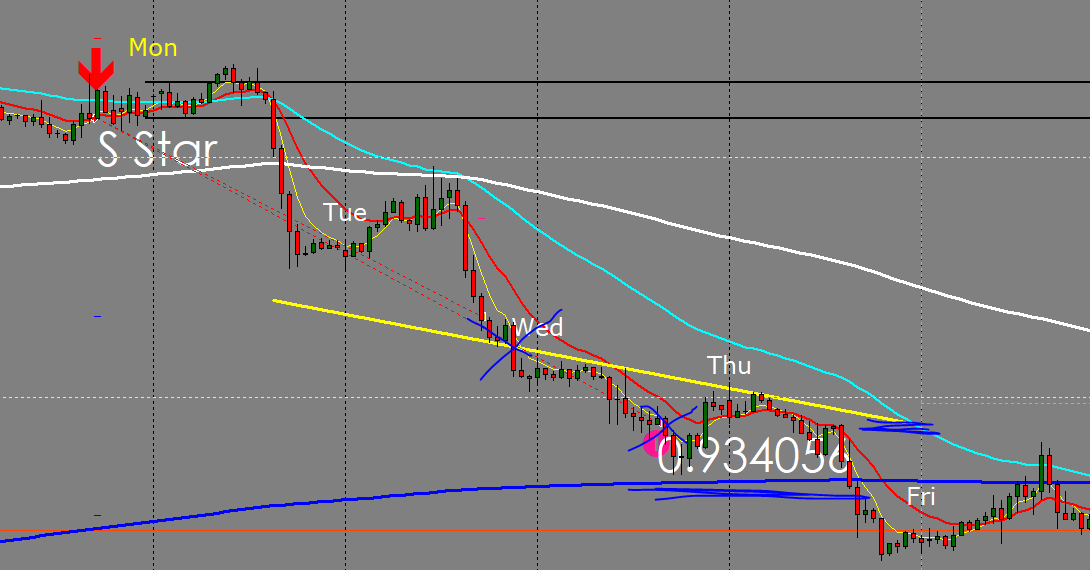
Never mind, I figured it out.
Apparently when setting the modified variables the start and then end goes backwards, meaning you need to start with the end and end with start values which is odd but make sense since it's how it works.
So I was working on the way to get monday first 8 hours high and low as a variable.
I all seemed to work until i notice very bizzare bug.
So the ea is simple rather, it filters days and gives it ID, then it filters hours and gives it id too, then a bunch of if functions to determine how many candles there were from Monday open. So all works until now.
When I try to get the values if I do not make it
Start_ID = ID_Count - 1;
End_ID = ID_Count - 2;
candle IDs are correct but variables give completely bizarre out-of-the-range numbers.
but if you'd only make it into
Start_ID = ID_Count ;
End_ID = ID_Count;
it works as intended.
It will make more sense when you take a look for yourself.
I honestly don't understand where the problem is coming from.
Well, that does not solve a problem that I have. This script will only work on Monday and between that time period. So on any random day, it will simply give me 0. And I'd have to leave the pc on for a whole week sure it would get values but that's not ideal.
I need that any given day and given time id turn on EA and it would know this week Monday first 8 hours high and low prices. I obviously can do it manually but where the fun in that?
If it would have been that simple I would have not asked for help lol.
Thanks for a response anyways.
I need to get 2 price variables of Monday first 8 hours high and low. Now getting current day Hi-Lo is simple just use time-based candles.
However how the heck so at any given day of the week and at any given time I would get this week's Monday variables.
I was thinking of something like checking what time and reference to that count the candle id's but that's a hard way of doing it.
Does anyone have ideas?
Thanks in the advice!