Ok pretty sure this one is a bug. I found a fix where if I go to updates and click through the history it restores the older versions with the data. The super weird thing is that turning off one block (highlighted in red) wipes all the logic I put in the blocks for the whole project (currently several hundred blocks) 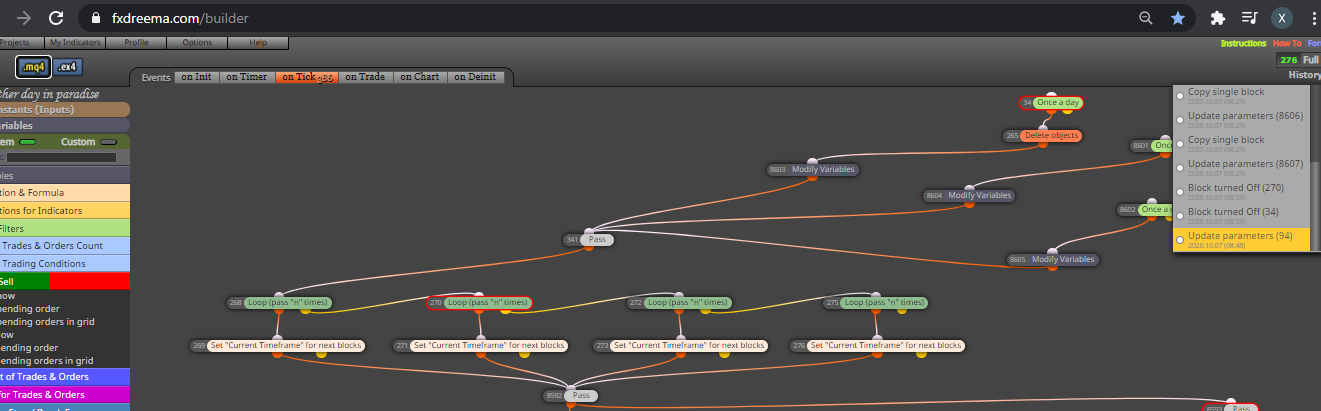
X
Posts made by Xander
-
RE: Bug - All conditions reset to MA?posted in Questions & Answers
-
RE: Bug - All conditions reset to MA?posted in Questions & Answers
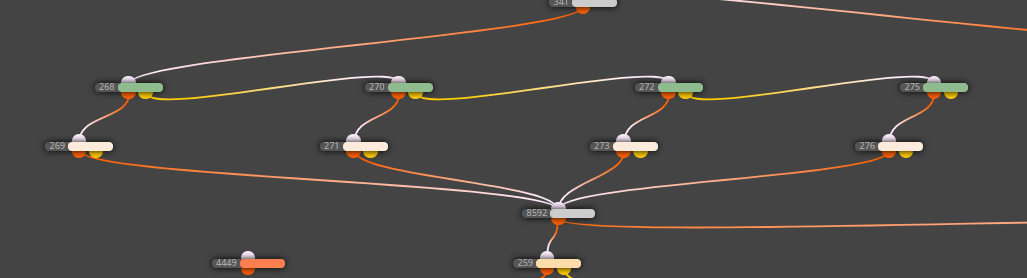
Tried reloading it an all blocks are blank
-
RE: Bug - All conditions reset to MA?posted in Questions & Answers
All the colouts of my objects are gone and formuals refer to moving averages rather than actual values
-
RE: Bug - All conditions reset to MA?posted in Questions & Answers
Had another look now and some of them have been reset to a 20 MA on the other side of the condition
-
Bug - All conditions reset to MA?posted in Questions & Answers
Hi All
Bit upset right now and hoping someone can help me out. Several hundred of my blocks have reset themselves to show a moving average as a condition instead of what I placed in there. eg Candle 1 high > Candle 2 high has been replaced with MA5 > Candle high 2. Is there any way to restore the old version? I have the latest EA as I was busy testing it. Any help would be greatly appreciated.
-
RE: Help with reducing variable to 1 and stopping loopposted in Questions & Answers
I don't think thats the problem, I run this on a 1h chart, so block 70 and 71 should only allow it to happen once a day, when I reset these to a certain value. The loop should then test for highs, reduce the variables by one and if they are still greater than one run block 63, which should not reset the variables? In effect if you set variable 1 to 24 it should repeat 23 times until the variable equals 1 and then stop.
shared/QXlN3HIPc
-
RE: Help with reducing variable to 1 and stopping loopposted in Questions & Answers
Yeah don't worry about the buy and sell just trying to test where the system triggers and when. The ruleset is a massively simplified version of teh actual project. My concern is that the loop does not draw a line at each high for each loop, instead only one is drawn. Dont really care about the conditions just want the loop to run at 24 for example, reduce to 23 and repeat all conditions until the variable =1
-
RE: Help with reducing variable to 1 and stopping loopposted in Questions & Answers
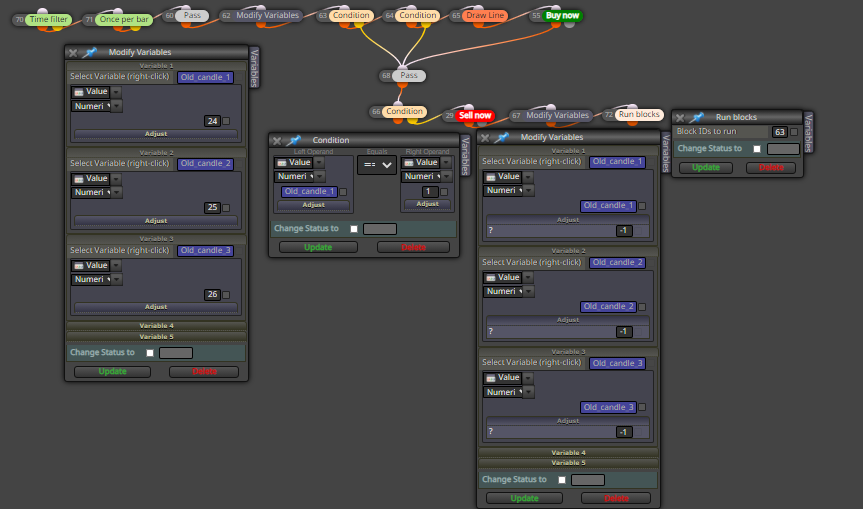
Ok I wiped the other rules to try and clean this up. shared/psbUifl0b
Essentially the rules now are start 24 candles back, look for a 3 candle swing high, draw a line at the high. Regardless of whether there is a high reduce the old candle ID by 1 and repeat until it equals 1. (you can ignore the buy and sells was just using those to test where it stops working because the line is only drawn once).
Basically two problems:
- The line for the high does not draw each time and
- Run through all rules and reduce by 1 until it equals 1
-
RE: Help with reducing variable to 1 and stopping loopposted in Questions & Answers
Sure and sorry for forgetting the link shared/dVmcx8jTb
-
RE: Help with reducing variable to 1 and stopping loopposted in Questions & Answers
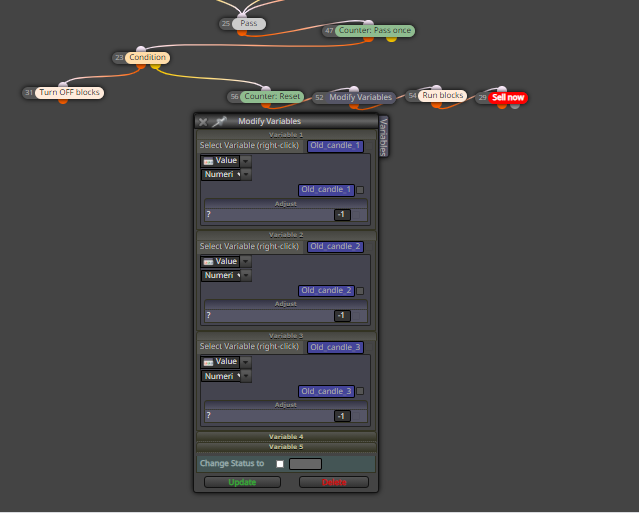
Found this one but still not working
-
Help with reducing variable to 1 and stopping loopposted in Questions & Answers
Hi All
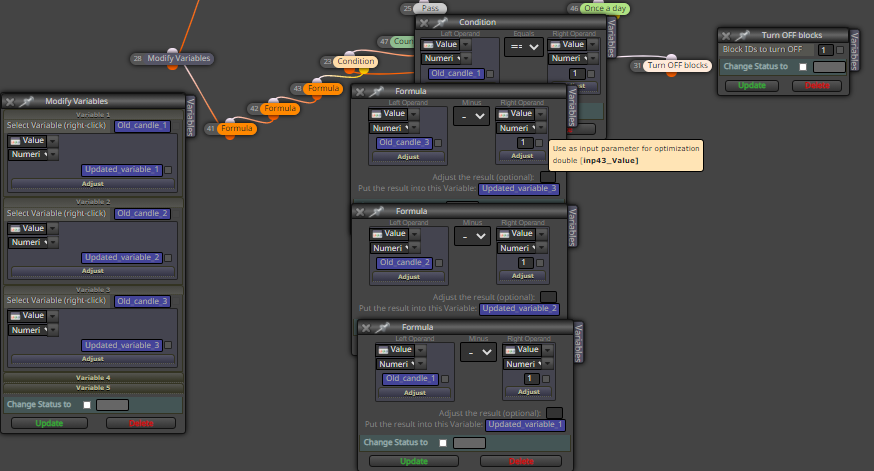
Busy with this project shared/Zq5NSUzmb and cannot get the loop to work. There are essentially 3 variables that reduce by 1 each loop. When one of them equals 1 the project this should trigger the loop to stop but doing something wrong. Would really appreciate some help. The snippet below shows the problem blocks
-
RE: Possible reasons for differences in visual mode?posted in Questions & Answers
Its set on current with blocks in the EA to set the current timeframe for blocks going forward.
-
Possible reasons for differences in visual mode?posted in Questions & Answers
Hi All
I have completed an EA and I am busy testing it. I noticed that the results will sometimes differ depending on whether or not I run the MT4 tester in visual mode or not. Is there a reason for this? -
Need help with constantsposted in Questions & Answers
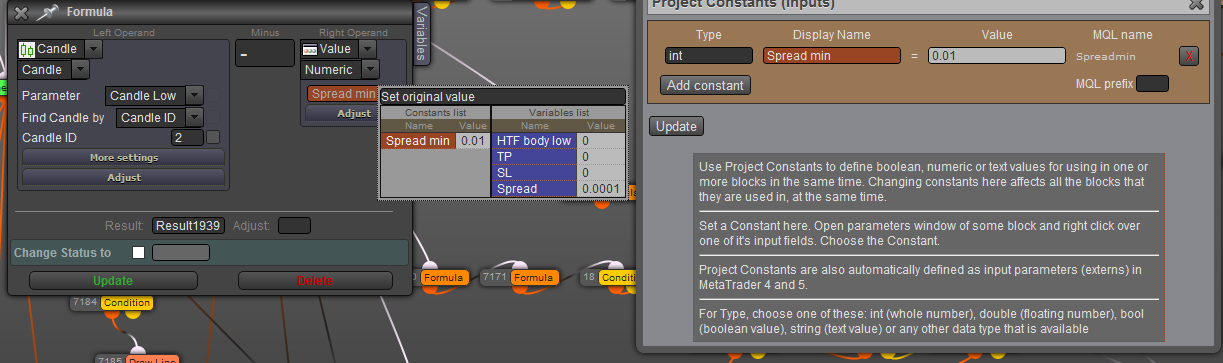
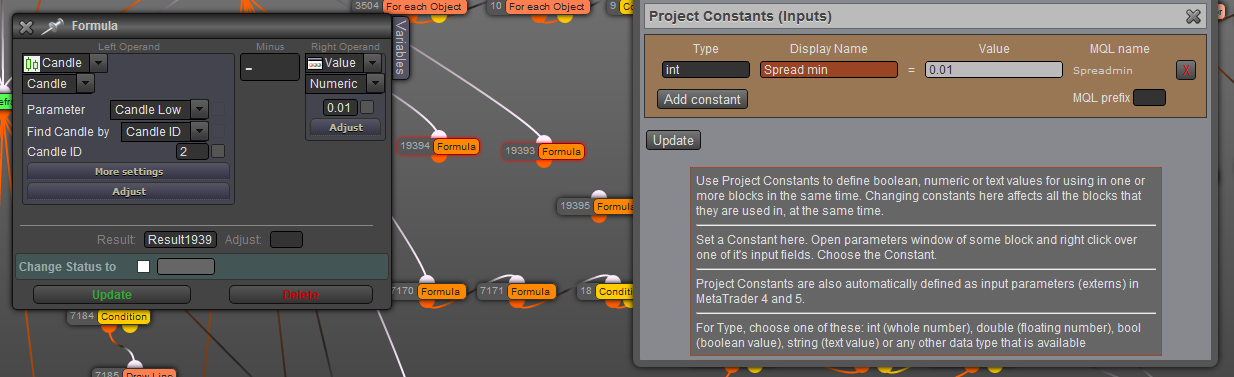
Below is a formula block where I am trying to use the constant. The result of the EA differs when i use the constant (example 1) and when I manually type the value (example 2) not sure what I am doing wrong, sorry first time using constants:
-
RE: Move stop loss to last take profitposted in Questions & Answers
Apologies one more thing, the reason I use the formula is because these blocks trigger when the first trade closes, so the open range should be equal to the profit of the first trade
-
Move stop loss to last take profitposted in Questions & Answers
Hi All. I am busy with an EA designed to open two positions. Each position will have an initial stop loss of 20 pips. Then if first target is at 10 pips the first trade will be closed and the second's stop loss moved to a loss of 10 pips. This part is working fine. Where I am stuck is I need a condition that if the new stop loss is greater then 10 pips (the first target) then the second trade should be auto closed (this happens sometimes due spread spikes). The numbers used above are just examples they are variable depending on the trade. I have tried the below but it does not work for some reason?

Any suggestions are welcome.
-
Check age based on candlesposted in Questions & Answers
Hi All
Is it possible to check the age of a trade based on candles rather than time? From what I can see the check age block does not have this option. -
Update formula for spreadposted in Questions & Answers
Hi All.
A while back fxdreema gave me the formula MathAbs(OrderClosePrice() - OrderOpenPrice()) to work out the distance from open price of my trades. Is there anyway to incorporate the spread in this? ie reduce the distance by the spread (not sure if the formula would be the same for buy and sells). -
RE: Server Error message compilating on Desktop versionposted in Bug Reports
Hi I received the same error. Was just wondering if the reason for this was ever discovered, the only change I made was to the time filter blocks in the EA and I received this error. Happy to try the solution above just wanted to check if it would wipe my projects before doing it? I have a lot of them and don't want to lose them. Not sure where they are saved to back them up either.