@Hiten7405 Thank you so much 
X
Posts made by XDV
-
How to solving this enum error ?posted in Questions & Answers
I do this with enum but cannot compile. I need to do enum with timeframe. and I have read another forum about enum but cannot solve this error.
Thank you for helping me solve this problem.


-
RE: Close All MT5 trades quicklyposted in Tutorials by Users
@jstap Do you have any way to turn ON/OFF Algo Trading in MT5 ?

-
RE: MQ5 & WinAPIposted in Bug Reports
And This script MQL5 can run direct on MT5 >>>
#define MT_WMCMD_EXPERTS 32851
#define WM_COMMAND 0x0111
#define GA_ROOT 2
#include <WinAPI\winapi.mqh>void AlgoTradingStatus(bool Enable)
{
bool Status = (bool) TerminalInfoInteger(TERMINAL_TRADE_ALLOWED);
if(Enable != Status)
{
HANDLE hChart = (HANDLE) ChartGetInteger(ChartID(), CHART_WINDOW_HANDLE);
PostMessageW(GetAncestor(hChart, GA_ROOT), WM_COMMAND, MT_WMCMD_EXPERTS, 0);
}
}void OnStart()
{
AlgoTradingStatus(false);
} -
MQ5 & WinAPIposted in Bug Reports
I have run the MQL5 script in fxDreema, tested it in both "Custom block" and in the "Custom MQL code" block, the result appears to be the same error:
can't open "S:\www-node\Server.....\WinAPI\winapi.mqhThis is likely caused by preventing WinApi in the server. Therefore, I would like to ask the system administrator to help check this matter. Thank you in advance.


-
RE: Error after run Custom Blockposted in Questions & Answers
For your link I make it on MT4 and Complete run and working perfectly.
But MT5 with MT5 code is not work with error >> can't open "S:\www-node\Server .... winapi.mqh -
RE: Error after run Custom Blockposted in Questions & Answers
Thank you so much @jstap I have read your link and many other related links. Including checking the code. But the result is the same error. Is it possible that the error occurred not from the code, but from some settings? And how can I fix it?
So it sayscan't open "S:\www-node\Server\apps\fxdreema\components\builder\templates\export\MQL5\compiler\MQL5\Include\WinAPI\winapi.mqh" include file
'AlgoTradingStatus' - undeclared identifier -
Error after run Custom Blockposted in Questions & Answers
Please ask someone who knows. This code from genius guy that create a custom block to control Algo-Trading Button in MT5 but after run have error ... please Help find this solution. Thank you in advance.

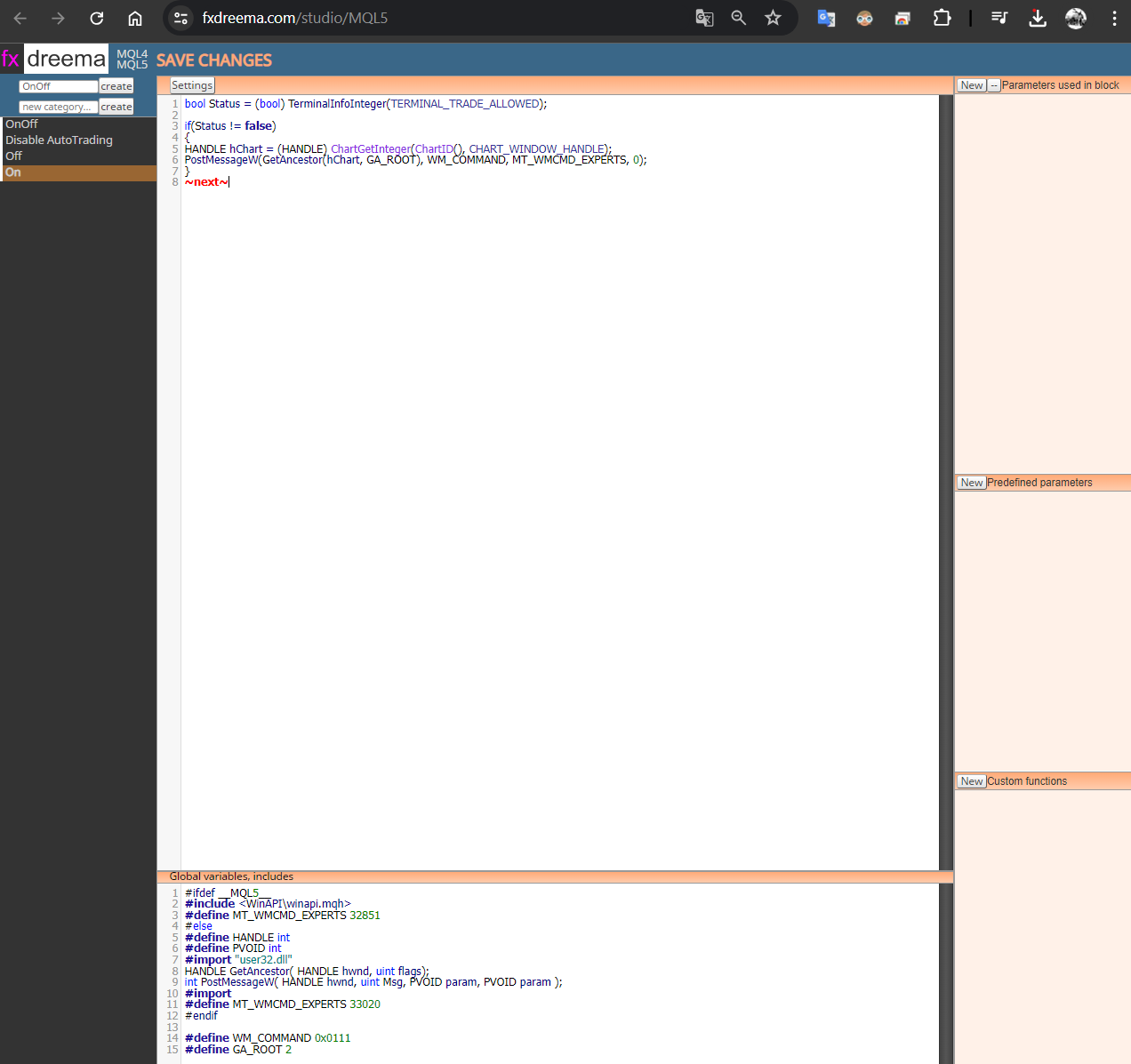
----- Upper Block ------
bool Status = (bool) TerminalInfoInteger(TERMINAL_TRADE_ALLOWED);if(Status != false)
{
HANDLE hChart = (HANDLE) ChartGetInteger(ChartID(), CHART_WINDOW_HANDLE);
PostMessageW(GetAncestor(hChart, GA_ROOT), WM_COMMAND, MT_WMCMD_EXPERTS, 0);
}
~next~----- Lower Block ------
#ifdef MQL5
#include <WinAPI\winapi.mqh>
#define MT_WMCMD_EXPERTS 32851
#else
#define HANDLE int
#define PVOID int
#import "user32.dll"
HANDLE GetAncestor( HANDLE hwnd, uint flags);
int PostMessageW( HANDLE hwnd, uint Msg, PVOID param, PVOID param );
#import
#define MT_WMCMD_EXPERTS 33020
#endif#define WM_COMMAND 0x0111
#define GA_ROOT 2 -
RE: How I disable Algo-Trading Button or send CTRL-E by FxDreemaposted in Questions & Answers
Thank you @jstap i will try that.
-
RE: How I disable Algo-Trading Button or send CTRL-E by FxDreemaposted in Questions & Answers
How i get winapi.mqh ?
-
RE: How I disable Algo-Trading Button or send CTRL-E by FxDreemaposted in Questions & Answers
@reyxv16 Thank you very very much
But I don't know if this is the right way to do it.
Please help explain further.https://fxdreema.com/shared/k4w7gSHB

-
RE: How I disable Algo-Trading Button or send CTRL-E by FxDreemaposted in Questions & Answers
@jstap That you mean answer for disable Algor trade button in the Amazon web right ?


