X
Posts made by Xfire
-
RE: Tutorial : Working with ex4 & ex5 indicator fileposted in Tutorials by Users
- Now, you can use your indicator in the your EA
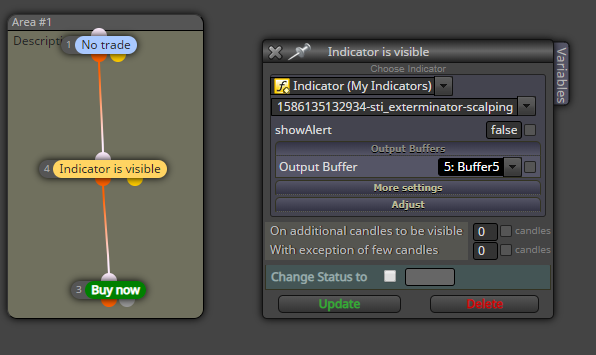
It is very important, you have to use the "Indicator is visible" block for the same as my indicator, when your values are filling with TEMP.
If in the data window your values are always filled with numbers you can use "Condition" block
you can see in the screenshot how should using custom indicators

- Now, you can use your indicator in the your EA
-
RE: Tutorial : Working with ex4 & ex5 indicator fileposted in Tutorials by Users
- Now, you should add your indicator to Fxdreema same as this picture
Before that copy your indicator to MT4 or MT5 indicators folder

- Enter your data type (if you want)
Then enter buffers (i have 3 colours) same as the picture

- Now, you should add your indicator to Fxdreema same as this picture
-
Tutorial : Working with ex4 & ex5 indicator fileposted in Tutorials by Users
IF you want to work with special indicator and you don't have Mq4 or Mq5 file you have to can find active buffer in the indicator and enter that to the Fxdreema.
You have 5 part to do that.
i have prepared some screenshot to guide you.1.Added you indicator and open data windows

- when you moving the mouse on the indicator you can see which buffer (value) is active with your shape.
Here i have 3 values and colour but I should use Value 2 and Value 3 (Green&Orange)
Note: some times value is TEMP ( when the value is not active at the moment )

- when you moving the mouse on the indicator you can see which buffer (value) is active with your shape.
-
RE: Custom Indicator - Color dependent operationsposted in Questions & Answers
@ad put Candle ID 1 try this.
how you config your indicator in the custom indicator?
if your buffer value = TEMP you should use "Indicator is visible" block , you cant use condition block -
RE: I have been trying convert the custom indicator to EA. Will appreciate your help.posted in Questions & Answers
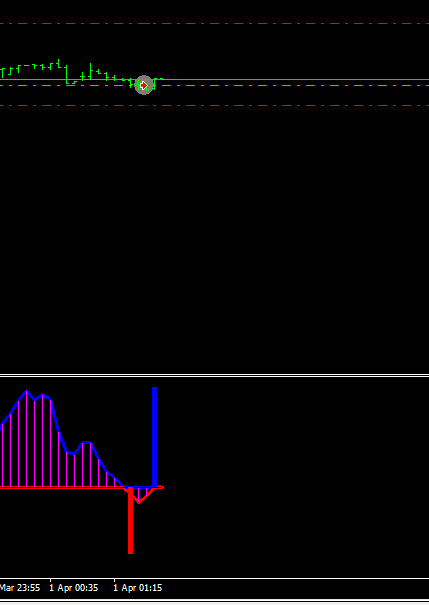
@billy-1 i checked and working as well. just one thing, your indicator similar to a lot of other indicators do repaint.
i checked you have to put 2 for Candle ID because maybe buffer remove after 1 candle!for example, the blue bar remove after the next candle
-
RE: Help With using variables (I think)posted in Questions & Answers
@johnkscott4781 Hi. i changed your blocks. but you used Buy variable (BLDistBuy) for sell blocks
im not sure that working perfectly
i think you have some issue as well
just try now
https://fxdreema.com/shared/0kx4JMcie -
RE: Custom Indicator - Color dependent operationsposted in Questions & Answers
@ad Hi.
please share your project and indicator
some options are here for sharing -
RE: My Indicator EAposted in Questions & Answers
@javed77 your indicator doesn't work in my mt4 and i cant check for you
-
RE: My Indicator EAposted in Questions & Answers
@javed77 it is good logic if you entred correct config for indicator
-
RE: I have been trying convert the custom indicator to EA. Will appreciate your help.posted in Questions & Answers
@billy-1 You have 2 way for close trade
1.waiting your position touch SL or TP
2. for buy position, use "If trade" block and check if sell condition is true ( in "Indicator is invisible") just use "close trade" blockvery simple just reverse do
-
RE: Setting the SL to break even once the price goes 1X the ATR in your favorposted in Questions & Answers
@digru "Modify Stops" block changed the open position to SL 0, I don't know what is your strategy just I want to show you how you can change SL in an open position,
if you have problem with your strategy please share your project here -
RE: Conflict EA between two different chartposted in Bug Reports
@l-andorrà yes. I want just one EA using in multi chart.
-
RE: I have been trying convert the custom indicator to EA. Will appreciate your help.posted in Questions & Answers
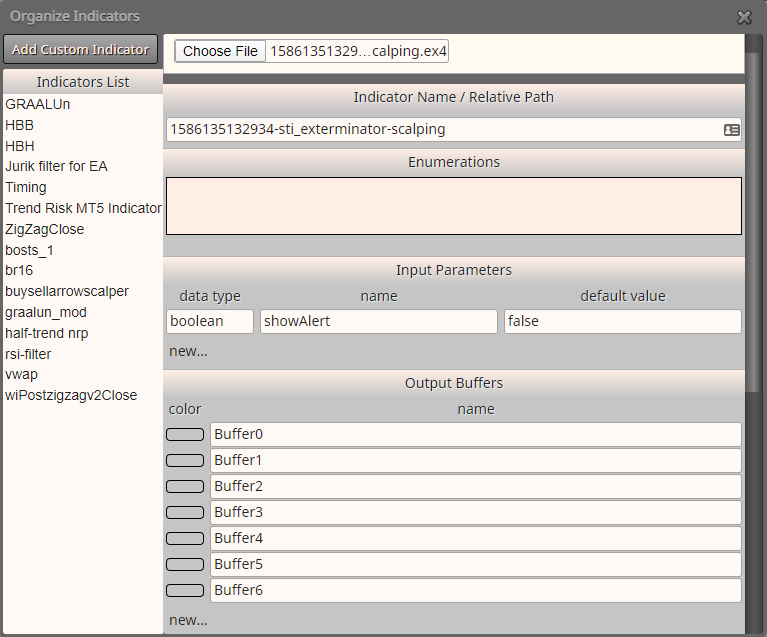
At first, you should copy indicator in the root indicator folder in mt4
and create these custom indicator parameters by menu.
then you can use this indicator in "Indicator is visible" block
if buffer 5 is visible you should open buy position and if buffer 6 is visible you should open sell position -
RE: I have been trying convert the custom indicator to EA. Will appreciate your help.posted in Questions & Answers
@billy-1 really i don't know how working your indicator in the condition!!
this is my way, i create custom indicators in the "My indicator " menu and I use in a condition, and use "My indicator" part from condition block and set everything about an indicator for working.
i never before using your style.
you have to use "Indicator is visible" block for this indicatori think your buffers are incorrect and you have a loop for open and close trades
-
RE: Chart Indicator EAposted in Questions & Answers
@javed77 Hi.
i checked your indicator.
you cant working with that for EA because hasn't any buffer entry, this is just drawing indicator.
you can find better Fibonacci indicators