@trader-philipps no need to change ea indicators.
just save the template in your mt4 and then use the name of that template in template block

@trader-philipps no need to change ea indicators.
just save the template in your mt4 and then use the name of that template in template block
@clacky
https://fxdreema.com/shared/pUmNON0Td
In this example block 1, 2, 3, 4 are the conditions that you wanna confirm before you buy or sell, so replace them with what ever you want
Block 7 and 8 count the number of trades that the ea executes (separately for both long and short)
Look in the on trade menu you will find blocks with ID 9, 10 11 and 12 these blocks are decreasing the number of trades that are previously counted in case a trade is closed.
Block 13 Is used to print the number of currently long and short trades on the chart. The variable buycount and sellcount are storing the number of long and short trades you can use these 2 variables to further proceed
In my case I simply printed them on the screen hence block 13, and 14, you can do whatever you want with these 2 variables
@tyquan1414 check this:
https://fxdreema.com/shared/Dzg0CABFc
i havent tested it but it should work
all the levels are working now
just the close all on 10pip profit isnt working
@ambrogio https://fxdreema.com/shared/p6vJfV2yb
check block 32 now its working with the level 3 trades ,
havent tested level 4 yet
problem now is its not closing all the trades when the recovery trade recovers the loss meaning when its in 10 pip profit
@ambrogio
still no 3rd level recovery
@ambrogio
i did that because it needs to close all running trades when the recovery trade is in 10 pip profit otherwise it wont recognize the recovery trade , cuz i dont want it to close the first trade in 10 pips profit when there is no recovery trade
@ambrogio
can you please take a look?
https://fxdreema.com/shared/kGiBZE4gd
@tyquan1414
Well you can try this:
Step 1 :Add few buttons on the chart for " buy, sell, close trade, auto and manual " button
Step2: attach required blocks with these buttons, also add use flags for "auto and manual" buttons
Step 3: Now add conditions of ma cross over and attach alert blocks to those conditions, so when the condition is true it will give the alert, in your case when the ma cross happens it will give you an alert and you take trade by clicking on the buttons you created in step 1, and when you want fully automated version that takes trades automatically, just click the auto button that you created in step 1 and bot will start trading automatically, you can click on manual button which turns off this auto feature just make sure you use flags correctly
@ambrogio I am trying to do replicate the cap zone recovery
I tried it with keeping every recovery trade to be of different group but couldn't accomplish anything
Do you have any idea?
need some advice on this :
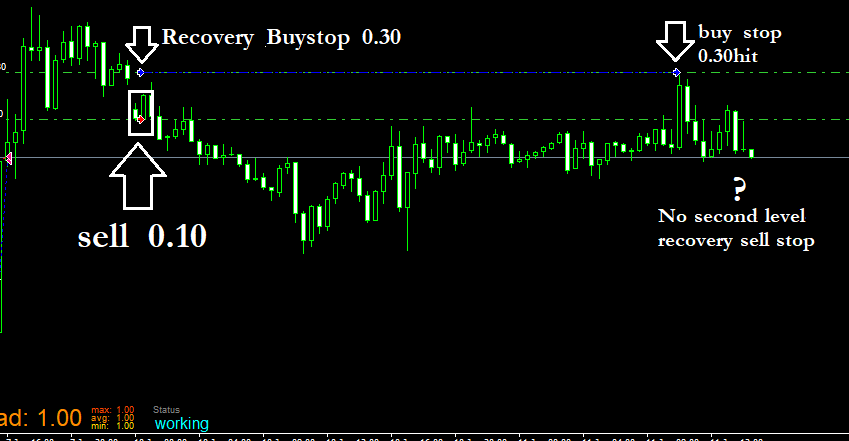
i am not using any stoploss in the trades taken by the ea and instead of the stoploss i want the ea to recover the trades that are in negative let say trades that are running 20 pips in loss the ea opens up a reverse trade with martingale volume.
here is an example :
let say the i have a buy trade with lotsize 0.10 that is running in -10 pips , so instead of closing this trade it should open a sell trade but the sell trades volume should be enough to recover the loss of buy trade within next 10 pips.
so first trade is in negative 10 and when the reverse sell is opened and goes 10 pips in profit it closes both running trades , so the buy will be in 20 pips loss and the recover sell will be in 10 pips profit , but because the recovery sell will be of lotsize 0.20 it will recover the loss from the buy trade. so it closes both.
let say the recovery sell trade goes into negative then ea open a second level recovery trade (buy ) to recover this sell loss. and if the second level recovery buy trade also goes into negative of 10 pips , it opens another recovery sell trade keeps on doing this until any of the recovery trade goes into 10 pips profit and then close all running trades
so any idea? where to begin ?
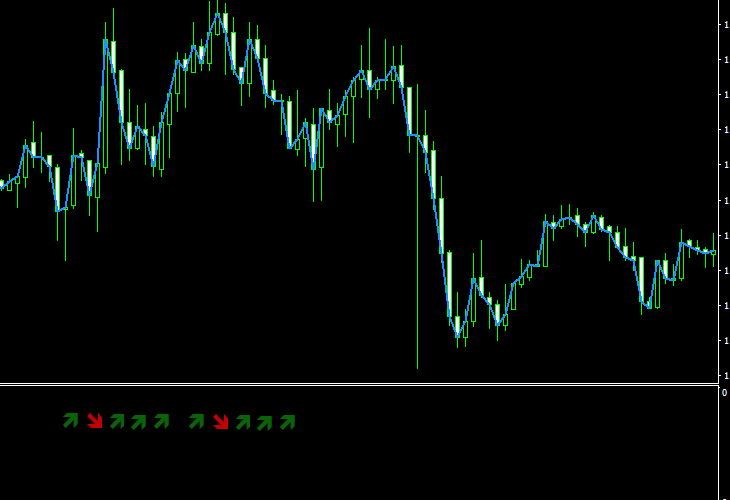
is there a way to place the wingdings at a certain place according to x and y coordinates instead of the candle high,low,open or close? like in the chart subwindow like this:
is there a way to save the object name into a variable?
@ashley111 I would have used it above the Ema cross conditions so it won't run any block below the check trade count block , but considering you also want the ea to keep tabs on the Ema cross and trade accordingly so I think it's best to use this block right above the buy and sell block. But you are gonna need to put a check flag true/false block right above the trade count block, and also use a set flag true false right below the Ema cross blocks so that when the Ema conditions change and revert back again ea takes trade again, and don't forget to set the flag to false again once the four trades are done


