fxDreema

    • Register
    • Login
    • Search
    • Back to the main page
    • Categories
    • Recent
    • Tags
    • Popular
    • Search

    Can an executed order's magic number be used for recovery after an EA crashes?

    Questions & Answers
    3
    9
    282
    Loading More Posts
    • Oldest to Newest
    • Newest to Oldest
    • Most Votes
    Reply
    • Reply as topic
    Log in to reply
    This topic has been deleted. Only users with topic management privileges can see it.
    • MTAB
      MTAB last edited by

      I have tried to research this online but I get multiple answers. Here is my question: After an EA crashes (or MT4 crashes or my system crashes) is there a way to use the magic number to have the EA "pick up where it left off?"

      More information: Like most EAs, it uses multiple variables to control what to do, whether it is a pending trade or an executed order. However, if my EA crashes after a pending order has been placed or an order has been executed, my EA will not "recognize" them to continue on with the strategy, even after I restart the EA.

      I don't mind deleting pending orders so that the EA can start again with those, but I do not want to have to close out executed orders just because the EA or MT4 or my computer restarts. Aside from using a VPS, is there a way to use the magic number to have the EA "pick up where it left off?" Or any other suggestions?

      1 Reply Last reply Reply Quote 0
      • l'andorrà
        l'andorrà last edited by

        Yes, that is possible, but you will need some custom code to store the relevant information into a file that can be retrieved later by the EA once it is run again on the chart. You will need a programmer to do that, I'm afraid.

        (English) I will try to help everyone in these fxDreema forums. But if you want to learn how to use the platform in depth or more quickly, I can help you with my introductory fxDreema course in English at https://www.theandorraninvestor.eu.

        (Català) Miraré d’ajudar tothom en aquests fòrums d’fxDreema. Tanmateix, si vols aprendre a fer servir la plataforma amb més profunditat o més de pressa, t’hi puc ajudar amb el meu curs d’introducció a fxDeema en català a https://www.theandorraninvestor.eu/ca.

        (Español) Intentaré ayudar a todo el mundo en estos foros de fxDreema. Sin embargo, si quieres aprender a usar la plataforma en profundidad o más deprisa, te puedo ayudar con mi curso de introducción a fxDreema en español en https://www.theandorraninvestor.eu/es.

        1 Reply Last reply Reply Quote 0
        • MTAB
          MTAB last edited by

          Thanks @l-andorrà, I was hoping there was another way but oh well! 🙂

          1 Reply Last reply Reply Quote 0
          • jstap
            jstap last edited by

            Save things in a terminal variable (global variable), this way any saved values stay is terminal is closed

            Learn fxDreema Without the Wait!

            My comprehensive book, available on Amazon, is packed with examples and invaluable insights to help you fast-track your learning journey.

            The paperback and hardback editions include MT4 & MT5 QR codes for easy access to all prebuilt projects and robots, including my latest gold trading robot!

            Don’t miss out

            Click here➡️ https://mybook.to/fxDreema to get your copy today!

            Enjoy! 😊

            MTAB 1 Reply Last reply Reply Quote 0
            • MTAB
              MTAB @jstap last edited by

              @jstap Thank you so much for taking the time to respond! At the risk of sounding dumb, how exactly does one do that? I actually opened up my EA on the MetaEditor and it seems my variables are already listed under "Variables (Global Variables)" so should I assume this isn't what you mean?

              1 Reply Last reply Reply Quote 0
              • jstap
                jstap last edited by

                Global variables (terminal variables) are values saved in a file in the terminal folder, push fn f3 to see a window of variables used in your platform. In output you have a yellow block that will save this from the name you chose, you can then get this value using most blocks, use in the same way as normal variables, but the backtest will change like in live, so you may need to use an if testing block to limit when it can be changed

                Learn fxDreema Without the Wait!

                My comprehensive book, available on Amazon, is packed with examples and invaluable insights to help you fast-track your learning journey.

                The paperback and hardback editions include MT4 & MT5 QR codes for easy access to all prebuilt projects and robots, including my latest gold trading robot!

                Don’t miss out

                Click here➡️ https://mybook.to/fxDreema to get your copy today!

                Enjoy! 😊

                1 Reply Last reply Reply Quote 1
                • MTAB
                  MTAB last edited by

                  Wow, so ok thank you very much for that explanation. If I understand you correctly, I'm using the "Terminal variables" block to store the variables that I'm using for the EA like in the image below. Very clever way to solve this problem! A question I have now is based upon your back test comment: Since the variables will be the same on each chart, but their associated values will obviously be different on each chart, will running my EA simultaneously on Chart 1 and then Chart 2 (during live forward testing) overwrite the Chart 1 variables' values in the MT4 platform into the Chart 2 variables' values? If that makes sense...? Thanks in advance!
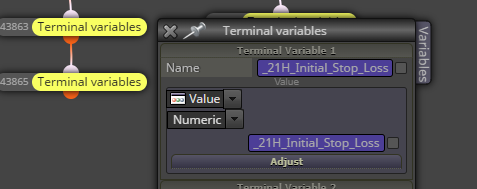
                  image.png

                  1 Reply Last reply Reply Quote 0
                  • jstap
                    jstap last edited by

                    Yes, you will need to create a separate variable for each chart, then use something like a condition to decide which variable to check and change.

                    Learn fxDreema Without the Wait!

                    My comprehensive book, available on Amazon, is packed with examples and invaluable insights to help you fast-track your learning journey.

                    The paperback and hardback editions include MT4 & MT5 QR codes for easy access to all prebuilt projects and robots, including my latest gold trading robot!

                    Don’t miss out

                    Click here➡️ https://mybook.to/fxDreema to get your copy today!

                    Enjoy! 😊

                    1 Reply Last reply Reply Quote 0
                    • MTAB
                      MTAB last edited by

                      Understood, thanks so much, @jstap !

                      1 Reply Last reply Reply Quote 0
                      • 1 / 1
                      • First post
                        Last post

                      Online Users

                      G
                      H
                      J
                      E
                      T
                      E

                      16
                      Online

                      146.6k
                      Users

                      22.4k
                      Topics

                      122.6k
                      Posts

                      Powered by NodeBB Forums | Contributors