Distance from last open and only buy/sell above/below last open trade
-
I don't mind helping, but chat GPT is better at explaining code than me, if I add code to my project I do it one section at a time. Everything you have here you don't need code for, and your last project nearly worked. When I started using FX I would create 1 thing, then backtest before adding another. Get 1 thing working, and if not ask why. As you did, so start by removing 1 of your sell blocks and see what happens.
-
I'm pretty sure this replicates the above next trade order logic (after a signal)? So missing something pretty obvious?
-
@jstap Thanks, yes its a learning curve. Adding blocks that say they'll do something but don't unless something else is changed is what is confounding me...
-
After signal and 1st open trade, go to:
If SELL trade, then check if the current price is n pips away (open price) the current partial trade then go back to trade signal and sell.
-
What I don't understand is the pips away open price block or the check no trade nearby block should be used. There must be a tutorial somewhere about this? It seems such a simple thing I'm trying to do!
-
-
Maybe last attempt at this before I go back to MQL marketplace for a programmer. This is driving me nuts now and I can't seem to find any solutions that work on the site... hmm.
-
So up to a certain block it works, remove blocks and backtest, then add a block and backtest, then add more and backtest. By doing this you can find a single block that's causing trouble. Ask here if you find something not working.
-
I keep trying different blocks and settings but still spinning my wheels. It just by passes pips away from open price like it's not there? I've changed the sttings to chart direction and also tried it on other signals but can't find settings.
Are you this works as I've wasted hours and hours on it now?https://fxdreema.com/shared/flf1ZEoyc
Cheers
-
You are testing this on a 15-minute chart? tell me what block stops it from working, and you are getting the 1st trade?
-
Ok so I turned all back to timeframes back to current. That didn't change anything? So I've eliminated the signal and put a new one in to test without the once a bar in case that was creating an issue.
But still can't get pips away to fire in?
-
Getting somewhere... now need to figure out the only order pips from last trade... and make it work with a signal rather than no order.
-
Right then, so I need to attach a variable to replace the Open price belongs to command. This is where I messed up last time and got confused!
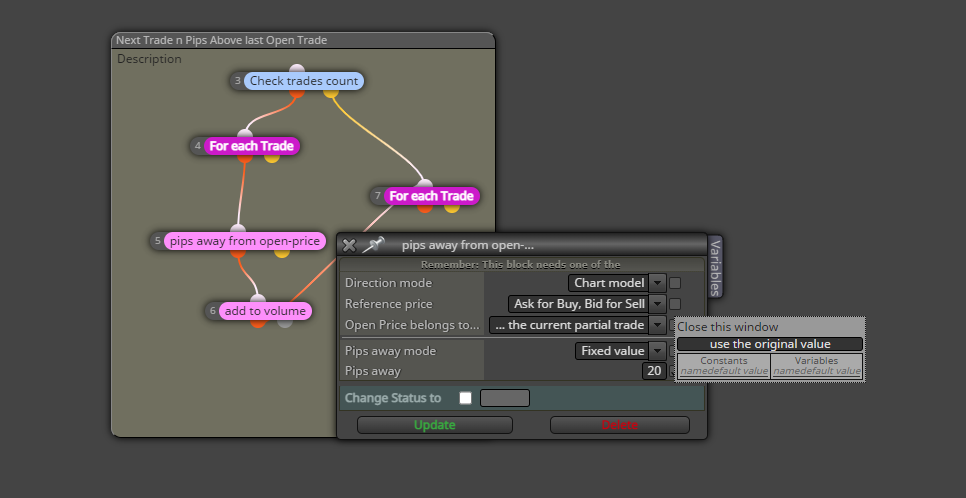
-
Ok stuck now, I can't get the trades going to test after trying to add the variable?
-
Think i'm on the right track but struggling on the look back as a variable of the last open sell trade and distance block in the formula?
-
This is what I see wrong, what stops the 1st area from placing all trades possible if you have a bull candle?
Area 2 I am not sure what you are doing with every n trade as only 1 is allowed and you are expecting greater than 1 trade, your sell pips gap is not in pips.
Until you get these problems sorted, and remove blocks while you test others, you won't find where your problem is coming from. -
Hi Jstap, thanks for trying to help me

1st area i used the sell block as 13 so the last in the chain?
2nd area i've removed the trade count as I don't really know what i'm doing... I've added every n1 trade and not more than n1 trade in the For Each trade block as I read that was how it looks back for last order to then get a price position using the price of the last candle open on that order?
I've now select sell pips gap box if thats what you mean? -
Above your 1st sell you need a no trade block, this will limit this tree to 1 trade.
'> means greater than, as you are only placing 1 trade this will never be true. -
@jstap Ok got that now, so it is only opening one trade (which will be the 1st one)?
-
@jstap Thank you I'm rolling with it now, sorted the pip gap but it looks like it it is placing the next trades n pips from the parent (1st trade)? And not the last open trade.
