Variables in blocks
-
Hello, what is this?
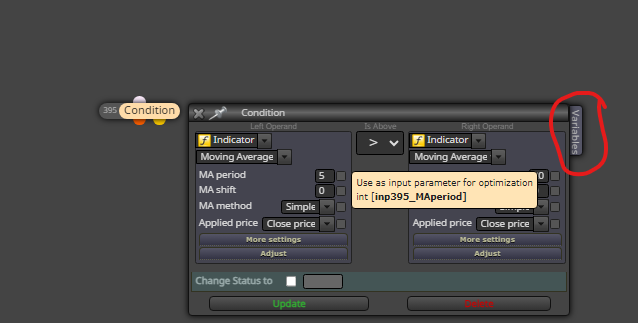
-
You can access and change any variable you have created if you click it and hover the mouse over it will tell you what happens when something happens.
-
@amiinkiaei how we can use it can you show it example
-
This is a basic way of adding 1 on every candle: https://fxdreema.com/shared/gbcgqEoHc
-
@amiinkiaei how it works?
-
Run it and see, I have already said and it shows what you need to do. If there is anything in particular ask.
-
@amiinkiaei There was nothing
-
What do you mean?
-
@amiinkiaei nothing happened in mt
-
@amiinkiaei
Variables are for your calculationsIf you don't need it, simply neglect it
-
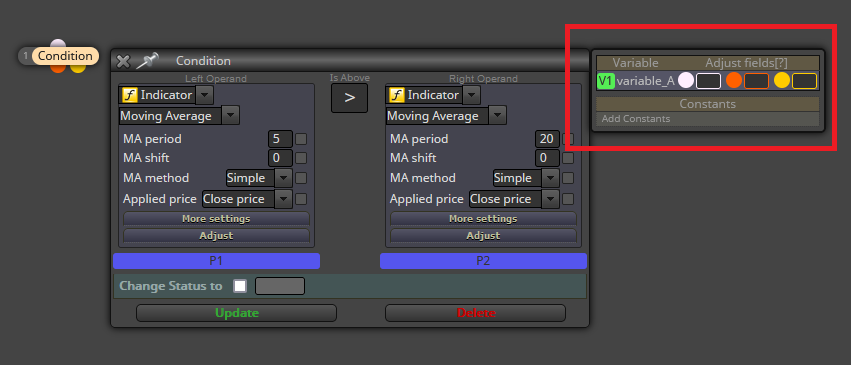
@amiinkiaei You need to create at least 1 constant/variable to see that tab's functionality:
-
@amiinkiaei can you explain more about it
-
That depends on what you need. Are you planning to use the tab in any specific way?
-
@amiinkiaei no i just want to learn
-
Very briefly, you can use any variable (not constants) on those positions. If you use a variable on the white dot, it will be modified BEFORE executing the block. If you use it on the orange one it will be modified IF the block condition is true AND AFTER the execution of the block. Finally if you use the yellow one, the variable will be modified IF the block condition is false AND AFTER the execution of the block. I hope this helps.
-
@amiinkiaei thanks
-
@amiinkiaei It does what "Modify Variables"does
right? -
@amiinkiaei Correct.


