fxDreema

    • Register
    • Login
    • Search
    • Back to the main page
    • Categories
    • Recent
    • Tags
    • Popular
    • Search

    Trade Manager

    Questions & Answers
    2
    6
    289
    Loading More Posts
    • Oldest to Newest
    • Newest to Oldest
    • Most Votes
    Reply
    • Reply as topic
    Log in to reply
    This topic has been deleted. Only users with topic management privileges can see it.
    • F
      funmi last edited by

      Is it possible to create a Trade Management EA, that removes all limitOrders 6minutes before red news and add them back 6minutes after news and that will remove stop ✋losses and TakeProfits 🎯 if there are existing trade(s) 6minutes before the red news?

      If yes, how to do it?

      1 Reply Last reply Reply Quote 0
      • jstap
        jstap last edited by

        For 1 order or many?

        Learn fxDreema Without the Wait!

        My comprehensive book, available on Amazon, is packed with examples and invaluable insights to help you fast-track your learning journey.

        The paperback and hardback editions include MT4 & MT5 QR codes for easy access to all prebuilt projects and robots, including my latest gold trading robot!

        Don’t miss out

        Click here➡️ https://mybook.to/fxDreema to get your copy today!

        Enjoy! 😊

        F 1 Reply Last reply Reply Quote 0
        • F
          funmi @jstap last edited by

          @jstap Many

          1 Reply Last reply Reply Quote 0
          • jstap
            jstap last edited by jstap

            Try this, I haven't tested it, AI has written the code: https://fxdreema.com/shared/BIQYITMQd

            You will have to set the times but this should add replace orders back onto your platform

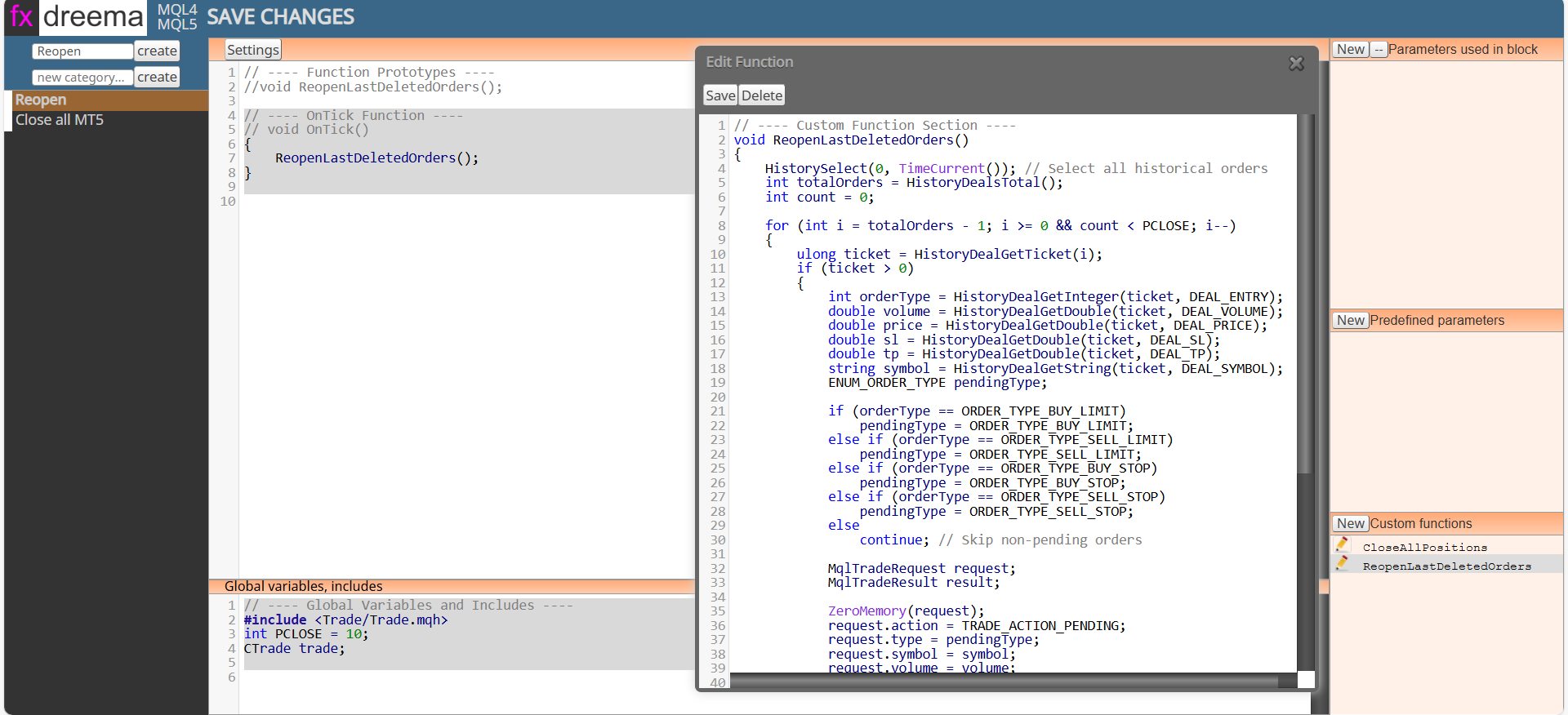
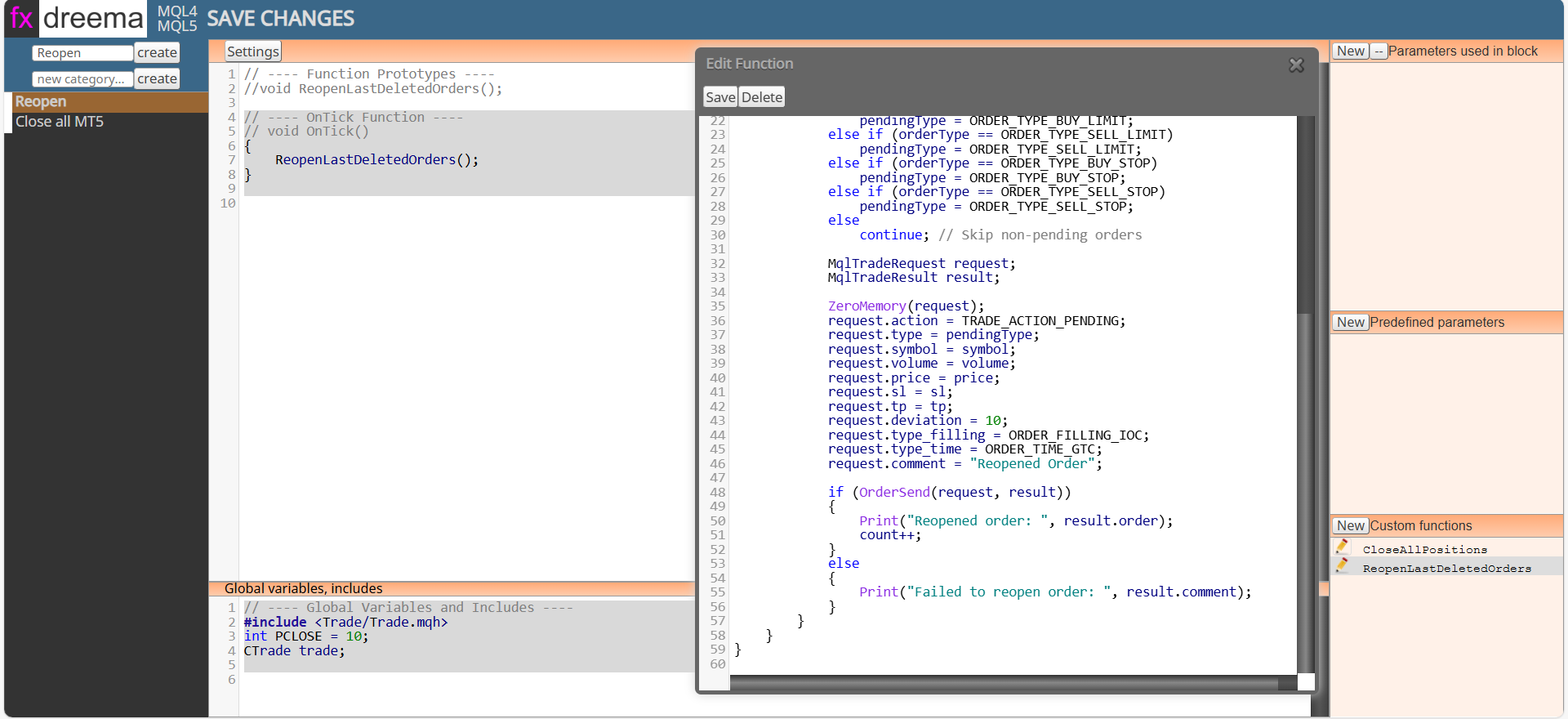
            The next pictures and text will show you how to create on FX:


            // ---- OnTick Function ----(for this is the main settings section)
            {
            ReopenLastDeletedOrders();
            }


            // ---- Global Variables and Includes ----
            #include <Trade/Trade.mqh>
            int PCLOSE = 10;
            CTrade trade;


            // ---- Custom Function Section ----
            void ReopenLastDeletedOrders()
            {
            HistorySelect(0, TimeCurrent()); // Select all historical orders
            int totalOrders = HistoryDealsTotal();
            int count = 0;

            for (int i = totalOrders - 1; i >= 0 && count < PCLOSE; i--)
            {
                ulong ticket = HistoryDealGetTicket(i);
                if (ticket > 0)
                {
                    int orderType = HistoryDealGetInteger(ticket, DEAL_ENTRY);
                    double volume = HistoryDealGetDouble(ticket, DEAL_VOLUME);
                    double price = HistoryDealGetDouble(ticket, DEAL_PRICE);
                    double sl = HistoryDealGetDouble(ticket, DEAL_SL);
                    double tp = HistoryDealGetDouble(ticket, DEAL_TP);
                    string symbol = HistoryDealGetString(ticket, DEAL_SYMBOL);
                    ENUM_ORDER_TYPE pendingType;
                    
                    if (orderType == ORDER_TYPE_BUY_LIMIT)
                        pendingType = ORDER_TYPE_BUY_LIMIT;
                    else if (orderType == ORDER_TYPE_SELL_LIMIT)
                        pendingType = ORDER_TYPE_SELL_LIMIT;
                    else if (orderType == ORDER_TYPE_BUY_STOP)
                        pendingType = ORDER_TYPE_BUY_STOP;
                    else if (orderType == ORDER_TYPE_SELL_STOP)
                        pendingType = ORDER_TYPE_SELL_STOP;
                    else
                        continue; // Skip non-pending orders
                    
                    MqlTradeRequest request;
                    MqlTradeResult result;
                    
                    ZeroMemory(request);
                    request.action = TRADE_ACTION_PENDING;
                    request.type = pendingType;
                    request.symbol = symbol;
                    request.volume = volume;
                    request.price = price;
                    request.sl = sl;
                    request.tp = tp;
                    request.deviation = 10;
                    request.type_filling = ORDER_FILLING_IOC;
                    request.type_time = ORDER_TIME_GTC;
                    request.comment = "Reopened Order";
                    
                    if (OrderSend(request, result))
                    {
                        Print("Reopened order: ", result.order);
                        count++;
                    }
                    else
                    {
                        Print("Failed to reopen order: ", result.comment);
                    }
                }
            }
            

            }


            To create a block click on custom then create custom block
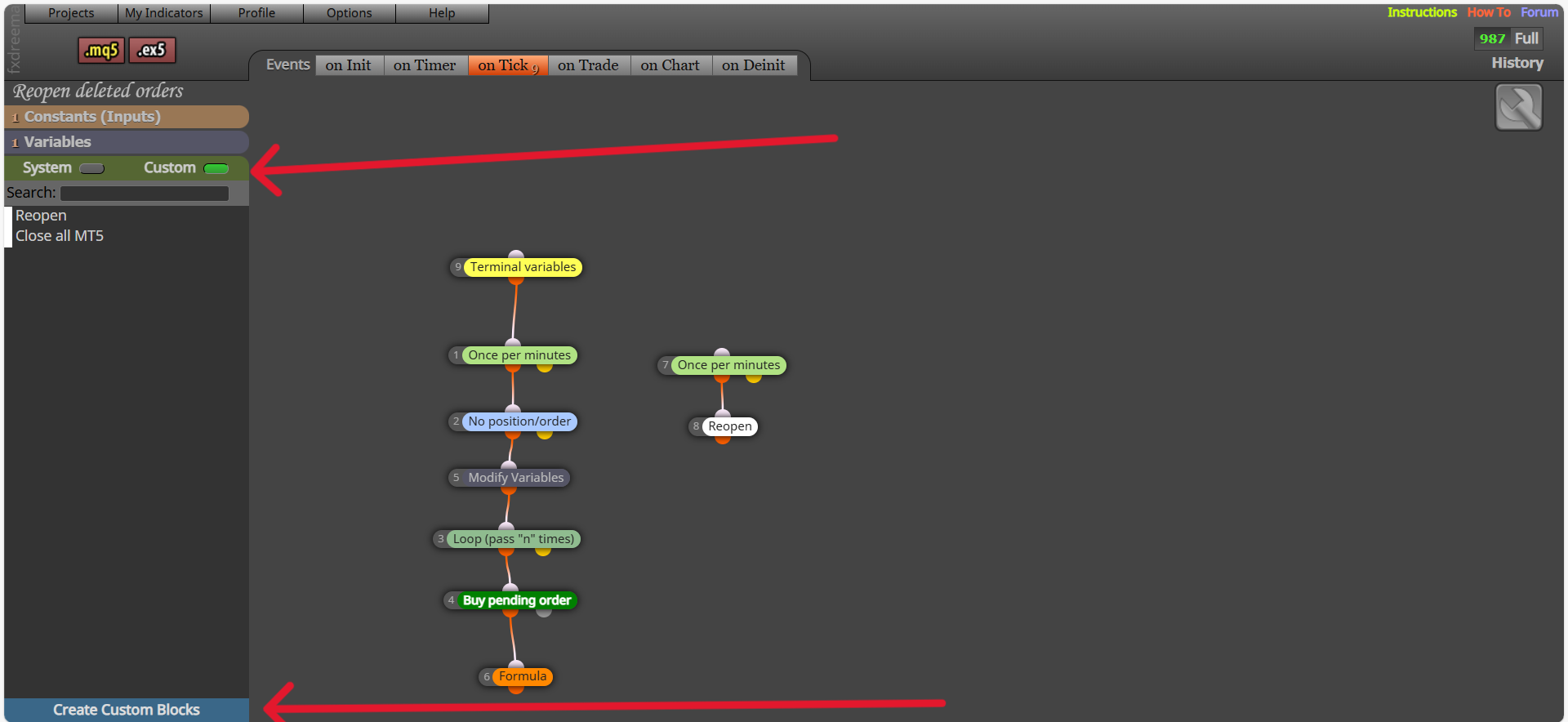
            Screenshot (2547).png

            Settings (on tick) is at the top, includes & global variables is at the bottom, custom functions is on the lower right
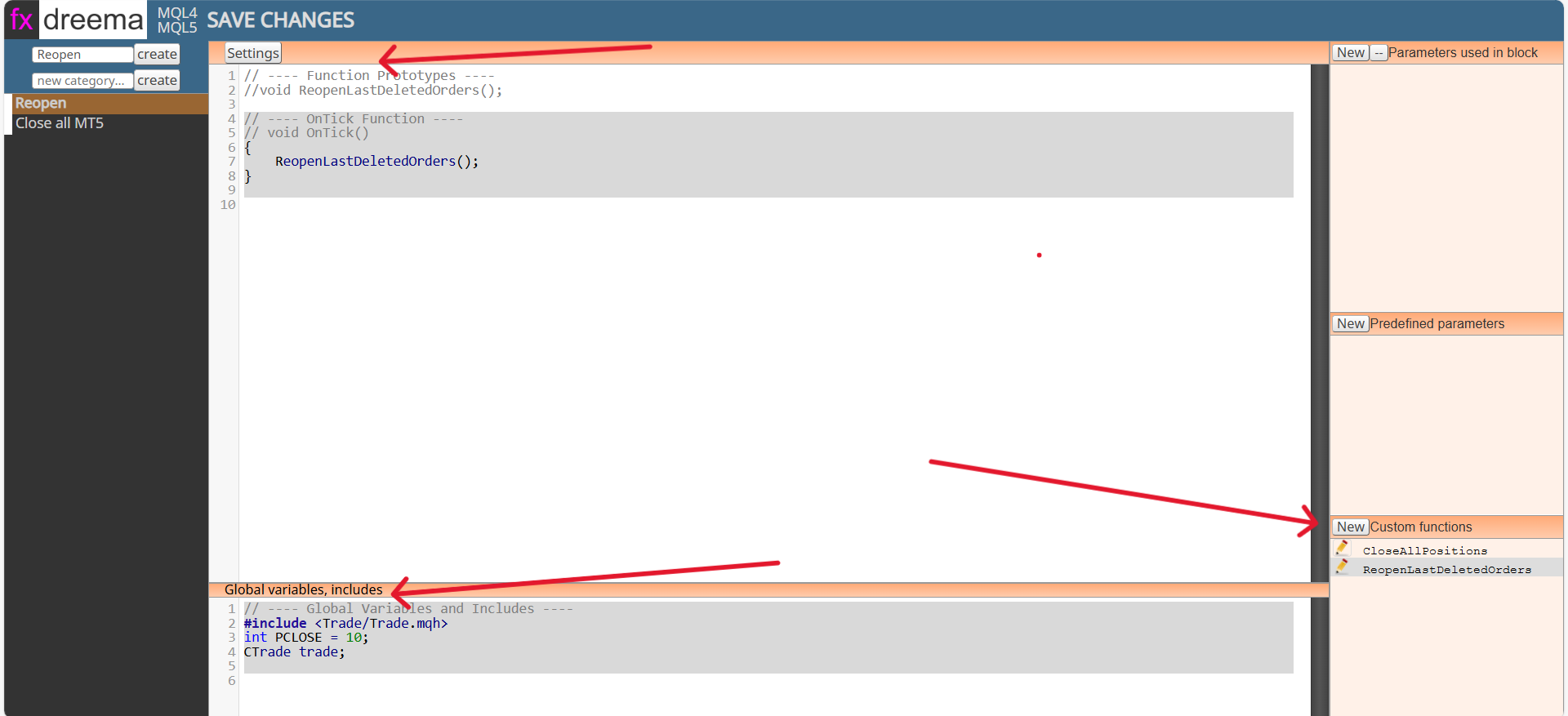
            Screenshot (2548).png
            Screenshot (2549).png
            Screenshot (2550).png

            Learn fxDreema Without the Wait!

            My comprehensive book, available on Amazon, is packed with examples and invaluable insights to help you fast-track your learning journey.

            The paperback and hardback editions include MT4 & MT5 QR codes for easy access to all prebuilt projects and robots, including my latest gold trading robot!

            Don’t miss out

            Click here➡️ https://mybook.to/fxDreema to get your copy today!

            Enjoy! 😊

            F 1 Reply Last reply Reply Quote 0
            • F
              funmi @jstap last edited by

              @jstap Thank you so much for your efforts. I appreciate it alot.

              jstap 1 Reply Last reply Reply Quote 0
              • jstap
                jstap @funmi last edited by

                @funmi 👍

                Learn fxDreema Without the Wait!

                My comprehensive book, available on Amazon, is packed with examples and invaluable insights to help you fast-track your learning journey.

                The paperback and hardback editions include MT4 & MT5 QR codes for easy access to all prebuilt projects and robots, including my latest gold trading robot!

                Don’t miss out

                Click here➡️ https://mybook.to/fxDreema to get your copy today!

                Enjoy! 😊

                1 Reply Last reply Reply Quote 0
                • 1 / 1
                • First post
                  Last post

                Online Users

                J
                B
                D
                E
                J

                17
                Online

                146.7k
                Users

                22.4k
                Topics

                122.6k
                Posts

                Powered by NodeBB Forums | Contributors