fxDreema

    • Register
    • Login
    • Search
    • Back to the main page
    • Categories
    • Recent
    • Tags
    • Popular
    • Search

    Help with my Project Logic: EA doesn't activate any trades on mt5 backtest

    Questions & Answers
    4
    17
    1691
    Loading More Posts
    • Oldest to Newest
    • Newest to Oldest
    • Most Votes
    Reply
    • Reply as topic
    Log in to reply
    This topic has been deleted. Only users with topic management privileges can see it.
    • P
      Pocro last edited by

      Hey Everyone, I am just getting started with FXdreema and I put my EA in MT5. Forgive me if this is a simple fix, but I can't seem to find the answer for it.

      I made a quick project and tried to backtest it in MT5, but when I did, it did not trigger any trades to open. So I wonder what is wrong my logic. See the image below. I have everything inside of "on timer" because I wanted it to enter a trade on eur/usd and gbp/usd at exactly 2:59:59 AM EST on days that are a weekday. You can see both of those time filters below. The rest are things that should trigger after the trade has started, but the issue is that it wont even enter trades so it has to be the time filters.

      I've seen other people share their flow chart and you can actually see all the variables, can someone tell me how I can do that? That way I can get help the fastest. Thank you in advance to anybodies help, I really appreciate it.

      7536054c-a95e-4758-b40e-c6ee152f5926-image.png

      1 Reply Last reply Reply Quote 0
      • jstap
        jstap last edited by

        Pink blocks should be in a separate tree, in another tree put if trade - breakeven, put a no trade above your buy block to prevent multiple pointless trades

        Learn fxDreema Without the Wait!

        My comprehensive book, available on Amazon, is packed with examples and invaluable insights to help you fast-track your learning journey.

        The paperback and hardback editions include MT4 & MT5 QR codes for easy access to all prebuilt projects and robots, including my latest gold trading robot!

        Don’t miss out

        Click here➡️ https://mybook.to/fxDreema to get your copy today!

        Enjoy! 😊

        1 Reply Last reply Reply Quote 0
        • P
          Pocro last edited by

          where is the if trade variable? I searched for it but dont see it.

          1 Reply Last reply Reply Quote 0
          • jstap
            jstap last edited by jstap

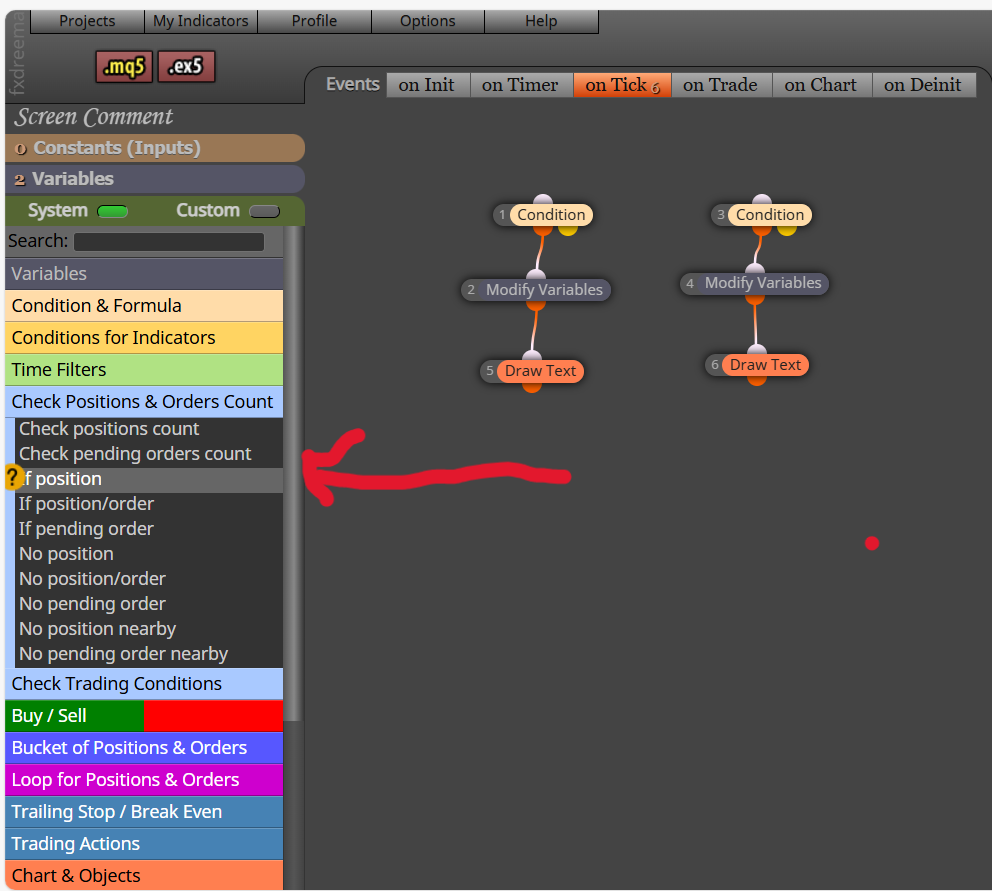
            It's if position on MT5

            Screenshot (2546).png

            Learn fxDreema Without the Wait!

            My comprehensive book, available on Amazon, is packed with examples and invaluable insights to help you fast-track your learning journey.

            The paperback and hardback editions include MT4 & MT5 QR codes for easy access to all prebuilt projects and robots, including my latest gold trading robot!

            Don’t miss out

            Click here➡️ https://mybook.to/fxDreema to get your copy today!

            Enjoy! 😊

            1 Reply Last reply Reply Quote 0
            • P
              Pocro last edited by

              Ok I added the changes. Do you think this will work?
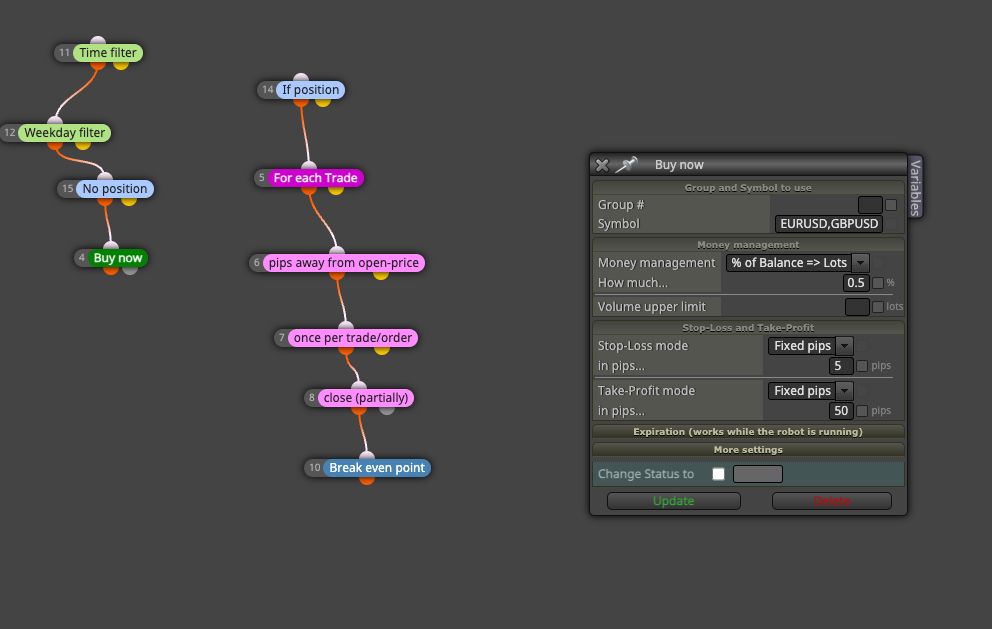
              image.png

              1 Reply Last reply Reply Quote 0
              • P
                Pocro last edited by Pocro

                this on the "ON TIMER" event by the way

                1 Reply Last reply Reply Quote 0
                • jstap
                  jstap last edited by

                  Possibly, add a shared link to look at, I rarely use anything on the timer event, I would run it on tick to backtest with first.

                  Learn fxDreema Without the Wait!

                  My comprehensive book, available on Amazon, is packed with examples and invaluable insights to help you fast-track your learning journey.

                  The paperback and hardback editions include MT4 & MT5 QR codes for easy access to all prebuilt projects and robots, including my latest gold trading robot!

                  Don’t miss out

                  Click here➡️ https://mybook.to/fxDreema to get your copy today!

                  Enjoy! 😊

                  1 Reply Last reply Reply Quote 0
                  • P
                    Pocro last edited by Pocro

                    Here you go

                    https://fxdreema.com/shared/lcPY3H5nb

                    1 Reply Last reply Reply Quote 0
                    • jstap
                      jstap last edited by

                      Looks like it should work, what is it doing?

                      Learn fxDreema Without the Wait!

                      My comprehensive book, available on Amazon, is packed with examples and invaluable insights to help you fast-track your learning journey.

                      The paperback and hardback editions include MT4 & MT5 QR codes for easy access to all prebuilt projects and robots, including my latest gold trading robot!

                      Don’t miss out

                      Click here➡️ https://mybook.to/fxDreema to get your copy today!

                      Enjoy! 😊

                      1 Reply Last reply Reply Quote 0
                      • P
                        Pocro last edited by

                        I tried it on both "On Tiimer" and "ON Tick" and theyre not working. I try to test them in mt5 and it does the simulation but it doesnt execute any trades. Maybe download it and try it for yourself cause I have no idea.

                        Maybe this will help you figure it out? This is the settings I'm using for the backtest in mt5
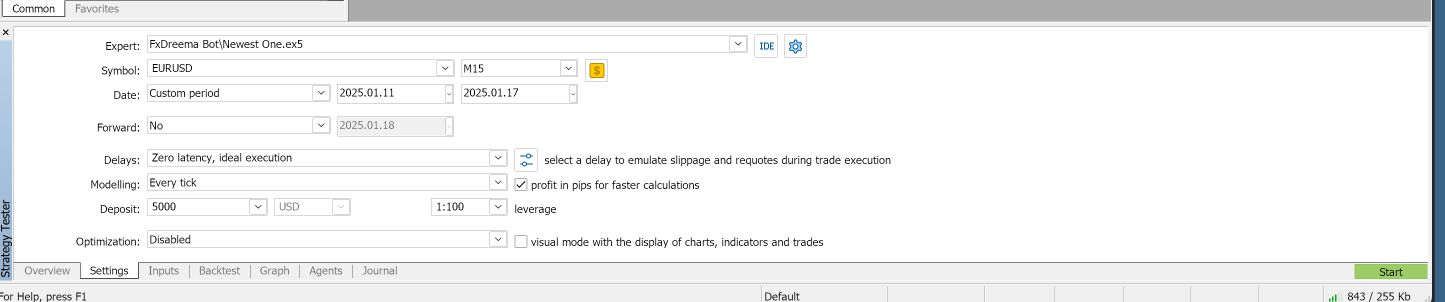
                        image.png

                        A 1 Reply Last reply Reply Quote 0
                        • S
                          sktsec last edited by

                          Try remove the If Position Block. This block seems tricky. Use the false output of No Trade if you really need this function

                          P 1 Reply Last reply Reply Quote 0
                          • A
                            ambrogio @Pocro last edited by

                            @Pocro i checked your project and returned some error like these

                            Immagine 2025-02-14 211559.jpg

                            and i can say there are some issues when we put more than one symbol inside blocks

                            Immagine 2025-02-14 211254.jpg

                            you can leave empty that field, or use "set current market for next block"
                            Furthermore it should be reported to the administrator

                            P 1 Reply Last reply Reply Quote 0
                            • jstap
                              jstap last edited by

                              It will probably work if you use quotation marks "EURUSD","GBPUSD"

                              Learn fxDreema Without the Wait!

                              My comprehensive book, available on Amazon, is packed with examples and invaluable insights to help you fast-track your learning journey.

                              The paperback and hardback editions include MT4 & MT5 QR codes for easy access to all prebuilt projects and robots, including my latest gold trading robot!

                              Don’t miss out

                              Click here➡️ https://mybook.to/fxDreema to get your copy today!

                              Enjoy! 😊

                              1 Reply Last reply Reply Quote 1
                              • A
                                ambrogio last edited by ambrogio

                                already tried jstap, i don't know why. Also putting a constant string with more symbols doesn't work

                                1 Reply Last reply Reply Quote 0
                                • P
                                  Pocro @sktsec last edited by

                                  @sktsec So your saying for this whole right branch of actions, I should replace "if position" with "no trade" set to false?
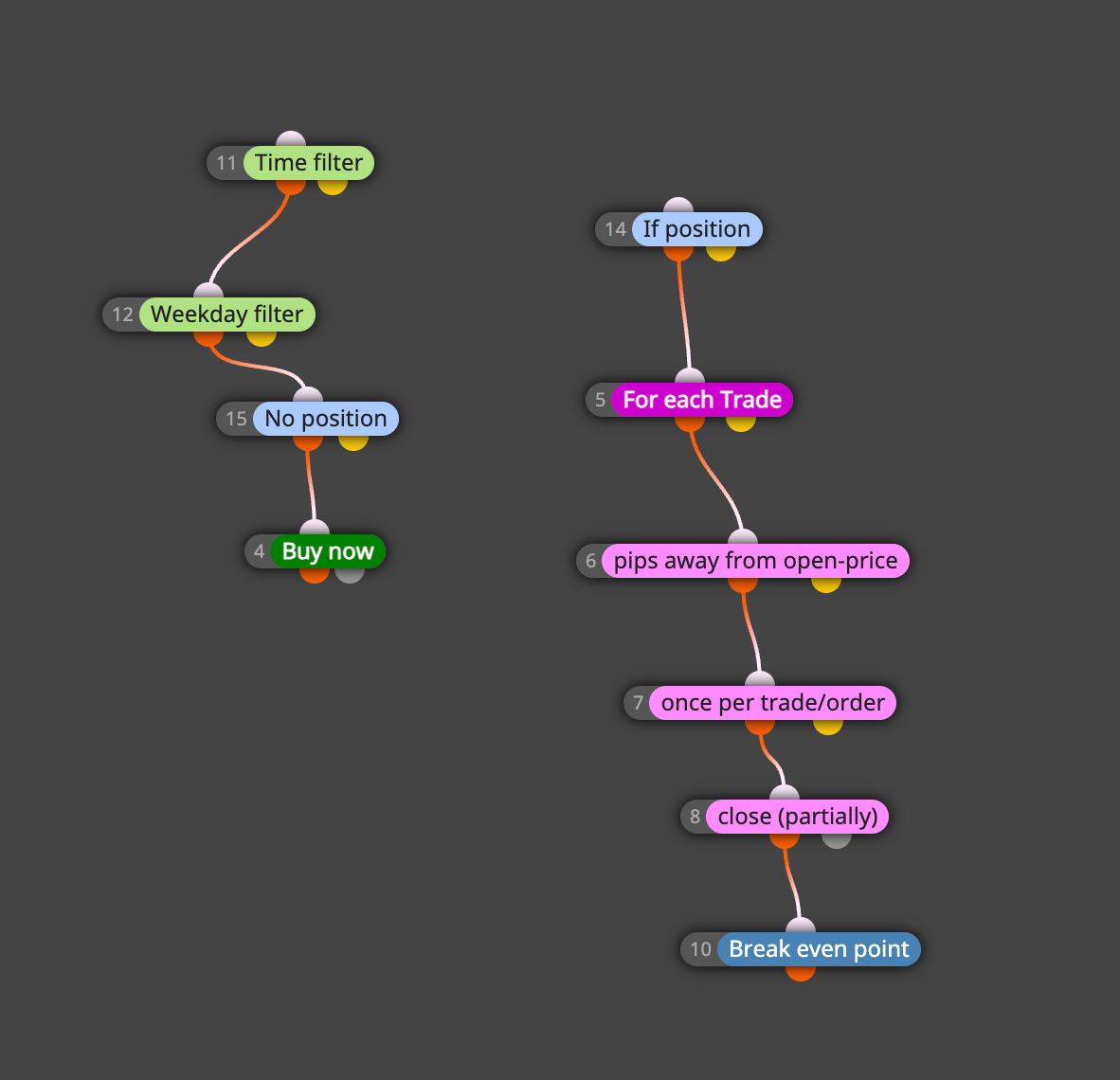
                                  b9aee441-6f59-4691-ae4e-35c7bf83f5b1-image.png

                                  1 Reply Last reply Reply Quote 0
                                  • P
                                    Pocro @ambrogio last edited by

                                    @ambrogio your saying to leave "symbol" empty? How would It know the pairs I want to trade. And by Admin you mean the dev of fxdreema?

                                    1 Reply Last reply Reply Quote 0
                                    • P
                                      Pocro last edited by Pocro

                                      Hey Everyone, I added what you all said except the quotations around the symbols as @jstap said. But I am using "no trade: false" variable now and just testing it only one symbol, eurusd. I tested it on mt5 and it seems to now execute trades, so that's good. Problem is now the bot is immediately entering a new trade as soon as it his the previous trades SL. How do I set it up so it just does one trade a day?

                                      Additonally, was the whole issue just that I had two pairs in the symbol field? You should be able to do two at once right? is that just a bug with fxdreema or I am missing the logic? For now I am just going to play around with one pair if it works, but I do want to get to the bottom of that issue.

                                      Also just some general qs about MT5: You can only backtest one pair at a time correct? And you can only have one EA per chart? If so, I guess I could build two versions of this EA, one for each chart. Hopefully someone can tell me the easiest setup for all these questions to be addressed.

                                      Here is the updated share link, download it and test it to let me know
                                      https://fxdreema.com/shared/pTZ3SkqD

                                      Thank you everyone

                                      1 Reply Last reply Reply Quote 0
                                      • 1 / 1
                                      • First post
                                        Last post

                                      Online Users

                                      D
                                      J
                                      D
                                      T
                                      M
                                      E
                                      F
                                      M
                                      K
                                      E
                                      E
                                      O

                                      21
                                      Online

                                      146.7k
                                      Users

                                      22.4k
                                      Topics

                                      122.6k
                                      Posts

                                      Powered by NodeBB Forums | Contributors