fxDreema

    • Register
    • Login
    • Search
    • Back to the main page
    • Categories
    • Recent
    • Tags
    • Popular
    • Search

    Help with ON/OFF button

    Questions & Answers
    2
    8
    188
    Loading More Posts
    • Oldest to Newest
    • Newest to Oldest
    • Most Votes
    Reply
    • Reply as topic
    Log in to reply
    This topic has been deleted. Only users with topic management privileges can see it.
    • M
      Manuel M last edited by

      Hello:

      I'm adding an on/off button to my EA.
      Everything should be working correctly according to this tutorial: https://fxdreema.com/shared/pTdDdY2Fb.
      I'd like the letters (start/stop) to be green if the EA is ON. If it's OFF, the letters should be red.
      Can someone help me?
      Regards

      1 Reply Last reply Reply Quote 0
      • jstap
        jstap last edited by

        Add a shared link to see what you have done

        Learn fxDreema Without the Wait!

        My comprehensive book, available on Amazon, is packed with examples and invaluable insights to help you fast-track your learning journey.

        The paperback and hardback editions include MT4 & MT5 QR codes for easy access to all prebuilt projects and robots, including my latest gold trading robot!

        Don’t miss out

        Click here➡️ https://mybook.to/fxDreema to get your copy today!

        Enjoy! 😊

        1 Reply Last reply Reply Quote 0
        • M
          Manuel M last edited by

          Hello:

          This is the project link. It's hard to tell when the EA is on or off. If the letters (START/STOP) changed color, it would be better.
          https://fxdreema.com/shared/XpOvFGhdc
          Thanks.

          1 Reply Last reply Reply Quote 0
          • jstap
            jstap last edited by

            redraw the button on tick and change properties
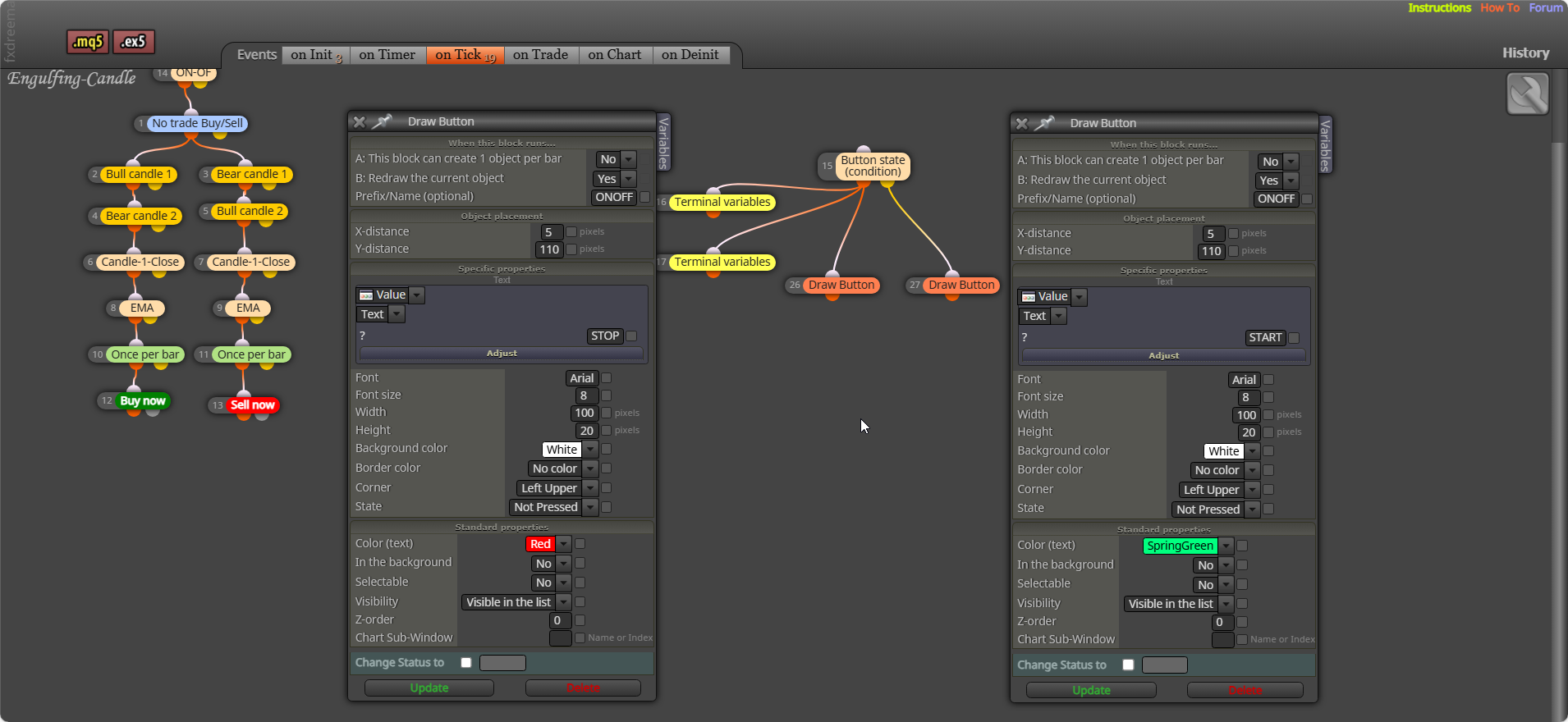
            image.png

            Learn fxDreema Without the Wait!

            My comprehensive book, available on Amazon, is packed with examples and invaluable insights to help you fast-track your learning journey.

            The paperback and hardback editions include MT4 & MT5 QR codes for easy access to all prebuilt projects and robots, including my latest gold trading robot!

            Don’t miss out

            Click here➡️ https://mybook.to/fxDreema to get your copy today!

            Enjoy! 😊

            1 Reply Last reply Reply Quote 0
            • M
              Manuel M last edited by

              Hello:

              Thanks for your help. It's better now.
              The "start" button appears in the graph.
              If I change it to Stop, it stays there for a second or two and then returns to "start."
              Is there something I did wrong?
              https://fxdreema.com/shared/rNGv0OC3d

              Regards

              1 Reply Last reply Reply Quote 0
              • jstap
                jstap last edited by

                I should have showed you this, change the state on one of your buttons to pressed
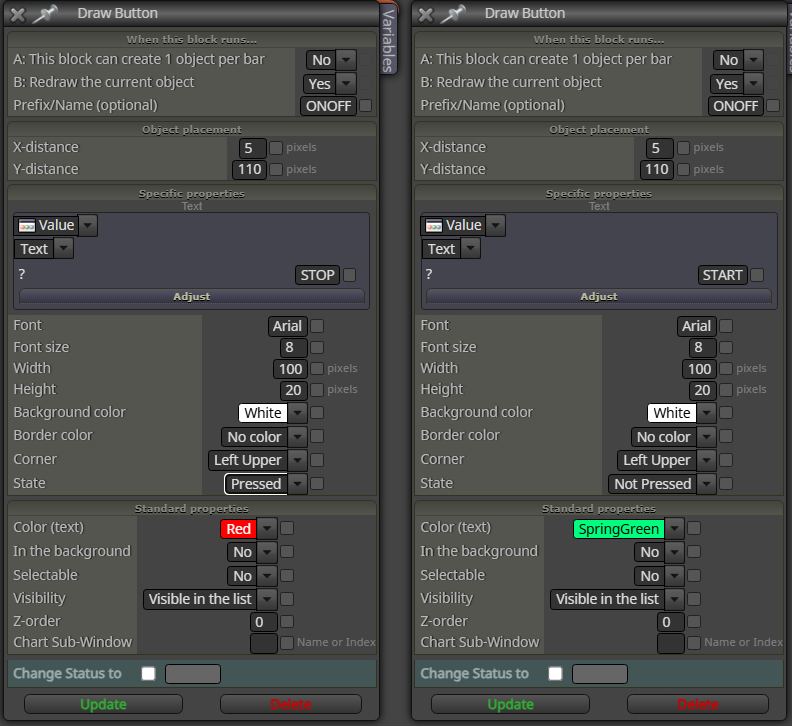
                image.png

                Learn fxDreema Without the Wait!

                My comprehensive book, available on Amazon, is packed with examples and invaluable insights to help you fast-track your learning journey.

                The paperback and hardback editions include MT4 & MT5 QR codes for easy access to all prebuilt projects and robots, including my latest gold trading robot!

                Don’t miss out

                Click here➡️ https://mybook.to/fxDreema to get your copy today!

                Enjoy! 😊

                1 Reply Last reply Reply Quote 0
                • M
                  Manuel M last edited by

                  Hello:

                  It's working correctly now.
                  Thank you very much.

                  jstap 1 Reply Last reply Reply Quote 0
                  • jstap
                    jstap @Manuel M last edited by

                    @Manuel-M Your welcome

                    Learn fxDreema Without the Wait!

                    My comprehensive book, available on Amazon, is packed with examples and invaluable insights to help you fast-track your learning journey.

                    The paperback and hardback editions include MT4 & MT5 QR codes for easy access to all prebuilt projects and robots, including my latest gold trading robot!

                    Don’t miss out

                    Click here➡️ https://mybook.to/fxDreema to get your copy today!

                    Enjoy! 😊

                    1 Reply Last reply Reply Quote 0
                    • 1 / 1
                    • First post
                      Last post

                    Online Users

                    A
                    G
                    Q
                    C
                    T
                    S
                    A
                    M
                    R
                    G

                    16
                    Online

                    146.7k
                    Users

                    22.4k
                    Topics

                    122.6k
                    Posts

                    Powered by NodeBB Forums | Contributors